|

|
Download
ChromaPure
3
Contact us
for custom orders. We also sell bare (standalone)
meters to existing ChromaPure users.
|
|
NEW TO CALIBRATION? CONSIDER OUR TWO MOST POPULAR BUNDLES:
|
|
|
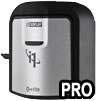
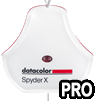
EyeOne Display 3 PRO
(enhanced version of
i1Display Pro Plus)
+ ChromaPure 3 Standard
Includes free
Calibration
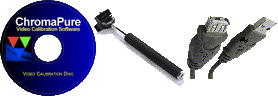
Accessories Bundle
The PRO version offers substantially enhanced
accuracy across a wide range of displays
(More information) |
|
|
|
|
SOFTWARE ONLY:
|
|
|
ChromaPure 3 Standard
For Beginners/Enthusiasts
(Includes licences for two (2) meters)
Digital download
(no shipping) |
|
|
|
ChromaPure 3 Plus
Same as ChromaPure Standard but adds support for the
AccuPel 3D video
and DVDO
AVLab TPG 4K (Ultra HD) test pattern
generators without having to
upgrade to ChromaPure Professional. Includes licences for
two (2) meters.
Digital download
(no shipping) |
|
|
|
ChromaPure 3 Pro
For Professionals
Includes unlimited licences for all supported meters and all advanced
features including Auto-Calibrate.
Digital download
(no shipping) |
|
|
|
Auto-Calibrate
Add-On
Allows
anyone with little or no
training in video
technology to fully
calibrate their display
with almost no user
input. Calibrates at 6
colour points.
Duo
video processor required.
Digital download
(no shipping) |
|
|
|
Advanced
Auto-Calibrate
Add-On
Same as
Auto-Calibrate but increases calibration from 6 to
up to 4913 colours, achieving
unparalleled colour accuracy.
Radiance
video processor required.
More information
Digital download
(no shipping) |
|
|
|
Licence for an additional meter
ChromaPure Standard and Plus include licences for two (2) meters
by default. ChromaPure Professional includes unlimited
licences.
Digital download
(no shipping) |
|
|
|
|
SOFTWARE UPGRADES:
|
Upgrade from ChromaPure 2 to
3
Upgrade is FREE if you purchased ChromaPure after December 17, 2014.
Digital
download
(no shipping) |
|
|
|
|
|
Upgrade from ChromaPure Standard
to Professional
Digital download
(free shipping) |
|
|
|
Upgrade from
competitor's product to ChromaPure Professional
Digital download
(no shipping) |
|
|
|
Upgrade
from Auto-Calibrate
to Advanced Auto-Calibrate
Digital download
(no shipping) |
|
|
|
|
CHROMAPURE STANDARD PACKAGES:
|
|
|
EyeOne Display 3 PRO
(enhanced version of
i1Display Pro Plus) + ChromaPure Standard
Includes free
Calibration
Accessories Bundle
The PRO version offers substantially enhanced
accuracy across a wide range of displays
(More information) |
|
|
|
EyeOne Display 3 PRO
(enhanced version of
i1Display Pro Plus) + ChromaPure Standard
+ Auto-Calibrate
Includes free
Calibration
Accessories Bundle
Auto-Calibrate allows
anyone with little or no
training in video
technology to calibrate their display
with almost no user
input.
iScan Duo required.
Calibrates at 6 colour
points. |
|
|
|
EyeOne Display 3 PRO
(enhanced version of
i1Display Pro Plus) + ChromaPure Standard
+ Advanced
Auto-Calibrate
Includes free
Calibration
Accessories Bundle
Advance Auto-Calibrate
adds calibration of
up to 4913 colours
distributed throughout the gamut achieving
unparalleled colour accuracy.
Lumagen Radiance
required. |
|
|
|

EyeOne Pro 3 + ChromaPure Standard |
|
|
|
EyeOne Display 3 + EyeOne
Pro 3 + ChromaPure Standard |
|
|
|
|
CHROMAPURE PROFESSIONAL PACKAGES:
|
|
|
EyeOne
Display 3 PRO
(enhanced version of i1Display
Pro Plus)
+ ChromaPure
Professional
Competitive upgrade
(Must already own a
qualifying product.
Contact us for
details.)
Includes free
Calibration
Accessories Bundle |
|
|
|
|
|
|
|

Colorimetry Research CR‑100 Professional Colorimeter
with ChromaPure
Professional
More
information
|
|
|
|
|
|
|
|
|
|

Klein K-10a Professional Colorimeter with ChromaPure Professional
More
information
|
|
|
|
|
HARDWARE &
ACCESSORIES:
|
|
|
|
|
USB to
RS-232 adapter
For connecting the PC running
ChromaPure Auto-Calibrate to a Radiance 2020 video processor.
Not required with the newer Radiance 21xx/4xxx
series.
(Not available for sale separately - Must be
purchased at the same time as a meter). |
|
|
|
|
UPGRADES &
SERVICES:
|
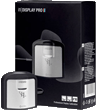
UPGRADE: Include the retail*
(boxed) version of the
Display 3 meter in my
order
* Includes
software from the meter
manufacturer to
automatically calibrate PC/Mac
monitors.
(Must be
purchased at the same
time as a Display 3) |
|
|
|
Upgrade a Display 3 to
PRO or SpyderX PRO
(same as recalibration)
You pay for shipping to us and for US
customers we pay for
shipping back to you.
ChromaPure licence required (not included). |
|
|
|
Add a new correction mode to a Display 3
PRO or SpyderX PRO
You pay for shipping to us and for US
customers we pay for
shipping back to you.
ChromaPure licence required (not
included).
|
|
|
|
|
|
|
Sign up
today to receive the latest ChromaPure news.
Most US orders ship USPS Priority Mail and international orders ship USPS Express Mail.
For exact shipping costs click BUY NOW and enter your location.
International orders may include extra import
duties and/or taxes according to the laws of the target country.
Contact us for custom shipping.
Payment methods include PayPal and all major credit cards
(PayPal account *not* needed to pay by credit card).
Our payment processor
will automatically convert the
amount
to
your local currency. Given the nature of calibration software/hardware,
all sales are final.
Orders ship directly from our
ChromaPure partner in Missouri, USA (or direct from the manufacturer in
the case of some of the higher end meters). |
We've worked out
an exclusive deal for our members to bring you these ChromaPure packages at
prices lower than anywhere else on the internet. Buy direct from our ChromaPure
partner at prices lower than buying off their own website. Same product, same
support, just more money in your pocket at the end of the day.
ChromaPure is very easy to use calibration software designed by
experienced professional ISF certified calibrator Tom Huffman.
Doesn't matter if you're new to
calibration or a seasoned professional, ChromaPure provides all the features you
need, including advanced features not found in any free software.
Support for life is included. There are no yearly maintenance or support fees.
Unlike some other calibration packages, none of our meters are locked to only
work with the software it was sold with.
New to calibration? Give our
free step by step guide a read:
Confused about meters? See our
FAQ: Which meter
is right for me?
Why buy from CurtPalme.com?
CurtPalme.com are calibration experts and authors of popular free calibration
guides. We live and breathe calibration. No matter what
your needs we can assist in choosing what's right for you. We offer products for
the budget DIY'er all the way up to the seasoned professional, all at CurtPalme.com
discounted prices.
What is ChromaPure?
Even expensive video displays are often adjusted at the factory to make the
best impression on well-lit show room floors. This generally means bluish
whites, elevated black levels, excessive edge enhancement, and peak whites that
preclude comfortable viewing. When you get the video display home under
realistic viewing conditions many are shocked at the difference.
Most displays do not have accurate colour out-of-the-box. Fortunately, it is
becoming increasingly common for manufacturers to offer built-in colour
management systems that allow users with the right equipment and software to
dial in industry standard colour. Without this calibration you are not viewing
television and film the way it was intended to be seen.
Used in conjunction with test patterns and a colorimeter, ChromaPure software
allows the user to quickly bring a any video display with adequate controls into
conformity with industry standards.
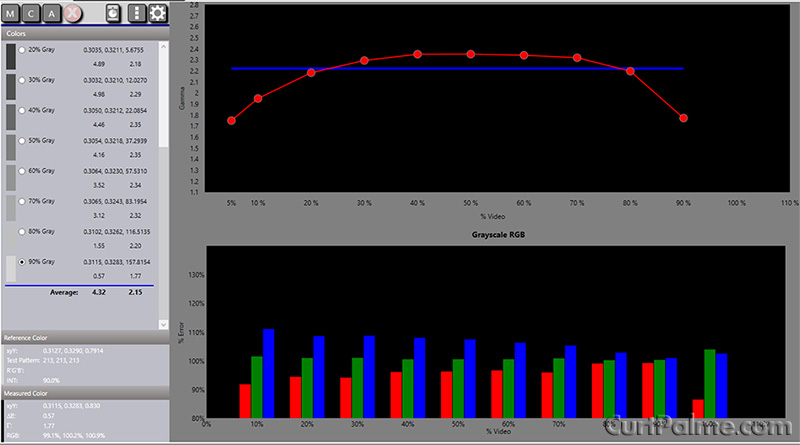
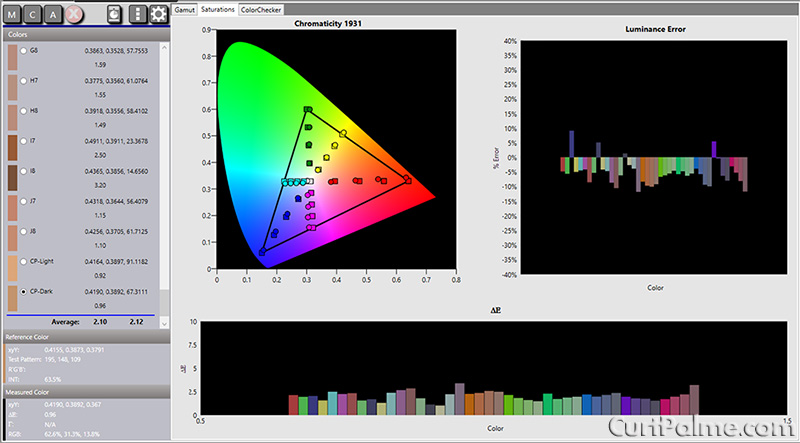
The display's performance is presented in colourful charts and precise
numerical values, both of which can update in real time as calibration
adjustments are made.
ChromaPure is based on a before/after model. When the calibration is
finished, the user can generate a printable report that depicts the performance
of the display before and after calibration.
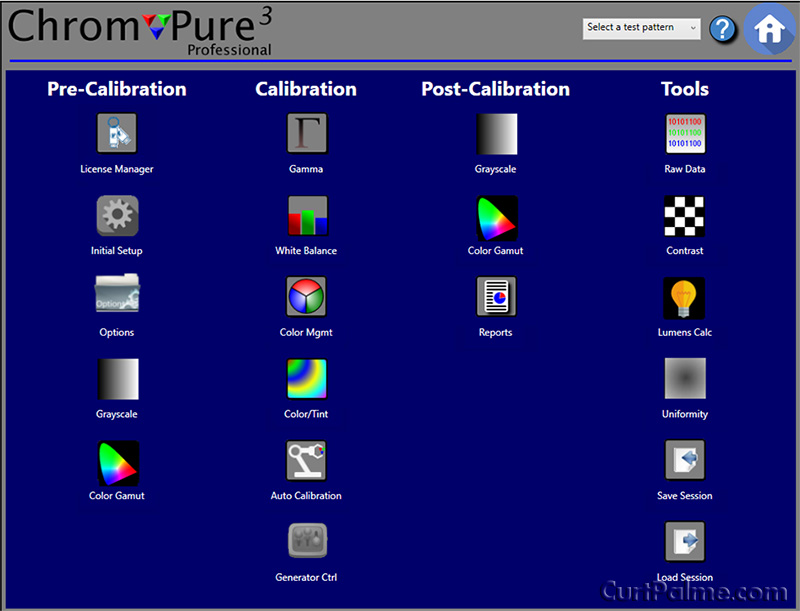
User Friendly Interface
ChromaPure offers a simple, easy to use interface that will be familiar to
anyone who has browsed the internet (see screenshots and videos further
below).
All major functions are laid out in modules:
-
Grayscale
-
Gamma
-
White Balance
-
Color Gamut
-
Color Management
-
Support for pre-calibrated PRO meters
-
Color/Hue Adjustments
-
24-Point ColorChecker w/16-point Skin Tones
-
Multi-point Color Saturation measurements
-
Contrast
-
Lumens Calculator
-
Raw Data with CSV Export
-
Import/Export Calibration Data
-
Screen Uniformity
-
Calibration Reports
-
Auto-Calibration (with video processor and optional add-on)
-
LUT Auto-Calibration (with Lumagen process and optional
add-on)
The display's performance with respect to each of these
parameters is presented in colorful charts and precise numerical values, both of
which can update in real time as calibration adjustments are made.
Optimized for Colour Management
ChromaPure was designed especially with modern colour management systems in
mind.
To facilitate quick, easy, and accurate calibration of a display's colour,
you must be able to display in real time the lightness, saturation, and hue of
each of the primary and secondary colours.
- User-selectable DeltaE formulas for
accurate and flexible analysis of colour accuracy.
- Real-time analysis of lightness, saturation,
and hue of primary and secondary colours in % error and DeltaE. Watch the values
change as you make adjustments.
- User-selectable colour luminance targets. Use
fixed targets from selected gamut or calculated targets from measured primaries.
Comprehensive Reporting
ChromaPure offers comprehensive PDF and Microsoft Excel-based reports.
Generate a calibration report with a single click to provide before and after
information about the display performance in nine areas:
- Raw xy data for greyscale tracking.
- DeltaE and CCT analysis of greyscale
tracking.
- Point-by-point RGB data for greyscale
tracking.
- Raw xyY data for primary and secondary
colours.
- DeltaE analysis of primary and secondary
colours relative to the user-selectable gamut.
- % Error in lightness, saturation, and hue
relative to the user-selectable gamut.
- xy coordinates of the user-selectable gamut
displayed on 1931 xy and 1976 u'v' chromaticity charts.
- Colour decoding performance.
- Gamma response.
Click here for a
sample detailed report.
FAQ
How do I purchase ChromaPure?
ChromaPure software can be downloaded
here.
To use the software you need a licence which is purchased through the bundles or
software purchases on the right.
A licence and installation instructions will be emailed within 24 hours of
purchase. If the purchase is made during business hours (US Central Standard
time), licence and installation instructions will arrive before close of
business, often within the hour.
If you are ordering a software/meter bundle, then the licence will be e-mailed
to you along with installation instructions when the meter ships.
What is Auto-Calibrate?
Automatic calibration allows anyone with little or no training to fully
calibrate their display with almost no user input.
It adjusts the display's grayscale, gamma, and colours to levels of accuracy that
are simply not achievable by manual methods.
Just setup a few simple options in ChromaPure
software, click "Auto-Calibrate", and then go have a cup of coffee while the
process completes, usually in a few minutes.
There is no need for the user to understand how calibration works.
It is suitable for all display types. This feature is an optional add-on to ChromaPure Standard, and it works in
conjunction with a DVDO Duo or
Lumagen Radiance external video processor. The
processor acts as both a test pattern signal generator and calibration device.
The Auto-Calibrate software controls the processor and the color analyzer to get
the most out of your display. It will even generate a before and after
calibration report for you.
The display's performance with respect to each of these parameters is
presented in colourful charts and precise numerical values, both of which can
update in real time as calibration adjustments are made.
Auto-Calibrate is available to ChromaPure
Standard users at a CurtPalme.com discounted price. It is free for ChromaPure
Professional users. ChromaPure Professional users should
contact us
to enable this option.
Watch the
Auto-Calibrate demo video.
See our ChromaPure Automatic
Calibration packages page for more information. Auto-Calibrate requirements:
- PC or laptop running Microsoft Windows 7/8/10 and ChromaPure 2.3 or higher.
- A supported color analyzer.
- DVDO
Duo
or Radiance video processor connected to the PC via a
USB to RS232 serial cable (DVDO Duo or older Radiance models) or USB cable (newer Radiance
models with USB ports).
What is Advanced Auto-Calibrate? Advanced
Auto-Calibrate includes the same features as Auto-Calibrate but instead of only
calibrating to 6 colours, it calibrates
up to 4913 colours distributed throughout the gamut achieving unparalleled colour
accuracy.
It colour calibrates not just the 6 colours at the gamut boundary, but throughout the
entire colour space measuring and correcting up to 4913 points. This revolutionary
ability is made possible by the
Lumagen Radiance
family of video processors. (The DVDO Duo does not have the processing power for
advanced auto-calibrate).
(More information)
The maximum number of colour calibration points depends on the model of video
processor you have:
- 4913 points: Radiance 21xx, 41xx/44xx, Pro series
- 729 points: Radiance 20xx series
- 125 points: Radiance Mini, XD, XE, XS
- 6 points: DVDO Duo
Advanced Auto-Calibrate requirements:
- PC or laptop running Microsoft Windows 7/8/10 and ChromaPure 2.3 or higher.
- A supported color analyzer (We strongly
recommend a fast and accurate meter, such as the
Display 3 PRO,
SpyderX PRO,
X-Rite Hubble, or
Klein K-10).
- Lumagen Radiance
(any model) external video processor with the supporting firmware installed
connected to the PC via a
USB to RS232 serial cable (older Radiance models) or USB cable
(newer Radiance models). Most modern PCs will require a USB-RS232
adaptor if using an older Radiance that has a serial port (no USB). The DVDO Duo
is not supported.
See our ChromaPure Automatic
Calibration packages page for more information.
What meters does ChromaPure Standard support?
*Unlocked versions only. Some vendors lock their meter such that it may only
be used by the software it was sold with. Contact us for a utility to test if
your meter to see if it's been locked. The meters we sell are never locked.
ChromaPure Standard includes two (2) meter licences in the base price.
A separate licence must be purchased for any additional meters you may wish to
use.
What meters does ChromaPure Professional support?
ChromaPure Professional supports the same meters as Standard in addition to:
ChromaPure Professional includes an unlimited number of meter licences.
Subscribe to our newsletter to stay
informed as new meters are added.
What signal generators does ChromaPure Standard support?
What signal generators does ChromaPure Professional support?
Contact
us about bundling colour meters and signal generators.
Subscribe to our newsletter
to stay informed as new signal generators are added.
How is ChromaPure Professional different from ChromaPure
Standard?
ChromaPure Professional offers the same
ease-of-use and comprehensive feature set as ChromaPure Standard, with the
several enhancements aimed at the professional user:
- Support for
high-end color analyzers.
- Support for
high-end signal generators.
- Licencing for professional use. This
includes any use in which the software will be included in for-profit
activity.
- Licencing for an unlimited number of meters.
To add a meter, simply contact
us and we will update your licence free of charge.
- Support for individually customized Excel-based reports.
Just tell us what charts, graphs, and company information you would like and
we will update the software to include this.
- Licencing for Duo/Radiance auto-calibrate
is already included at no additional cost (advanced auto-calibrate is still
extra). Auto-calibrate
lets Duo and
Radiance owners
click a button in ChromaPure and have their display be calibrated
completely automatically. It's really that simple.
Why buy two meters instead of one? Often users will purchase both a
colorimeter (ex: Display 3
or SpyderX) together with a
spectroradiometer (EyeOne
Pro) to
get the best of both technologies. The combination of the EyeOne Pro together with either of these colorimeters offers excellent accuracy, speed, and
low-light sensitivity and is suitable for professional calibrations. For more
information see our EyeOne Pro order page.
Do you have an upgrade policy?
Yes. Point upgrades will be offered to licenced users for free. These upgrades
will generally include only small changes and bug fixes. New versions will be
offered to licenced users at a substantial discount. New versions will include
major new functionality, and will not be merely cosmetic.
Do I have to pay extra for ongoing technical support?
No. As a licenced owner of ChromaPure, you are entitled to lifetime
free e-mail
technical support.
Do I have to pay annual maintenance fees?
No. There is no annual maintenance fees for ChromaPure Standard or Professional.
The only fee you will ever incur is if you wish to purchase new versions of the
software, such as upgrading from version 1.x to version 2.x.
Can I purchase meters separately?
Standalone Display 3 PRO,
SpyderX PRO, and
EyeOne Pro (i1Pro) meters are
available for existing ChromaPure users through thei respective product pages.
Contact us about other meters
as therules
may vary.
How many meters can I use at the same time with ChromaPure?
How many meters you may have licenced for use at the same time depends on your
version of ChromaPure:
There is no cost to change what meters you have licenced for use
in ChromaPure. Contact us
to change your licence for free. If you wish to add additional meters
beyond the limits above, the cost is $90 (CurtPalme.com
discounted price) for each
additional licence, plus the cost of the meter (if you are purchasing an
additional meter from us).
ChromaPure Professional supports an unlimited number of meters. No extra licences need to be purchased.
Can I replace my current meter without incurring any additional
licencing costs?
Yes. If you merely want to get a new meter the only cost to you is the meter itself.
There is no additional licencing fee to switch over from one meter to another.
Contact us to change your
licence for free.
Can I add additional meters after my initial purchase?
Yes. Contact us to change
your licence for free.
May I use my copy of ChromaPure for commercial purposes?
Yes. A ChromaPure Professional licence is required for commercial use.
Is there a professional version of ChromaPure?
Yes. The Professional version adds support for high-end colour analyzers,
high-end signal generators, a licence for an unlimited number of meters,
customized reports, and licencing for Duo/Radiance auto-calibrate (also available in the Standard version as an optional add-on).
Do I need anything extra to use ChromaPure?
No.
Can I install ChromaPure on more than one PC?
Yes. You can install the software on as many PCs as you like. However, you can
only use it with the meter(s) that it is licenced with.
Is there a Mac version of ChromaPure?
Not at this time. However, we are constantly reviewing market conditions so this
may change. ChromaPure does run fine on a Mac using Windows emulators such as
Parallels Desktop or
a split partition using
Boot Camp.
Is my ChromaPure licence transferable?
Yes and No. Yes in the sense that you are free to sell your copy to someone else
if you like. However, "no" in the sense that it will still only function with
the meter(s) it is licenced for. If you wish to transfer a fully functional
version, it must be bundled with the licenced meter(s).
How much does shipping cost?
US orders generally ship USPS Priority Mail. International orders
generally ship USPS Express Mail.
For exact shipping costs, use the BUY NOW buttons above to add items to
your cart and enter your address. International orders may include extra import
duties and/or taxes according to the laws of the target country.
Contact us for custom shipping.
Can my meter be recalibrated?
Yes*. For a modest fee, your
Display 3,
Display 2/LT, DTP-94,
Chroma 5,
SpyderX, or
Hubble colorimeter can (and
should) be periodically recalibrated to ensure it retains its initial accuracy.
This service eliminates the problems associated with exposure to the elements
over time.
We can recalibrate any of these meters (not just the ones you purchased through
us) for use with ChromaPure. A ChromaPure licence is required to use the PRO
meter. Subsequent recalibrations are then available as the meter ages.
We recommend doing this yearly. See our BUY NOW buttons
to the right. You pay for shipping to us and for US customers we pay for shipping back to you.
(International customers pay shipping in both directions).
The service includes a certificate of calibration that itemizes all the
corrections that were applied to the meter.
*Not all Chroma 5's may be upgraded/recalibrated as some vendors lock or
modify their
Chroma 5's to only work with their software. See our
Chroma 5 page for details.
Can I calibrate 3D with ChromaPure?
Yes. There are only two differences between a 3D calibration and a regular one:
1. The test patterns must invoke the 3D mode on the display. We do not know of
any Blu-ray test discs that include 3D patterns as of this writing (March 2012).
The AccuPel video pattern generator has
three different 3D modes (frame packing, side-by-side, and top-to-bottom). When
the display detects one of the test modes, it automatically goes into its 3D
operating mode. On some displays 3D mode can forced regardless of the signal.
The Radiance video processor may also be used
as it has some 3D test patterns available.
2. Place the 3D glasses in front of the meter and calibrate as you would
normally.
Videos
Watch the videos below to see ChromaPure's
features:
System
Requirements Pretty much any
laptop or PC from the last 5-10 years or so will run ChromaPure perfectly fine. The
requirements are:
- PC or laptop running Microsoft Windows 7/8/10
- 1.5Ghz CPU
- 4GB of RAM
- Monitor with at least 1024x768 resolution
- .Net framework 4.x (4.6.1
for ChromaPure 3)
While there is no native Mac OS X version of ChromaPure, it does run fine on
a Mac using Windows emulators such as
Parallels Desktop or
a split partition using
Boot Camp.
User manual
ChromaPure 3 user
manual (PDF
format).
ChromaPure 2 user
manual (PDF
format).
Support All ChromaPure customers are entitled to lifetime
e-mail technical support. All
technical support issues will be handled through email.
Before submitting a technical support request, make sure that the issue is
not addressed by the Help file included with every installation of ChromaPure or
in the FAQ listed above.
Reviews/Testimonials
"I don't want to sound like a cheerleader for ChromaPure but in my opinion
realistically, even using it manually, the ChromaPure software is much easier
to use and is more flexible than [other commercial calibration software], hence, in the end faster
with better and more consistent results." - Ron W
"Last night I had my first opportunity to use ChromaPure on the famed JVC
D-ILA 750HD Front Projector. Calibrating the Color Management System (CMS) with
the Color Management Module on ChromaPure was, dare I say?...a "BREEZE".
Yes...CMS is a breeze with this software! I can't overstate my wholehearted
endorsement of ChromaPure and Tom Huffman, the man who "wrote the book" on Color
Management. In fact, I traded my [other commercial calibration] software in to get the ChromaPure
System specifically for new generation displays with Color Management Systems,
as well as LED illuminated displays." - Bill Hergonson, Owner,
Coast Calibration, Carlsbad, CA.
ISF/HAA Level II Certified
"I asked Tom what his key goals were when he set off to develop
ChromaPure. He said that he wanted to offer a calibration program that
incorporated the features that he wanted to use, along with a well thought out
workflow. I’m pleased to report that ChromaPure has delivered on those goals and
more. ChromaPure is an excellent calibration program that is well worth the very
reasonable purchase price. The software is easy to use, well thought out
and is very stable. The CMS support is a
standout feature that is not available in competing products and by itself is
worth the price of the software. When combined with all of the other features
like multiple colorspace support and multiple color difference model support,
the program is a compelling bargain. I found that the program yielded excellent
results while significantly speeding up my calibration times. After using the
program, I’ve decided to use ChromaPure for all of my display calibration needs.
Future display reviews on this blog will be done using ChromaPure, so expect the
graphs from ChromaPure to show up often." - Mark Petersen of
VideoVantage.com
"ChromaPure is very straight forward in it's process ... for the home user that
simply wants to calibrate their display quickly and easily, it's very easy to
get going and get fantastic results in a single evening, with no steep learning
curve. I really loved using ChromaPure. It was simple, powerful, and fast.
With the integrated pattern generation features, it sped up my calibrations by a
ton, so that I could do one in under an hour without a problem. Tom Huffman was
also very responsive, answering all of the questions that I had, and taking all
of my suggestions to heart... If I was starting with nothing, and wanted to
calibrate my own displays, I would purchase the i1 Display with ChromaPure
package, as it's an easy way to get started and get great results if your
display gives you access to a full CMS." - Chris Heinonen and Mark Vignola
of HomeTheaterHiFi.com "For the home user like me, I don't want to spend hours trying
to sort through the interface. I want to spend that time on the actual
calibration. If its software you use only a few times a year, I think it is
important that it be very intuitive and user-friendly... and I guess that is the
main reason I like the looks of Tom's solution. ... I think most home users will find ChromaPure's
easy-to-navigate interface a real advantage." - Stash64
"I have just received my copy of ChromaPure and it simply can do
everything I want or need to easily and completely do an accurate run. My
opinion is from beginner to long time pro, ChromaPure is now at the top of my
list for calibration software whether it is expensive or free." - JimmyR
"I am fairly novice at calibration, but the layout of the software and the
implementation of each step really make it easy to use as well as informative."
- Kadeeu
"I've made three attempts to calibrate my 1st generation Sony SXRD RPTV. The
1st time thru I used an earlier version of Color HCFR along with my i1 Pro
meter. The results were less than stunning, although some improvement was noted.
I purchased a Chromapure/Chroma 5 package from Tom. My ChromaPure/Chroma 5
package via insured Priority Mail. It was nicely packed and arrived safely
and quickly. Asides from watching ChromaPure videos I dove into the
calibration not knowing what to really expect. As to ChromaPure vs HCFR I am no
expert but I do think one could get similar results using both software
packages. That said it's what ya gotta do to get to those end results. In my
opinion Chromapure gets you there quicker and in a far more straightforward (and
intuitive) fashion. Don't get me wrong, HCFR is decent freeware but
Chromapure is professional grade calibration software that is easier for the
novice (me) to use than HCFR. Its layout is terrific. Being able to view
gamma response in real time is brilliant. The bottom line is I'm very happy with
the purchase. The ChromaPure/Chroma 5 package cost $600, which is not cheap but
I can calibrate my displays whenever I choose. Alternatively I could have had my
displays professionally calibrated just twice for that price so in the long run
I'll be money ahead. Going into this I was less sure of the Chromapure benefits
over HCFR (other than not being able to use Chroma 5 colorimeter with HCFR) but
in this instance one gets what one pays for. HCFR is decent but Chromapure is
several notches better: It's much more refined and far easier to use (IMO).
For me it was well worth the $200 price of admission. Perhaps I should not
have been surprised - Chromapure is software written BY an ISF Calibration
expert who has a keen understanding of the calibration process. But I expected
the software to be competent and fitting for the job at hand. What I wasn't sure
of is how well crafted and user friendly it was going to be to use but it turns
out that it's quite excellent in that regard and is quite intuitive to
use. I never pushed the help button once during calibration: Only when I was
done did I look at the help section and see how really excellent those files
are. They are clear and concise and contain all the info needed to help you
understand what you need to do. All I can say is WELL DONE TOM!" - Geof
"ChromaPure is so easy to use and has a simple learning curve. Many years
with HCFR have educated me to the ins and outs of video calibration and Tom's
guide is a real help. The ChromaPure help is also very good. In my opinion
ChromaPure is well worth the investment." - catmother "I must say
that this software rocks and is very easy to use. I was able to calibrate
my RS20 to perfection. I have the EyeOne Pro/Display 2 combo. The videos on the
website are very good to start you and Tom is very helpful and fast to answer
questions. I have no problem recommending it." - B. Gosselin
"ChromaPure is designed with the home user in mind and I
believe does a better job of stepping the beginner through the whole process and
in the correct order." - Sean
"I can give a Novice's testimony that ChromaPure is a DELIGHT to use!
Congrats to Tom for a beautiful product, and thanks to him for taking the effort
to bring it out. (And he has been enormously responsive in 'hand holding' me
through my endless, probably trivial, questions!). I've only been through the
process once, using a Display LT (that I've had for over a year), and the
result is outstanding. UMR (Jeff Meier) did a calibration of my RS20 almost
a year ago, but I'm now on my second lamp, in fact already with a 1000 hrs on
it! So the original calibration was quite out of date; even my first attempt
has produced a more striking pic, more depth, and rich natural colors. This
weekend I'm looking forward to using an EyeOne Pro to 'train' the Display LT,
and then go through the process again. Great fun, and even better when it
works!" - Millerwill
"I bought the Chroma 5 Pro from Tom and am extremely happy with the
results. IMHO having customized built in offsets particular to your
individual meter to improve accuracy is a no brainer. And the way that Tom
integrates the offsets into the license file available in a drop down when you
initialize the meter makes usage easy as pie... :)" - Bob Sorel
"I just wanted to send you a quick email from my work address thanking you
for your help ... I was able to grab the software from the address you posted it
to and do a quick test on everything last evening. Great software. Simple to
use and understand. Works well with the EyeOne." - Kevin F.
ChromaPure 3
Screenshots
Links
GUIDE: ChromaPure
Grayscale & Color Calibration for Dummies
Official ChromaPure calibration software forum thread
ChromaPure Discussion/Support Forum
FAQ: Which meter
is right for me?
Some informative Colour Science articles can be found here - an
interesting read for advanced users:
Colour
Science: About Meter Accuracy
Colour Science:
Video Calibration Myths
Colour
Science: Display Calculators
Colour Science:
Lightness and Luminance
Colour Science:
Why CIE94?
Colour Science:
Calibrating Front Projectors
Colour Science:
The Three Dimensions of Color
Colour Science:
Understanding Contrast
Colour Science:
All about Color Decoding
Colour Science:
Understanding Delta-E
Colour Science:
Understanding Gamma
Questions, comments or feedback should be directed to
:
chromapure@curtpalme.com
|