|
Display gamma is numerical expression that describes the relationship between signal input and light output of a display device. As you increase signal voltage, the traditional CRT display does not produce increases in light output in a linear way. The relationship between signal input and light output is non-linear. To correct for this, reciprocal non-linearity is applied at the production stage. This is typically referred to as camera gamma. The combination of these two opposite nonlinear luminance curves-camera gamma at the production end and display gamma at the device end-results in a linear system gamma of 1.0, which is what we want. However, when viewing material in a dim environment, it is generally thought desirable to have a system gamma that is slightly higher: somewhere between 1.1 and 1.2 is most often quoted figure.
Assuming a Rec. 709 camera encode gamma of 0.51, this means that display gamma should be in the 2.2-2.35 range, but what does this mean? For an idea of what different display gammas provide, see the chart below.

These numbers are calculated by using a standard power law. Quite simply, the output at any given level is just that percentage of 100% video that is the level of input to the power of the gamma used. For example, if we assume a 2.2 gamma, then an 80% input results in an output that is 61.21% of 100% luminance, or 0.8^2.2. So to calculate the desired level of output at any level of input, all you need to know is the luminance at 100% and the desired gamma.

As you can see, the various gammas all begin and end with a one-to-one relationship between signal input and light output. Zero input produces zero output (actually, because of the display's residual black level it is really just the minimum amount of light the display produces, not literally zero) and maximum input produces maximum output. This is as you would expect. However, the precise relationship between input and output as you gradually increase input from 0% and above is not linear, as shown above, and it varies depending on gamma.
A display with lower gamma increases its light output more quickly as you increase the signal input. If you look at the 10% input, you will see that a 2.8 gamma produces only 16% of the light output of 2.0 gamma. This is obviously an enormous difference. The difference becomes increasingly less significant as the level of input rises, so that at 80% input a display with a 2.8 gamma produces nearly 84% of the output of a display with 2.0 gamma, which would be barely noticeable.
For this reason, the primary effect of system gamma on image quality will be with shadow detail and black levels. If the gamma is too low you will achieve great shadow detail but your black levels will be noticeably elevated and contrast will suffer. If you raise gamma too high then you will create deep, dark blacks but with compromised shadow detail.
Setting gamma correctly
There are several myths about how to properly set gamma. For example, Rec. 709-the high definition standard-includes an encoding specification, but no decoding specification, so it provides no help in setting display gamma properly.
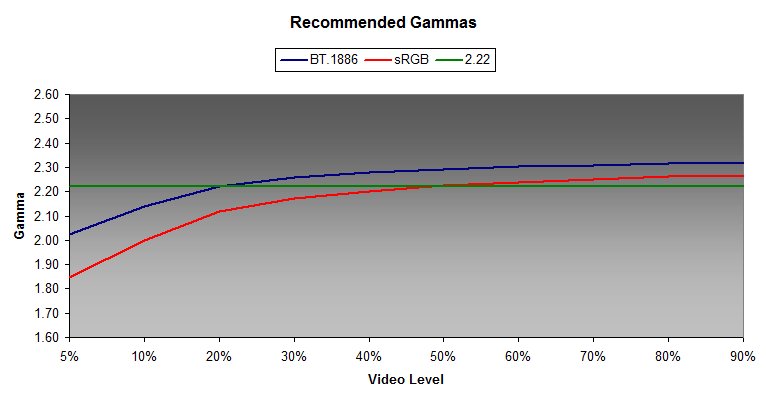
sRGB-the standard for computer monitors and which incidentally includes exactly the same gamut and white point as Rec. 709-does have a complete gamma specification. It is sometimes claimed that sRGB recommends a display gamma of 2.2 or 2.22. This is not quite correct. Although the sRGB display gamma is on average near 2.2, it actually recommends a higher gamma at the top end of the video range and a much lower gamma at the bottom of the video range. In general, this is a good approach, but sRGB is intended for viewing conditions that are considerably brighter than what one experiences in the typical home theater environment where lighting tends to be low or even completely dark.
Others argue that one should use a display gamma of 2.4, especially if one has a high contrast display. This stems partially from the fact that Rec. 709 implies a 2.4 display gamma and many professional studio environments reportedly use 2.4 when mastering content for Blu-ray release. This is also not quite true. Calibrating a display to a straight power curve of 2.4 will only result in substantially reduced shadow detail and an unnatural "contrasty" quality to the image.
The correct approach is suggested by the sRGB standard and has fairly recently been codified in a new gamma specification called BT.1886, which uses 2.4 as a starting point but adjusts the overall response curve depending on the black level and white level of the display. Like sRGB, BT.1886 recommends a gamma response that is higher at the top end than at the low end. A straight power curve of 2.4 is correct only if the display has a zero black level and an infinite contrast ratio, which no real-world display has. The full BT.1886 specification is complex and its precise recommendations vary depending upon the white level, and especially the black level, of the display. However, if you don't want to bother with a precise BT.1886 calculation, white/black values of 120/0.03 cd/m2 serve as a good rule of thumb. This results in a gamma response between 2.3-2.4 at the top end and 2.2-2.1 on the low end.
There are several points to keep in mind about gamma:
- The gamma of your display should be either a straight 2.22, sRGB, or BT.1886. BT.1886 is the preferred standard.
- The gamma of red, green, and blue, should all be the same. If they are different, then you will have a problem with grayscale tracking. In fact, grayscale tracking and RGB gamma are essentially the same.
- Do not use the contrast and brightness controls to affect gamma. Use a pluge pattern to set brightness and a white pluge along with white balance and total output measurements to set contrast.
- Because of gamma, 50% input does not produce a 50% output. To get 50% output, you need a signal input of between 70-80%. Conversely, with a typical display 50% input produces only about an 18% output.
- Getting gamma is important not only to achieve a balance between shadow detail and high contrast. A good gamma response will help to provide the image with great depth and realism.
To order ChromaPure software & meter packages at CurtPalme.com exclusive prices, see our ChromaPure order page. Same product, same support - just more money in your pocket at the end of the day!
|
DISCLAIMER (Legal mumbo-jumbo because we have to): Any dealings with the third party seller/manufacturer listed here,
including the delivery of and the payment for goods and services, and any other
terms, conditions, warranties or representations associated with such dealings
or promotions, are solely between you and the third party seller/manufacturer.
Curtpalme.com shall not be responsible or liable for any part of any such dealings or promotions.
Duties, taxes, and other customs fees charged on internationally shipped orders are the SOLE responsibility of the buyer. CurtPalme.com and the seller are unable to provide estimates for any customs fees, taxes, or duties; check with your country's local customs office for more information about importing goods into your country.
CURTPALME.COM IS NOT THE SELLER OR MANUFACTURER OF THESE PRODUCTS OR SERVICES.
THE SELLER/MANUFACTURER MAY HAVE PROVIDED A WARRANTY ON THE GOOD(S) PURCHASED.
CURTPALME.COM HAS NOT MADE, AND DOES NOT MAKE, ANY REPRESENTATION, WARRANTY,
PROMISE OR COVENANT, EXPRESS OF IMPLIED, AS TO THE CONDITION, QUALITY,
DURABILITY, CAPABILITY, FUNCTION, PERFORMANCE, OR SUITABILITY OF THE EQUIPMENT,
ITS MERCHANTABILITY OR ITS FITNESS FOR ANY PARTICULAR PURPOSE. BUYER AGREES THAT
CURTPALME.COM SHALL NOT BE LIABLE FOR EITHER SPECIFIC PERFORMANCE OR ANY
LIABILITY, LOSS, TAMPERING, ABUSE, DAMAGE, INCLUDING CONSEQUENTIAL AND
INCIDENTAL DAMAGES, ARISING OUT OF BUYER'S PURCHASE OF THE EQUIPMENT, ANY
DEFECTS IN THE EQUIPMENT, OR FAILURE OF SELLER/MANUFACTURER TO TIMELY DELIVER
THE EQUIPMENT.
|


