| Author |
Message |
Videodrome

Joined: 22 Feb 2023
Posts: 56
|
| Posted: Fri Jun 14, 2024 4:28 pm Post subject: VPH-D50 with Moome IFB v3, Menu vs Input 'white'. |
|
|
VPH-D50
Moome IFB-FULLHD v3
Moome Contrast all the way down (counter clockwise) which should be the default 0.7v (?)
Moome Gamma all the way up.
PJ Gain is set to max. (blue and green a little lower)
PJ Bias is in the middle 128
PJ Contrast 65
PJ Brightness 60-80
When I'm inputting a signal(Moome), white is far less bright compared to the overlay projector menu.
The signal is coming from a PC which has 12-bit 0-255 as output with a custom gamma curve.
However white(255) seems very dull compared to the menu-white.
Should I start turning the contrast pot to match the brightness of the menu?
And, is turning that pot similar to increasing the contrast on the projector? Or is the projector always leading and the moome can't exceed whatever the projector is set at?
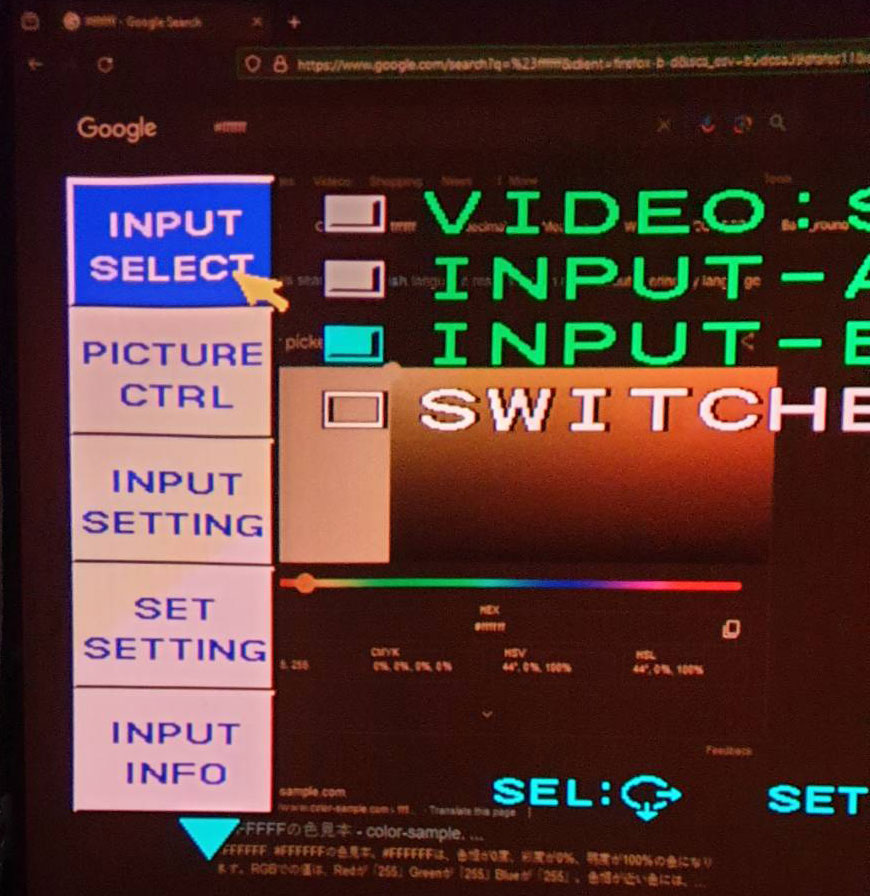
//added a picture
The white square next to the menu is supposed to be full white.
Though my settings are warm compared to the menu, you can see the 'switcher' text looking brighter.
In reality it is much brighter.
| Description: |
|
| Filesize: |
142.38 KB |
| Viewed: |
3451 Time(s) |
|
|
|
| Back to top |
|
 |
wanderer
Joined: 11 Jan 2015
Posts: 76
|
| Posted: Sat Jun 15, 2024 2:32 pm Post subject: |
|
|
In looking at the spec sheet it says that the output is adjustable from 0.6-1.0v. Turning the Moome contrast pot adjustment all the way down would put you at 0.6v I would have thought. Throw gamma being set high then on the card, and a custom gamma on the PC... yeh, I could see this being a mess.
http://www.curtpalme.com/docs/ifb_fhdv3_v11_20140228.pdf
https://www.curtpalme.com/forum_archived/viewtopic.php@t=38220.html
I would start with a BD player and adjust using that as it's going to be a reasonable pattern source with a ballpark reliable HD level output. Then when you get that so you are happy - white levels correct, etc, then move onto something exotic like the PC with 12bit 0-255 output. You may find the PC output levels are the issue as it's not really doing what you think it is signal output wise.
|
|
| Back to top |
|
|
kal
Forum Administrator

Joined: 06 Mar 2006
Posts: 18114
Location: Ottawa, Canada
TV/Projector: JVC DLA-NZ7
|
| Posted: Sat Jun 15, 2024 5:46 pm Post subject: Re: VPH-D50 with Moome IFB v3, Menu vs Input 'white'. |
|
|
| Videodrome wrote: | | Moome Contrast all the way down (counter clockwise) which should be the default 0.7v (?) |
No, not necessarily. The manual states:
| Quote: | There are three little pots on the panel, one for contrast adjustment (need
professional person to do this)...
【Note】Please don't turn the contrast pot if you have no instrument to measure
white level. (The factory default is 0.7V for white) |
It's pre-set to 0.7V. Where that point is in terms of turns on the pot depends on the electronic components which have tolerances that vary. That's why there's a control to adjust it and it's set correctly at the time of manufacturing. Same as any other pot in any other electronic device that isn't supposed to be adjusted the user. It's there to correctly set up the device to factory settings because component tolerances vary.
Per the manual, it shouldn't be touched unless you're a pro and have pro equipment. Just like lots of pots in CRT projectors (especially NEC XGs - you need a scope a deep understanding of electronics if you want to start messing around with some of those pots deep inside the projector).
| Quote: | | Should I start turning the contrast pot to match the brightness of the menu? |
No. Don't touch it. It should be set to 0.7V already. It shouldn't be touched unless you're a pro and have pro equipment. If you bought it used and/or someone else adjusted it then it may not be set correctly.
| Quote: | | And, is turning that pot similar to increasing the contrast on the projector? |
No. The contrast pot adjusts the input voltage level which is very low (under 1V DC). Contrast on the projector increases light output and completely changes the drive to the tubes. Completely different.
The input voltage to the projector should be pre-set to be correct. Don't touch that pot.
Kal
_________________

Support our site by using our affiliate links. We thank you!
My basement/HT/bar/brewery build 2.0
|
|
| Back to top |
|
|
Videodrome
Joined: 22 Feb 2023
Posts: 56
|
| Posted: Sun Jun 16, 2024 4:44 am Post subject: |
|
|
A few months ago I touched the pot because the playstation input is very dark.
I had no way of setting a custom gamma curve like on a PC, so I was trying random things.
Then reset it to 0 counterclock wise, thinking it would be 0.7.
Good to know it is actually 0.6 and I have some room to up it.
Last night I turned it about 3 times and things look a lot better!
I have another moome card as backup, I'll make sure to not touch the contrast pot on that one.
|
|
| Back to top |
|
|
kal
Forum Administrator
Joined: 06 Mar 2006
Posts: 18114
Location: Ottawa, Canada
TV/Projector: JVC DLA-NZ7
|
| Posted: Sun Jun 16, 2024 1:02 pm Post subject: |
|
|
| Videodrome wrote: | | Good to know it is actually 0.6 and I have some room to up it. |
It is not actually 0.6V.
What it is when turned all the way left and right is not defined precisely and will vary unit to unit because part tolerances vary as I mentioned above. That's why there's a pot to adjust.
You can ask Moome how to return it to the correct setting. I imagine it'll take a scope and some sort of precise test signal.
Kal
_________________
Support our site by using our affiliate links. We thank you!
My basement/HT/bar/brewery build 2.0
|
|
| Back to top |
|
|
Videodrome
Joined: 22 Feb 2023
Posts: 56
|
| Posted: Sun Jun 16, 2024 3:32 pm Post subject: |
|
|
It should be close to 0.7 though.
I know it's analog and not accurate but going from 0.6 to 1.0 in 25 turns, should give about 6 turns per 0.1v increase.
I did 3 or 4 turns.
It basically looks how it was before I started turning it all the way to zero (0.6).
I don't have a scope but I read through some threads and the makeshift solution from Moome was to pick a gradient and make sure 255 and 254 white are still well defined instead of one color.
I might get a scope in the future but for now I'm good.
|
|
| Back to top |
|
|
kal
Forum Administrator
Joined: 06 Mar 2006
Posts: 18114
Location: Ottawa, Canada
TV/Projector: JVC DLA-NZ7
|
| Posted: Sun Jun 16, 2024 9:36 pm Post subject: |
|
|
| Videodrome wrote: | It should be close to 0.7 though.
I know it's analog and not accurate but going from 0.6 to 1.0 in 25 turns, should give about 6 turns per 0.1v increase. |
You really don't know any of that. Digital is not more accurate than analog. It's just different. You also don't know if the control is linear per turn.
But as long as you're ok with it, that's all that matters!
Kal
_________________
Support our site by using our affiliate links. We thank you!
My basement/HT/bar/brewery build 2.0
|
|
| Back to top |
|
|
|
|




