| Author |
Message |
tse
Joined: 03 May 2006
Posts: 1014
Location: Sweatbucket, Fl.
|
| Posted: Sun Mar 09, 2008 11:05 pm Post subject: Ampro X600 H Phase and HDTV |
|
|
There have been some comments about horizontal phase being at max when running HDTV formats. I did some experiments and found that my 3600 needed the phase set at 90% to center picture on raster with 1080i30 and 1080p60 inputs.
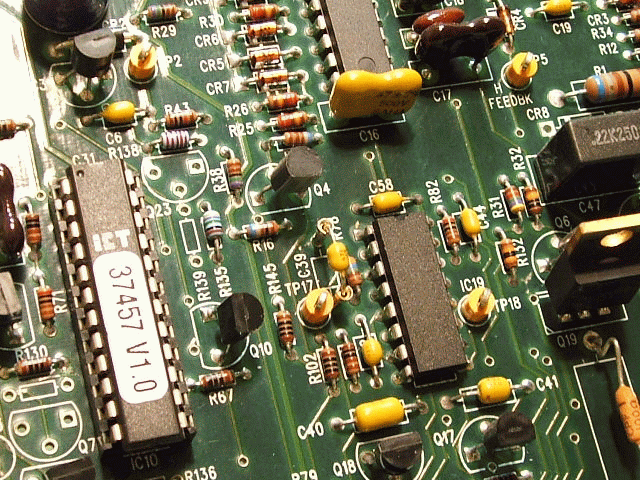
There is a circuit on the horizontal board that delays the sync. The delay causes phase to be at a higher percent setting than if there was no delay. The delay can be lowered by reducing the value of C39. I first reduced it from 1000pF to 330pf. The settings changed to 60% for 1080i30 and 4% for 1080p60.
Next try was with 470pF. The settings were then 68% for 1080i30 and 36% for 1080p60.
C39 is right in the center of the PCB. The attachment shows the cap connected to the board with pin sockets from an IC socket with milled contacts. Easy way to try different values.
COG or NPO type caps will be the most temperature stable. The voltage is only a few volts so no need for high voltage caps.
Scott
| Description: |
|
| Filesize: |
241.81 KB |
| Viewed: |
3194 Time(s) |
|
_________________
"Were we directed from Washington when to sow and when to reap, we would soon want bread."
Thomas Jefferson
|
|
| Back to top |
|
 |
macgyver655
Joined: 22 Aug 2007
Posts: 8508
|
| Posted: Sun Mar 09, 2008 11:28 pm Post subject: |
|
|
Great info. Thanks Scott. 
|
|
| Back to top |
|
|
stefuel

Joined: 07 Mar 2006
Posts: 3353
Location: Green Harbor MA USA
|
| Posted: Mon Mar 10, 2008 1:55 am Post subject: |
|
|
What about the master "H" shift? That ends up in the mid 90's also at 1080P. Did you ever get a chance to try those modded yokes I sent you?
_________________
Chip
A Barco is only a AmPro with training wheels
Card carrying member of the AVS chain gang.
|
|
| Back to top |
|
|
tse
Joined: 03 May 2006
Posts: 1014
Location: Sweatbucket, Fl.
|
| Posted: Mon Mar 10, 2008 2:54 am Post subject: |
|
|
The H Shift works by putting a DC current through the horiz deflection yokes. That shifts both raster and picture. The H Phase shifts only the picture within the raster.
Yes I tried the deflection yokes. The ring attachment method is very nice. The rings didn't work, though. I have to admit that I don't know how to magnetise the rings properly. They need to be magnetised N - S with the poles 180 degrees from each other around the ring. What I did, evidently, made one side N and the other S. They didn't work.
Scott
_________________
"Were we directed from Washington when to sow and when to reap, we would soon want bread."
Thomas Jefferson
|
|
| Back to top |
|
|
stefuel
Joined: 07 Mar 2006
Posts: 3353
Location: Green Harbor MA USA
|
| Posted: Mon Mar 10, 2008 10:02 am Post subject: |
|
|
| tse wrote: | The H Shift works by putting a DC current through the horiz deflection yokes. That shifts both raster and picture. The H Phase shifts only the picture within the raster.
Yes I tried the deflection yokes. The ring attachment method is very nice. The rings didn't work, though. I have to admit that I don't know how to magnetise the rings properly. They need to be magnetised N - S with the poles 180 degrees from each other around the ring. What I did, evidently, made one side N and the other S. They didn't work.
Scott |
I think I'll build another set and look for some centering rings from a NEC PG. They are thin, strong and the tabs shouldn't pose a problem like the one's you sent me. Do you think the problem was the rings or the placement?
_________________
Chip
A Barco is only a AmPro with training wheels
Card carrying member of the AVS chain gang.
|
|
| Back to top |
|
|
tse
Joined: 03 May 2006
Posts: 1014
Location: Sweatbucket, Fl.
|
| Posted: Mon Mar 10, 2008 11:24 pm Post subject: |
|
|
| stefuel wrote: | | tse wrote: | The H Shift works by putting a DC current through the horiz deflection yokes. That shifts both raster and picture. The H Phase shifts only the picture within the raster.
Yes I tried the deflection yokes. The ring attachment method is very nice. The rings didn't work, though. I have to admit that I don't know how to magnetise the rings properly. They need to be magnetised N - S with the poles 180 degrees from each other around the ring. What I did, evidently, made one side N and the other S. They didn't work.
Scott |
I think I'll build another set and look for some centering rings from a NEC PG. They are thin, strong and the tabs shouldn't pose a problem like the one's you sent me. Do you think the problem was the rings or the placement? |
The rings aren't right. The placement is exactly right. In front of focus mag 2 pole rings are for position. Behind focus mag 2 pole rings are for beam centering or flair.
Scott
_________________
"Were we directed from Washington when to sow and when to reap, we would soon want bread."
Thomas Jefferson
|
|
| Back to top |
|
|
|
|




