| Author |
Message |
drice1234
Joined: 07 Oct 2006
Posts: 1309
Location: Allen, Texas
|
| Posted: Fri Jan 25, 2008 3:26 pm Post subject: Barco 1209 mounting angle problem |
|
|
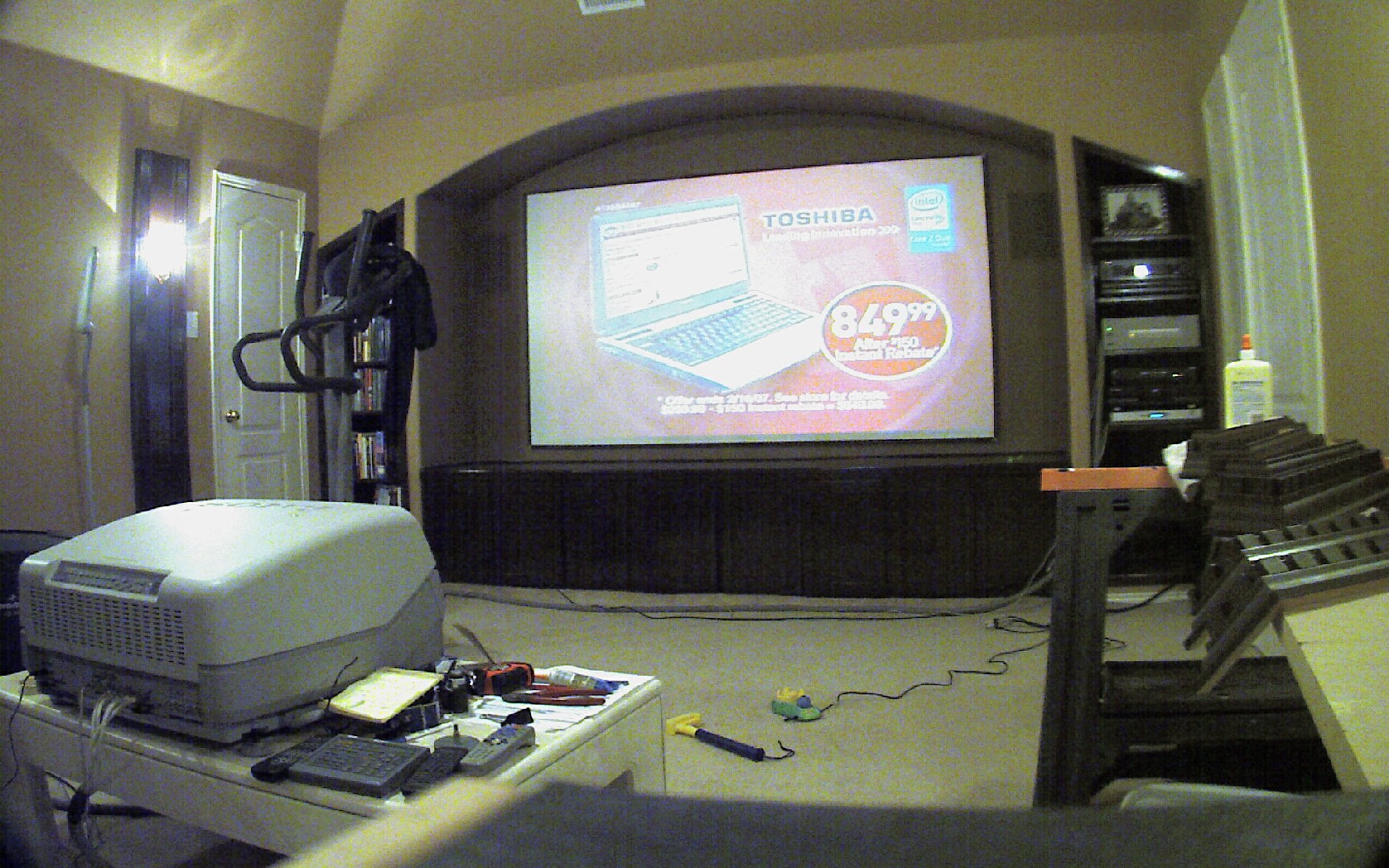
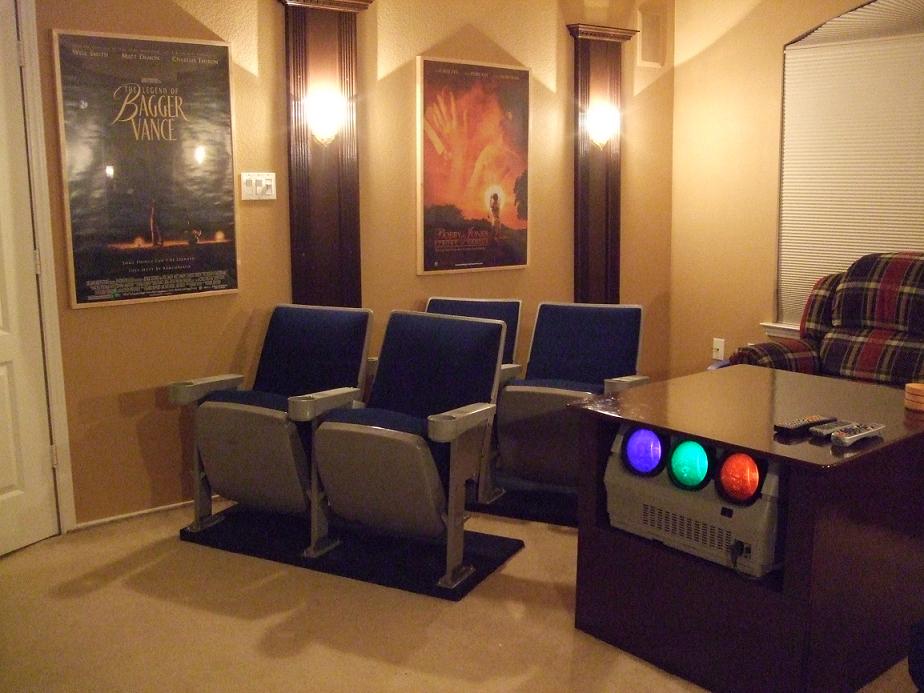
My current setup is a D50 floor mount for which I have constructed a "coffee table" enclosure to put it in. It looks like I will soon have a Barco 1209 with the Eisemann mods operational. My problem is WAF. I am going to have to have another table made to house the 1209 that is going to be substantially larger than my current table. The bottom of my screen is about 30" off of the floor due to having cabinets under the screen so I have the bottom of the projector elevated about 18" off of the floor which puts the table top at around 30". I would have a much easier time with getting by with a larger table length and width wise if I could lower the top of the table considerably (more asthetically pleasing to the wife). Is it possible to have the projector substantially lower than the screen than the specifications call out for? If so, will I be able to obtain good focus and will this put undue strain on the projector? Please no suggestions about ceiling mounting the projector. It is not feasible in my setup. I have included a few pics and will welcome any other alternative suggestions.
Thanks
Dan
| Description: |
|
| Filesize: |
458.73 KB |
| Viewed: |
4210 Time(s) |
|
| Description: |
|
| Filesize: |
94.68 KB |
| Viewed: |
5649 Time(s) |
|
|
|
| Back to top |
|
 |
r.bauer
Joined: 08 Apr 2006
Posts: 280
Location: The Netherlands
|
| Posted: Fri Jan 25, 2008 4:11 pm Post subject: |
|
|
If you are handy, you can 'chop your 1209s in half' so the table doesn't have to be that much larger. Barco chassis are designed to be placed in different housings where the front and the back are actually 'separated'. The Barco Retro projectors are also built this way. All we did was adopting that method and applied it to a 1209s chassis.
The electronics compartment in the back is rotated 180 degrees and mounted underneath the projector in your case. I helped someone out who had the same idea, only his projector was ceiling mounted. He did al the metal work, and I assisted with the final assembly using two self made straightforward U-connectors. We almost could have used the standard U-connector board from a retro which I had laying around, but the distance between the connectors was just 1cm too small.
Here's how it looks after the chop:


If you want to see more pictures, look here:
http://www.htforum.nl/yabbse/index.php?topic=56212.0
You probably can't read a word on this dutch forum, but there are so much pictures in this thread, it almost explains itself.
The chassis had to cut in two places, small cuts which can be easily undone:


Think about it, this might be a perfect solution in your situation.
|
|
| Back to top |
|
|
r.bauer
Joined: 08 Apr 2006
Posts: 280
Location: The Netherlands
|
| Posted: Fri Jan 25, 2008 4:19 pm Post subject: |
|
|
One question.
Do you have a 1209 or a 1209s? The s chassis has fewer and longer cables between the neckboards and the motherboard compared to the non-s chassis so the longer cable runs were no problem. No cable had to be extended.
This has to be checked on the non-s chassis if this will work out the same way.
|
|
| Back to top |
|
|
drice1234
Joined: 07 Oct 2006
Posts: 1309
Location: Allen, Texas
|
| Posted: Fri Jan 25, 2008 4:27 pm Post subject: |
|
|
It is the 1209. I like the idea but am not sure of the amount of work involved. I will check out the cables to see if they would be long enough. I am semi technical but am not sure if I could pull this off. On the plus side this would probably allow me to make the table smaller than it is now.
Dan
|
|
| Back to top |
|
|
Person99
Joined: 09 Mar 2006
Posts: 4899
Location: Flower Mound, TX
|
| Posted: Fri Jan 25, 2008 6:00 pm Post subject: |
|
|
If doing a 16:9 raster, you have a small amount of wiggle room in the offset. Not much more than a couple inches though. If you want to move the offset more than a couple inches, you can do it (only a few more though) before loosing resolution.
Also, level mounting is the best, but you can also mount it at an angle and take a small hit on the resolving power on the bottom 1/3 of the screen.
Lastly, if it is a dedicated room, why not ceiling mount it?
_________________
Dave
A train station is where the train stops. A bus station is where the bus stops. On my desk, I have a work station....
|
|
| Back to top |
|
|
drice1234
Joined: 07 Oct 2006
Posts: 1309
Location: Allen, Texas
|
| Posted: Fri Jan 25, 2008 6:33 pm Post subject: |
|
|
| Quote: | | Lastly, if it is a dedicated room, why not ceiling mount it? |
There are a few reasons but by far the primary one is WAF. The room has a cathedral ceiling and the pj would have to hang down quite a few feet for the correct mounting height. I would also have to eliminate the ceiling fan or replace the 1 fan with 2 evenly spaced fans. Unfortunately ceiling mounting is not open for debate.
|
|
| Back to top |
|
|
stefuel

Joined: 07 Mar 2006
Posts: 3353
Location: Green Harbor MA USA
|
| Posted: Sun Jan 27, 2008 4:36 pm Post subject: |
|
|
There's no problem putting the projector down near the floor. You just have to tip the top of the screen in and the front of the PJ up so that you maintain a 90 degree angle from the bottom of the PJ to the screen face.
_________________
Chip
A Barco is only a AmPro with training wheels
Card carrying member of the AVS chain gang.
|
|
| Back to top |
|
|
drice1234
Joined: 07 Oct 2006
Posts: 1309
Location: Allen, Texas
|
| Posted: Sun Jan 27, 2008 5:12 pm Post subject: |
|
|
| Quote: | | There's no problem putting the projector down near the floor. You just have to tip the top of the screen in and the front of the PJ up so that you maintain a 90 degree angle from the bottom of the PJ to the screen face. |
Good suggestion. It's the obvious things you overlook. That I can do easy enough. I was considering going with the splitting option mentioned earlier until I realized that the PJ would be sitting on the hinged cover that would needed to be opened on occasion
Thanks
Dan
|
|
| Back to top |
|
|
|
|





