| Author |
Message |
ncc1701d
Joined: 08 Aug 2007
Posts: 187
Location: sweden
|
| Posted: Mon Jan 07, 2008 10:43 pm Post subject: BG1208 raster/image/convergence |
|
|
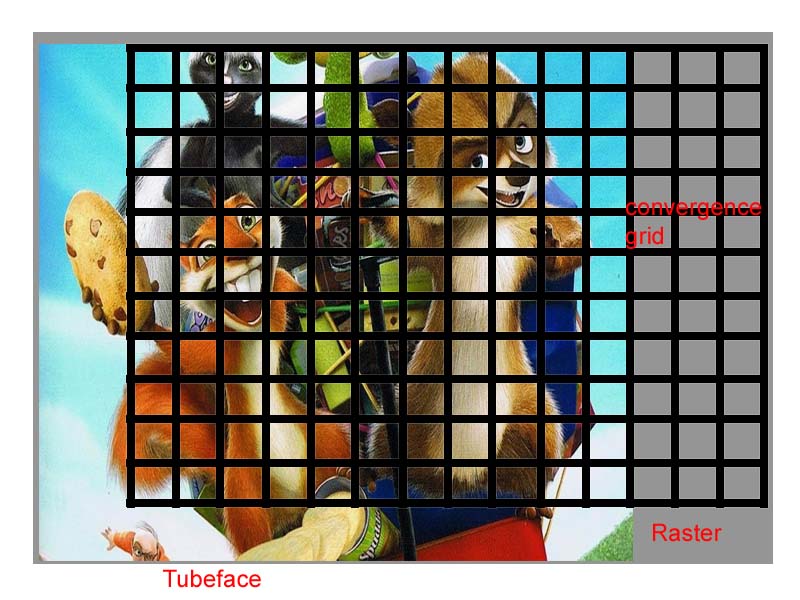
The convergence grid is shifted for my image, that means i can't converge correctly all over the image.
I attach an mockupimage of what i get.
Big raster, convergence-grid offset and the image shifted outside convergence grid.
On left part of image i can't converge correctly as the grid does not cover, and convergence middle is shifted to the right..
Actually the grid is also outside the raster.. (i think).
This makes it hard also with all other setups, as center focus is not at all in the IMAGE center..
Is something very wrong with my setup?
Projector straight in front of screen in the middle, correct sideangle, but slightly tilted forward to get image lower.
All settings done in installation menu (lenses, focus, raster width coils etc.)
This problem started with attachment of hdfury..
| Description: |
|
| Filesize: |
124.47 KB |
| Viewed: |
3087 Time(s) |
|
_________________
BG1208 and BG1208/2
|
|
| Back to top |
|
 |
Person99
Joined: 09 Mar 2006
Posts: 4899
Location: Flower Mound, TX
|
| Posted: Mon Jan 07, 2008 11:42 pm Post subject: |
|
|
I've never seen this. Generally, the built in genlocked grid is bigger on all sides than the active image area of an image. So, you may or may not have issues (Barcos are picky beasts).
Anyway, you can solve this problem by converging from a source (calibration DVD, DVR recorded patterns, scaler's patterns, etc) instead of the genlocked pattern.
_________________
Dave
A train station is where the train stops. A bus station is where the bus stops. On my desk, I have a work station....
|
|
| Back to top |
|
|
ncc1701d
Joined: 08 Aug 2007
Posts: 187
Location: sweden
|
| Posted: Tue Jan 08, 2008 12:35 am Post subject: |
|
|
ofcourse i exaggerated the problem, it's not that big difference as the image.
But still, the internal convergence spots are fixed as i cycle through them (they follow the internal grid) so
on the right the 5 points are half outside my image.
And on the left part i "miss" almost 5 points.
Hard to describe..
But will move the pj lower and redo all, see if it's the same then..
_________________
BG1208 and BG1208/2
|
|
| Back to top |
|
|
rod
Joined: 18 Mar 2006
Posts: 418
Location: Northern Ontario, Canada
|
| Posted: Tue Jan 08, 2008 4:32 am Post subject: |
|
|
I think I have the same problem but can't recall if it started with HD-Fury. The image is shifted over to the right for me. If I try to bring it more centered the pic goes dark as if I'm falling out of the raster area - I don't know. I use the patten with the cross pattern with graduated rings from 20 (inner ring) to 5 outer ring and completly lose the 5 on the left side. I got around the isse by moving the pj slighty off-center and likely I am doing something wrong.
Oh, and where/what are the raster width coils you refer to? or are you refering to adjs from the installation menu?
_________________
Rod
|
|
| Back to top |
|
|
Person99
Joined: 09 Mar 2006
Posts: 4899
Location: Flower Mound, TX
|
| Posted: Tue Jan 08, 2008 3:10 pm Post subject: |
|
|
| rod wrote: |
Oh, and where/what are the raster width coils you refer to? or are you refering to adjs from the installation menu? |
There are two sets of raster width coils on the deflection board which is mounted to the underside of the CRT bay cover. One is high frequency (which you will never kick over to) and one is low frequency. DO NOT ADJUST THEM WITH A METAL SCREWDRIVER.
_________________
Dave
A train station is where the train stops. A bus station is where the bus stops. On my desk, I have a work station....
|
|
| Back to top |
|
|
Ile

Joined: 09 Mar 2006
Posts: 1491
Location: Jyväskylä, Finland
|
| Posted: Tue Jan 08, 2008 4:03 pm Post subject: |
|
|
|
What is your source? Is everything ok without fury? Is there difference between port3 and port5?
|
|
| Back to top |
|
|
ncc1701d
Joined: 08 Aug 2007
Posts: 187
Location: sweden
|
| Posted: Tue Jan 08, 2008 9:58 pm Post subject: |
|
|
you do kick over to high if running 1920x1080p/72hz analog from computer, but that will never happen when using HDMI/DVI as it does not allow for refresh over 60hz.
I have tried forcing my pj to go into highscanning mode with the hysteresis pot (the switching freq pot) but it won't switch over anyway  i wanted to try that because i have problemw with ps3 to short porches so i don't get the full image from ps3 (edges bend over). i wanted to try that because i have problemw with ps3 to short porches so i don't get the full image from ps3 (edges bend over).
| Person99 wrote: | | rod wrote: |
Oh, and where/what are the raster width coils you refer to? or are you refering to adjs from the installation menu? |
There are two sets of raster width coils on the deflection board which is mounted to the underside of the CRT bay cover. One is high frequency (which you will never kick over to) and one is low frequency. DO NOT ADJUST THEM WITH A METAL SCREWDRIVER. |
_________________
BG1208 and BG1208/2
|
|
| Back to top |
|
|
ncc1701d
Joined: 08 Aug 2007
Posts: 187
Location: sweden
|
| Posted: Tue Jan 08, 2008 9:59 pm Post subject: |
|
|
i will check that again soon with analog cables. But i had no problems before i got hd-fury.
The image is shifted a little also.
| Ile wrote: | | What is your source? Is everything ok without fury? Is there difference between port3 and port5? |
_________________
BG1208 and BG1208/2
|
|
| Back to top |
|
|
|
|




