schneirc
Joined: 24 Aug 2006
Posts: 39
|
| Posted: Fri Jan 04, 2008 8:55 pm Post subject: Ampro 4600 Alignment |
|
|
I have an Ampro 4600 and the alignment of the red/blue to green is impossible to align on the far left side of the screen.
Are there an Width adjustment screws on the red/blue like the height ones for red and blue?
I have been messing with it for months.
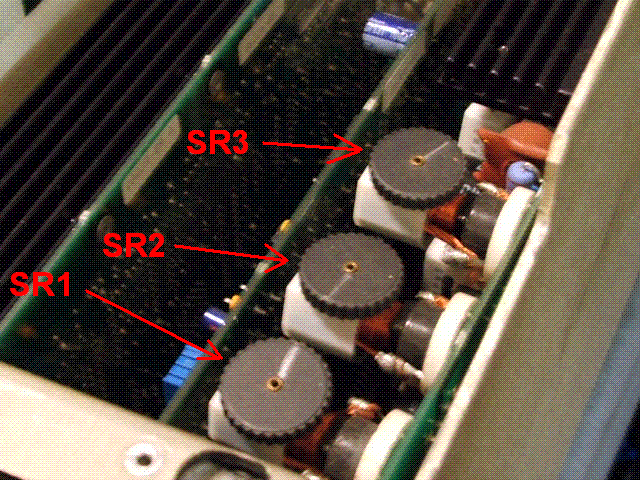
Also, what do the 3 dials do on the Horzontial output board?
Did I accidently change this once when I was working on my PJ and that is the cause of my left width alignment problems?
If so, how in the world do I know what to set them back to?
Thanks for the help.
Bobby
|
|
tse
Joined: 03 May 2006
Posts: 1014
Location: Sweatbucket, Fl.
|
| Posted: Sat Jan 05, 2008 4:55 am Post subject: Re: Ampro 4600 Alignment |
|
|
| schneirc wrote: | "I have an Ampro 4600 and the alignment of the red/blue to green is impossible to align on the far left side of the screen.
Are there an Width adjustment screws on the red/blue like the height ones for red and blue?"
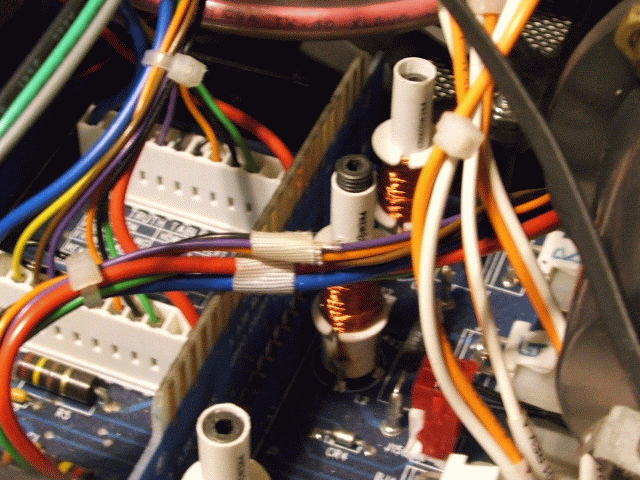
Use the width coils on the yoke interface bd to make the horiz width the same for all three colors. Lenses focussed and registration turned off.
"I have been messing with it for months.
Also, what do the 3 dials do on the Horzontial output board?"
They are used to make the horizontal linearity as even as possible.
"Did I accidently change this once when I was working on my PJ and that is the cause of my left width alignment problems?"
Probably not. They effect all three colors pretty much the same.
"If so, how in the world do I know what to set them back to?"
Input UXGA, 1080p, or something with similar horizontal frequency (50-75KHz) and adjust SR3 so left side has size similar to right side. Change input to 540p, 1080i, 720p or similar horizontal frequency and adjust SR2 for left side of image to match right side. Change input to 540i and adjust SR1 for best horizontal linearity.
"Thanks for the help.
Bobby" |
'saright, 'sok!
| Description: |
|
| Filesize: |
94.27 KB |
| Viewed: |
1765 Time(s) |
|
| Description: |
|
| Filesize: |
4.1 KB |
| Viewed: |
1765 Time(s) |
|
| Description: |
|
| Filesize: |
180.67 KB |
| Viewed: |
1765 Time(s) |
|
_________________
"Were we directed from Washington when to sow and when to reap, we would soon want bread."
Thomas Jefferson
|
|





