| Author |
Message |
Mr. Green

Joined: 23 Feb 2007
Posts: 1394
Location: Calgary
TV/Projector: Marquee 9501LC / NEC 9PG+
|
| Posted: Sat Dec 08, 2007 4:28 am Post subject: Red tube acting up please help! |
|
|
I'm really hoping this is just a "nube" question, but I'm freakin just a bit.
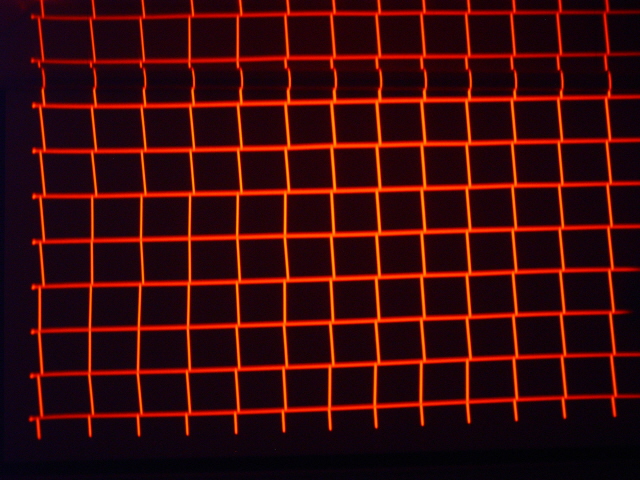
I'm really hoping it's the cable (the red was buggy to start with), but I didn't ask for a replacement because the HDFury is on the way (currently sitting in Customs in Vancouver). The red tube usually flickers out so all you do is move the cable to get it back in working order. Well, my screen came today so I tossed a couple screws into the wall and hung it to give it a try. I turned the projector on (9PG+ with near mint tubes) to find that the red was way off. I switched to the rough grid pattern and this is what I found. I've never seen an image on the forum that looked quite like this. The horizontal looks pretty good but the vertical is really weird. Please let me know what's going on! Don't worry about the lump 3/4 of the way up, that's the top of the screen (just put up to try it, not permanent install).
| Description: |
|
| Filesize: |
187.43 KB |
| Viewed: |
9148 Time(s) |
|
_________________
You can be young only once but, you can be immature forever.
Current Projector Marquee9501LC with PS3 (BLu-Ray) at 1080P LOVE IT! Screen is an Elunevision 120" 4:3 (2.4 gain - no hotspots). (also own a NEC 9PG+)
|
|
| Back to top |
|
 |
dbaisey
Joined: 09 Mar 2006
Posts: 821
Location: Southern Cal LA / Seattle WA
|
| Posted: Sat Dec 08, 2007 5:28 am Post subject: |
|
|
Mr Green,
Well I can say this is the first time I have see this. I guess the first thing to try is to normalize the red point convergence. Doug
What red cable do you have to move. The red BNC signal cable? You should fix that.
|
|
| Back to top |
|
|
Mr. Green
Joined: 23 Feb 2007
Posts: 1394
Location: Calgary
TV/Projector: Marquee 9501LC / NEC 9PG+
|
| Posted: Sat Dec 08, 2007 5:58 am Post subject: |
|
|
Well, I decided to get a bit brave. I fired her up and as you suggested played with the point convergence. I don't know how to reset the point convergence, but adjusting the red 5 clicks to the left (give or take a click or 2 depending on the point) I managed to get it close to where it was. I'm hoping to have it in it's permanent home in the next month so I can do a proper set up at least 3 times. How does one reset the point?
Any idea, why it went that far off when it had been working fine the last time I had it on?
The screen incidentally, makes a HUGE difference. Blacks blacker, whites, whiter, colours brighter, image deeper. Now I just need the Fury and a HDDVD/BluRay and I'm off!
You don't like my cable either?... I know, I know. The connection is buggered at the VGA end of it. I've had the projector 2 months and I've put less than 7 hours on it. Depending on the good old customs officials, I should get the Fury next week, so hopefully no more problems. Soon, soon... 
_________________
You can be young only once but, you can be immature forever.
Current Projector Marquee9501LC with PS3 (BLu-Ray) at 1080P LOVE IT! Screen is an Elunevision 120" 4:3 (2.4 gain - no hotspots). (also own a NEC 9PG+)
|
|
| Back to top |
|
|
dbaisey
Joined: 09 Mar 2006
Posts: 821
Location: Southern Cal LA / Seattle WA
|
| Posted: Sat Dec 08, 2007 6:10 am Post subject: |
|
|
I wouldn't hook the Fury up until this issue is worked out and yes you need to fix the red cable.
Go back and un adjust what you just did if you used static convergence. On the remote you have a point button. Select that then select red by holding the CTL button down and hit R. When you see Point R on the screen hit the normal button on the remote then confirm yes for normalize. If it askes for a passcode use 2580. You will have to hit the adjust button first.
Also read the manual when you have time. Doug
|
|
| Back to top |
|
|
Mr. Green
Joined: 23 Feb 2007
Posts: 1394
Location: Calgary
TV/Projector: Marquee 9501LC / NEC 9PG+
|
| Posted: Sat Dec 08, 2007 6:28 am Post subject: |
|
|
Thanks for your help Doug! Sounds good. The Fury (green advanced kit -including cables) will be replacing the freebie vga-5bnc. It will be hooked up to an upconverting DVD player via HDMI until I can get a dedicated HTPC. I will also start the whole setup from scratch again... I'm going to need to make the image a bit bigger to fill the screen up... I can't have wasted space on the screen now can I?
I've been putting off reading the manual because well, it reads like an encyclopedia that's trying to give you stereo instructions in the wrong language... Now that I've played a bit and figured a few things out I'll try again.
_________________
You can be young only once but, you can be immature forever.
Current Projector Marquee9501LC with PS3 (BLu-Ray) at 1080P LOVE IT! Screen is an Elunevision 120" 4:3 (2.4 gain - no hotspots). (also own a NEC 9PG+)
|
|
| Back to top |
|
|
dbaisey
Joined: 09 Mar 2006
Posts: 821
Location: Southern Cal LA / Seattle WA
|
| Posted: Sat Dec 08, 2007 7:05 am Post subject: |
|
|
This may or may not correct what you have. If not I would suggest reseating the wave board then the system board just because. Reseat the smaller connectors on the deflection board as well as the c drive. From there it could be memory corrupt on the red or maybe the c drive itself if it was overheated. You can swap the red with another color there to test but you have two connectors for each color. Mark them first.
Memory you will need to start zeroing out (set to mid) each function on the red channel. Manuals are on this site and I would read them as well as looking at the pictures in the PG section. http://www.curtpalme.com/NECPG.shtm
I dont think it is a major thing but you need to narrow it down. Curt or I have plenty of parts but hopefully not needed. Good luck. Doug
|
|
| Back to top |
|
|
Mr. Green
Joined: 23 Feb 2007
Posts: 1394
Location: Calgary
TV/Projector: Marquee 9501LC / NEC 9PG+
|
| Posted: Sat Dec 08, 2007 8:17 am Post subject: |
|
|
<uuurk! -clutches chest> I had a feeling someone was going to suggest I start playing with boards.
I can't see how anything would over heat it's like 4 degrees celcius in the basement right now. I guess I have to read the manual, then start playing with boards. <gulp> I'm not thrilled with the idea of playing around with that stuff, but if it has to be done, well, we'll see what's what. If I bugger it up even worse, well, we'll get to that later... ;-P
_________________
You can be young only once but, you can be immature forever.
Current Projector Marquee9501LC with PS3 (BLu-Ray) at 1080P LOVE IT! Screen is an Elunevision 120" 4:3 (2.4 gain - no hotspots). (also own a NEC 9PG+)
|
|
| Back to top |
|
|
dbaisey
Joined: 09 Mar 2006
Posts: 821
Location: Southern Cal LA / Seattle WA
|
| Posted: Sat Dec 08, 2007 4:09 pm Post subject: |
|
|
Mr Green,
I was thinking out loud and to save posts on what to check next. It may be nothing..maybe it has a cold or ticked off it has a bad red cable.
|
|
| Back to top |
|
|
macgyver655
Joined: 22 Aug 2007
Posts: 8508
|
| Posted: Sat Dec 08, 2007 4:29 pm Post subject: |
|
|
|
Mr Geen. After reading these post there are a few things you have to realize. What Doug meant about overheating has nothing to do with your basement temp. Electronic parts can overheat because of improper adjustment no matter what the outside temp is. Also you have to realize that having that projector in a cold enviornment and then turning it on is not good. When glass or metal is cold and then is heated rapidly it condenses moisture. Same as when glasses fog up when going inside after being outside in the cold. Now I think we all know what can happen when there is moisture in you projector. Moisture can very well be causing you problem. And it only takes a small amout in the right place. And moisture usually causes odd problems or ones never seen before.This is why we all recommend letting a unit set in a room for 24 hours before turning it on, after you just received it from somewhere else. Good Luck!!!!
|
|
| Back to top |
|
|
dbaisey
Joined: 09 Mar 2006
Posts: 821
Location: Southern Cal LA / Seattle WA
|
| Posted: Sat Dec 08, 2007 5:04 pm Post subject: |
|
|
NEC Spec for environment temp is 0-40C. Humidity 0-90% non-condensing. Storage -10 to 50C. The above post is correct also.
Overheating can also be using one function for to long of period like when doing convergence over a long session. It will heat the drive chips and heat sync from ramping, same with focus. Projectors like to be used and helps keep things charged up. Sometimes you will see oddities when first powering up after long periods but usually it wont create major problems. Condensation isn't a good thing.
Not saying this is related but just some thought. I'm betting I can probably duplicate this issue and will most likely be connection related to the red channel. Overheating a component can cause connection problems also. Doug
|
|
| Back to top |
|
|
Mr. Green
Joined: 23 Feb 2007
Posts: 1394
Location: Calgary
TV/Projector: Marquee 9501LC / NEC 9PG+
|
| Posted: Sun Dec 09, 2007 9:30 am Post subject: |
|
|
Well, I guess I'm lucky. Calgary in the winter has like 3% humidity. Humidity shouldn't be a problem. The projector sat for more than 24 hours before turning it on the first time. As I said, other than it getting much colder and drier outside, nothing has changed for 2 months. It was getting close to perfect before this issue happened. I'd given my sisters a demo on the painted wall about a week before and hadn't turned it on until the screen arrived. You can imagine my surprise when something went that wrong after such a short time.
Are you saying I should be running it more often for longer periods? I thought only digitals required a 1 hour run time + cool down? Currently it has been used in only 15 minute or so incrememnts. Out of the 7(ish) hours I've put on it. Much more during the original set up.
The main reason I want to get my HDFury is I know it is going to be a good cable. I have no other cable than the buggered freebie (Curt did offer to replace it, but I told him I was going to upgrade to the Fury ASAP, so it didn't matter). I'm hoping it is the cable. I'll go get a can of compressed air as soon as poosible (renovations take precedence over CRT for the next month or so). I do want to make sure it is working when I get it to it's proper home in the other house (mid January).
Do you suggest I re-seat the boards, blow it out with compressed air, then let it run for a few hours? I know the cable VGA-5BNC is a problem, but it's all I have right now.
_________________
You can be young only once but, you can be immature forever.
Current Projector Marquee9501LC with PS3 (BLu-Ray) at 1080P LOVE IT! Screen is an Elunevision 120" 4:3 (2.4 gain - no hotspots). (also own a NEC 9PG+)
|
|
| Back to top |
|
|
dbaisey
Joined: 09 Mar 2006
Posts: 821
Location: Southern Cal LA / Seattle WA
|
| Posted: Sun Dec 09, 2007 3:13 pm Post subject: |
|
|
Some confusion. I thought it was stored and not turned on for awhile.
Did you try normalizing the red point convergence?
|
|
| Back to top |
|
|
Mr. Green
Joined: 23 Feb 2007
Posts: 1394
Location: Calgary
TV/Projector: Marquee 9501LC / NEC 9PG+
|
| Posted: Sun Dec 09, 2007 4:53 pm Post subject: |
|
|
Sorry, no. I've owned it for about 2 months and since the original set up it's only been getting turned on for 15 minutes or so every 2 weeks. Right now I'm just doing small showings for friends and family. I don't have enough time to sit and watch a whole movie on it...yet.
Haven't had time yet to reset the red point, will try to do it today.
Is it odd for the convergence to just go out like that? I'd hate to plan a movie night just to find it does something like that unexpectedly and have to spend a bunch of time reconverging it.
One more thing I thought of is that it is not plugged in all of the time, should I leave it plugged in when not in use for long periods? I don't have a good surge protector for it yet and after losing a TV to a power surge I don't like having my electronics just plugged into the wall.
_________________
You can be young only once but, you can be immature forever.
Current Projector Marquee9501LC with PS3 (BLu-Ray) at 1080P LOVE IT! Screen is an Elunevision 120" 4:3 (2.4 gain - no hotspots). (also own a NEC 9PG+)
|
|
| Back to top |
|
|
dbaisey
Joined: 09 Mar 2006
Posts: 821
Location: Southern Cal LA / Seattle WA
|
| Posted: Sun Dec 09, 2007 5:13 pm Post subject: |
|
|
Its not odd for static to be out a bit until it reaches full op temp, this is normal. Manual states 'Allow 20 minutes' to fully warm up and before doing focus or convergence. This is also noted in troubleshooting and board alignments. What you are seeing is not normal static convergence as we know it.
Its normal for static to be out with the lid open and or with the deflection tray down. You do the final touch up closed up and fully warm.
A C drive can start to go out by jumping in and out (left to right) seen best on a cross hair pattern or just stop working going open or short out and shut the projector down.
If you have a designated circuit to the projector you can just power off and leave with a stand-by light. If you have bad weather then remove the power plug. This is up to you how you use it but I like to keep standby power. If your pulling the power plug there is a function you set in the settings that can auto power on when it sees line voltage applied.
All of this is in the service manuals and most of it in the two user manuals. Doug
After normalizing red point also normalize red tilt and skew or set to mid point. See if that corrects.
After looking at the red test crosshatch again the vertical and horz lines have different thickness. Is this the same on the green and blue?
|
|
| Back to top |
|
|
Mr. Green
Joined: 23 Feb 2007
Posts: 1394
Location: Calgary
TV/Projector: Marquee 9501LC / NEC 9PG+
|
| Posted: Sun Dec 09, 2007 11:59 pm Post subject: |
|
|
Okay, I tried Normalizing the red convergence. That made it go back to the original picture I posted. All verticals are diagonal. I guess I now need to reseat the wave board? I'll take a look to on this site to see where it is.
You were also asking about how thick the horizontal lines were. All 3 colors are the same width.
_________________
You can be young only once but, you can be immature forever.
Current Projector Marquee9501LC with PS3 (BLu-Ray) at 1080P LOVE IT! Screen is an Elunevision 120" 4:3 (2.4 gain - no hotspots). (also own a NEC 9PG+)
|
|
| Back to top |
|
|
dbaisey
Joined: 09 Mar 2006
Posts: 821
Location: Southern Cal LA / Seattle WA
|
| Posted: Mon Dec 10, 2007 12:16 am Post subject: |
|
|
Meant red point convergence first then red tilt and shew.
Are BOTH the H and V the same thickness?
|
|
| Back to top |
|
|
Mr. Green
Joined: 23 Feb 2007
Posts: 1394
Location: Calgary
TV/Projector: Marquee 9501LC / NEC 9PG+
|
| Posted: Mon Dec 10, 2007 12:24 am Post subject: |
|
|
Now that I look at it the horizontal is a little thicker (but equal) on all 3 colors. It's also more out of focus than the verticle on all 3.
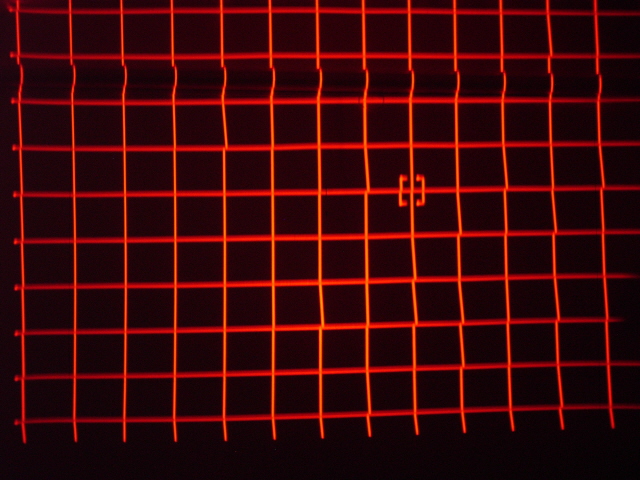
I reseated the wave board (After normalizing the red point convergence). Here is what I have. I fixed about 80% of them.
| Description: |
|
| Filesize: |
173.74 KB |
| Viewed: |
8958 Time(s) |
|
_________________
You can be young only once but, you can be immature forever.
Current Projector Marquee9501LC with PS3 (BLu-Ray) at 1080P LOVE IT! Screen is an Elunevision 120" 4:3 (2.4 gain - no hotspots). (also own a NEC 9PG+)
|
|
| Back to top |
|
|
dbaisey
Joined: 09 Mar 2006
Posts: 821
Location: Southern Cal LA / Seattle WA
|
| Posted: Mon Dec 10, 2007 12:28 am Post subject: |
|
|
OK this is a good thing. You solved most of it. This looks much better. Go to red linarity then hold the CTL button down then hit linearity to get to red linearity balance on the right side (photo) . Normalize that or set to mid point. Doug
Also after you do that try deleting red point again.
If you look close at the red the center focus is not optimum but the edges are more in focus. It looks like center mechanical astig is way off
Last edited by dbaisey on Mon Dec 10, 2007 12:44 am; edited 1 time in total
|
|
| Back to top |
|
|
dbaisey
Joined: 09 Mar 2006
Posts: 821
Location: Southern Cal LA / Seattle WA
|
| Posted: Mon Dec 10, 2007 12:40 am Post subject: |
|
|
Hold on Im checking something. Doug
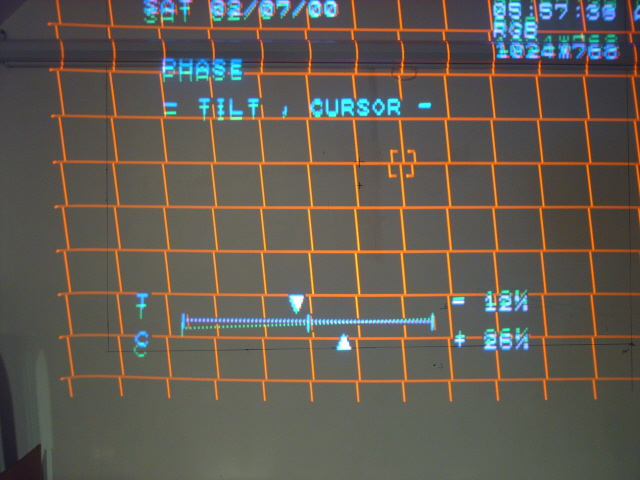
Go into phase and see if you have that set right as well as cursor phase. See pictures in the manual.
Basically I don't think its a hardware thing now. Re seating the wave board connections may have helped also. It just needs to get the bad data out of the memory. Alot of corruption going on in the first photo.
The line at the bottom of the photo tells alot and it may be phase settings. Set format and amplitude to fit what your using in screen and 4:3 or 16:9.
Last edited by dbaisey on Mon Dec 10, 2007 12:53 am; edited 1 time in total
|
|
| Back to top |
|
|
Mr. Green
Joined: 23 Feb 2007
Posts: 1394
Location: Calgary
TV/Projector: Marquee 9501LC / NEC 9PG+
|
| Posted: Mon Dec 10, 2007 12:52 am Post subject: |
|
|
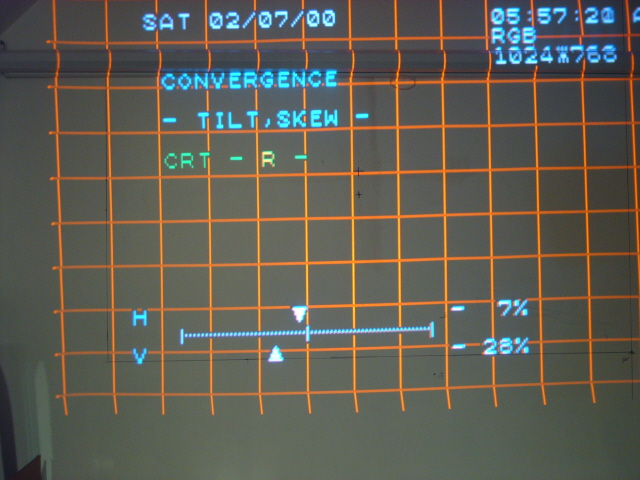
Ok, well, uh, interesting. I reseated the wave board.which corrected 80%. The point convergence needed only 1-3 presses to get it back to straight. I then went through and did tilt, bow, keystone, pin,... and it looked pretty good. after 3 rounds of tweaking I meant to hot the left tilt/Skew button, but pressed the right instead... This happened... Then I pressed the left tilt/skew button and it went back to normal... if I flip back and forth between the 2 buttons it gets messed up or corrected depending on if I hit left or right. Thoughts?
| Description: |
|
| Filesize: |
211.72 KB |
| Viewed: |
8942 Time(s) |
|
| Description: |
|
| Filesize: |
216.55 KB |
| Viewed: |
8942 Time(s) |
|
_________________
You can be young only once but, you can be immature forever.
Current Projector Marquee9501LC with PS3 (BLu-Ray) at 1080P LOVE IT! Screen is an Elunevision 120" 4:3 (2.4 gain - no hotspots). (also own a NEC 9PG+)
|
|
| Back to top |
|
|
|
|




