| Author |
Message |
nathan
Joined: 21 Jan 2007
Posts: 56
Location: Utah
|
| Posted: Fri Nov 02, 2007 10:47 pm Post subject: 1209s/R1101 won't show whole 1080p image from PS3 -PICTS |
|
|
After a test run for a few months, I finally got my runco 1101 (1209s) re-mounted. I was too far away before and was projecting well to the sides of my screen.
Anyway, I deleted all the setup and started over. I created a green 16x9 border image to display from my PS3 to help me get a feel for where the PJ was pointed. I found something that I noticed before, but since it was off the screen I hadn't paid it much attention.
The image seems to be masked off on the left side, kind of like I had some left blanking on which I don't. The right side has the same thing, but it is right up next to the right side of the tube face. After playing with a few things this just appears to be the edge of the H-Size adjustment. Using the raster shift I got it so it was basically centered. However, no matter what I do, it won't display the full 16x9 image I am viewing.
I hope I am explaining this clearly enough. The easiest way for me to see it is to play with the H-Phase. As I slide the image side to side it cuts off way early on the left or right side and wont display the full 1920x1080 image. It is getting the full 1920 wide signal, but won't display the whole thing at once. I shrank the H-size and the edges come in towards the middle, but won't display any more of the picture. It just shrinks the same cut off picture.
Can the PJ not display an non 4x3 ratio image? I know the PJ understands something about 16x9 because it is one of the options when you play with the automated EYE-Q setup.
Anybody have a clue what's going on. I am a new to this PJ and barcos in general, so any ideas would be appreciated.
FYI, I am running a PS3 -> HDMI -> HDFury -> 5 BNC inputs.
EDIT: I don't have this problem when I change the PS3 to only output 720p. It fits the whole image into the 'mask' created by the H-Size. I'm pretty sure the PJ has the bandwidth to handle 1080p, but even if it didn't I wouldn't expect symptoms like this.
EDIT: Tried this with the PS3 set to 1080i and it works fine as well. I'd sure hate to find out this bugger won't do 1080p properly. I guess I will just go forward with the initial setup in 1080i or 720p.
Last edited by nathan on Mon Nov 05, 2007 2:58 am; edited 1 time in total
|
|
| Back to top |
|
 |
tse
Joined: 03 May 2006
Posts: 1014
Location: Sweatbucket, Fl.
|
| Posted: Sat Nov 03, 2007 3:06 am Post subject: |
|
|
That sounds like the projector's horizontal retrace time is too long. The beam sweeps across the tube face and when at the extreme right side the projector turns off the beam as it returns to the left side. This "retrace" time takes a certain amount of time to happen. If longer than the horizontal blanking time of the video what you describe happens. Some projectors have a way to switch to a short retrace. Check your menus.
Scott
_________________
"Were we directed from Washington when to sow and when to reap, we would soon want bread."
Thomas Jefferson
|
|
| Back to top |
|
|
oliverg

Joined: 15 May 2007
Posts: 800
Location: Melbourne, Australia
TV/Projector: Sony G90 X2 - Vidikron Vision 1
|
| Posted: Sat Nov 03, 2007 7:26 am Post subject: |
|
|
What are your porches set to?
_________________
( R ) G ( G ) 9 ( B ) 0 ( R ) G ( G ) 9 ( B ) 0
( R ) G ( G ) 9 ( B ) 0 ( R ) G ( G ) 9 ( B ) 0
|
|
| Back to top |
|
|
Spotmatic

Joined: 29 Jun 2006
Posts: 531
Location: Gelderland, Netherlands
|
| Posted: Sat Nov 03, 2007 12:15 pm Post subject: |
|
|
Part of the solution is putting your 1209s in "high scanning mode". This cannot be done through the internal menus, you have to turn a pot on the sync + vertical deflection board.
A quote of what I wrote on AVSforum in the past:
"Keep in mind that the 12xx chassis has a shorter retrace time than other Barcos, so we should be able to do something about the strange timings from the Xbox (note: this applies to the PS3 as well). Unlike many projectors out there, the 12xx have two sets of scan width coils, and thus two scanning ranges (high and low). On the Sync + Vertical deflection board there's pot P1 (Low/High Frequency Mode). This pot determines when the projector is in high or low scanning range. The factory default is 75kHz, and it is adjustable between 60 and 90kHz with a hysteresis of 4kHz. The 1080p signal from the Xbox is at 66.6 KHz. For this solution we have to adjust P1 so that 66.6 KHz is in the high scanning mode.
As you need the lowest setting, you can do the adjustment with the projector powered off. Set the pot all the way to one end and see if it switches when you turn on the projector. If it doesn't you need to power it off again and adjust it all the way to the other end.
The above does not apply to the 8xx series Barcos. Now you see why a 1208 is not just a 808 in a bigger case, but really a much better machine."
|
|
| Back to top |
|
|
nathan
Joined: 21 Jan 2007
Posts: 56
Location: Utah
|
| Posted: Sat Nov 03, 2007 2:43 pm Post subject: |
|
|
Thank you gentlemen. That certainly gives me something to look at. I am not as familiar with the internals on this Barco yet, like I was on my Marquee. I'll go see if I can find the pots mentioned.
If it is just an odd timing thing from the PS3, I'll try hooking up a PC at similar high resolutions and see how it behaves before tweaking anything, too. I may end up posting some pics to confirm if I've found the right spot. I know the boards are slightly, if not significantly, different on this Runco from the standard 1209s.
|
|
| Back to top |
|
|
nathan
Joined: 21 Jan 2007
Posts: 56
Location: Utah
|
| Posted: Mon Nov 05, 2007 2:54 am Post subject: Pics |
|
|
Did I pull the right board? From my googling it looked like this double decker board right in line with the middle fan.
I am not seeing anything labled P1. There are a couple of others labeled VHold and such, so I'm thinking I got the right board. Do I have to unstack it? I didn't want to do that if I didn't need to just to look. One of these picts is good enough to read the labeling.
Can you point me in the right direction spot?


|
|
| Back to top |
|
|
ncc1701d
Joined: 08 Aug 2007
Posts: 187
Location: sweden
|
| Posted: Mon Nov 05, 2007 1:05 pm Post subject: |
|
|
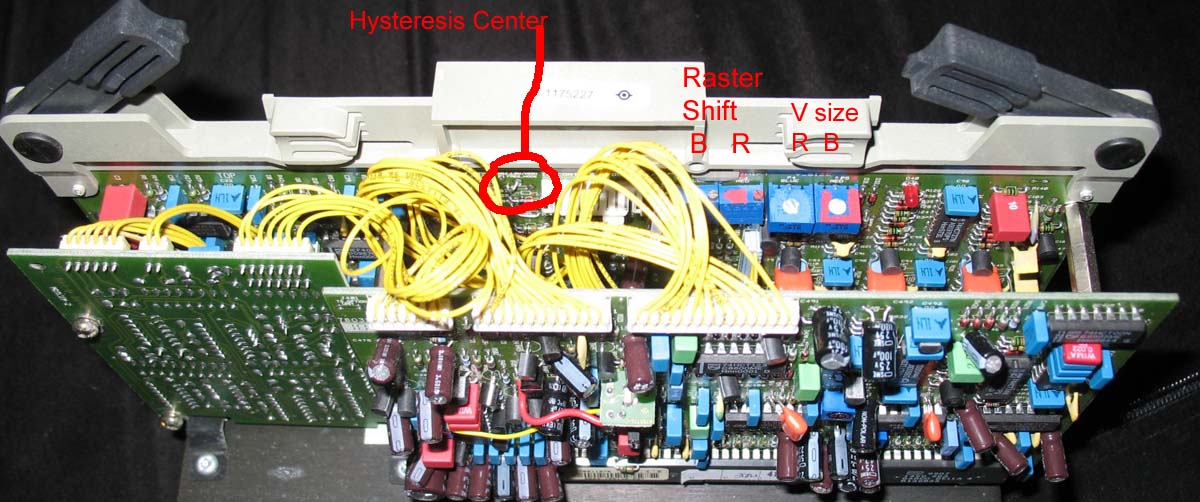
If i am correct you are missing the pot. There is a jumper on your board instead.
I have marked in the picture where it should be.
| Description: |
|
| Filesize: |
150.68 KB |
| Viewed: |
4439 Time(s) |
|
_________________
BG1208 and BG1208/2
|
|
| Back to top |
|
|
Chuchuf
Joined: 11 Mar 2006
Posts: 548
|
| Posted: Mon Nov 05, 2007 2:29 pm Post subject: |
|
|
The runco 1101 only has one scan mode which can be clearly see by the lack of the extra 3 coils on the board where the switches are that you change orientation. The machine runs up to 1080P 60 like this.
Terry
|
|
| Back to top |
|
|
nathan
Joined: 21 Jan 2007
Posts: 56
Location: Utah
|
| Posted: Mon Nov 05, 2007 2:53 pm Post subject: |
|
|
| Chuchuf wrote: | The runco 1101 only has one scan mode which can be clearly see by the lack of the extra 3 coils on the board where the switches are that you change orientation. The machine runs up to 1080P 60 like this.
Terry |
So, I am SOL for 1080p? Lovely $8K POS I have here. I've been running it at 1080i and 720p and the difference is visible even from normal viewing distances.
Do other players have this problem or just the PS3/XBOX360? Not that I can afford to switch players at this point. I don't even have seating! Just a giant bean bag and some banana chairs. 
|
|
| Back to top |
|
|
nathan
Joined: 21 Jan 2007
Posts: 56
Location: Utah
|
| Posted: Mon Nov 05, 2007 2:54 pm Post subject: |
|
|
BTW, thanks guys.
Well, I can watch it cropped or in 1080i, I guess. I'm just glad that Walmart was out of the A2 Friday morning when I went down. I hadn't actually tried 1080i at that point yet and would have been upset that I hadn't held out for a 1080p player. Looks like now I'm going to need it.
Is there something I can put inline that will change the timings? I thought I read somewhere, while looking for info about the pot, that some people didn't have problems after running it through something. I just don't remember if it was a switcher or who knows what. I can't think of what you would want put in the chain.
-Nathan
|
|
| Back to top |
|
|
Spotmatic
Joined: 29 Jun 2006
Posts: 531
Location: Gelderland, Netherlands
|
| Posted: Mon Nov 05, 2007 3:09 pm Post subject: |
|
|
Nathan, you'd need a scaler. This will allow you to alter the timings. Mind you, not all scalers are usable. The ones that are, and that come to my mind, are the DVDO iScan VP50 and VP50pro, the Crystalio II and the Lumagen HDP/HDQ (I have to check the specs of the Lumagens though).
I'm looking for a scaler myself because of the smart engineers at Sony, who decided not to include a hardware scaler in the PS3. So the PS3 will only output everything at its native resolution (it can upscale DVDs but 50Hz timings are HORRIBLE so upscaling DVDs with the PS3 is not for me, unfortunately).
|
|
| Back to top |
|
|
nathan
Joined: 21 Jan 2007
Posts: 56
Location: Utah
|
| Posted: Tue Nov 06, 2007 12:11 am Post subject: |
|
|
| Spotmatic wrote: | Nathan, you'd need a scaler. This will allow you to alter the timings. Mind you, not all scalers are usable. The ones that are, and that come to my mind, are the DVDO iScan VP50 and VP50pro, the Crystalio II and the Lumagen HDP/HDQ (I have to check the specs of the Lumagens though).
I'm looking for a scaler myself because of the smart engineers at Sony, who decided not to include a hardware scaler in the PS3. So the PS3 will only output everything at its native resolution (it can upscale DVDs but 50Hz timings are HORRIBLE so upscaling DVDs with the PS3 is not for me, unfortunately). |
Well, I don't think I'll get a $2500-$4K scaler to fix a problem with a $600 PS3, although I am sure it would be a nice piece of hardware to have.
In defense of the Runco it is a beautiful picture. Just the fact that I can see the scanlines at 1080i from 15feet is a testament to its resolving power. Especially considering my poor setup skills. Someday I'll learn to get the dang corners focused properly, too.
|
|
| Back to top |
|
|
ncc1701d
Joined: 08 Aug 2007
Posts: 187
Location: sweden
|
| Posted: Tue Nov 06, 2007 1:42 pm Post subject: |
|
|
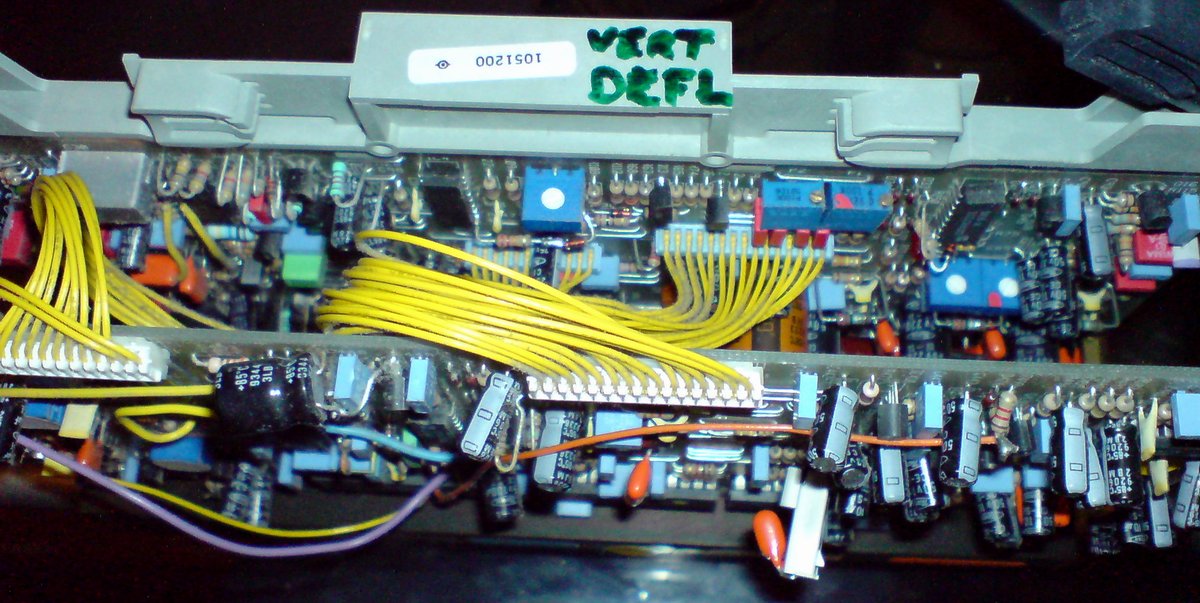
I was thinking i would test the scan switching thing on my BG1208/2 ( to get PS3 1080p to switch to the high scanning mode)
But as i looked at my vertical deflection board i got only 3 pots, and the one i thougt would be the hysteresis pot is marked P5, Not P1 as in the manual. So i don't have the guts to try.
My board does not look like the one in the service manual.. mine is marked: 762112S or 7621125
Is P5 the hysteresis pot?? (the blue in the middle)
| Description: |
|
| Filesize: |
178.61 KB |
| Viewed: |
4422 Time(s) |
|
_________________
BG1208 and BG1208/2
|
|
| Back to top |
|
|
|
|





