| Author |
Message |
Celeborn
Joined: 17 Sep 2007
Posts: 8
Location: Stockholm, Sweden
|
|
| Back to top |
|
 |
CRT_Ben
Joined: 28 Aug 2006
Posts: 1684
Location: Northern Virginia
|
| Posted: Wed Sep 19, 2007 8:11 pm Post subject: |
|
|
Even though 80ft is a long-ish run of VGA without a booster, the fact that you get a good pic without powerstrip at 1024x768 rules out cable troubles.
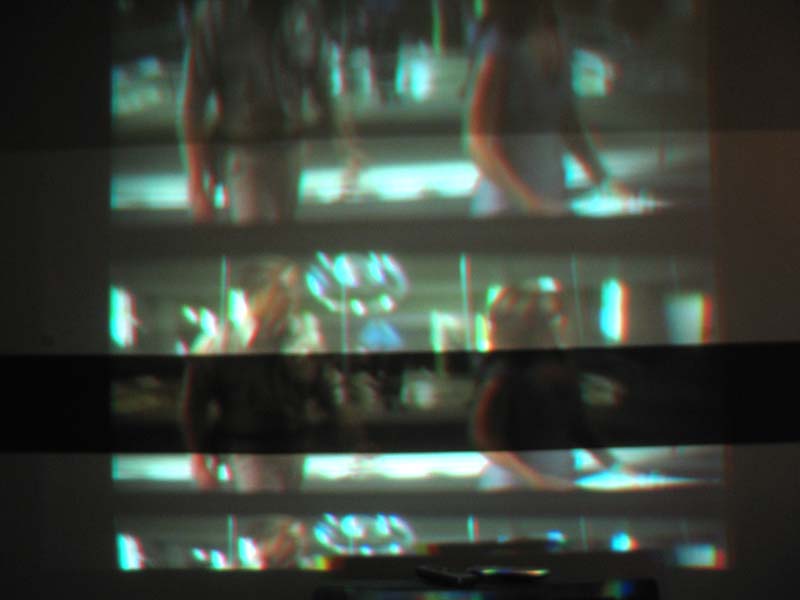
I don't know what you mean by banding, though, can you take a picture of what you're describing?
Ben
|
|
| Back to top |
|
|
Celeborn
Joined: 17 Sep 2007
Posts: 8
Location: Stockholm, Sweden
|
| Posted: Wed Sep 19, 2007 8:29 pm Post subject: |
|
|
By banding I mean that the picture is being stacked upon itself and scrolling up or down.
I took a picture of it, you'll have to excuse the circumstances, no screen, no convergence fixes, the PJ isn't even mounted properly in the roof yet, just mucking about with it atm 
Jes.
| Description: |
|
| Filesize: |
49.04 KB |
| Viewed: |
9136 Time(s) |
|
|
|
| Back to top |
|
|
CRT_Ben
Joined: 28 Aug 2006
Posts: 1684
Location: Northern Virginia
|
| Posted: Wed Sep 19, 2007 8:33 pm Post subject: |
|
|
|
I gotcha now - so it looks like the PJ can't get vertical hold. Offhand I don't know much about the custom timings but that's probably where your problem is.
|
|
| Back to top |
|
|
Ile

Joined: 09 Mar 2006
Posts: 1491
Location: Jyväskylä, Finland
|
| Posted: Wed Sep 19, 2007 8:52 pm Post subject: |
|
|
|
Clic vertical sync to - and see what happen.
|
|
| Back to top |
|
|
Celeborn
Joined: 17 Sep 2007
Posts: 8
Location: Stockholm, Sweden
|
| Posted: Wed Sep 19, 2007 8:54 pm Post subject: |
|
|
| Ile wrote: | | Clic vertical sync to - and see what happen. |
Tried that earlier, no difference 
|
|
| Back to top |
|
|
Ile
Joined: 09 Mar 2006
Posts: 1491
Location: Jyväskylä, Finland
|
| Posted: Wed Sep 19, 2007 9:04 pm Post subject: |
|
|
Nvidia drivers have same kind sync problems with Barco, but I'm not sure how things goes with Powerstrip.
Have you tried to remove v sync cable and use negative composite sync from Powerstrip?
|
|
| Back to top |
|
|
Celeborn
Joined: 17 Sep 2007
Posts: 8
Location: Stockholm, Sweden
|
| Posted: Wed Sep 19, 2007 9:53 pm Post subject: |
|
|
| Ile wrote: | Nvidia drivers have same kind sync problems with Barco, but I'm not sure how things goes with Powerstrip.
Have you tried to remove v sync cable and use negative composite sync from Powerstrip? |
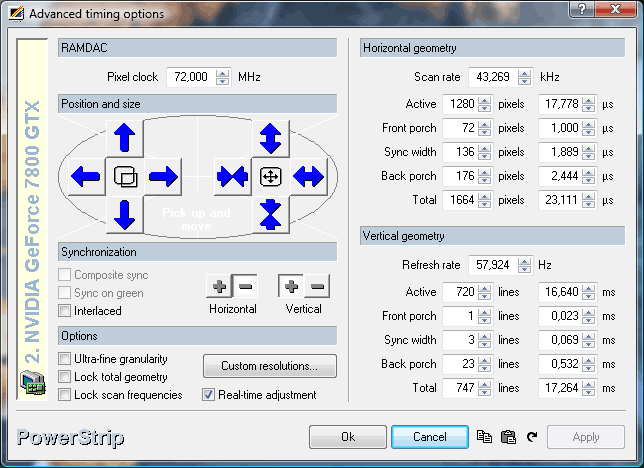
Hmm, I would but Composite sync is greyd out  just like in the first screenshot. just like in the first screenshot.
|
|
| Back to top |
|
|
Ile
Joined: 09 Mar 2006
Posts: 1491
Location: Jyväskylä, Finland
|
| Posted: Wed Sep 19, 2007 10:03 pm Post subject: |
|
|
| Celeborn wrote: | | Hmm, I would but Composite sync is greyd out just like in the first screenshot. |
Ok, I thought it would be active after removing cable and reboot...
Do you still have Nvidia drivers installed?
|
|
| Back to top |
|
|
Celeborn
Joined: 17 Sep 2007
Posts: 8
Location: Stockholm, Sweden
|
| Posted: Wed Sep 19, 2007 10:19 pm Post subject: |
|
|
| Ile wrote: | | Ok, I thought it would be active after removing cable and reboot... |
Nope, still grey after reboot and v-sync disconnected.
Edit: When switching back to 1024x768 after the composite sync attempt I had to re-connect the v-sync to prevent banding there too.
And yeah I'm running the latest NVidia drivers. I actually re-formatted and reinstalled earlier today (not related to this), so the computer is completely fresh
Jes.
|
|
| Back to top |
|
|
Ile
Joined: 09 Mar 2006
Posts: 1491
Location: Jyväskylä, Finland
|
| Posted: Thu Sep 20, 2007 7:03 am Post subject: |
|
|
[quote="Celeborn]And yeah I'm running the latest NVidia drivers. I actually re-formatted and reinstalled earlier today (not related to this), so the computer is completely fresh
Jes.[/quote]That's probably your problem, when I installed latest Nvidia drivers I couldn't get any picture without sync box from my two Barcos. Chance few step older drivers and sync problems could be gone. Or if Powerstrip works without Nvidia drivers installed it's even better.
|
|
| Back to top |
|
|
Celeborn
Joined: 17 Sep 2007
Posts: 8
Location: Stockholm, Sweden
|
| Posted: Thu Sep 20, 2007 3:07 pm Post subject: |
|
|
Well I went back as far as 158.24 in Nvidia drivers, and also tried running without nvidia drivers, but there is no difference. 1024x768 works great, but 1280x720 does not. and Composite Sync is always grey, no matter what I do so I'm starting to wonder if Vista is the cause of that.
Jes.
|
|
| Back to top |
|
|
Zebu Fellenz
Joined: 21 Dec 2006
Posts: 2567
|
| Posted: Thu Sep 20, 2007 8:48 pm Post subject: |
|
|
Welcome to the Forum,
Do you have another computer you can use to test with; I don't think Vista could be causing it if it is an analog output. have you connected a monitor at 720p to see if it works?
Erik
|
|
| Back to top |
|
|
Ile
Joined: 09 Mar 2006
Posts: 1491
Location: Jyväskylä, Finland
|
| Posted: Thu Sep 20, 2007 9:25 pm Post subject: |
|
|
Used sync box would be easy and cheap solution. That's how Barco have designed 801s to work with pc.
You could also test Port3, it should convert syncs to negative. But don't count on that.
|
|
| Back to top |
|
|
Celeborn
Joined: 17 Sep 2007
Posts: 8
Location: Stockholm, Sweden
|
| Posted: Thu Sep 20, 2007 11:21 pm Post subject: |
|
|
Well I plugged it into my laptop(WinXP, Radeon 9000 Mobility) and set up 1280x720 and low and behold, it worked right off the bat.
I tried copying the powestrip parameters to my main PC but all I got was more banding... I dont get it..
Jes.
|
|
| Back to top |
|
|
Zebu Fellenz
Joined: 21 Dec 2006
Posts: 2567
|
| Posted: Fri Sep 21, 2007 12:41 am Post subject: |
|
|
It could be the video card; do you have onboard graphics on your main PC that you could try. I had a lot of trouble trying to setup my Barco 801s with a Nvidia Geforce 5500FX card a while back.
I also agree with Ile, a sync box would be an easy fix to the problem
|
|
| Back to top |
|
|
Celeborn
Joined: 17 Sep 2007
Posts: 8
Location: Stockholm, Sweden
|
| Posted: Fri Sep 21, 2007 1:22 pm Post subject: |
|
|
I had the bright idea of installing an old AGP Geforce I had lying around next to the PCI-E Geforce currently in the computer, however I quickly realised that the mobo didn't have a AGP port...So much for backwards compability.
So I guess the only options left now are either buy a new graphics card, a sync box or try port 3.
I'm thinking the sync box looks pretty good right now... Any idea where I could find one? Do they have a more specific name other than "Sync Box"?
Thanks a lot for all the help guys, I really appreciate it!
Jes.
|
|
| Back to top |
|
|
Ile
Joined: 09 Mar 2006
Posts: 1491
Location: Jyväskylä, Finland
|
| Posted: Fri Sep 21, 2007 8:43 pm Post subject: |
|
|
| Celeborn wrote: | I'm thinking the sync box looks pretty good right now... Any idea where I could find one? Do they have a more specific name other than "Sync Box"?
Thanks a lot for all the help guys, I really appreciate it!
Jes. |
RGB Analog Interface is Barcos name for that. These are pretty easy to find from europe.
http://cgi.befr.ebay.be/Barco-RGB-Analog-Interface-120Mhz_W0QQitemZ110169566906QQihZ001QQcategoryZ61395QQcmdZViewItem
I have similar. This one is easy to mod just for syncs if you don't need boost for rgb lines, because rgb stages is in other card...
I think Extron cals these Universal Computer Video Interface and some other Universal Video Interface.
|
|
| Back to top |
|
|
|
|