| Author |
Message |
Ironman1965
Joined: 28 Jun 2007
Posts: 98
|
| Posted: Mon Aug 27, 2007 8:43 pm Post subject: Small anomaly when diplaying cross hatch |
|
|
|
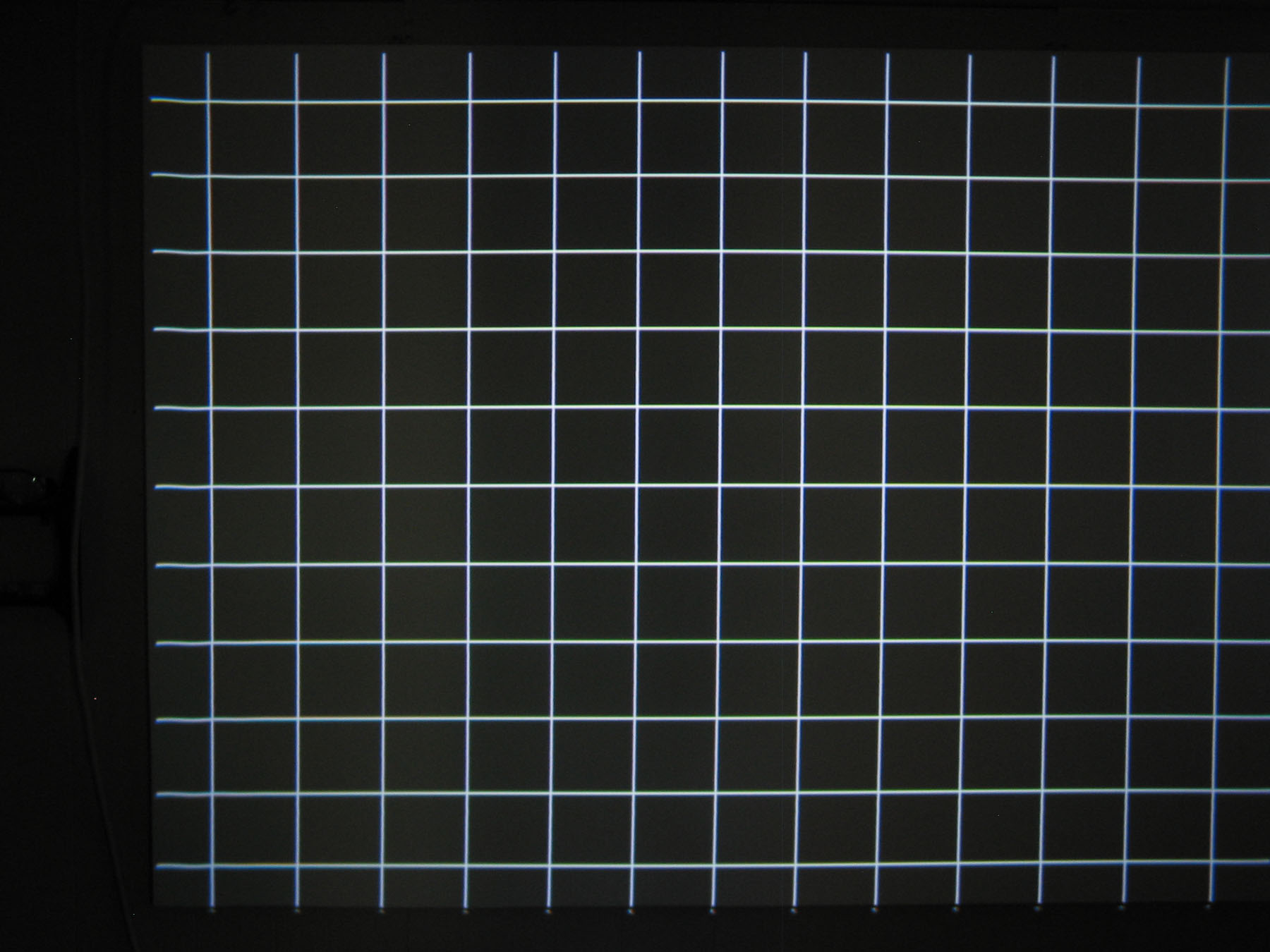
When I display a crosshatch (internal or external) I get a slight dip in the horizontal lines on the left side of the display. It appears in the first square of the coarse x-hatch and first two of the fine. The distortion goes from bottom to top and is unifrom from bottom to top as well. The PJ is a NEC XG-1350. Any suggestions as to what this could be
|
|
| Back to top |
|
 |
dbaisey
Joined: 09 Mar 2006
Posts: 821
Location: Southern Cal LA / Seattle WA
|
| Posted: Tue Aug 28, 2007 12:39 am Post subject: |
|
|
Set the tilt phase for the signal entry. Its in the manual under 'signal entry' Doug
http://www.curtpalme.com/NECXG_Downloads.shtm
Download the setup manual then read past page 18
|
|
| Back to top |
|
|
Ironman1965
Joined: 28 Jun 2007
Posts: 98
|
| Posted: Tue Aug 28, 2007 4:24 pm Post subject: |
|
|
It is not a phase dip in the line. Looks kind of like this __ __|_____|
\__/ | |
The dip isn't quite so pronounced but is there, maybe not even the thickness of the line. The line does not drop off on the end, it comes back up to normal. Also noted that the 1350 doesn't have the coarse medium and fine point convergance option. Is this normal? Is there a way to access fine adjust? Can't seem to find where to access. Mine seems to be preset to medium.
|
|
| Back to top |
|
|
dbaisey
Joined: 09 Mar 2006
Posts: 821
Location: Southern Cal LA / Seattle WA
|
| Posted: Tue Aug 28, 2007 4:38 pm Post subject: |
|
|
This sounds like point convergence corruption but guessing now. Select the color your on (under point) then hit the normal button to delete it. This will delete all for that color so will need cleaned up afterwards if alot is being used. When you have a issue like this try to take a picture and post also, it helps see what your seeing. There is also line distortion corrections but not as profound as the above. Doug
There is also an oddity that can show up on the far left but is much harder to get rid of, it will be slight but still wanted to mention it. This can be corrected by offsetting the raster then reposition the actual image. Sometimes called harmonics or raster ring but will show 2-3 lines going top to bottom on a all white screen. The internal test patterns are overscanned about 10%
|
|
| Back to top |
|
|
Ironman1965
Joined: 28 Jun 2007
Posts: 98
|
| Posted: Tue Aug 28, 2007 5:03 pm Post subject: |
|
|
Tried point normalize and is still there. Getting on all tubes. It doesn't have any impact on the projected image that I can see, even when displaying PC data on screen. More curious if there may be a problem that needs to be addressed. Could it be some kind of interference?
| Description: |
|
| Filesize: |
250.7 KB |
| Viewed: |
6408 Time(s) |
|
|
|
| Back to top |
|
|
dbaisey
Joined: 09 Mar 2006
Posts: 821
Location: Southern Cal LA / Seattle WA
|
| Posted: Tue Aug 28, 2007 5:08 pm Post subject: |
|
|
|
In my above post I edited it so you may have missed it but this is the oddity I was addressing. If it is outside the actual image I wouldnt have a concern. Its normal for the XG and nothing wrong with your chassis. Doug
|
|
| Back to top |
|
|
Ironman1965
Joined: 28 Jun 2007
Posts: 98
|
| Posted: Tue Aug 28, 2007 5:18 pm Post subject: |
|
|
|
Yeah Doug, I caught your post edit when I loaded my last post. I'll see if I can adjust it as you've described. Don't know if I'll get the time today though. Taking the family camping for the last time before school starts back up. I'll let you know the results when I get the opportunity to give it a try though. Thanks for the help. By the way, don't the 1350's have more than medium point cvg?
|
|
| Back to top |
|
|
dbaisey
Joined: 09 Mar 2006
Posts: 821
Location: Southern Cal LA / Seattle WA
|
| Posted: Tue Aug 28, 2007 5:29 pm Post subject: |
|
|
You hit the point button to toggle to the 'fine' point. Remember point uses three time the memory so try to do 99% by convergence first.
Look over 'balance' before the functions for better control. What is \ / can be / / using the balance function. Also works on linearity, pincushion.
If you move the raster you need to check and redo the astig. It will change the core center in relation to the flare. Its not worth it if it doesnt affect the actual image. Doug
|
|
| Back to top |
|
|
Ironman1965
Joined: 28 Jun 2007
Posts: 98
|
| Posted: Sun Sep 02, 2007 12:09 am Post subject: |
|
|
|
I'm back. Thanks for the responses Doug. I must assume the 208 points include the offscreen adjustments as well. I'm still quite new to the real PJ scene. My last PJ was a Kloss Novabeam Model 2, which I'm actually glad I had as it gave me a bit of a foundation to build on with this PJ. Please bear with me if I ask dumb questions. I'm still trying to wrap my head around registering a signal, but I think I'm slowly starting to get it. I would need an entry for each resolution I wish to display on the PJ? Thanks again Doug. And thanks for the joint venture you are getting into with Mike.
|
|
| Back to top |
|
|
Curt Palme
CRT Tech
Joined: 08 Mar 2006
Posts: 24396
Location: Langley, BC
TV/Projector: All of them!
|
| Posted: Sun Sep 02, 2007 12:16 am Post subject: |
|
|
|
I had this once on an XG and it turned out to be software corruption. I had the lower right corner on two points (red only I think) not work. There was the same slight dip as you say. Doing a master reset solved it. If you're close to Doug, I'd suggest you send him the system board to do that, it's not something that a newbie end user should do, there's too much to bring back in line when you do that.
|
|
| Back to top |
|
|
Ironman1965
Joined: 28 Jun 2007
Posts: 98
|
| Posted: Sun Sep 02, 2007 7:46 pm Post subject: |
|
|
|
Thanks Curt. I would be closer to you than Doug, seeing as I live 80Kms west of Edmonton AB. It is not just one color. It is all three, and it is from top to bottom. If you've looked at the image I posted you'll see it is very slight and I can't even see it unless I'm displaying a cross hatch, even If displaying a static image like a computer display. I was more curious to see if anyone would say it was some kind of EM or electronic interference. If I recall correctly the POS Novabeam had a similar anomaly on the same side (just wasn't able to converge the image completely). Not that I'm putting these two units in the same catagory, because they are truly apples and oranges, but was thinking that since they both displayed the same characteristic that it may be an environmental issue. The nice thing is that the XG allows me so much more control that I can converge the tubes so it doesn't show at all on the final image (at least not to my eye). If I get a chance I'll post a couple screenshots of a video and computer display and you and/or Doug can let me know if your discriminating eyes can see the distortion. I'm not running any real expensive video equipment but I am feeding it through a Lumagen Vision One Scaler, and boy did that make a big difference from the unscaled s-video signals I was feeding it before the scaler arrived. One other quick question. Why does my computer display when run through the Lumagen VGA passthrough shift to the right and need to be tweaked with software to be centered onscreen. This one has me baffled seeing as it is supposed to be a straight through signal. Is it some kind of timing issue? Thanks again.
|
|
| Back to top |
|
|
|
|




