| Author |
Message |
RCP85
Joined: 29 Jan 2026
Posts: 2
Location: Scotts Valley, California
|
| Posted: Thu Jan 29, 2026 3:55 pm Post subject: New user Sony D50 setup questions |
|
|
Hello all,
I'm new and I've got myself one of those NIB Sony D50's. I used to watch a lot of podcasts with Robert Heron when I was younger and I remember him speaking reverentially about the technology so this satisfies a very old dream of mine.
I have some questions if I can just post them all here in this forum:
1. I'd like to run 72hz because I believe that's what a triple shutter cinema film projector runs. Is there a catch I'm missing? I think I see a lot more people going for 96hz in the instead.
2. 1024x576 vs 1280x720? It would feel simpler to run 720p and certainly be easier to explain to others. But as I understand it these 7" tubes don't exactly have the TV Lines to fully resolve 1280x720. I'll try them both of course but as I understand it it may be challenging and/or disadvantageous to switch back and forth between them.
3. I believe I will primarily use an HTPC for viewing. I have a DVI-I to BNC cable and an old Nvidia 680 that has a DVI-I output. Is it as simple as setting the refresh rate to 71.928hz and pulling up a 23.976fps file in VLC? Or is Kodi and specific care necessary to achieve stable 1 to 3 frame output?
Thanks
|
|
| Back to top |
|
 |
virusc
Joined: 11 Apr 2007
Posts: 358
Location: Massachusetts
|
| Posted: Mon Feb 02, 2026 1:05 pm Post subject: |
|
|
|
This projector should do 720p nicely if the setup is done well. I would make sure you use a lot of the tube face which means the projector sitting a little closer to the screen than the manual suggests. You should set the projector up on the ground and look into the lenses as you test the throw distance. These tubes can be run near the tube edge safely. I would also suggest looking for a Lumagen HDQ processor that can do 72 and 96hz output. Maybe even the HDP ones will work and they should be $100-200. HTPC is a pain to use for me anyway. You probably will end up with both. This projector also will do 1080i/96. 96hz progressive is too much for this projector even at 720p.
|
|
| Back to top |
|
|
RCP85
Joined: 29 Jan 2026
Posts: 2
Location: Scotts Valley, California
|
| Posted: Thu Feb 19, 2026 11:39 pm Post subject: |
|
|
| virusc wrote: | | This projector should do 720p nicely if the setup is done well. I would make sure you use a lot of the tube face which means the projector sitting a little closer to the screen than the manual suggests. You should set the projector up on the ground and look into the lenses as you test the throw distance. These tubes can be run near the tube edge safely. I would also suggest looking for a Lumagen HDQ processor that can do 72 and 96hz output. Maybe even the HDP ones will work and they should be $100-200. HTPC is a pain to use for me anyway. You probably will end up with both. This projector also will do 1080i/96. 96hz progressive is too much for this projector even at 720p. |
Thank you for the reply!
I have started using it now and am quite satisfied. I did use the simple vertical horizontal adjustment to get it about as big as possible and then placed the projector from there. After placement, I reduce it slightly to hit the matte bars of my screen exactly. I've looked into the tubes to confirm that I'm using enough of the face at least it looks good to me.
I'm glad to find that despite how deep I understand tuning can go, I am actually quite happy with a minimal level of calibration. I have it on a rolling cart about 6" off the ground because I don't have a dedicated room or permanent placement, and I'm able to roll it back out of storage, set the size, do a rough main and corner focus, set the registration, in about 15 minutes total and it's perfectly good enough for me. I haven't got perfect corner focus or registration yet but I really don't notice it once the movie's on.
I'm running 1280x1024 72hz from the HTPC and might just leave it that way for all content, once I open the content in full screen the black bars are technically drawn outside of the projector screen but it seems to be no problem that way.
|
|
| Back to top |
|
|
CIR Engineering

Joined: 25 Aug 2008
Posts: 4269
Location: Chicago USA & Berlin Germany
|
| Posted: Sat Mar 21, 2026 3:44 am Post subject: |
|
|
What are you watching on the projector and at what aspect ratio?
I'm an extreme Lumagen expert, but even I would struggle to remember how to setup an HDQ at this point (been a long time). However, it wouldn't be that bad. I haven't worked on a D50 in a while, but I've set them up to run 720p 60Hz nicely. I also like running 1080i at 60Hz for TV and 72Hz for 24Hz sources. Both can be rendered quite well on the D50. You can also run 800x####p at 72Hz for 2.40 movies. You'd need to experiment with #### to see where it performs well; maybe start with 1280 and if that stays sharp try 1440.
Anyway, I have a small pile of Lumagen HDQ's. You are welcome to one for the price of shipping and $30 for my time to pack it. Shoot me an EMAIL or give me a call if you would like one to play with.
_________________
JETI 1501-HiRes 2nm Spectroradiometer
JETI 1211 Spectroradiometer
Photo Research PR-650 Spectroradiometer
Klein K10-A Colorimeter
Murideo Fresco SIX-G HDMI 2.x Multimedia Generator
Murideo Fresco SIX-A HDMI 2.x Analyzer
Light Illusion ColourSpace XPT Color Calibration Software
Light Illusion LightSpace XPT Pro Version 10.x Color Calibration Software
OMARDRIS JVC Software Patch to use K10-A and Jeti with JVC OEM AutoCal Software!
Sencore CR7000 CRT Tube Analyzer / Rejuvenater
Authorized Dealer for Lumagen & just about everything worth buying 
www.CIR-Engineering.com - craigr@cir-engineering.com
Phone: 865-405-6892
|
|
| Back to top |
|
|
harry27
Joined: 04 Aug 2019
Posts: 55
Location: Los Angeles, CA, United States
|
| Posted: Wed Apr 01, 2026 2:55 am Post subject: |
|
|
|
I'm interested in a Lumagen HDQ to try out, i'll try to contact you tomorrow
|
|
| Back to top |
|
|
Videodrome

Joined: 22 Feb 2023
Posts: 56
|
| Posted: Wed May 06, 2026 5:46 pm Post subject: |
|
|
D50 can do resolutions like:
1280x720p @ 85hz.
1920x1080i @ 100hz
or more exotic 1600x900i @ 120hz.
100hz is a lot nicer for the eyes than 60/72 hz, and for movies the interlacing frequency would be at such a high refreshrate you wouldn't notice it.
Though getting an interlaced signal out of modern gpus might be a challenge, so 1280x720@85 might be your best bet.
For best framepacing use windows with media player classic be (MPC-BE), install and use the MadVR plugin for MPC (enable smooth motion in the settings).
I know you can use perfect intervals of 23.98, but even then mediaplayers can get stuttery. With MadVR I have perfect frame pacing regardless the video file.
I recommend setting the resolution to the actual 16:9 frame you use, so it doesn't waste bandwidth drawing the black parts.
Finally, these projectors have a tremendous black crunch.
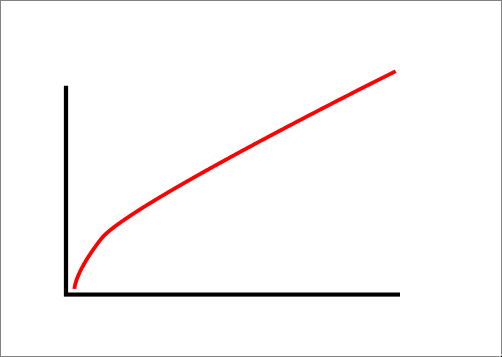
I'd recommend something like VideoEqualizer 2.0, and adjust the curve using a gradient.
This way you can have a nice picture without blasting the contrast at full brightness, ruining your tubes.
| Description: |
|
| Filesize: |
3.65 KB |
| Viewed: |
18 Time(s) |
|
|
|
| Back to top |
|
|
|
|




