| Author |
Message |
harry27
Joined: 04 Aug 2019
Posts: 55
Location: Los Angeles, CA, United States
|
| Posted: Sun Nov 16, 2025 9:07 pm Post subject: Moome Gamma Understanding |
|
|
I have two questions about the Moome Gamma.
For the digital adjustment, what point is the middle? Do I have the understanding that it functions like this? With 10 clicks from Min or Max is the middle value?
Min 1 2 3 4 5 6 7 8 9 10 11 12 13 14 15 16 17 18 19 Max
Also is the middle value equivalent to no gamma processing?
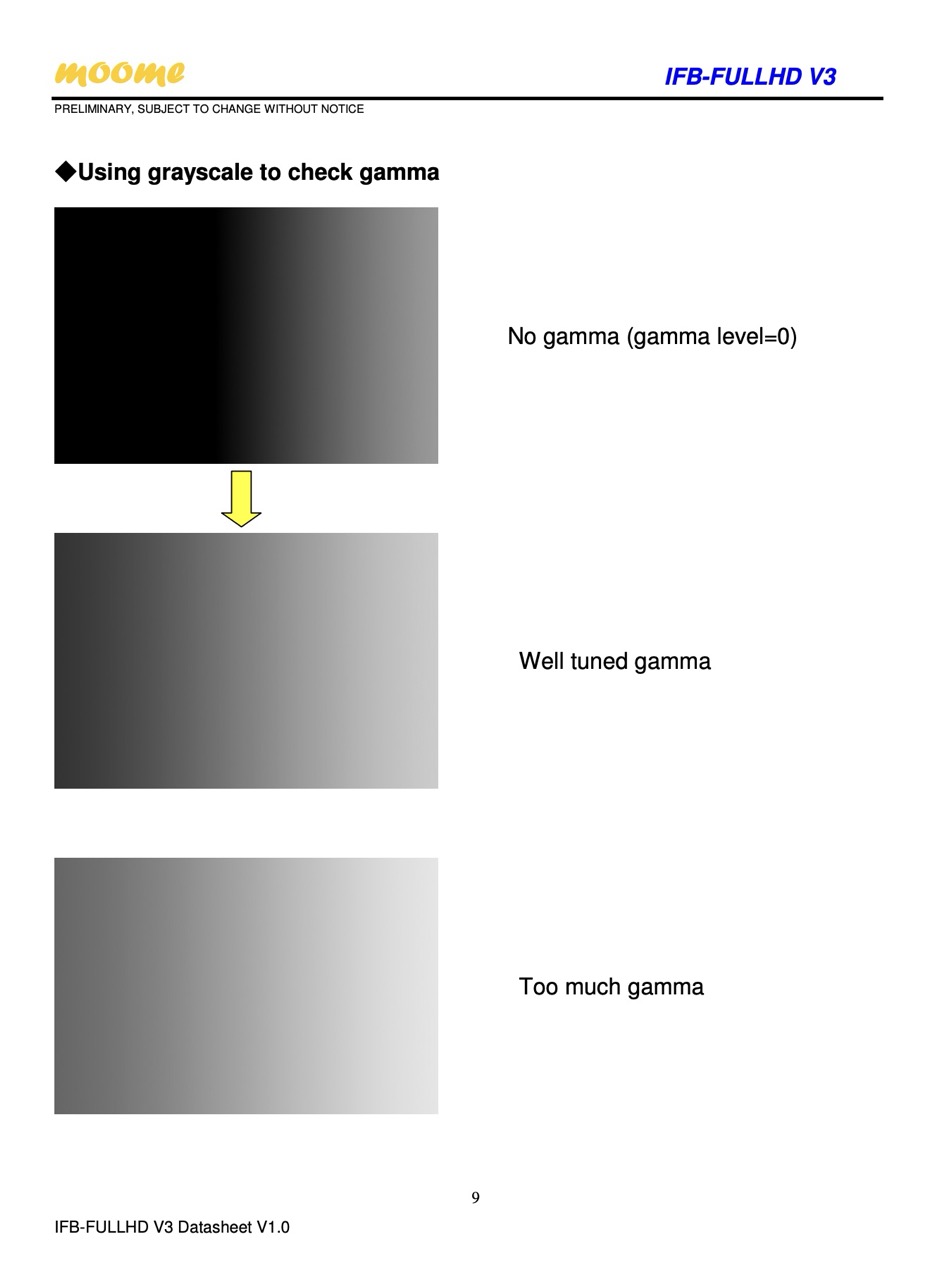
I assumed that was the case but then I saw this picture from the manual where it says "No Gamma is gamma level=0".
Is having the digital gamma adjustment in the middle a value with no gamma processing or is having the value at 0 (min).
I just installed a brand new HDMI 1.4 card into my G90 and want to start out at a factory reset value with no gamma processing or modification. The plan is a color calibration then gamma adjustment if it's needed.
Thanks for the help!
| Description: |
|
| Filesize: |
67.6 KB |
| Viewed: |
73 Time(s) |
|
|
|
| Back to top |
|
 |
kal
Forum Administrator

Joined: 06 Mar 2006
Posts: 18114
Location: Ottawa, Canada
TV/Projector: JVC DLA-NZ7
|
| Posted: Mon Nov 17, 2025 1:02 pm Post subject: |
|
|
Gamma boost is raising of the signal near black. So I would imagine that having gamma at MIN is equivalent to the it being off, or the MINIMUM gamma processing, not the middle (10). You'd never want a negative curve as that would crush black detail. So there would be no point in Moome building a curve that LOWERS the curve near black. gamma boost is all about raising the curve near black. So set to to 0 if you want it to be (no gamma boost) as the manual states. That would pass the signal unchanged (no boost).
All CRT projectors require gamma boost so yours should need it.
Kal
_________________

Support our site by using our affiliate links. We thank you!
My basement/HT/bar/brewery build 2.0
|
|
| Back to top |
|
|
harry27
Joined: 04 Aug 2019
Posts: 55
Location: Los Angeles, CA, United States
|
| Posted: Mon Nov 17, 2025 6:56 pm Post subject: |
|
|
Hi Kal,
Thanks for the information!
I was confused whether or not Min would be zero processing because the instructions have a note that says " For test only"
However it might be because Moome assumed no one would use level zero.
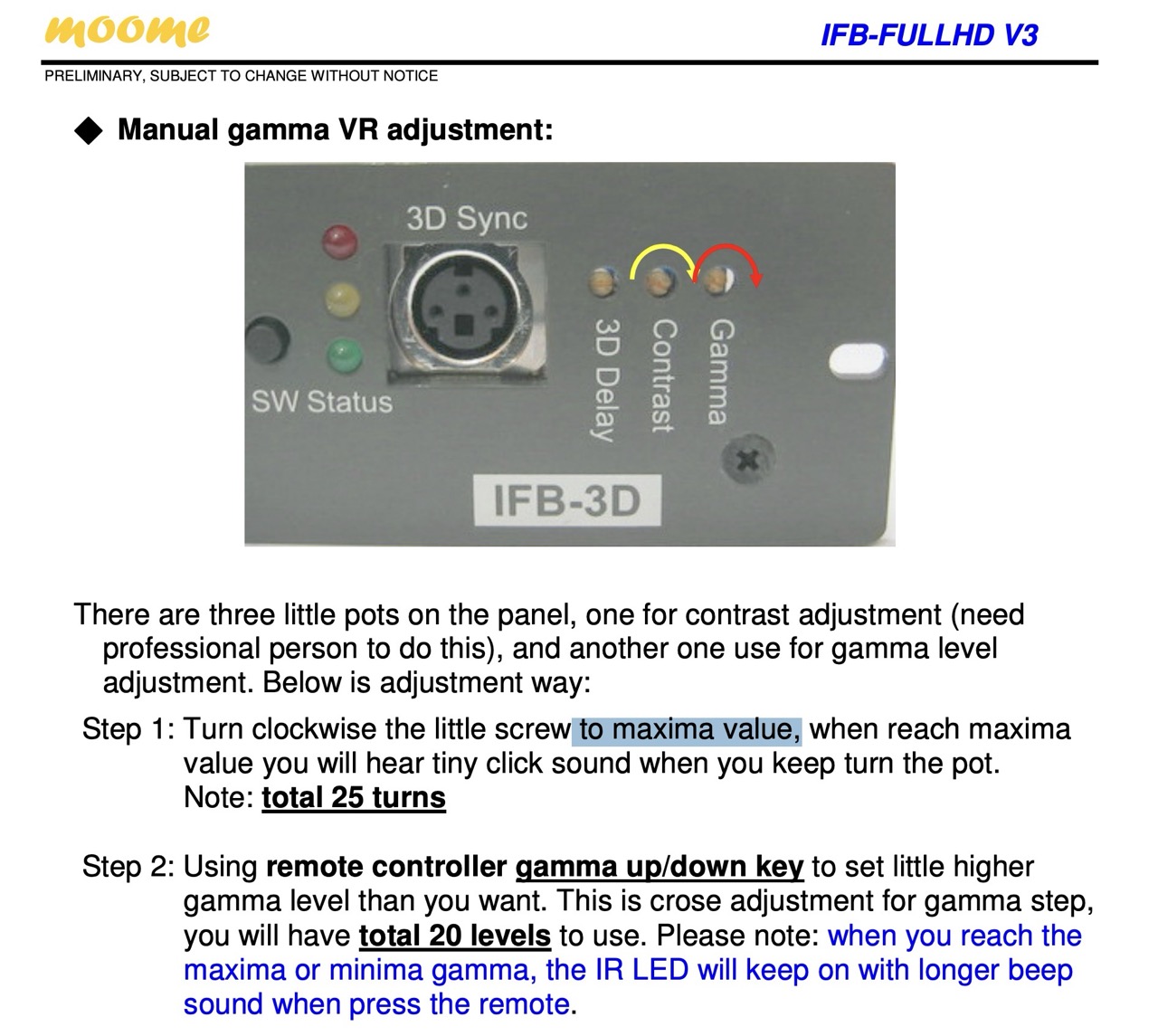
Do you know anything about the manual gamma potentiometer on the back of the Moome card? For some reason when I turn it my peak brightness on the G90 will change. In theory this shouldn't happen as the output of the Moome should remain the same and only the gamma curve changes, but clearly this isn't the case on my Moome card. I made sure to only adjust gamma not the contrast pot.
The same is also true with the digital gamma adjustment it appears to also modify the peak brightness but I will double check. Should I turn the trim pot all the way to the right? That seems to be what the instructions imply but I'm not sure. I'm trying to reset everything to default value.
| Description: |
|
| Filesize: |
256.1 KB |
| Viewed: |
68 Time(s) |
|
| Description: |
|

Download |
| Filename: |
Moome HDMI Instructions.jpeg |
| Filesize: |
190.59 KB |
| Downloaded: |
3 Time(s) |
|
|
| Back to top |
|
|
kal
Forum Administrator
Joined: 06 Mar 2006
Posts: 18114
Location: Ottawa, Canada
TV/Projector: JVC DLA-NZ7
|
| Posted: Mon Nov 17, 2025 8:19 pm Post subject: |
|
|
| harry27 wrote: | | I was confused whether or not Min would be zero processing because the instructions have a note that says " For test only" |
The only place the manual states "for test only" is under the 0 and 100 IR codes. These set 0% or 100% gamma through the IR remote, meant for people who are testing. Note that it's for both 0% and 100% not just Min.
Nobody would leave their gamma at 0% or 100% so Moome mentions it's for "Testing only".
| harry27 wrote: | | Do you know anything about the manual gamma potentiometer on the back of the Moome card? |
I don't know anything more about the gamma pot other than what's written in the manual on page 8 which describes in 3 steps how to set gamma. The pot how it's a fine tuning pot. You're supposed to adjust gamma with the remote by using the gamma up/down keys. If you find that you want gamma between two of the steps that are available, only then would you adjust the pot.
| harry27 wrote: | | For some reason when I turn it my peak brightness on the G90 will change. |
Brightness is black level on CRTs. What do you mean by "peak brightness"? Do you mean contrast? (Light output)
| harry27 wrote: | | Should I turn the trim pot all the way to the right? That seems to be what the instructions imply but I'm not sure. |
The instructions on page 8 step one say []i"Step 1: Turn clockwise the little screw to maxima value, when reach maxima value you will hear tiny click sound when you keep turn the pot. Note: total 25 turns"[/i]
So you need to turn the little gamma pot clockwise until you can't any more. That could be 25 turns (max). If by "right" you mean clockwise you are correct.
Then do steps 2 and 3.
Kal
_________________
Support our site by using our affiliate links. We thank you!
My basement/HT/bar/brewery build 2.0
|
|
| Back to top |
|
|
harry27
Joined: 04 Aug 2019
Posts: 55
Location: Los Angeles, CA, United States
|
| Posted: Mon Nov 17, 2025 10:59 pm Post subject: |
|
|
By peak brightness I mean 100 IRE luminance in the video signal, the total light output. I am not referring to the "brightness" adjustment on CRT projectors or monitors.
When I have the gamma trim pot turned all the way clockwise ("to the right") I am able to get around 50 nits on a medium sized white window test pattern. When I turn it all the way to the left I believe it went down to around 36 nits on the same test pattern. I plan to retest this today and will update the forum when that happens.
From my understand the gamma adjustment should only adjust the dark area, but it appears both the 20 point remote adjustment and the gamma trim pot adjusts the entire gamma curve. It seems I am unable to fix low end gamma without also reducing mid tone gamma to 2.1 which ends up flattening the image in my opinion.
|
|
| Back to top |
|
|
kal
Forum Administrator
Joined: 06 Mar 2006
Posts: 18114
Location: Ottawa, Canada
TV/Projector: JVC DLA-NZ7
|
|
| Back to top |
|
|
harry27
Joined: 04 Aug 2019
Posts: 55
Location: Los Angeles, CA, United States
|
| Posted: Tue Nov 18, 2025 2:31 am Post subject: |
|
|
I'll read the discussion forum tonight. I'll also email you and perform some more testing.
Thanks again for the help! I spent a lot of time working on the G90 and really would like to get the picture as optimal as possible
|
|
| Back to top |
|
|
harry27
Joined: 04 Aug 2019
Posts: 55
Location: Los Angeles, CA, United States
|
| Posted: Tue Nov 18, 2025 10:37 pm Post subject: |
|
|
Just for documentation purposes, I did retest the Moome card's digital gamma comparing 0 gamma and the highest gamma and it resulted in the peak luminance changing from 37 nits to 50 nits with my color meter. I even recorded a video of it.
https://www.youtube.com/shorts/1-9h06Y86YU
|
|
| Back to top |
|
|
|
|




