Return to the CurtPalme.com main site CurtPalme.com Home Theater Forum
A forum with a sense of fun and community for Home Theater enthusiasts!
Products for Sale ] [ FAQ: Hooking it all up ] [ CRT Primer/FAQ ] [ Best/Worst CRT Projectors List ] [ Setup Tips & Manuals ] [ Advanced Procedures ] [ Newsletter ]
 
Blu-ray disc release list and must-have titles. Buy the latest and best Blu-ray titles to show off in your home theater!

 As this forum is rarely used anymore, we've locked it. Feel free to browse and read. Questions? Please reach out to us directly. Cheers! 

Color Calibration Problem QLED Q95T with i1Pro2 / ChromaPure

 
This forum is locked: you cannot post, reply to, or edit topics.   This topic is locked: you cannot edit posts or make replies.    CurtPalme.com Forum Index -> Audio & Video Calibration
Author Message
NeXXoc


Joined: 18 Oct 2021
Posts: 3
Location: Hannover, Germany

TV/Projector: Beamer Sony VW570es

Posted: Tue Oct 19, 2021 12:33 am    Post subject: Color Calibration Problem QLED Q95T with i1Pro2 / ChromaPure

Hi everyone,

Sorry for my English, I'm from Germany (thanks to Google) Wink

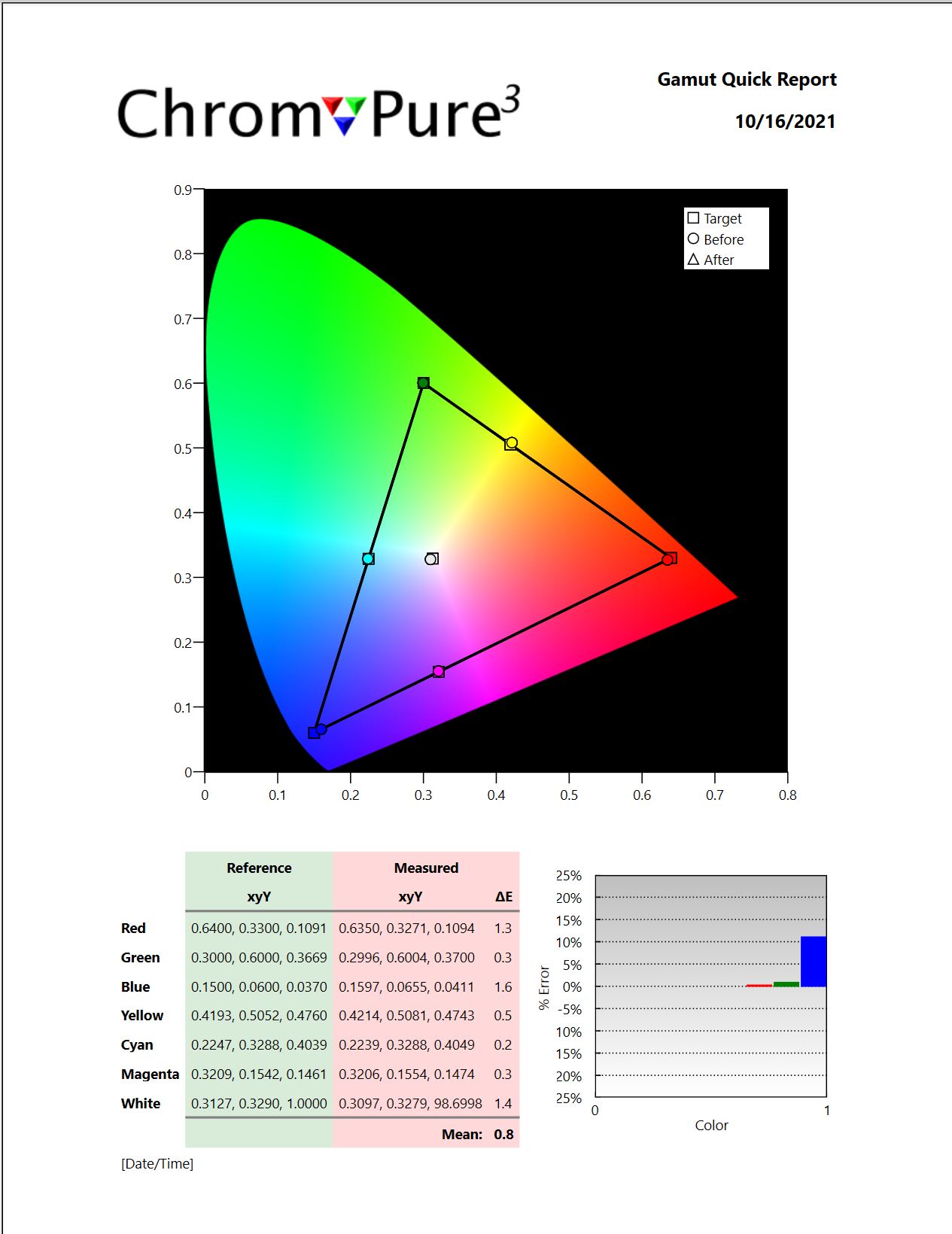
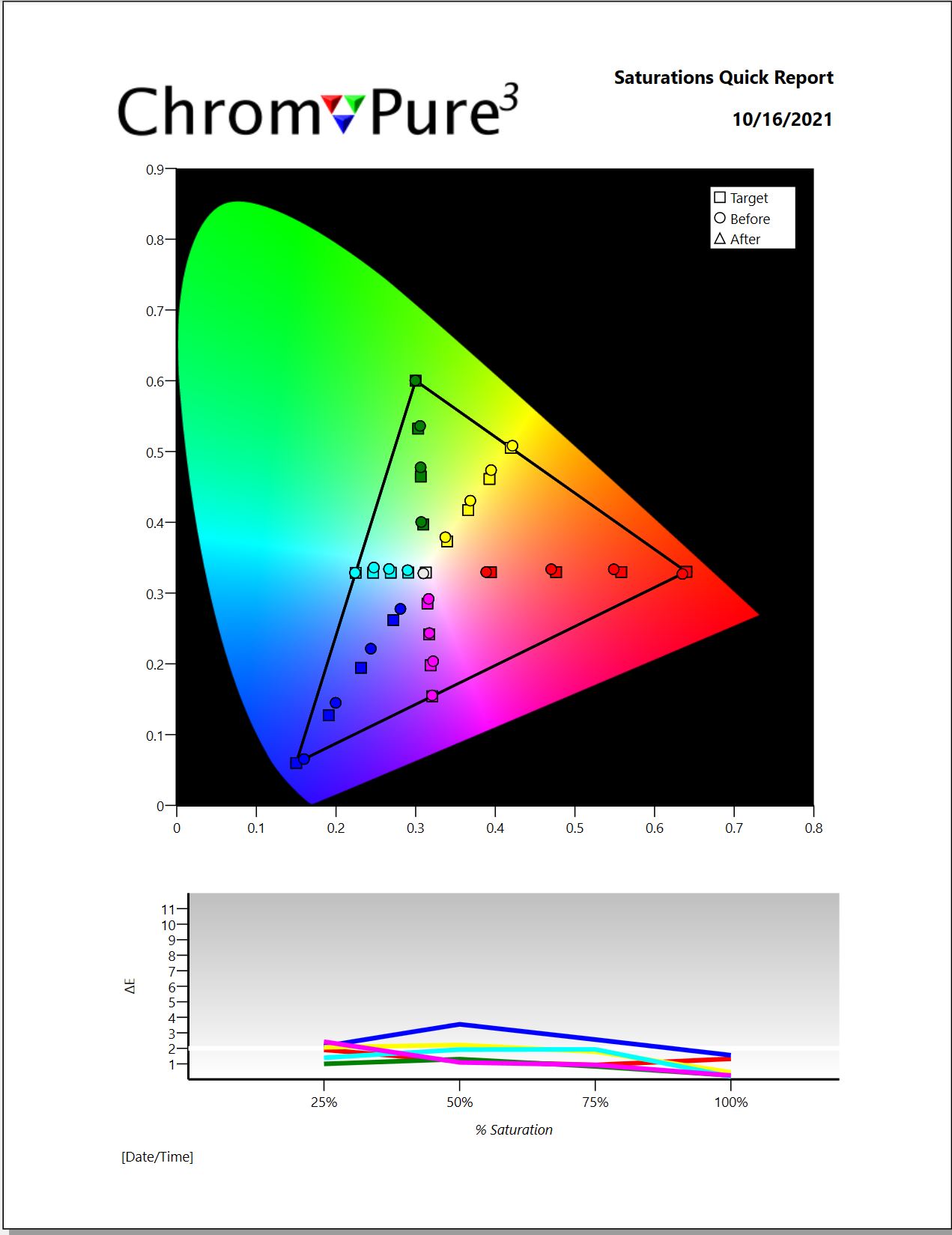
I am trying to perform a color comparison on my Q95T with moderate success and would be very happy to receive your tips here.
With the Q95T I can only do the adjustment per color via RGB, my main problem is the color blue, which contains too much red.
I can change what I want the red component in blue does not change !
(You can see the comparison as an attachment)

What can that be ?

Is that normal with QLED?
Is it because of my sensor in connection with QLED technology?
Or or ... ???

Is there perhaps someone who has also calibrated a QLED.
It could not be ruled out that I did something wrong.

I would be grateful for any help ...

Regards Thomas


Farbe.JPG
 Description:
color comparison
 Filesize:  160.89 KB
 Viewed:  98 Time(s)

Farbe.JPG


Farbe2.JPG
 Description:
color comparison_2
 Filesize:  133.52 KB
 Viewed:  98 Time(s)

Farbe2.JPG


Back to top
kal
Forum Administrator


Joined: 06 Mar 2006
Posts: 18114
Location: Ottawa, Canada

TV/Projector: JVC DLA-NZ7

Posted: Tue Oct 19, 2021 1:52 am    Post subject:

Hi!

I've forwarded your questions to ChromaPure support as they are best positioned to assist with their software. They'll most likely reply here.

Cheers!

Kal

_________________

Support our site by using our affiliate links. We thank you!
My basement/HT/bar/brewery build 2.0
Back to top
View user's photo album (18 photos)
TomHuffman


Joined: 01 Jun 2010
Posts: 76
Location: Springfield, MO

Posted: Tue Oct 19, 2021 1:58 am    Post subject:

The problem is that Blue is undersaturated. A CMS can only desaturate colors. It cannot add saturation.
_________________
ChromaPure calibration software & meter packages at CurtPalme.com discounted prices!
Back to top
kal
Forum Administrator


Joined: 06 Mar 2006
Posts: 18114
Location: Ottawa, Canada

TV/Projector: JVC DLA-NZ7

Posted: Tue Oct 19, 2021 12:35 pm    Post subject:

What's the solution (if there is one) in this case? To lower the output on red and green? Assuming it doesn't completely reduce the light output too far? I suppose it's a balancing act. In other words, how far do you want to reduce output to have a flat response?

Kal

_________________

Support our site by using our affiliate links. We thank you!
My basement/HT/bar/brewery build 2.0
Back to top
View user's photo album (18 photos)
NeXXoc


Joined: 18 Oct 2021
Posts: 3
Location: Hannover, Germany

TV/Projector: Beamer Sony VW570es

Posted: Tue Oct 19, 2021 3:29 pm    Post subject:

Hi,

Thanks for your explanation ...

I wasn't sure where the error was, because I was able to adjust the other colors via RGB !
In the case of blue, the red correction does not react at all, so it seems to be preset to a certain value and it does not allow me to change anything ...

If that is the case, I can live with it, then I will probably only get an improvement with another preset, so I'll look again...

It is my first experience with a Samsung LED television, previously I had a Panasonic VT50 plasma and there I was able to adjust all colors with HSL ...
So I was amazed when he showed no reaction to blue (red correction).

Regards
Back to top
kal
Forum Administrator


Joined: 06 Mar 2006
Posts: 18114
Location: Ottawa, Canada

TV/Projector: JVC DLA-NZ7

Posted: Wed Oct 20, 2021 2:00 am    Post subject:

NeXXoc, if you have follow up questions for ChromaPure support it's probably best you email them directly at support@ChromaPure.com as they do not follow this forum very closely. You'll get much faster responses that way. Cheers!

Kal

_________________

Support our site by using our affiliate links. We thank you!
My basement/HT/bar/brewery build 2.0
Back to top
View user's photo album (18 photos)
NeXXoc


Joined: 18 Oct 2021
Posts: 3
Location: Hannover, Germany

TV/Projector: Beamer Sony VW570es

Posted: Wed Oct 20, 2021 9:54 pm    Post subject:

Hi,

I have accessed the forum several times, but not registered.
That's why I've sent you something to thank you for it.

Well, I'll contact ChromaSupport directly in the future.

Regards
Back to top
kal
Forum Administrator


Joined: 06 Mar 2006
Posts: 18114
Location: Ottawa, Canada

TV/Projector: JVC DLA-NZ7

Posted: Wed Oct 20, 2021 11:46 pm    Post subject:

Certainly! We are here to help and want to make sure you get assistance in the simplest way for you. Good luck!

Kal

_________________

Support our site by using our affiliate links. We thank you!
My basement/HT/bar/brewery build 2.0
Back to top
View user's photo album (18 photos)
This forum is locked: you cannot post, reply to, or edit topics.   This topic is locked: you cannot edit posts or make replies.    CurtPalme.com Forum Index -> Audio & Video Calibration All times are GMT
Page 1 of 1
You cannot post new topics in this forum
You cannot reply to topics in this forum
You cannot edit your posts in this forum
You cannot delete your posts in this forum
You cannot vote in polls in this forum
You cannot attach files in this forum
You can download files in this forum