|
As this forum is rarely used anymore, we've locked it. Feel free to browse and read. Questions? Please reach out to us directly. Cheers! |

|
 |
|
|
| Author |
Message |
SGT Dave

Joined: 18 Jun 2021
Posts: 6
Location: Kyle, TX
|
| Posted: Thu Jun 24, 2021 3:53 am Post subject: NEC XG85 Restart |
|
|
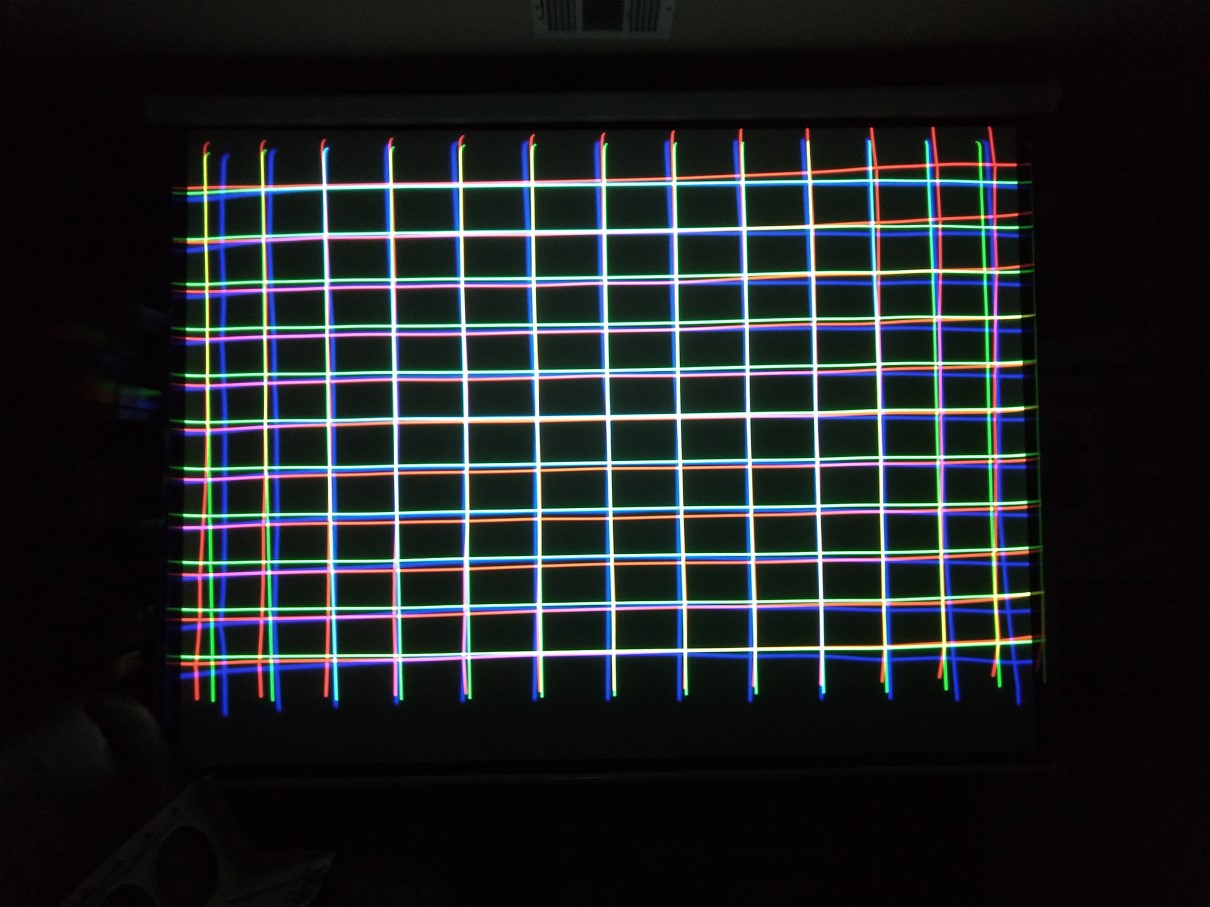
I finally got this XG85 ceiling mounted. I bought it over a year ago off of Craigslist but just started setting it up this week. Frankly, it's a mess. I can focus everything fine, but the lines, especially the red, are almost S-shaped along the horizontal axis. My problem is I've been trying to adjust off of what the previous owner had set up. I think I need to restart from step one.
Question: is there a way to quickly get all the settings back to the default zero? Or will I need to do that individually with every setting?
| Description: |
|
| Filesize: |
175.63 KB |
| Viewed: |
3664 Time(s) |
|
|
|
| Back to top |
|
 |
gjaky

Joined: 05 Jun 2010
Posts: 2802
Location: Budapest, Hungary
|
| Posted: Thu Jun 24, 2021 5:30 am Post subject: |
|
|
It's been a long time... but I think CTL+NORMAL does reset everything.
_________________
projectors in the past : NEC 6-9PG xtra, Electrohome Marquee 6-7500, NEC XG 1351 LC ( with super modified Electrohome VNB neckboard !!!)
current: VDC Marquee 9500LC
The MOD: VNB-DB, VIM-DB
|
|
| Back to top |
|
|
kal
Forum Administrator

Joined: 06 Mar 2006
Posts: 18114
Location: Ottawa, Canada
TV/Projector: JVC DLA-NZ7
|
| Posted: Thu Jun 24, 2021 12:27 pm Post subject: |
|
|
Been a while here too, but you DO NOT want to do a full factory EEPROM (hard) reset as that completely resets everything and can turn the machine into a boat anchor.
Quick Googling reminds me that the suggestion is to delete all inputs, or zeroing out at the root level is all you should have to do. To zero out menus pick the top level of each submenu in the adjust menu, and then hit CRTL+NORMAL.
What you have to hope now is that the previous owners didn't get annoyed and start adjusting various white pots pots inside the machine. If they have been then you're going to need an oscilloscope, the service manual, and a good understanding of waveforms/signals to set up the projector very carefully from scratch.
Kal
_________________

Support our site by using our affiliate links. We thank you!
My basement/HT/bar/brewery build 2.0
|
|
| Back to top |
|
|
SGT Dave
Joined: 18 Jun 2021
Posts: 6
Location: Kyle, TX
|
| Posted: Thu Jun 24, 2021 7:17 pm Post subject: |
|
|
That isn't working. CRTL+NORMAL seems to jest load the last save.
Can I transfer settings from one input mode to another? The S-Video PAL grid looks a lot better. Is there a way to save those settings as S-video NTSC?
|
|
| Back to top |
|
|
kal
Forum Administrator
Joined: 06 Mar 2006
Posts: 18114
Location: Ottawa, Canada
TV/Projector: JVC DLA-NZ7
|
|
| Back to top |
|
|
SGT Dave
Joined: 18 Jun 2021
Posts: 6
Location: Kyle, TX
|
| Posted: Fri Jun 25, 2021 12:51 am Post subject: |
|
|
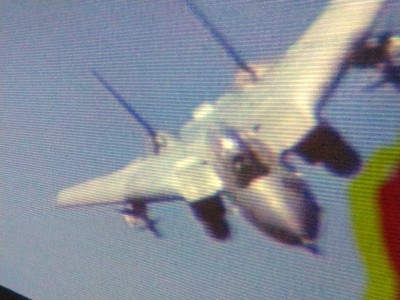
I got it in the ballpark one pin point at a time. It's has a little bleeding and some heavy scan lines, but it's watchable now.
| Description: |
|
| Filesize: |
32.2 KB |
| Viewed: |
3622 Time(s) |
|
|
|
| Back to top |
|
|
gjaky
Joined: 05 Jun 2010
Posts: 2802
Location: Budapest, Hungary
|
| Posted: Fri Jun 25, 2021 5:20 am Post subject: |
|
|
It is not counterproductive to read the actual user manual either 
_________________
projectors in the past : NEC 6-9PG xtra, Electrohome Marquee 6-7500, NEC XG 1351 LC ( with super modified Electrohome VNB neckboard !!!)
current: VDC Marquee 9500LC
The MOD: VNB-DB, VIM-DB
|
|
| Back to top |
|
|
kal
Forum Administrator
Joined: 06 Mar 2006
Posts: 18114
Location: Ottawa, Canada
TV/Projector: JVC DLA-NZ7
|
| Posted: Fri Jun 25, 2021 12:20 pm Post subject: |
|
|
| SGT Dave wrote: | | I got it in the ballpark one pin point at a time. |
If by "pin point" you mean using point convergence, try to minimize how much you use that. It should only be used at the end to make subtle tweaks. The more you use it, the more you stress the electronics and the more the image will drift, the longer it'll take to stabilize when you first turn it on, etc. It's completely normal for someone new to CRT projectors to overuse it however as it's a quick fix when you don't understand the right setup procedure. It takes a few tries through a setup before you start to get things right.
See the link I posted earlier: http://www.curtpalme.com/CRTSetupGuide.shtm
| Quote: | Point adjustment
Once you have the convergence grid adjusted so that hopefully it’s about as good as the above image, you can now take the remote and go very close to the screen and use the point convergence to fine tune the image. It’s very easy to overdo the point convergence. Generally speaking, you shouldn’t use more than 4 presses of the arrow keys in any direction, nor should the convergence be out more than one or two test pattern line thicknesses. If it is not looking as good as the above, go back and fine tune the basic convergence and geometry controls to get as close to the above image as possible. |
Kal
_________________
Support our site by using our affiliate links. We thank you!
My basement/HT/bar/brewery build 2.0
|
|
| Back to top |
|
|
gjaky
Joined: 05 Jun 2010
Posts: 2802
Location: Budapest, Hungary
|
| Posted: Fri Jun 25, 2021 12:38 pm Post subject: |
|
|
| kal wrote: | | SGT Dave wrote: | | I got it in the ballpark one pin point at a time. |
If by "pin point" you mean using point convergence, try to minimize how much you use that. It should only be used at the end to make subtle tweaks. The more you use it, the more you stress the electronics and the more the image will drift, the longer it'll take to stabilize when you first turn it on, etc. It's completely normal for someone new to CRT projectors to overuse it however as it's a quick fix when you don't understand the right setup procedure. It takes a few tries through a setup before you start to get things right.
See the link I posted earlier: http://www.curtpalme.com/CRTSetupGuide.shtm
| Quote: | Point adjustment
Once you have the convergence grid adjusted so that hopefully it’s about as good as the above image, you can now take the remote and go very close to the screen and use the point convergence to fine tune the image. It’s very easy to overdo the point convergence. Generally speaking, you shouldn’t use more than 4 presses of the arrow keys in any direction, nor should the convergence be out more than one or two test pattern line thicknesses. If it is not looking as good as the above, go back and fine tune the basic convergence and geometry controls to get as close to the above image as possible. |
Kal |
From electronic point of view that guide is a bit strict.
Clearly, good toe-in, centered rasters, proper tilt and skew + keystone should be adjusted, but above that I'd say it is completely irrelevant whether you use point convergence or the separate menu for the correction.
The thing is that the signals are sent to the convergence amplifier board anyway, only the source of the correction signal differs, which does not stress the projector anyway, since those are small signals.
NEC went with this over the top, you could dial in convergence with only the menu items better (not using point convergence) than any other projector WITH using point convergence, and the NECs had the 200+ point on the top of this...
_________________
projectors in the past : NEC 6-9PG xtra, Electrohome Marquee 6-7500, NEC XG 1351 LC ( with super modified Electrohome VNB neckboard !!!)
current: VDC Marquee 9500LC
The MOD: VNB-DB, VIM-DB
|
|
| Back to top |
|
|
kal
Forum Administrator
Joined: 06 Mar 2006
Posts: 18114
Location: Ottawa, Canada
TV/Projector: JVC DLA-NZ7
|
| Posted: Fri Jun 25, 2021 4:11 pm Post subject: |
|
|
| gjaky wrote: | From electronic point of view that guide is a bit strict.
Clearly, good toe-in, centered rasters, proper tilt and skew + keystone should be adjusted, but above that I'd say it is completely irrelevant whether you use point convergence or the separate menu for the correction. |
Possibly too strict, but too many new users do not do proper mechanical (or base electronic) setup before going directly to point convergence. I guess my point is that you can certainly use it, but get everything else perfect first.
Kal
_________________
Support our site by using our affiliate links. We thank you!
My basement/HT/bar/brewery build 2.0
|
|
| Back to top |
|
|
|
|
|
|
|
You cannot post new topics in this forum
You cannot reply to topics in this forum
You cannot edit your posts in this forum
You cannot delete your posts in this forum
You cannot vote in polls in this forum
You cannot attach files in this forum
You can download files in this forum
|
Forum powered by phpBB © phpBB Group
|
|




