|
As this forum is rarely used anymore, we've locked it. Feel free to browse and read. Questions? Please reach out to us directly. Cheers! |

|
 |
|
|
| Author |
Message |
wallace123456

Joined: 14 Aug 2006
Posts: 2236
Location: Northwest VA area
|
| Posted: Thu Feb 13, 2020 10:15 pm Post subject: G90 and/or Moome issue |
|
|
Well, hello everyone! Been a long, long time. Hope everyone is doing well.
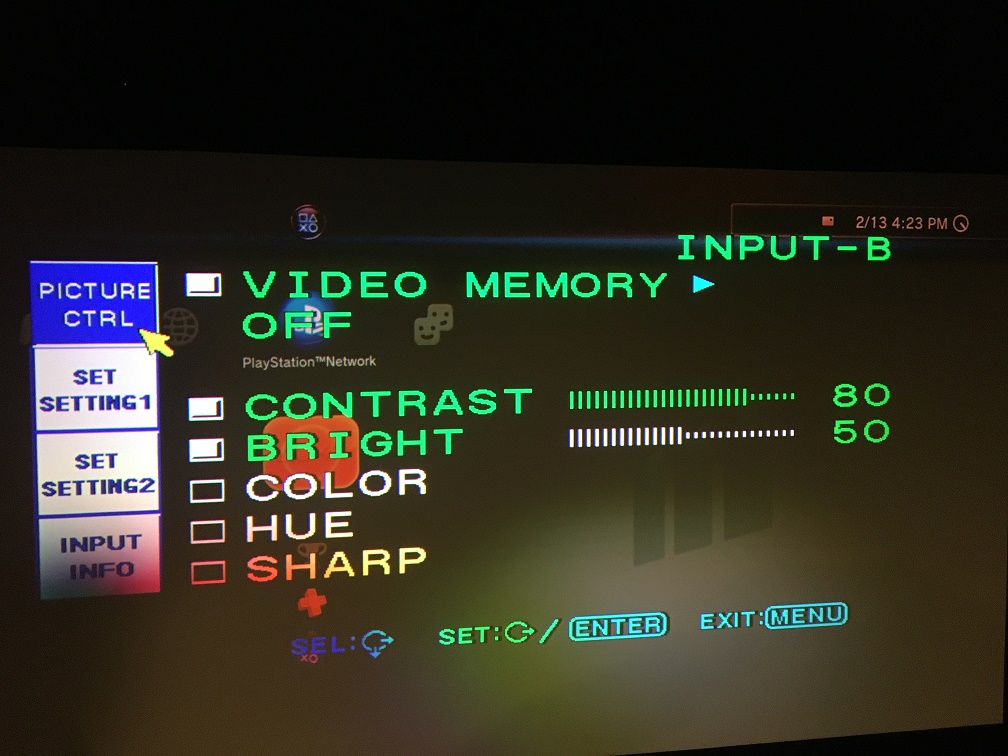
Got an issue with either the G90 or Moome card. I have tried using different sources (Sony PS-3, OPPO), different HDMI cables, different slots in the G90 (B & C), different input slots on the Moome card, everything I can think of.
Maybe something happened to the memory in the G90, just don't know.
Still have a problem with picture.
The pics will hopefully help.
Still loving and cooking BBQ!!!
| Description: |
|
| Filesize: |
237.26 KB |
| Viewed: |
2453 Time(s) |
|
| Description: |
|

Download |
| Filename: |
IMG_0561.jpg |
| Filesize: |
495.39 KB |
| Downloaded: |
266 Time(s) |
| Description: |
|
Download |
| Filename: |
IMG_0559.JPG |
| Filesize: |
371.22 KB |
| Downloaded: |
276 Time(s) |
| Description: |
|
Download |
| Filename: |
IMG_0553.JPG |
| Filesize: |
497.77 KB |
| Downloaded: |
265 Time(s) |
_________________
Life Is Good, But BBQ Is Better! BBQ Competition Team
|
|
| Back to top |
|
 |
AnalogRocks
Forum Moderator

Joined: 08 Mar 2006
Posts: 26706
Location: Toronto, Ontario, Canada
TV/Projector: Sony 1252Q, AMPRO 4000G
|
| Posted: Thu Feb 13, 2020 11:41 pm Post subject: |
|
|
DON WALLACE! How's west Korea? 
Off the top of my head that looks like the source may be sending 24fps
_________________
Tech support for nothing
CRT.
HD done right!
|
|
| Back to top |
|
|
Curt Palme
CRT Tech
Joined: 08 Mar 2006
Posts: 24396
Location: Langley, BC
TV/Projector: All of them!
|
| Posted: Thu Feb 13, 2020 11:44 pm Post subject: |
|
|
Seen this before. Check the 'sync' settings in one of the menus when you're in the service/convergence mode. If they have defaulted to 'auto', then there's your issue. One of the settings at least needs to be off the 'auto' mode, and your brightness and colors will come back.
It's been a few years since I've played with a G90, so I can't remember which one it is exactly, but there's only 5 or so settings in that menu. Once you switch the affected one, the brightness and color should snap right back. Store it, etc.
When's the last time you changed the Dallas chip? Might be time to do that as well.
Hope you're doing well.
|
|
| Back to top |
|
|
HaydnG90

Joined: 22 May 2006
Posts: 1356
|
| Posted: Fri Feb 14, 2020 1:41 am Post subject: |
|
|
Still loving it. A few of us still out there......And yes if that Dallas is around 10 years old, time to get a new one. Its funny how quickly that comes around. I keep telling myself this is the last time, but the beast keeps trucking
As Curt said scroll to the sync page and make sure everything is off auto eg sync, clamp etc
Then report back
|
|
| Back to top |
|
|
|
|
|
|
|
You cannot post new topics in this forum
You cannot reply to topics in this forum
You cannot edit your posts in this forum
You cannot delete your posts in this forum
You cannot vote in polls in this forum
You cannot attach files in this forum
You can download files in this forum
|
Forum powered by phpBB © phpBB Group
|
|




