|
As this forum is rarely used anymore, we've locked it. Feel free to browse and read. Questions? Please reach out to us directly. Cheers! |

|
 |
|
|
| Author |
Message |
Flash
Joined: 08 Aug 2017
Posts: 35
Location: Aberdeen, Scotland
|
| Posted: Sun Aug 18, 2019 11:03 am Post subject: HELP - Barco 909 Raster Centring |
|
|
After a long break from it, am back attempting to setup my 909 again. Have now spent around 20 hours on it, so am a bit more familiar with the process than I was at the outset.
The problem I’m having is with centring the rasters. First off, am I correct in thinking that the rasters can be digitally centred both initially from the “installation” menu, and then also via the “raster shift” in “random access”? Do these both do the same thing, except the latter allows you to do it based on different sources? Are the readings for H & V in raster shift the same absolute readings as in “installation” mode?
Also, what is the difference between setting HPhase and doing a raster shift?
I really struggle to see and judge the rasters through the lenses in the raster centring function of the “Installation” menu.
I initially tried setting all the rasters to 50:50, but after aligning the picture to the screen it was impossible to do convergence on one side as it was badly distorted. I also ended up with a yellow band down the left side of the picture because the blue raster was so far off to one side and striking the faceplate.
With some effort I managed to get the red and blue centred to the point where when I play the source on full-screen, the green and red fit within the faceplate with fairly (but not perfectly) uniform gaps around the sides... however this necessitated raster shifting to 13H and also setting HPhase to 13H, so clearly something is way way off. Even with the green and red sort of centred like this, the blue raster ended up striking the faceplate way off to one side. At least this time it was possible to do convergence without distortion, but clearly my setup is still fundamentally wrong!
The weird thing is that the test patterns all seem to be centred on the screen. I deleted all the blocks and used the test pattern to mechanically align the projector, so it appears to all be square and level. The root of my problem seems to be with centring the rasters. I can only really tell whether they are centred when my source is playing. Should I go back, delete all the blocks again, forego the raster centring in the “install” menu, run my source through and use that to centre them instead from the “Random Access” menu, then work mechanical alignment from there?
Having read more on this, it seems that I should perhaps be using the POTS to initially adjust the rasters rather than doing it from the menu??? Is this correct, and how do I go about it. From what I can gather the POTS are potentiometers, types of variable resistor located within the projector on a card somewhere. Is this in the front or the back? What do they look like? What do I use to adjust them? I’m assuming that the projector has to be on to do this? How do I avoid short-circuit or electrocution? Am I even on the right track?
Just to summarise how I got here, these are the steps I took.
1. Had a skilled carpenter mount the projector on the ceiling using uni-strut that allows it to be moved up, down, left, right, forwards, and backwards.
2. Deleted all the memory blocks, checked everything was set to the midpoints, projected a test pattern, and mechanically aligned the projector to the screen using that, with even gaps around the sides. The projector was also moved as close to the screen as could be achieved so as to maximise the useable raster.
3. Went through projector setup on the “installation” menu. Did manual focus. Attempted to centre the rasters. Did mechanical convergence to align the crosshairs (this necessitated a tiny amount of raster centring to get them to line up perfectly in the vertical), then did all the initial geometry and digital convergence using the test pattern to create an image that fitted perfectly onto the screen.
4. Hooked up a source, copied the initial memory block to each new picture type. At this point it became apparent that my picture was way off to one side, and I had to use extreme settings on raster shift and HPhase to get it to line up horizontally.
I’ve managed to converged the picture. The green and red rasters are fairly centred in the lenses, but the digital settings needed to obtain this are extreme in the horizontal axis, and the blue raster is way off to one side and striking the face plate..
HELP!!!
|
|
| Back to top |
|
 |
sevs
Joined: 19 Sep 2017
Posts: 39
Location: Norway
|
| Posted: Sun Aug 18, 2019 11:55 am Post subject: |
|
|
Following this as I'm having very similar problems on my 701s.
Have you tried different sources? What source are you using? Some devices (like the Playstation 4) output weird short timings that are unsuitable for projectors, for example. This can cause the picture to be displayed too far to one side.
Afaik the H phase setting has to do with video timings (affected by blanking etc), and raster shift only moves the picture without changing blanking in relation to it.
_________________
Barco Data 701s - Barco Graphics 808s - Barco Graphics 1200
I love CRT! I don't want to hear your opinion on CRT vs anything else. I use CRT because I want to.
|
|
| Back to top |
|
|
Flash
Joined: 08 Aug 2017
Posts: 35
Location: Aberdeen, Scotland
|
| Posted: Sun Aug 18, 2019 12:50 pm Post subject: |
|
|
| sevs wrote: | Following this as I'm having very similar problems on my 701s.
Have you tried different sources? What source are you using? Some devices (like the Playstation 4) output weird short timings that are unsuitable for projectors, for example. This can cause the picture to be displayed too far to one side. |
Aaah - yeah I’m using a PS4 for setup, until I decide what player to get. How can this be the case though, I’d have expected every source to centre its image on the raster? Certainly playing a DVD through the PS4 and it seems to be less problematic than a BluRay disc! Can’t even get an image from most of my BluRays when PS4 hooked up to the Barco.
|
|
| Back to top |
|
|
km987654

Joined: 25 Jul 2007
Posts: 2874
Location: Australia
TV/Projector: Barco BG809s
|
| Posted: Tue Aug 20, 2019 2:44 am Post subject: |
|
|
"Also, what is the difference between setting HPhase and doing a raster shift? "
Raster shift as you might expect moves the raster on the tube face. HPhase moves the image so that it can be centred within the raster.
|
|
| Back to top |
|
|
kal
Forum Administrator

Joined: 06 Mar 2006
Posts: 18114
Location: Ottawa, Canada
TV/Projector: JVC DLA-NZ7
|
|
| Back to top |
|
|
Flash
Joined: 08 Aug 2017
Posts: 35
Location: Aberdeen, Scotland
|
| Posted: Mon Oct 28, 2019 12:11 am Post subject: |
|
|
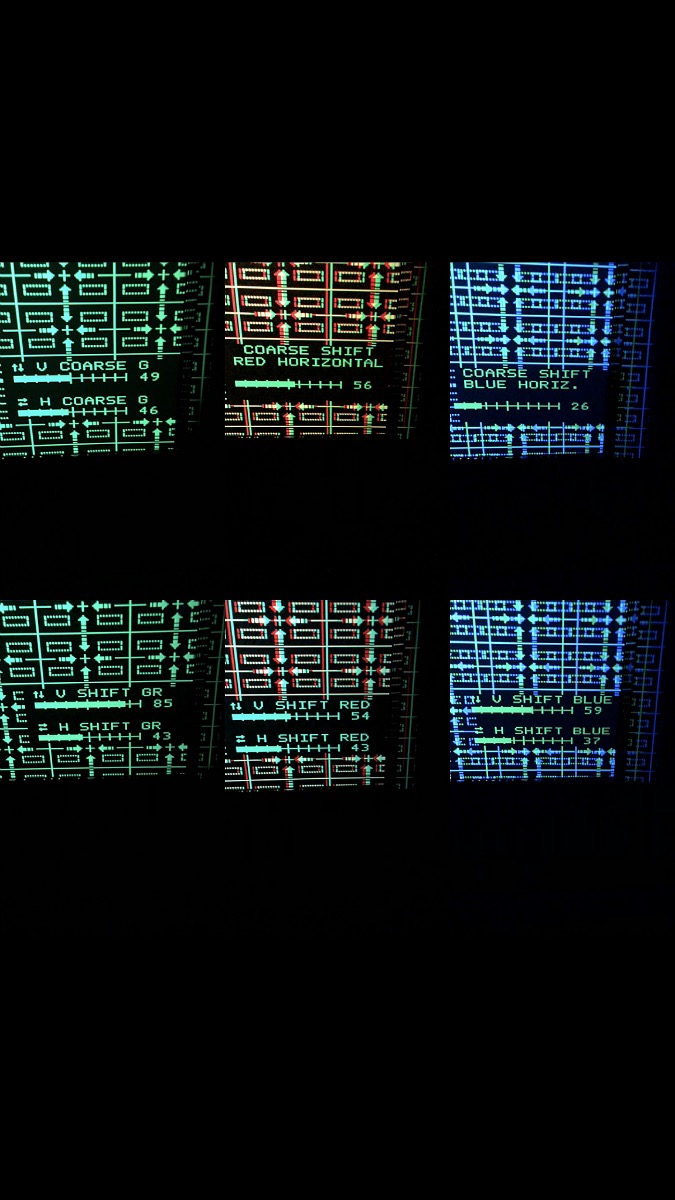
Got a bit further with this today, and starting to get a handle on how it works. I’d done convergence in my old 808 data before, but didn’t even know raster centring was a thing until I purchased this 909 a couple of years ago.
The rasters in the 909 are very big, and I found it easier to play a source Blu Ray and centre them from the random access menu that way.
Managed to get the picture in the centre of each tube, with a little gap round the edge, but I suspect there’s something needs adjusted in the projector itself, because the settings needed go accomplish this were fairly extreme on the blue tube. Have tried several different sources, and always the same issue. Today I was using a high end Denon Blu Ray player, but get the same issue with an Apple Mac or or Playstation.
Have uploaded photos showing how far the adjustment had to be in order to centre the cross hairs without the picture striking the faceplate. Does this mean that I need to adjust the POTS, and if so where are they and how do I go about that?
Have the projector positioned quite far forward in order to use as much of the raster as possible, so with the picture sized to the screen there’s not really any scope to align the image to the screen using the raster shift. Is there any way to accomplish this in the menus, or do I have to loosed the bolts in the ceiling runners and physically move the projector?
| Description: |
|
| Filesize: |
169.47 KB |
| Viewed: |
3304 Time(s) |
|
|
|
| Back to top |
|
|
|
|
|
|
|
You cannot post new topics in this forum
You cannot reply to topics in this forum
You cannot edit your posts in this forum
You cannot delete your posts in this forum
You cannot vote in polls in this forum
You cannot attach files in this forum
You can download files in this forum
|
Forum powered by phpBB © phpBB Group
|
|




