| Author |
Message |
Murillo
Joined: 30 Dec 2007
Posts: 113
Location: Sweden
|
| Posted: Sat Oct 22, 2016 7:27 pm Post subject: Problems with flickering image and horizontal lines |
|
|
Lately I´ve been having problems with flickering image and horizontal lines. Its occurs in general when the image is bright.
My setup is at blurayplayer through a ext moome fullhd v3 card which i connect to port 3 in a barco 1209. Im using bluejean cables.
I did notice that when i wiggle the cable thats connected to the vga output the image flicker a bit.
Does anybody know what could be wrong?
Best regards.
|
|
| Back to top |
|
 |
gregstv
Joined: 27 Aug 2007
Posts: 628
Location: Australia
|
| Posted: Sat Oct 22, 2016 8:28 pm Post subject: |
|
|
|
Have you tried port 5?
|
|
| Back to top |
|
|
Murillo
Joined: 30 Dec 2007
Posts: 113
Location: Sweden
|
| Posted: Mon Oct 31, 2016 6:51 pm Post subject: |
|
|
I tried port 5 and it was even worse. Even the colours became distorted. I didn´t mention that i recently switched from HTPC to bluray player. These problems wasn´t there with the HTPC. The HTPC-resolution was set at 1080p 60hz.
I didn´t do any adjustements to the pj when i switched, just connected the bluray player to moome card.
Any suggestions what this could be?
Thanks
|
|
| Back to top |
|
|
Curt Palme
CRT Tech
Joined: 08 Mar 2006
Posts: 24396
Location: Langley, BC
TV/Projector: All of them!
|
| Posted: Mon Oct 31, 2016 9:19 pm Post subject: |
|
|
What about the menus and internal test pattern?
My guess is that you may have some internal HV arcing, in the HV splitter or a tube HV lead.
Run the internal menus and test pattern at 100% contrast, and see if you get flickering then.
|
|
| Back to top |
|
|
Murillo
Joined: 30 Dec 2007
Posts: 113
Location: Sweden
|
| Posted: Tue Nov 01, 2016 9:49 pm Post subject: |
|
|
|
Just tried internal patterns with contrast at 100, and no flickering at all.
|
|
| Back to top |
|
|
Curt Palme
CRT Tech
Joined: 08 Mar 2006
Posts: 24396
Location: Langley, BC
TV/Projector: All of them!
|
| Posted: Tue Nov 01, 2016 10:22 pm Post subject: |
|
|
It's leading me to think it's a signal source issue, but then again, the internal menus don't drive the projector/tubes/HV as hard as a bright video signal does. Can you post a short video clip to Youtube, and put a link here?
thanks!
|
|
| Back to top |
|
|
Murillo
Joined: 30 Dec 2007
Posts: 113
Location: Sweden
|
|
| Back to top |
|
|
Curt Palme
CRT Tech
Joined: 08 Mar 2006
Posts: 24396
Location: Langley, BC
TV/Projector: All of them!
|
| Posted: Wed Nov 09, 2016 10:31 pm Post subject: |
|
|
|
Is the 24fps setting turned off on the BluRay player? This really looks like a source issue.
|
|
| Back to top |
|
|
Murillo
Joined: 30 Dec 2007
Posts: 113
Location: Sweden
|
| Posted: Fri Nov 11, 2016 7:07 pm Post subject: |
|
|
|
Actually 24 p for Blu Ray and DVD are turned off but I rarely watch movies from Blu Ray since i rip my movies to an external HDD and watch them from there. Is there prehaps another setting that could be causing this problem?
|
|
| Back to top |
|
|
gregstv
Joined: 27 Aug 2007
Posts: 628
Location: Australia
|
| Posted: Fri Nov 11, 2016 7:18 pm Post subject: |
|
|
|
Try the htpc again
|
|
| Back to top |
|
|
Murillo
Joined: 30 Dec 2007
Posts: 113
Location: Sweden
|
| Posted: Tue Nov 15, 2016 9:32 pm Post subject: |
|
|
Tried a HTPC, the same thing. I looked into the tubes and noticed that it´s coming from the blue tube. At some specific scenes (normally bright) the lines are showing and moves up or down (se two lines at the bottom on the attached image). I also noticed that the blue tube is very unstable compared to the green and read. At some scenes it gets very jumpy inside the blue tube.
A few years ago I hade a grind pattern on the display and the contrast set almost to max to set focus. The grind seems to have burned in the tube but It never showed on any images before.
Best regards
| Description: |
|

Download |
| Filename: |
Scanlines.jpg |
| Filesize: |
490.82 KB |
| Downloaded: |
417 Time(s) |
|
|
| Back to top |
|
|
Murillo
Joined: 30 Dec 2007
Posts: 113
Location: Sweden
|
| Posted: Sat Jan 07, 2017 4:28 pm Post subject: |
|
|
|
I connected my setup to an old CRT monitor that is lying around and couldn´t see as much as a hint of flickering. Could it be something with the projector?
|
|
| Back to top |
|
|
draganm

Joined: 08 Mar 2006
Posts: 8990
Location: Colorado
|
| Posted: Sat Jan 07, 2017 7:28 pm Post subject: |
|
|
in the video, on port 3 at :04 and :05 second mark the screen flashes to purple which would indicate a loss of Green as well. On port 5 there is banding of different colors.
Curt is the RGB switcher board going bad? or is the port 3 board going bad and corrupting the RGB board ?
I would remove the port 3 board and see if the problem on port 5 goes away or changes, but lets see what Curt suggests
http://www.curtpalme.com/Barco808_Layout3.shtm
|
|
| Back to top |
|
|
Murillo
Joined: 30 Dec 2007
Posts: 113
Location: Sweden
|
| Posted: Sun Jan 08, 2017 10:34 pm Post subject: |
|
|
I removed the port 3 card but was unable to watch through port 5 due to the banding. I changed the output to 720p and there wasn`t even a hint of flickering or lines. Afterwards I put back the port 3 card and ran my setup through port 3 still on 720p and I didn´t notice any flickering or lines. When I set the output to auto it startes again.
By the way what is causing the banding? Now that I think back the problem actually started when I switched from HTPC to blurayplayer. I didn´t do any setups after I switched beacuse it looked good. Instead I got problems with flickering and lines.
Best regards
|
|
| Back to top |
|
|
Curt Palme
CRT Tech
Joined: 08 Mar 2006
Posts: 24396
Location: Langley, BC
TV/Projector: All of them!
|
| Posted: Mon Jan 09, 2017 1:06 am Post subject: |
|
|
|
About all I can think is that the H phase control in the geometry menu is set too far to one side. Not sure why 720p works, but 1080p doesn't.
|
|
| Back to top |
|
|
draganm
Joined: 08 Mar 2006
Posts: 8990
Location: Colorado
|
| Posted: Mon Jan 09, 2017 5:30 pm Post subject: |
|
|
| Murillo wrote: | | Tried a HTPC, the same thing. |
with or without moome box?
The moome card (internal) in my marquee 8500 runs fine at 720P but has serious problems at 1080P. not a problem for me as my 8500 is perfectly happy at 720P but this might be your issue
|
|
| Back to top |
|
|
Murillo
Joined: 30 Dec 2007
Posts: 113
Location: Sweden
|
| Posted: Mon Jan 09, 2017 10:43 pm Post subject: |
|
|
I havent tried without the moome box.
Should a do a new setup from scratc on my Barco with the bluray player?
I thinkt that when I was seting up the HTPC I might used H phase shift on the moome card. Prehaps this also should be set to zero if I´m doing at new setup?
Best regards
|
|
| Back to top |
|
|
draganm
Joined: 08 Mar 2006
Posts: 8990
Location: Colorado
|
| Posted: Tue Jan 10, 2017 5:34 pm Post subject: |
|
|
| Murillo wrote: | I havent tried without the moome box.
Should a do a new setup from scratc on my Barco with the bluray player?
I thinkt that when I was seting up the HTPC I might used H phase shift on the moome card. Prehaps this also should be set to zero if I´m doing at new setup?
Best regards |
I don't think H-shift or set-up or any of that should be causing this.
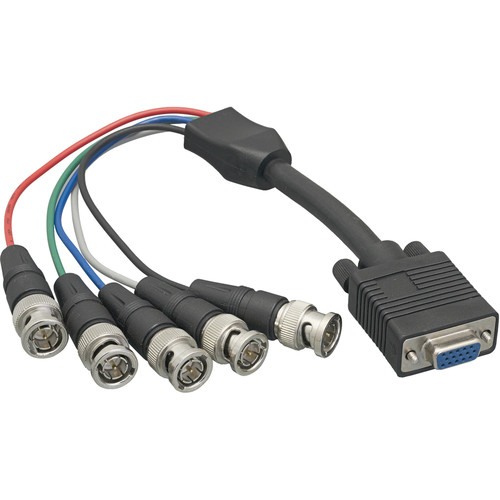
do you have a VGA to BNC breakout cable? you should be able to go from HTPC video card directly to barco with no moome box. of course this won't work with the BD player but for testing................
|
|
| Back to top |
|
|
Murillo
Joined: 30 Dec 2007
Posts: 113
Location: Sweden
|
| Posted: Mon Jan 16, 2017 9:50 pm Post subject: |
|
|
I connect my HTPC directly to the PJ. The graphic card I used to use didn´t work so I used an old replacement that couldn´t output 1920x1080 through VGA. I could set it up to 1600x1200. Not a hint of flicker without and with the moome card. When I was close to the screen i noticed that the image was a bit unstable at the same parts where I usually get flickers watching through the sony bluray player. It was High Plains Drifter and it appeared on the bright parts such as filming heaven. But from a normal watching distance you couldn´t see anything.
Best regards.
|
|
| Back to top |
|
|
|
|





