| Author |
Message |
barcodude

Joined: 14 Jun 2014
Posts: 169
Location: The Netherlands
|
| Posted: Mon Nov 09, 2015 8:34 pm Post subject: what can i do to boost picture quality on a barco 701? |
|
|
hello,
i hope if some one can tell me how to boost my Vision 701mm. The Bluray setup is great, with a 1080i output and a diy screen.I got my barco from belgium at a respectable price, so it's not new but clearly it really hasn't been used with 1000 hours on it. It's a stock model ecsept for the 'MM'. The only thing i did to it whas clean the front of the lenses but that's it.
I saw you can change a lot on this forum even replacing the glycol with antifreeze?
I think i can change my diy screen with a good one, clean the inside of the lenses and maybe carefully the front screens, but what else? 
|
|
| Back to top |
|
 |
gjaky

Joined: 05 Jun 2010
Posts: 2802
Location: Budapest, Hungary
|
| Posted: Mon Nov 09, 2015 8:57 pm Post subject: |
|
|
I wouldn't even change glycol... If you have a video procesor you can push a a bit of extra sharpness to it if you like, but that's all... You can replace it with a better projector 
_________________
projectors in the past : NEC 6-9PG xtra, Electrohome Marquee 6-7500, NEC XG 1351 LC ( with super modified Electrohome VNB neckboard !!!)
current: VDC Marquee 9500LC
The MOD: VNB-DB, VIM-DB
|
|
| Back to top |
|
|
Curt Palme
CRT Tech
Joined: 08 Mar 2006
Posts: 24396
Location: Langley, BC
TV/Projector: All of them!
|
| Posted: Mon Nov 09, 2015 9:07 pm Post subject: |
|
|
|
I agree, those little Sony tubes should be sharp, but that's about all you can do. The set came with HD6 lenses, right? You can go to color corrected HD145s (I've got lots for cheap), but that won't improve sharpness. Check the focus pots on the side of the set, if those have drifted, then the focus can be soft too.
|
|
| Back to top |
|
|
barcodude
Joined: 14 Jun 2014
Posts: 169
Location: The Netherlands
|
| Posted: Mon Nov 09, 2015 9:17 pm Post subject: |
|
|
| Curt Palme wrote: | | Check the focus pots on the side of the set, if those have drifted, then the focus can be soft too. |
i can check that. That's in the same place as the G2 adjustments right?
I also saw a steward filmscreen go by at a second hand site maybe that's worth a try?
|
|
| Back to top |
|
|
Curt Palme
CRT Tech
Joined: 08 Mar 2006
Posts: 24396
Location: Langley, BC
TV/Projector: All of them!
|
| Posted: Mon Nov 09, 2015 9:55 pm Post subject: |
|
|
Yes, don't touch the G2 controls!
the screen won't really make a difference, sorry!
|
|
| Back to top |
|
|
barcodude
Joined: 14 Jun 2014
Posts: 169
Location: The Netherlands
|
| Posted: Tue Nov 10, 2015 7:43 am Post subject: |
|
|
thank's curt
finally a chapter in my life i can close after spending more time with my barco than my friends and familie
|
|
| Back to top |
|
|
tschaeikaei
Joined: 08 Apr 2013
Posts: 490
Location: Germany/Saarland
|
| Posted: Tue Nov 10, 2015 10:08 pm Post subject: |
|
|
Did you throw it away fearing to get a HV- nerd?
Regards, Julian
_________________
Marquee 9500U edgeblend P43 | NEC 9PG
|
|
| Back to top |
|
|
barcodude
Joined: 14 Jun 2014
Posts: 169
Location: The Netherlands
|
| Posted: Wed Nov 11, 2015 4:51 pm Post subject: |
|
|
| tschaeikaei wrote: | Did you throw it away fearing to get a HV- nerd?
Regards, Julian |
nooooooo i wouldn't dare it's my baby 
i finally can close this chapter of trying anything to get a perfect picture so yes i'm a HV- nerd!
Last edited by barcodude on Wed Nov 11, 2015 7:57 pm; edited 1 time in total
|
|
| Back to top |
|
|
barcodude
Joined: 14 Jun 2014
Posts: 169
Location: The Netherlands
|
| Posted: Wed Nov 11, 2015 7:54 pm Post subject: |
|
|
i searched for h/v isseus on a barco does it mean that it doesn't go wide enough? because my doesn't go wide enough what can i do to help this 
_________________
Epson EMP TW700 - Projecta HomeScreen Deluxe- Denon a/v receiver - Mission highrisers -klipsch subwoofer - Samsung Bluray player
|
|
| Back to top |
|
|
tschaeikaei
Joined: 08 Apr 2013
Posts: 490
Location: Germany/Saarland
|
| Posted: Wed Nov 11, 2015 9:32 pm Post subject: |
|
|
Try moving the deflection yokes back on the tube necks.
Reset width/ height settings to middle position before.
Regards, Julian
_________________
Marquee 9500U edgeblend P43 | NEC 9PG
|
|
| Back to top |
|
|
barcodude
Joined: 14 Jun 2014
Posts: 169
Location: The Netherlands
|
| Posted: Thu Nov 12, 2015 10:12 am Post subject: |
|
|
| tschaeikaei wrote: | Try moving the deflection yokes back on the tube necks.
Reset width/ height settings to middle position before.
Regards, Julian |
widh/heigt 50/50 understand that, but where do i find the 'yokes'? What do they look like?
_________________
Epson EMP TW700 - Projecta HomeScreen Deluxe- Denon a/v receiver - Mission highrisers -klipsch subwoofer - Samsung Bluray player
|
|
| Back to top |
|
|
redfox001

Joined: 16 Mar 2009
Posts: 2257
Location: The Netherlands
|
| Posted: Thu Nov 12, 2015 12:37 pm Post subject: |
|
|
I would not move the deflection yokes backward. They need to be as most to front as possible or they will not be fixed to the position.
Most of the CRT's have either coils to adjust the width and pots to adjust the height or something like that. I forgot how my 701 did that.
One other thing the blue should be a bit out of focus to get a better gamma on blue.
Anyone knows if the 701 has pots for width/height?
From Barco 701 tips and manuals:
| Quote: |
The middle board is the horizontal and vertical sections of the set. There are few user adjustable controls on this board, but the R and B master V height controls are located on this board, located near the bottom of the above picture, and the H width coils for each CRT are located near the top of the board. Use a non-metallic screwdriver to adjust these coils. Under normal conditions, these coils do not need to be adjusted.
|
So if you are sure that the width needs to be adjusted. Get a plastic screwdriver and turn the screw in the coil and than fire up to see how it looks etc.
_________________
701s->runco933->8500ultra->cinemax->9500mp->919 splitpack + cinemax
|
|
| Back to top |
|
|
barcodude
Joined: 14 Jun 2014
Posts: 169
Location: The Netherlands
|
| Posted: Fri Nov 13, 2015 7:25 am Post subject: |
|
|
thanks,
i'll take a look at it but i'm a little scared i will screw it all up. After all it's only de width thats a little bit off so it scans outside the raster and i know that's bad but how bad?
| redfox001 wrote: |
Get a plastic screwdriver and turn the screw in the coil and than fire up to see how it looks etc. |
and who the hell makes plastic screw drivers?
i didn't know dutch people are in to crt nerdness
_________________
Epson EMP TW700 - Projecta HomeScreen Deluxe- Denon a/v receiver - Mission highrisers -klipsch subwoofer - Samsung Bluray player
|
|
| Back to top |
|
|
redfox001
Joined: 16 Mar 2009
Posts: 2257
Location: The Netherlands
|
| Posted: Fri Nov 13, 2015 10:27 am Post subject: |
|
|
Do you mean the raster is outside the tube face or the picture is outside the raster?
In the latter case nothing to worry you can make it better with custom resolutions from a scaler or pc. Lots of trouble.
He Barco is Belgium
_________________
701s->runco933->8500ultra->cinemax->9500mp->919 splitpack + cinemax
|
|
| Back to top |
|
|
Hulio
Joined: 15 Apr 2006
Posts: 494
Location: Belgium
|
| Posted: Fri Nov 13, 2015 11:38 am Post subject: |
|
|
| redfox001 wrote: | | He Barco is Belgium |
Redfox, i think what Barcodude meant is that he didn't knew that a lot of dutch people are involved with CRT projection as a hobby. He saw you are from The Netherlands too, i guess 
@Barcodude
It is unlikely you'll have to adjust the width coils on deflection module. Those should take care that the raster width is equal on all three tubes and i doubt they are wrong set. We supposed to adjust the corresponding color when we swap a tube ( use the raster-width of the old tubes as reference ). Only when we swap all three tubes, because we don't have an old tube as refference, we should start from scratch by turning all coils max. in, etc. But again, this should not be your problem.
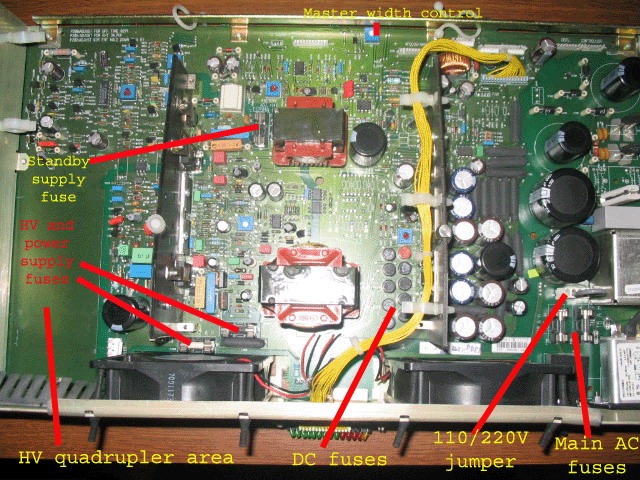
You have to adjust the P8 pot on the SMPS module ( max. horizontal amplitude ) if you don't have enough width to fill your screen. In the menu, go to geometry adjustments and put your horizontal width to 95. If you still can't fill up the screen, that P8 must be tweaked till the dsired width. I don't remember wich way is wider, clockwise or counter clockwise, you have to try.
Unlike other series Barco projectors, the location of P8 on SMPS requires the machine to be shut off ( you have to pull out the whole tray under the lenses ).
When horiz. width in geometry menu and max. horiz. amplitude (P8) are both at maximum adjustments and still not enough width, than is a 1080i timings issue and, like Redfox mensioned, a scaler or PC is needed.
Also, take care that your PJ is not installed too close to the screen. Even your raster is maximised on the tube-face, you still won't be able to fill the screen with video.
|
|
| Back to top |
|
|
Curt Palme
CRT Tech
Joined: 08 Mar 2006
Posts: 24396
Location: Langley, BC
TV/Projector: All of them!
|
| Posted: Fri Nov 13, 2015 3:04 pm Post subject: |
|
|
|
File down a wooden chopstick to fit the coils. PLastic screwdrivers are out there, but chopsticks are easier and cheaper to find.
|
|
| Back to top |
|
|
barcodude
Joined: 14 Jun 2014
Posts: 169
Location: The Netherlands
|
| Posted: Fri Nov 13, 2015 10:31 pm Post subject: |
|
|
| Hulio wrote: |
Unlike other series Barco projectors, the location of P8 on SMPS requires the machine to be shut off ( you have to pull out the whole tray under the lenses ).
|
wow  i have a power switch to shut it off in the front op my pj (normally i always leave it on stanby) i have a power switch to shut it off in the front op my pj (normally i always leave it on stanby)
and were do i find the 'P8 on SMPS' is it in the setup/tips and manuals section somewere in the picture?
when i had a scaler it whas no problem and now voilá
thanks curt for the chopstick tip
_________________
Epson EMP TW700 - Projecta HomeScreen Deluxe- Denon a/v receiver - Mission highrisers -klipsch subwoofer - Samsung Bluray player
|
|
| Back to top |
|
|
barcodude
Joined: 14 Jun 2014
Posts: 169
Location: The Netherlands
|
| Posted: Fri Nov 13, 2015 10:39 pm Post subject: |
|
|
i found this in Layout and Setup Tips
Switch Mode Power supply and HV section
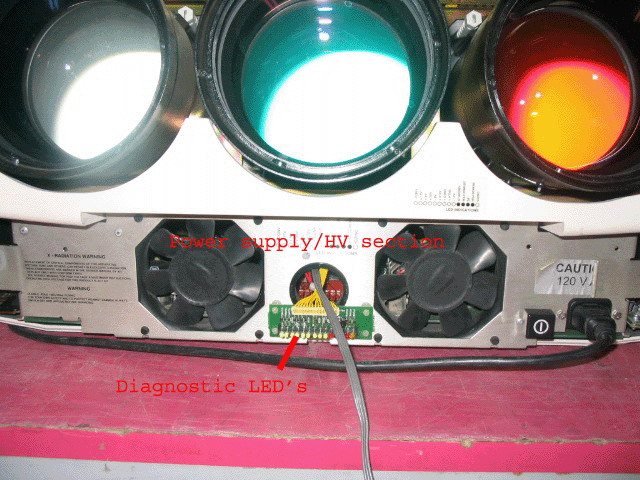
Let’s start with the 70X series power supply board where a lot of failures occur. This power supply is located under the lenses behind the plastic cover. Remove the two Philips screws and take off the plastic cover. If the set has an IRIS on it, remove the wire going to the IRIS at the IRIS. The power supply will then pull out from the front. Note that there are a number of wires that connect the power supply to the rest of the set, and they can snag on the chassis when you pull out the supply. Unlike other Barcos, the HV supply, SMPS and AC input board are all located on this board. The circuits are similar in design to the 800/801 series, but the layout of the components is completely different from other Barco sets.
is this the place to be hulio?
_________________
Epson EMP TW700 - Projecta HomeScreen Deluxe- Denon a/v receiver - Mission highrisers -klipsch subwoofer - Samsung Bluray player
|
|
| Back to top |
|
|
Hulio
Joined: 15 Apr 2006
Posts: 494
Location: Belgium
|
| Posted: Sat Nov 14, 2015 5:39 am Post subject: |
|
|
Yepp, that's the one. Here Curt's pics with P8 location ( master width control ) on the upper-middle section.
| Description: |
|
| Filesize: |
173.81 KB |
| Viewed: |
7432 Time(s) |
|
| Description: |
|
| Filesize: |
121.66 KB |
| Viewed: |
7432 Time(s) |
|
|
|
| Back to top |
|
|
barcodude
Joined: 14 Jun 2014
Posts: 169
Location: The Netherlands
|
| Posted: Sat Nov 14, 2015 8:42 am Post subject: |
|
|
ók thanks,
is it really ok to do this won't i screw anything up?
and witch pattern is the best refrence:
-projected image
-gen lock pattern
-internal pattern
regards,
barco dude
_________________
Epson EMP TW700 - Projecta HomeScreen Deluxe- Denon a/v receiver - Mission highrisers -klipsch subwoofer - Samsung Bluray player
|
|
| Back to top |
|
|
|
|





