| Author |
Message |
koldby
Joined: 07 Feb 2007
Posts: 126
Location: Denmark
TV/Projector: GJAKY modded VDC marquee 9500lc ultra
|
| Posted: Thu Jul 23, 2015 10:20 am Post subject: P19LCP tubes in a new marquee9500 with new type neckboards |
|
|
Hi
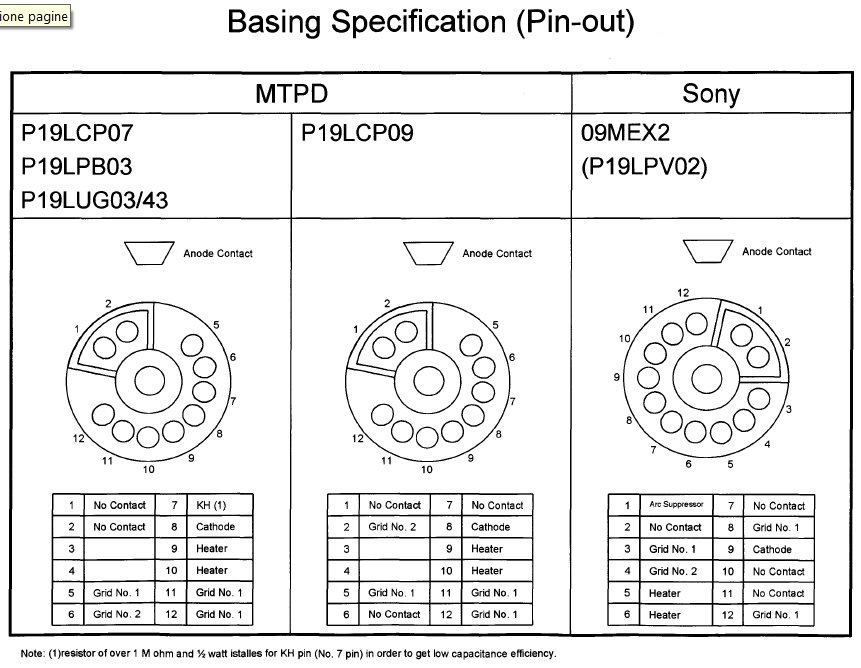
I am about to put in some P19LCP tubes in a 9500LC ultra equipped with new style neckboards and P19LUG tubes.
I know the pinout for the 2 tube types are different and I can see the new necboard apparently is preparede for both types?
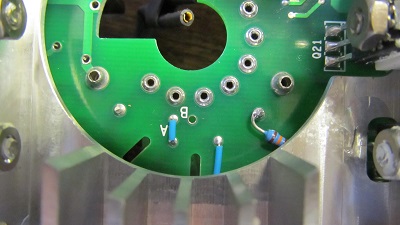
So what I think I should do is to remove the strap from A to B on the backside of the new NB and make a wire that connects A to Pin 2 on the LCP tube.
What about the NC pins 1 and 6?
Should they be connected to ground the same way NC pin 1 and 2 on the LUG tubes are?
And what about Pin 7 (KH(1) on the LUG types). It is apparently only a 1 meg resistor to ground , so I suppose I can leave that be?
| Description: |
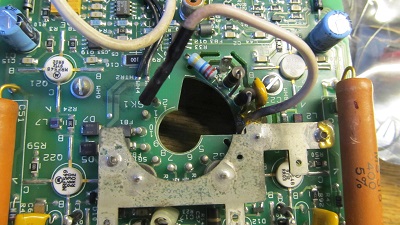
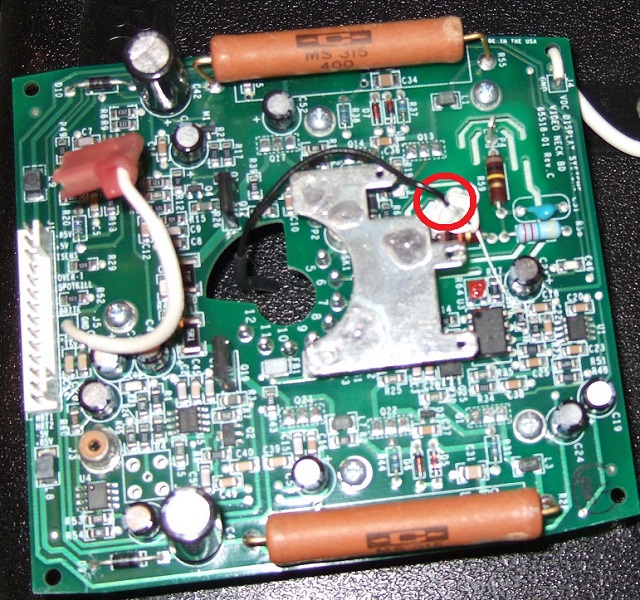
| This is the old type neckboard where the G2 connection is comming from the PCB in the white wire, supposed to be connected to Pin2 |
|
| Filesize: |
69.21 KB |
| Viewed: |
10645 Time(s) |
|
| Description: |
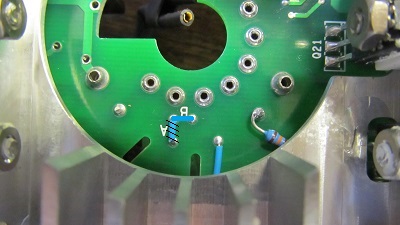
| This is the backside of the new NB.The strap from a to b is connecting G2 from PCB to pin6 (LUG type G2 connection) |
|
| Filesize: |
46.13 KB |
| Viewed: |
10645 Time(s) |
|
| Description: |
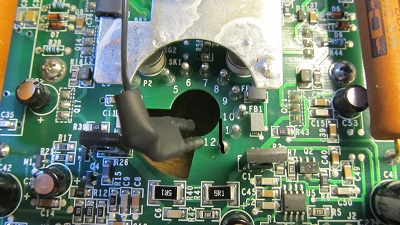
| This is frontside of new NB. Black wire from ground to Pin 1 and 2 on LUG types. |
|
| Filesize: |
73.39 KB |
| Viewed: |
10645 Time(s) |
|
| Description: |
|
| Filesize: |
217.67 KB |
| Viewed: |
10645 Time(s) |
|
_________________
What is home theater without good sound?
|
|
| Back to top |
|
 |
barclay66

Joined: 27 Jun 2011
Posts: 1304
Location: Germany
TV/Projector: Marquee 9500 Ultra
|
| Posted: Thu Jul 23, 2015 12:06 pm Post subject: |
|
|
Hi,
It's much easier:
- Remove the jumper at Position A
- Solder in the jumper at Position B
That's all I needed to make them work with LCP tubes...
Make sure that the G2 voltage is taken from the designated connection point near R57 (10K Resistor, black-brown-orange).
Regards,
barclay66
| Description: |
|
| Filesize: |
46.05 KB |
| Viewed: |
10615 Time(s) |
|
| Description: |
|
| Filesize: |
225.29 KB |
| Viewed: |
10615 Time(s) |
|
Last edited by barclay66 on Thu Jul 23, 2015 12:26 pm; edited 1 time in total
|
|
| Back to top |
|
|
koldby
Joined: 07 Feb 2007
Posts: 126
Location: Denmark
TV/Projector: GJAKY modded VDC marquee 9500lc ultra
|
| Posted: Thu Jul 23, 2015 12:25 pm Post subject: |
|
|
| barclay66 wrote: | Hi,
It's much easier:
- Remove the jumper at Position A
- Solder in the jumper at Position B
That's all I needed to make them work with LCP tubes...
Regards,
barclay66 |
Is it really so?
What about G2 then?
If the wire with the two pins are mounted, then G2 is shorted to gnd and if the wire is unconnected, G2 is not connected.
_________________
What is home theater without good sound?
|
|
| Back to top |
|
|
barclay66
Joined: 27 Jun 2011
Posts: 1304
Location: Germany
TV/Projector: Marquee 9500 Ultra
|
| Posted: Thu Jul 23, 2015 12:27 pm Post subject: |
|
|
Hi,
I just edited my post and added a new picture...
|
|
| Back to top |
|
|
barclay66
Joined: 27 Jun 2011
Posts: 1304
Location: Germany
TV/Projector: Marquee 9500 Ultra
|
| Posted: Thu Jul 23, 2015 12:38 pm Post subject: |
|
|
Another thing:
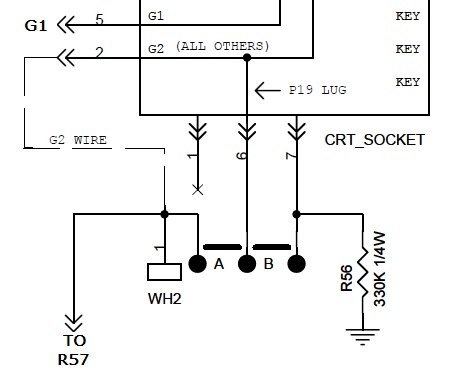
Nothing gets shorted when putting the jumper in the 'B' location. There it connects the tube's pin 6 together with pin 7 and ties them to ground via a 330k resistor.
The G2 line is left open and with the G2 wire (has to be added if it's not there) You connect G2 to pin 2 following the LCP pinout...
Regards,
barclay66
| Description: |
|
| Filesize: |
29.96 KB |
| Viewed: |
10612 Time(s) |
|
|
|
| Back to top |
|
|
koldby
Joined: 07 Feb 2007
Posts: 126
Location: Denmark
TV/Projector: GJAKY modded VDC marquee 9500lc ultra
|
| Posted: Thu Jul 23, 2015 12:40 pm Post subject: |
|
|
| barclay66 wrote: | Hi,
I just edited my post and added a new picture... |
Oh now I see.
This makes sense ... In the "B" position the G2 output is the routed to the 330K resistor connected to ground and via WH2 wire to pin 2 and G2.
I should have consulted the schematic for the new NB. It is shown there 
Thanks
By the way what is your opinion of the new NB. Better or worse than the old style?
_________________
What is home theater without good sound?
|
|
| Back to top |
|
|
koldby
Joined: 07 Feb 2007
Posts: 126
Location: Denmark
TV/Projector: GJAKY modded VDC marquee 9500lc ultra
|
| Posted: Thu Jul 23, 2015 12:41 pm Post subject: |
|
|
Opps you posted that just before I posted
_________________
What is home theater without good sound?
|
|
| Back to top |
|
|
koldby
Joined: 07 Feb 2007
Posts: 126
Location: Denmark
TV/Projector: GJAKY modded VDC marquee 9500lc ultra
|
| Posted: Thu Jul 23, 2015 12:42 pm Post subject: |
|
|
No need to connect the NC pins to ground as they do with th LUG tubes?
_________________
What is home theater without good sound?
|
|
| Back to top |
|
|
barclay66
Joined: 27 Jun 2011
Posts: 1304
Location: Germany
TV/Projector: Marquee 9500 Ultra
|
| Posted: Thu Jul 23, 2015 12:48 pm Post subject: |
|
|
| koldby wrote: | | No need to connect the NC pins to ground as they do with th LUG tubes? |
No, You can remove the black ground wire. Maybe You can reuse it for the G2 connection if it's long enough...
|
|
| Back to top |
|
|
koldby
Joined: 07 Feb 2007
Posts: 126
Location: Denmark
TV/Projector: GJAKY modded VDC marquee 9500lc ultra
|
| Posted: Thu Jul 23, 2015 12:52 pm Post subject: |
|
|
| barclay66 wrote: | | koldby wrote: | | No need to connect the NC pins to ground as they do with th LUG tubes? |
No, You can remove the black ground wire. Maybe You can reuse it for the G2 connection if it's long enough... |
Fine.
I think I will use a better wire than the one used as groundwire.
It seems a bit thin and not suitable for high voltage...
I have some Teflon cable I will use there.
_________________
What is home theater without good sound?
|
|
| Back to top |
|
|
koldby
Joined: 07 Feb 2007
Posts: 126
Location: Denmark
TV/Projector: GJAKY modded VDC marquee 9500lc ultra
|
| Posted: Thu Jul 23, 2015 12:55 pm Post subject: |
|
|
Misread your picture with the jumper.
In "B" position , pin 6 & 7 are connected together and via 330k to gnd.
G" just routed via wire to pin 2..
_________________
What is home theater without good sound?
|
|
| Back to top |
|
|
barclay66
Joined: 27 Jun 2011
Posts: 1304
Location: Germany
TV/Projector: Marquee 9500 Ultra
|
| Posted: Thu Jul 23, 2015 12:56 pm Post subject: |
|
|
| koldby wrote: | | By the way what is your opinion of the new NB. Better or worse than the old style? |
Hi,
I have the ones that have 81771-01/02 as part number.
Regarding bandwith they seem to be OK, maybe slightly better than the original ones. But the change they made on the spotkill circuit seems to have a negative effect. The picture is darker and maximum contrast is reduced too. I'm in the process of modifying this to using the schematic of the 02-270340-01 variant where this section is equivalent to the older circuit. Still not finished...
Regards,
barclay66
|
|
| Back to top |
|
|
koldby
Joined: 07 Feb 2007
Posts: 126
Location: Denmark
TV/Projector: GJAKY modded VDC marquee 9500lc ultra
|
| Posted: Thu Jul 23, 2015 1:06 pm Post subject: |
|
|
| barclay66 wrote: | | koldby wrote: | | By the way what is your opinion of the new NB. Better or worse than the old style? |
Hi,
I have the ones that have 81771-01/02 as part number.
Regarding bandwith they seem to be OK, maybe slightly better than the original ones. But the change they made on the spotkill circuit seems to have a negative effect. The picture is darker and maximum contrast is reduced too. I'm in the process of modifying this to using the schematic of the 02-270340-01 variant where this section is equivalent to the older circuit. Still not finished...
Regards,
barclay66 |
Ok!
Aparently the only difference is a bipolar transistor instead of a MOSFet and a resistor change from 1k to 220Ohm, Right?
_________________
What is home theater without good sound?
|
|
| Back to top |
|
|
barclay66
Joined: 27 Jun 2011
Posts: 1304
Location: Germany
TV/Projector: Marquee 9500 Ultra
|
| Posted: Thu Jul 23, 2015 1:23 pm Post subject: |
|
|
It's a bit more:
- Four resistors
- One transistor
- One potentiometer
|
|
| Back to top |
|
|
koldby
Joined: 07 Feb 2007
Posts: 126
Location: Denmark
TV/Projector: GJAKY modded VDC marquee 9500lc ultra
|
| Posted: Thu Jul 23, 2015 1:29 pm Post subject: |
|
|
Pot R64
Resistors R20 R49 R47
Transistor M1
Cant find the fourth resistor
_________________
What is home theater without good sound?
|
|
| Back to top |
|
|
barclay66
Joined: 27 Jun 2011
Posts: 1304
Location: Germany
TV/Projector: Marquee 9500 Ultra
|
| Posted: Thu Jul 23, 2015 1:46 pm Post subject: |
|
|
Resistor R48 is the missing one.
Now to the tricky part: What is the correct procedure for adjusting R64?
|
|
| Back to top |
|
|
koldby
Joined: 07 Feb 2007
Posts: 126
Location: Denmark
TV/Projector: GJAKY modded VDC marquee 9500lc ultra
|
| Posted: Thu Jul 23, 2015 1:52 pm Post subject: |
|
|
Sure ...
I have a bunch of tubes (LUG) that is worth nothing else as giny pigs for experimenting with spot kill circuits!!
_________________
What is home theater without good sound?
|
|
| Back to top |
|
|
barclay66
Joined: 27 Jun 2011
Posts: 1304
Location: Germany
TV/Projector: Marquee 9500 Ultra
|
| Posted: Thu Jul 23, 2015 2:29 pm Post subject: |
|
|
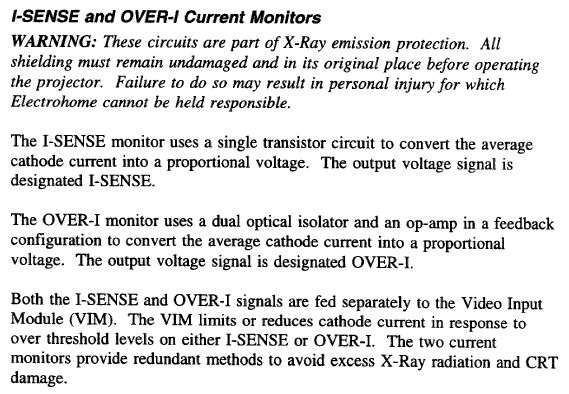
Unfortunately, the setting that is adjusted via R64 is not the spotkill part but the beam current limit. Maybe there's a document describing how to adjust that on the older style neck boards. The service manual mentions that this section is critical for safety but there's nothing to be found on its adjustment procedure. These potentiometers are ususally glued to a factory setting...
BTW, there's a thread with some info on it: https://www.curtpalme.com/forum_archived/viewtopic.php@t=10252.html
| Description: |
|
| Filesize: |
73.15 KB |
| Viewed: |
10575 Time(s) |
|
|
|
| Back to top |
|
|
koldby
Joined: 07 Feb 2007
Posts: 126
Location: Denmark
TV/Projector: GJAKY modded VDC marquee 9500lc ultra
|
| Posted: Thu Jul 23, 2015 3:42 pm Post subject: |
|
|
Would it be possible to measure the voltage @ +vf2 (and -vf2) and adjust with the new components to the same value (difference)?
Do you think it is the over-i sense that limits the performance. I would guess the spotkill cannot affect the performance..?
_________________
What is home theater without good sound?
|
|
| Back to top |
|
|
barclay66
Joined: 27 Jun 2011
Posts: 1304
Location: Germany
TV/Projector: Marquee 9500 Ultra
|
| Posted: Thu Jul 23, 2015 5:31 pm Post subject: |
|
|
Using reference measurements could be a suitable way indeed. What could be used too is testing with different video input levels in order to see how the I-sense output on the neck boards behaves and when the over-I signal kicks in.
I'm quite convinced that the different beam current control circuit is responsible for the lower contrast and brightness level...
Regards,
barclay66
|
|
| Back to top |
|
|
|
|




