| Author |
Message |
Audio_Geek_00

Joined: 07 Aug 2014
Posts: 82
Location: SF Bay Area
|
| Posted: Tue Feb 10, 2015 11:37 pm Post subject: Help! Sony VPH-1252Q setup |
|
|
I recently discovered that I had my screen too far away from my pj when I was re-tubing and going through the convergence and focusing. I went through the trouble of moving the screen to the correct distance. I then decided to use the Aussie setup video so generously provided here. After all the work I can't get a signal from my blu ray to the pj  The only thing I can think of is I changed something when I saved the registration data. I am using a Moome card that looks like it see's the player, but no signal output from the pj. Any ideas? Did I screw the pooch? The only thing I can think of is I changed something when I saved the registration data. I am using a Moome card that looks like it see's the player, but no signal output from the pj. Any ideas? Did I screw the pooch?
Thanks
Tim
|
|
| Back to top |
|
 |
Curt Palme
CRT Tech
Joined: 08 Mar 2006
Posts: 24396
Location: Langley, BC
TV/Projector: All of them!
|
| Posted: Wed Feb 11, 2015 12:05 am Post subject: |
|
|
|
Shouldn't have. Is the 24fps turned on in the BR player? If so, turn it off. How are you sending the signal from the Br to the projector?
|
|
| Back to top |
|
|
Audio_Geek_00
Joined: 07 Aug 2014
Posts: 82
Location: SF Bay Area
|
| Posted: Wed Feb 11, 2015 12:54 am Post subject: Help! Sony VPH-1252Q setup |
|
|
| Curt Palme wrote: | | Shouldn't have. Is the 24fps turned on in the BR player? If so, turn it off. How are you sending the signal from the Br to the projector? |
I am using HDMI to a Moome IFB 1.3 from my Oppo. I didn't change any settings in the Oppo so I don't know why that changed anything. I will check when I get home. Would changing the registration data make the projector not recognize 24fps?
TIA,
Tim
|
|
| Back to top |
|
|
Audio_Geek_00
Joined: 07 Aug 2014
Posts: 82
Location: SF Bay Area
|
| Posted: Wed Feb 11, 2015 12:55 am Post subject: |
|
|
| Curt Palme wrote: | | Shouldn't have. Is the 24fps turned on in the BR player? If so, turn it off. How are you sending the signal from the Br to the projector? |
I am using HDMI to a Moome IFB 1.3 from my Oppo. I didn't change any settings in the Oppo so I don't know why that changed anything. I will check when I get home. Would changing the registration data make the projector not recognize 24fps?
TIA,
Tim
|
|
| Back to top |
|
|
Curt Palme
CRT Tech
Joined: 08 Mar 2006
Posts: 24396
Location: Langley, BC
TV/Projector: All of them!
|
| Posted: Wed Feb 11, 2015 3:23 am Post subject: |
|
|
|
The set won't recognize 24 fps. you could have a bad Moome card or HDMI cable. try the BR player on a flat screen if the 24fps is off, try a new HDMI cable, and read the Moome manual to make sure you haven't accidentally pressed one of the buttons that don't need touching on the remote. that happened to me once. Customer pressed a button on the remote that disabled the Moome output. I tried it here, forgot about the buttons, sent it to Moome, who corrected it, but there was no issue with the card itself.
|
|
| Back to top |
|
|
Audio_Geek_00
Joined: 07 Aug 2014
Posts: 82
Location: SF Bay Area
|
| Posted: Wed Feb 11, 2015 3:28 am Post subject: re:Help! Sony VPH-1252Q setup |
|
|
| Curt Palme wrote: | | Shouldn't have. Is the 24fps turned on in the BR player? If so, turn it off. How are you sending the signal from the Br to the projector? |
Curt, you were correct. When I checked the video output of my Oppo 1080p/24fps was on auto. I turned it to off and, Voilà!
Thanks a ton! Once again your expertise has gotten me out of a frustrating situation.
Much appreciated.
Best,
Tim
|
|
| Back to top |
|
|
Audio_Geek_00
Joined: 07 Aug 2014
Posts: 82
Location: SF Bay Area
|
| Posted: Wed Feb 11, 2015 4:50 am Post subject: re: help! Sony VPH-1253Q setup |
|
|
Curt,
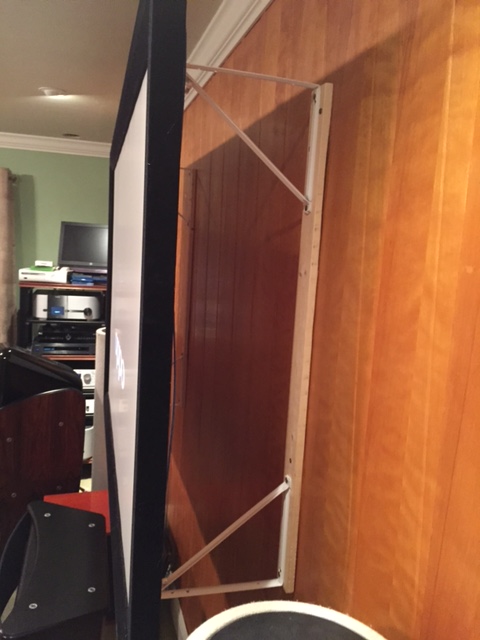
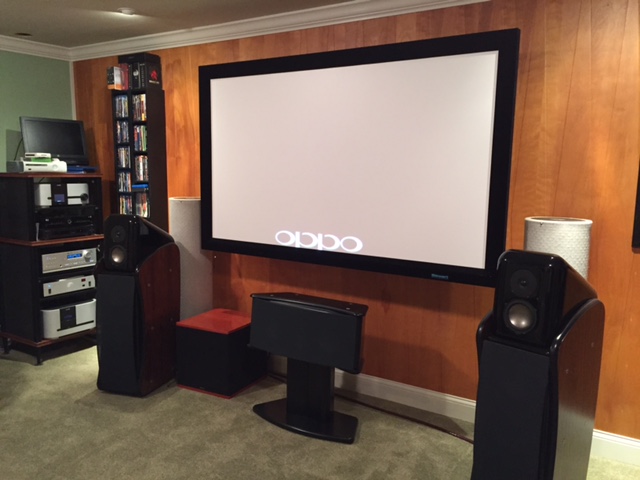
Here are two pics of the floating screen. I kinda like it. Thanx again for your help
| Description: |
|
| Filesize: |
93.54 KB |
| Viewed: |
2598 Time(s) |
|
| Description: |
|
| Filesize: |
83.98 KB |
| Viewed: |
2598 Time(s) |
|
|
|
| Back to top |
|
|
|
|





