| Author |
Message |
karmat63
Joined: 19 Dec 2007
Posts: 157
Location: Italy
|
| Posted: Mon Jun 02, 2014 9:55 pm Post subject: Marquee 9500: weird black lines across the screen |
|
|
Some days ago I opened a thread about strange horizontal lines, across the screen:
https://www.curtpalme.com/forum_archived/viewtopic.php@t=36144.html
I thought I had easily resolved the issue, only changing the power cable, but I was wrong, they were still there. But as the lines were barely visible from my seating position (and only on very light background), after swapping CLM, Focus board, VIM and HDM board and HVPS, I gave up.
But today, some minutes after powering the Marquee, some black straight, fixed lines appeared throughout the screen.
https://www.dropbox.com/s/uw31mnnrifqncrl/Black%20lines%20%281%20di%201%29.jpg
Even stranger, the remote was locked, with only the power button active. Powering off the PJ and then on, it worked normally for some minutes and, then, here again the black straight lines across the screen.
Really have no idea of what's happening...
|
|
| Back to top |
|
 |
Tim in Phoenix

Joined: 21 Oct 2006
Posts: 4409
Location: Phoenix
|
| Posted: Mon Jun 02, 2014 10:03 pm Post subject: |
|
|
Hello
Your control board has issues, or maybe the deflection processor board sitting on top of it. Try reseating all of the socketed chips.
|
|
| Back to top |
|
|
karmat63
Joined: 19 Dec 2007
Posts: 157
Location: Italy
|
| Posted: Mon Jun 02, 2014 10:46 pm Post subject: |
|
|
Ok, done (I pressed with my thumb on every socketed chip, hope it's enough, as I've never pulled out any chip and I'm afraid I' will break something even with a chip-puller).
For the while the PJ is running with no issue, other than the (for me) usual faint horizontal lines across the image (barely visible only on light background)... but this looks like is something different...
Thanks a lot, I will update
|
|
| Back to top |
|
|
Nashou66

Joined: 12 Jan 2007
Posts: 16171
Location: West Seneca NY
|
|
| Back to top |
|
|
karmat63
Joined: 19 Dec 2007
Posts: 157
Location: Italy
|
| Posted: Tue Jun 03, 2014 12:49 pm Post subject: |
|
|
Thank you Nash, I knew that, but I don't know how pull out the chips safely.
Can you recommend the right hardware and tech to pull the chips out?
By the way, only pushing on every single chip on the CLM + daughter boards, got rid of the straight black lines across the screen (at last I looked at a whole movie without the issue). Vice-versa the "faint horizontal lines" are still there...
|
|
| Back to top |
|
|
Nashou66
Joined: 12 Jan 2007
Posts: 16171
Location: West Seneca NY
|
|
| Back to top |
|
|
draganm

Joined: 08 Mar 2006
Posts: 8990
Location: Colorado
|
| Posted: Tue Jun 03, 2014 4:55 pm Post subject: |
|
|
be careful to put the chips back in facing the same way. There's an angled face with a dimple on the Chip and an arrow on the chip socket lip that needs to line up.
Oh and your Green G2 color temperature is too high 
|
|
| Back to top |
|
|
karmat63
Joined: 19 Dec 2007
Posts: 157
Location: Italy
|
|
| Back to top |
|
|
karmat63
Joined: 19 Dec 2007
Posts: 157
Location: Italy
|
| Posted: Mon Jun 16, 2014 11:30 am Post subject: High pitch buzz and tubes off |
|
|
A brief follow-up:
as per Nashou66 advice, I bought a chip puller and cleaned with deoxit all socketed chips on CLM, relative daughter boards, HDM and its daughter board. Reassembled the device and... tubes don't lights up; the Marquee makes a shorter routine at power on and then starts an high pitch buzz (as a small fan running at full speed) and nothing else. Sometimes (not always), the HDM Led lights on CLM diagnostic, so I tried to swap the HDM with another one known for working, with no success. Sadly I have no other working CLM to test, but I don't think there's anything wrong with the one installed...
Any idea?
|
|
| Back to top |
|
|
dvh99

Joined: 25 Dec 2009
Posts: 2158
Location: nederland
|
| Posted: Mon Jun 16, 2014 12:22 pm Post subject: |
|
|
clean the connector that goes onto the motherboard of the projector with alcohol (or deoxit).
also clean the connector of the dpb and the connector of the hdm and its daughterboard.
the clm cannot go bad all of a sudden.
_________________
1 answer always poses multiple questions.
marquee 9500ultra HD10L moome hdmi1.3 v3+ some mods.
|
|
| Back to top |
|
|
karmat63
Joined: 19 Dec 2007
Posts: 157
Location: Italy
|
| Posted: Mon Jun 16, 2014 1:16 pm Post subject: |
|
|
| dvh99 wrote: | clean the connector that goes onto the motherboard of the projector with alcohol (or deoxit).
also clean the connector of the dpb and the connector of the hdm and its daughterboard.
the clm cannot go bad all of a sudden. |
I've cleaned the connector of CLM, DPB, HDM and its daughter board; I also cleaned all socketed chips.
BTW what do you mean for "connectors going to motherboard"?
And what do you think is the high pitch buzz noise I hear at PJ start up?
Thanks a lot Dennis, nice to meet you on the forum!
Last edited by karmat63 on Mon Jun 16, 2014 5:12 pm; edited 3 times in total
|
|
| Back to top |
|
|
Curt Palme
CRT Tech
Joined: 08 Mar 2006
Posts: 24396
Location: Langley, BC
TV/Projector: All of them!
|
| Posted: Mon Jun 16, 2014 1:39 pm Post subject: |
|
|
|
You may need to replace the CLM. I have stock if you need one.
|
|
| Back to top |
|
|
Tim in Phoenix
Joined: 21 Oct 2006
Posts: 4409
Location: Phoenix
|
| Posted: Mon Jun 16, 2014 1:57 pm Post subject: |
|
|
Hello
You may have rotated one of the chips when you reinstalled them, check for that on all boards
|
|
| Back to top |
|
|
Nashou66
Joined: 12 Jan 2007
Posts: 16171
Location: West Seneca NY
|
| Posted: Mon Jun 16, 2014 3:18 pm Post subject: |
|
|
| Tim in Phoenix wrote: | Hello
You may have rotated one of the chips when you reinstalled them, check for that on all boards |
yes that is a common mistake. One corner of each chip of the PLLC types have an angle. that should line up the the angle on the socket. there are also arrows or dots on the chips and on the sockets for alignment.
Athanasios
_________________
Don't blame your underwear for your crooked ass~ unknown Greek philosopher
"Republicans believe every day is the Fourth of July, but the Democrats believe every day is April 15." --- President Reagan
One Smart Dog!!!
Marquee High Performance Bellows now shipping!!
Marquee Modifications and Performance Enhancement
Marquee C-element and Bellow removal
|
|
| Back to top |
|
|
karmat63
Joined: 19 Dec 2007
Posts: 157
Location: Italy
|
| Posted: Mon Jun 16, 2014 5:06 pm Post subject: |
|
|
| Tim in Phoenix wrote: | Hello
You may have rotated one of the chips when you reinstalled them, check for that on all boards |
I took a pic of the boards, before pulling out the chips. So I was pretty sure I've correctly aligned everything.
Anyway, I have controlled and every chip is in the right position. Anyway, I've noticed that if you misalign a chip, the "diagnostic Leds" light up in rapid succession...
Thanks for your advice, but no, the chips are in the correct position...
| Curt Palme wrote: |
You may need to replace the CLM. I have stock if you need one. |
Thanks Curt, first I'd like to be sure the problem is with CLM board; it's a special one as it was serviced and modded by my friend Dennis (dvh99)... Anyway, I could buy a spare one if the cost is right...
|
|
| Back to top |
|
|
haireez
Joined: 14 Jun 2007
Posts: 207
Location: singapore
TV/Projector: Vidikron Vision 1 - Ultra
|
| Posted: Tue Jun 17, 2014 5:21 am Post subject: |
|
|
Hi Karmat,
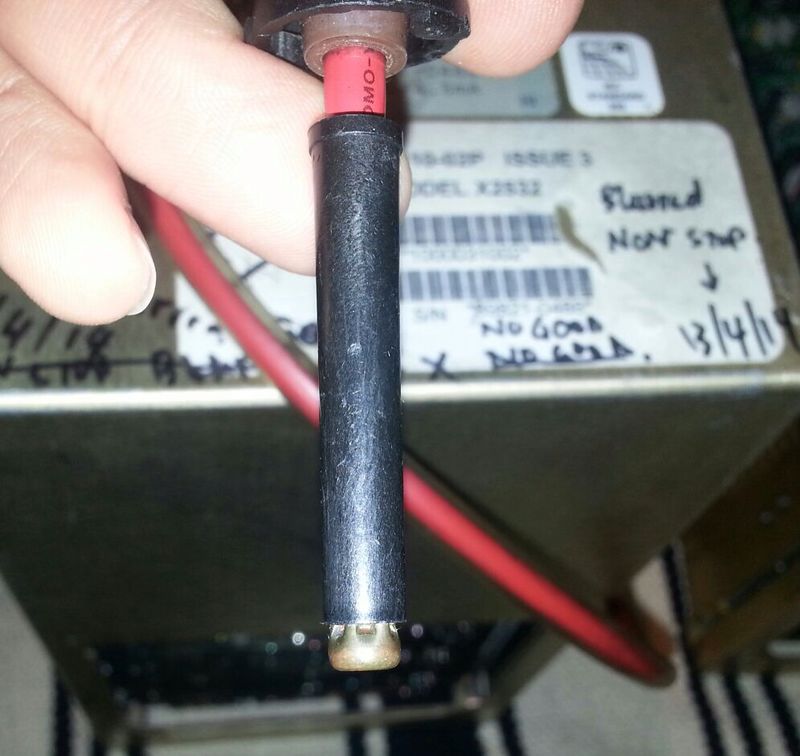
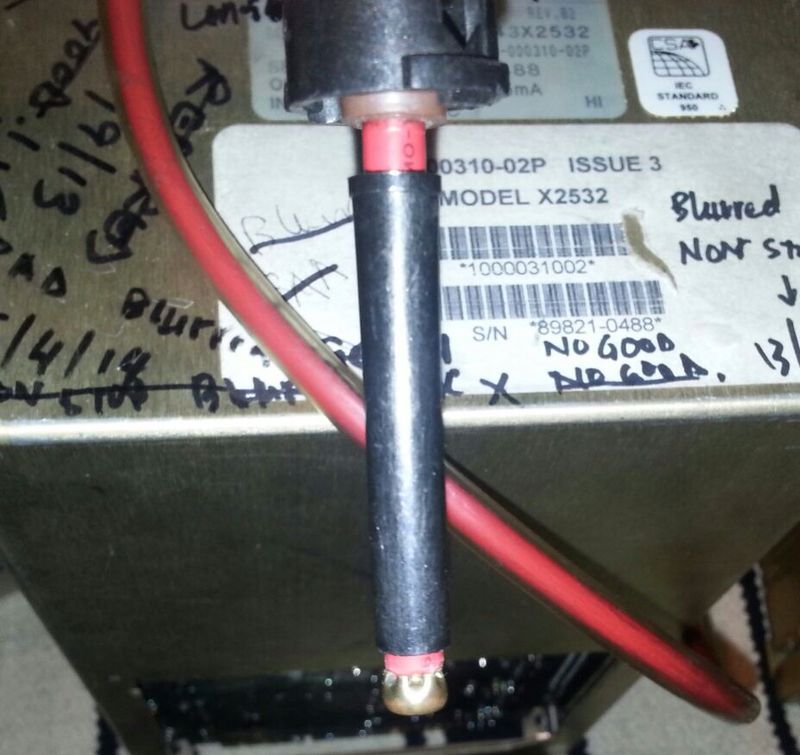
Lately, Barclay helped me to troubleshoot several HVPS for me and one of my HVPS exhibit black horizontal lines after repaired.
What happened was after cleaning the connector tip of the HVPS, the black sleeve got stuck to the metal tip and the contact to the splitter wasn't that good and it caused very bad horizontal lines. Therefore, i removed the HVPS cable out and loosen the black sleeve to ensure that it's loose.
I then re-installed the HVPS cable again to the HVPS splitter and the problem goes away till now without any issues. However, I'm not sure whether it might resolve your issue but i think it worth a try.
| Description: |
| HVPS black sleeve got stucked with metal tip during cleaning with alcohol cleaner |
|
| Filesize: |
67.54 KB |
| Viewed: |
8239 Time(s) |
|
_________________
2 White Vision 1
Last edited by haireez on Tue Jun 17, 2014 5:27 am; edited 1 time in total
|
|
| Back to top |
|
|
haireez
Joined: 14 Jun 2007
Posts: 207
Location: singapore
TV/Projector: Vidikron Vision 1 - Ultra
|
| Posted: Tue Jun 17, 2014 5:26 am Post subject: |
|
|
Just hope that this method will help to resolve your horizontal lines issue.
| Description: |
| Disconnect and loosen the black sleeve from metal tip, re-install and horizontal black lines goes away. Hopefully, your issue is the same as mine. |
|
| Filesize: |
78.16 KB |
| Viewed: |
8236 Time(s) |
|
_________________
2 White Vision 1
|
|
| Back to top |
|
|
karmat63
Joined: 19 Dec 2007
Posts: 157
Location: Italy
|
| Posted: Tue Jun 17, 2014 7:08 am Post subject: |
|
|
|
Thanks a lot haireez, this is very interesting... I will try as soon as my Marquee will power on again..
|
|
| Back to top |
|
|
karmat63
Joined: 19 Dec 2007
Posts: 157
Location: Italy
|
| Posted: Tue Jun 17, 2014 7:44 am Post subject: |
|
|
Don't know if this can help, but:
1) if I disconnect ALL the VDM cables, the high pitch buzz stops; if any VDM cable is connected the buzz starts again. Anyway, the tubes never fire...
2) If I disconnect one HDM cables, the buzz is still there
Last edited by karmat63 on Tue Jun 17, 2014 2:46 pm; edited 1 time in total
|
|
| Back to top |
|
|
Nashou66
Joined: 12 Jan 2007
Posts: 16171
Location: West Seneca NY
|
| Posted: Tue Jun 17, 2014 1:20 pm Post subject: |
|
|
| karmat63 wrote: | Don't know if this can help, but:
1) if I disconnect ALL the VDM cables, the high pitch buzz stops; if any HDM cable is connected the buzz starts again. Anyway, the tubes never fire...
2) If I disconnect one HDM cables, the buzz is still there |
The PJ will not run if any VDM or HDM cables are removed.
Also NEVER remove a VDM or HDM while the PJ is running!! it can cause a deflection burn on the tubes.
Some VDM's will buzz. I never had one but some times gluing the Capacitors together with hot glue will lower the buzz.
Have you looked on the front LED's from the LVPS to see if any are lit while its powered up?
Nashou
_________________
Don't blame your underwear for your crooked ass~ unknown Greek philosopher
"Republicans believe every day is the Fourth of July, but the Democrats believe every day is April 15." --- President Reagan
One Smart Dog!!!
Marquee High Performance Bellows now shipping!!
Marquee Modifications and Performance Enhancement
Marquee C-element and Bellow removal
|
|
| Back to top |
|
|
|
|




