| Author |
Message |
thewolfman

Joined: 28 Mar 2011
Posts: 1311
Location: Sweden
|
| Posted: Fri May 30, 2014 7:10 pm Post subject: Digital blue stigmator doesn't work |
|
|
So I put in the refurbished blue tube yesterday, and swapped my Blue Frankenyoke for the original just now, thinking it could be it, but no, still wont work. Other than that blue really cleaned up the image.
Some facts:
Cleaning the LVPS I snapped blue cable taking it apart and doing the P14 mod, resolder it and put it back together. 6,35V exactly.
Cleaning the CLM and reinserting the chips many times made (or something else) blue very blurry, but solved itself but still a bit blurry on edges, digital stigmator would probably solve this as I can only do so much with the magnets.
I'll fill in with more details if I can come up with some.
Last edited by thewolfman on Sat May 31, 2014 9:55 pm; edited 1 time in total
|
|
| Back to top |
|
 |
Nashou66

Joined: 12 Jan 2007
Posts: 16171
Location: West Seneca NY
|
|
| Back to top |
|
|
thewolfman
Joined: 28 Mar 2011
Posts: 1311
Location: Sweden
|
| Posted: Fri May 30, 2014 7:21 pm Post subject: |
|
|
| Nashou66 wrote: | | Did you try to swap the blue focus cable to the Green and see if it looks better on the edges. |
Witch is that then? I tried changing the cables on the left vertical board but that did nothing..
|
|
| Back to top |
|
|
thewolfman
Joined: 28 Mar 2011
Posts: 1311
Location: Sweden
|
| Posted: Fri May 30, 2014 7:26 pm Post subject: |
|
|
|
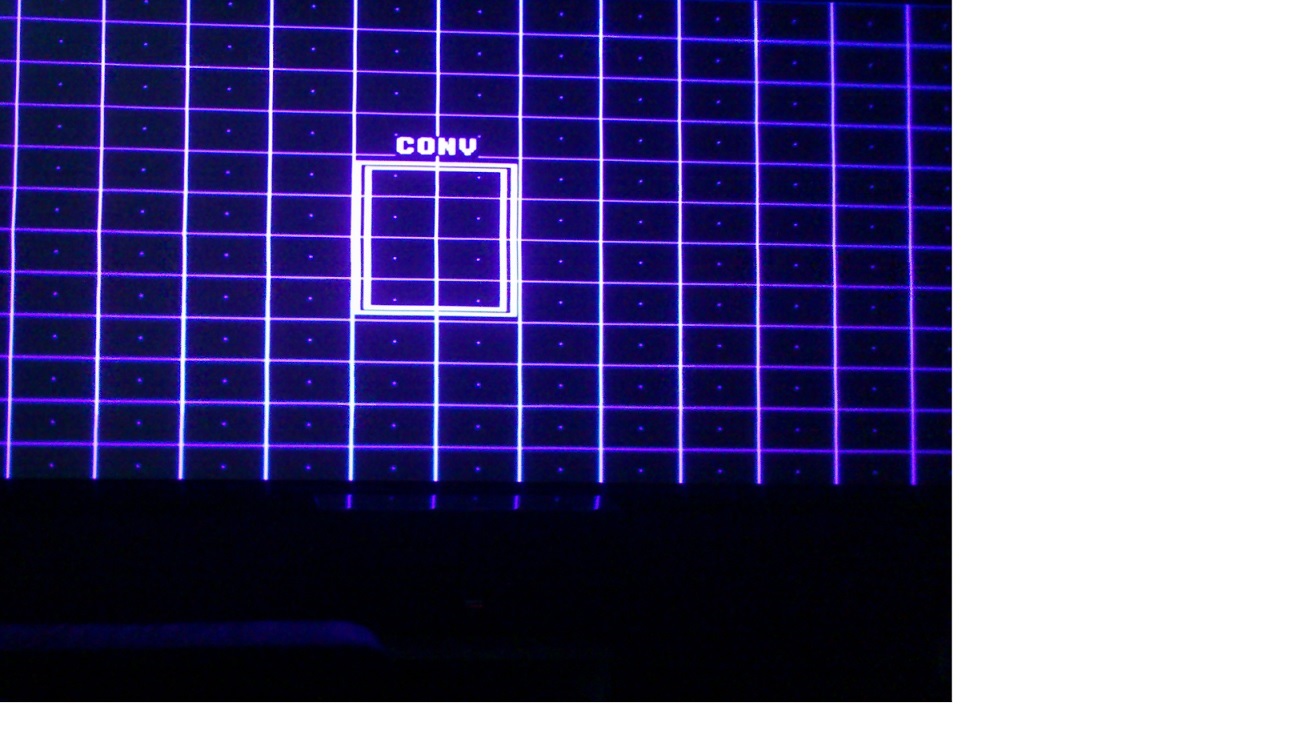
More details: It's mostly throughout the bottom and the upper right corner. Lensflap has nothing to do with this.
|
|
| Back to top |
|
|
thewolfman
Joined: 28 Mar 2011
Posts: 1311
Location: Sweden
|
| Posted: Fri May 30, 2014 7:39 pm Post subject: |
|
|
Photos blue on red. Blue is very uneven looking.
EDIT: My projector had a fit just now.. a snapping noise and the whole image went in and out of focus, went small and went back to big and normal again. All in maybe 2 seconds. Nah, the image is within the raster boarders so not that.. maybe a fluke thing that just had to happen now. I turned it off to be safe and on again and still working.
| Description: |
|
| Filesize: |
187.97 KB |
| Viewed: |
7733 Time(s) |
|
|
|
| Back to top |
|
|
thewolfman
Joined: 28 Mar 2011
Posts: 1311
Location: Sweden
|
| Posted: Fri May 30, 2014 8:39 pm Post subject: |
|
|
Mission has been solved (?) I decided to give it another try, with focus board, witch was many months ago last time, swapped green with blue, and then turned on the pj... well, now both green and blue are silly blurry. Extremely blurry.. ! That's it isn't it?
Let me fill you in some more facts about this.. a moron, like me, did this many months ago.. swapped both red blue and green many times but ended up clueless. What's seems news to me now is that 2 colors are off now.. while back then it was a different story..(?)
EDIT: I swapped one more time, to be sure. Swapping blue with green, makes both very blurry, and going into RGB focus only makes red adjustable. Blue and green stays the same - blurry as hell.
|
|
| Back to top |
|
|
Tim in Phoenix

Joined: 21 Oct 2006
Posts: 4409
Location: Phoenix
|
| Posted: Fri May 30, 2014 9:07 pm Post subject: |
|
|
Hello
Let's get methodical on this. Put all cables back where you started. Go to UTIL, 1, 6, 2 for 32khz test pattern. Hit Color, 3 for blue only. Set user Focus to 100 and ramp up Contrast to 70-80, are the dots round or oval or strettttttched? Go to Focus 0, is the flare dot centered in the fog?
|
|
| Back to top |
|
|
thewolfman
Joined: 28 Mar 2011
Posts: 1311
Location: Sweden
|
| Posted: Fri May 30, 2014 9:22 pm Post subject: |
|
|
| Tim in Phoenix wrote: | Hello
Let's get methodical on this. Put all cables back where you started. Go to UTIL, 1, 6, 2 for 32khz test pattern. Hit Color, 3 for blue only. Set user Focus to 100 and ramp up Contrast to 70-80, are the dots round or oval or strettttttched? Go to Focus 0, is the flare dot centered in the fog? |
I'll do it over again , I did it the wrong way. Sorry.
|
|
| Back to top |
|
|
thewolfman
Joined: 28 Mar 2011
Posts: 1311
Location: Sweden
|
| Posted: Fri May 30, 2014 9:30 pm Post subject: |
|
|
Before doing more of your tips, I was just about to post the thing that made me alert what the problem might be, if you still think it's worth more investigation I'll do it. But just answer me this.. the picture from before and this is quite different isn't it? All I did was to swap green and blue 2 times and now blue is ridicules blurry on the edges. So, all that taken into account, I wonder if that also has something to do with my heave drifting on red?
Have a look now what blue looks like.
|
|
| Back to top |
|
|
thewolfman
Joined: 28 Mar 2011
Posts: 1311
Location: Sweden
|
| Posted: Fri May 30, 2014 9:46 pm Post subject: |
|
|
Here's the facts you need.
Pushing blue, focus, dots, ramping it up and down does nothing. Green and red dose.
|
|
| Back to top |
|
|
Tim in Phoenix
Joined: 21 Oct 2006
Posts: 4409
Location: Phoenix
|
| Posted: Fri May 30, 2014 9:54 pm Post subject: |
|
|
Hmmm
Is the focus board blown?
|
|
| Back to top |
|
|
thewolfman
Joined: 28 Mar 2011
Posts: 1311
Location: Sweden
|
| Posted: Fri May 30, 2014 10:02 pm Post subject: |
|
|
| Tim in Phoenix wrote: | Hmmm
Is the focus board blown? |
I think so.. what's it going to cost me and what serial number should I be looking out for? An Ultra board on mine? What good would that do me over a stock one?
Thanks for all of this.
Btw, Hello! 
|
|
| Back to top |
|
|
Tim in Phoenix
Joined: 21 Oct 2006
Posts: 4409
Location: Phoenix
|
| Posted: Fri May 30, 2014 10:29 pm Post subject: |
|
|
Hello
If this is an Ultra chassis then half of the focus board has geometry circuits so must replace with same. Is your focus board fully covered with components?
|
|
| Back to top |
|
|
thewolfman
Joined: 28 Mar 2011
Posts: 1311
Location: Sweden
|
| Posted: Fri May 30, 2014 10:42 pm Post subject: |
|
|
| Tim in Phoenix wrote: | Hello
If this is an Ultra chassis then half of the focus board has geometry circuits so must replace with same. Is your focus board fully covered with components? |
It's not an Ultra, that's for sure. It's an 8500 from the very beginning, with an HVPS exchanged for an 34,9KV/4,5mA lately.
As for the board.. I'll look into it, but probably some old sh*t from that era.
I need to get laid more often. That's for sure.
|
|
| Back to top |
|
|
Tim in Phoenix
Joined: 21 Oct 2006
Posts: 4409
Location: Phoenix
|
| Posted: Fri May 30, 2014 10:51 pm Post subject: |
|
|
OK
$150 for a focus board, postage paid
|
|
| Back to top |
|
|
thewolfman
Joined: 28 Mar 2011
Posts: 1311
Location: Sweden
|
| Posted: Fri May 30, 2014 10:56 pm Post subject: |
|
|
| Tim in Phoenix wrote: | OK
$150 for a focus board, postage paid |
Sounds good, I'll work it out somehow.
|
|
| Back to top |
|
|
thewolfman
Joined: 28 Mar 2011
Posts: 1311
Location: Sweden
|
| Posted: Fri May 30, 2014 11:29 pm Post subject: |
|
|
Routing the cables another way may solve the yellowing/brownish color shift that moves around the image. It shows only on a white field so not that bothered by it. Hopefully a replacement focus board will solve it.
Last edited by thewolfman on Sat May 31, 2014 12:48 pm; edited 1 time in total
|
|
| Back to top |
|
|
gjaky

Joined: 05 Jun 2010
Posts: 2802
Location: Budapest, Hungary
|
|
| Back to top |
|
|
thewolfman
Joined: 28 Mar 2011
Posts: 1311
Location: Sweden
|
| Posted: Sat May 31, 2014 12:58 pm Post subject: |
|
|
Thanks for posting this I'll look into it later. I can't find the front cover to see which month it was made in. But I already know it's made in 1998.
Oh, and thanks everyone else for helping me out on this also.
|
|
| Back to top |
|
|
thewolfman
Joined: 28 Mar 2011
Posts: 1311
Location: Sweden
|
| Posted: Sat May 31, 2014 3:13 pm Post subject: |
|
|
First thing first: It's made in October 1996. Not 1998.
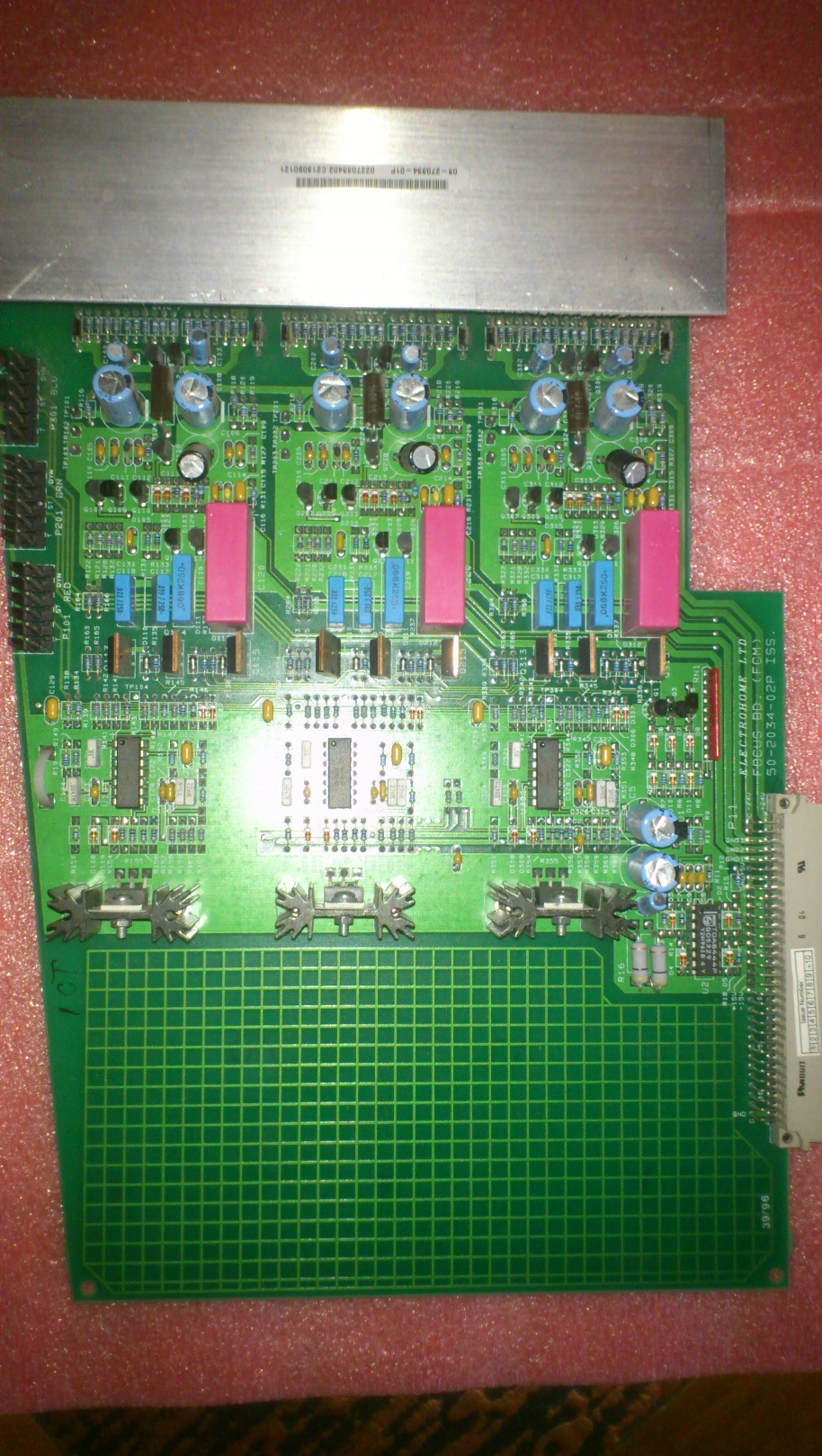
I removed the FCM and took a picture of it also. 50-2034-02P ISS (The sticker on the aluminium plate says 03-270334-01P)
May as well bring the numbers for the LVPS also. 10-000-229-02P ISSUE 2 Model: 10-0172
And Tim, I could buy your FCM on the 19th. I assume these Technical Bulletin has been sorted? Or a later model that doesn't require one? I mean, it would be stupid of me to get another one that could fail at any moment again.
If I understood that Bulletin right, I shouldn't be using the projector because other things could happen to it also if I did. I'll leave it off for the time being.
| Description: |
|
| Filesize: |
569.3 KB |
| Viewed: |
7593 Time(s) |
|
|
|
| Back to top |
|
|
|
|





