| Author |
Message |
shelleybear
Joined: 18 Jul 2013
Posts: 70
|
| Posted: Sat May 24, 2014 2:56 am Post subject: A Lines of Resolution Faq |
|
|
Is anyone with the information interested in creating a faq that will list the various media format and their lines of resolution, etc.
It would be nice if such a document existed that would negate the need to hunt up the various specifications.
Thanks for your time.
Shelley
|
|
| Back to top |
|
 |
AnalogRocks
Forum Moderator

Joined: 08 Mar 2006
Posts: 26706
Location: Toronto, Ontario, Canada
TV/Projector: Sony 1252Q, AMPRO 4000G
|
| Posted: Sat May 24, 2014 4:19 am Post subject: |
|
|
Lines of resolution is an old fashion way of stating things. Applicable to CRT's. Things now are stated in pixels, eg Bluray 1920 wide by 1080 tall. Guys, could we state that on a good 9" CRT to 1080 lines of resolution?
_________________
Tech support for nothing
CRT.
HD done right!
|
|
| Back to top |
|
|
the big E
Joined: 20 Apr 2013
Posts: 1928
Location: speedwell Tn.
|
| Posted: Sat May 24, 2014 4:33 am Post subject: |
|
|
It's listed in the specs sheet of almost every set(and in some manuals)
_________________
crt king of black
|
|
| Back to top |
|
|
AnalogRocks
Forum Moderator
Joined: 08 Mar 2006
Posts: 26706
Location: Toronto, Ontario, Canada
TV/Projector: Sony 1252Q, AMPRO 4000G
|
| Posted: Sat May 24, 2014 5:08 am Post subject: |
|
|
| the big E wrote: | | It's listed in the specs sheet of almost every set(and in some manuals) |
True but she's asking for the various formats lines of resolution. Not the display devices.
_________________
Tech support for nothing
CRT.
HD done right!
|
|
| Back to top |
|
|
the big E
Joined: 20 Apr 2013
Posts: 1928
Location: speedwell Tn.
|
| Posted: Sat May 24, 2014 5:19 am Post subject: |
|
|
| AnalogRocks wrote: | | the big E wrote: | | It's listed in the specs sheet of almost every set(and in some manuals) |
True but she's asking for the various formats lines of resolution. Not the display devices. |
Opps my mistake
Is this what she wants to know?
480 is 640 by 480
720 is 1280 by 720
1080 is 1920 by 1080
First number is the lines of resolution second is pixels per row
_________________
crt king of black
|
|
| Back to top |
|
|
shelleybear
Joined: 18 Jul 2013
Posts: 70
|
| Posted: Sat May 24, 2014 5:51 am Post subject: |
|
|
More broken down by the type of device.
For example:
V.H.S., Bets, super beta, DVD, blue ray, HD, VGA
|
|
| Back to top |
|
|
AnalogRocks
Forum Moderator
Joined: 08 Mar 2006
Posts: 26706
Location: Toronto, Ontario, Canada
TV/Projector: Sony 1252Q, AMPRO 4000G
|
| Posted: Sat May 24, 2014 5:52 am Post subject: |
|
|
| the big E wrote: | | AnalogRocks wrote: | | the big E wrote: | | It's listed in the specs sheet of almost every set(and in some manuals) |
True but she's asking for the various formats lines of resolution. Not the display devices. |
Opps my mistake
Is this what she wants to know?
480 is 640 by 480
720 is 1280 by 720
1080 is 1920 by 1080
First number is the lines of resolution second is pixels per row |
That's not entirely correct.
480 is 720x480 and the first number is horizontal pixels, the second vertical. However that may or may not equate directly once displayed on the face of the CRT. For instance, if you are running an older ES set like a SONY 1272 it may not fully resolve all the vertical pixels. SO lets say you send it 1280x720, it's been said the 12xx series of SONY's can only really display 600 lines in 16:9 mode. So while you are sending 720 lines the projector can only display 600 properly. You end up with line overlap making the picture a little soft. However. When I ran my 1252 like this it actually looked great. Very smooth and film like with better black level.
_________________
Tech support for nothing
CRT.
HD done right!
|
|
| Back to top |
|
|
the big E
Joined: 20 Apr 2013
Posts: 1928
Location: speedwell Tn.
|
| Posted: Sat May 24, 2014 5:57 am Post subject: |
|
|
V.h.s uses 640 by 480
HD formats can be any of these
1280x720(I/p dependent on if its a pc)
1920x1080(I/p)
The HD also covers Blu-ray Discs along with HDTV
The Bets I have no clue
VGA is a can of works best left unopened trust me(lots of different resolutions to list in both 4:3 and 16:9) that go from 800x600 to 4k if the video card and display supports it(most are only HD capible)
_________________
crt king of black
|
|
| Back to top |
|
|
the big E
Joined: 20 Apr 2013
Posts: 1928
Location: speedwell Tn.
|
| Posted: Sat May 24, 2014 6:04 am Post subject: |
|
|
Ar she only asked for the specs of each format not the resolving ability of a projector(don't get carried away)
I am correct if the projector is a 4:3 dlp(one of mine is that native) your reffering to the 16:9 version(also supported on a different dlp projector I have)
Also I list them as the computer shows them
_________________
crt king of black
|
|
| Back to top |
|
|
AnalogRocks
Forum Moderator
Joined: 08 Mar 2006
Posts: 26706
Location: Toronto, Ontario, Canada
TV/Projector: Sony 1252Q, AMPRO 4000G
|
| Posted: Sat May 24, 2014 6:28 am Post subject: |
|
|
| the big E wrote: | V.h.s uses 640 by 480
|
VHS was never spec'ed in pixel terms. It was in lines of resolution 240 lines was the spec.
| the big E wrote: |
HD formats can be any of these
1280x720(I/p dependent on if its a pc)
|
720i was never an official format. You are more likely to see 720p30, (vs the standard of 720p60fps) especially on some camcorders.
| the big E wrote: |
1920x1080(I/p)
The HD also covers Blu-ray Discs along with HDTV
|
Yes there is 1080i and P both 1920x1080.
| the big E wrote: |
The Bets I have no clue
|
What?
| the big E wrote: |
VGA is a can of works best left unopened trust me(lots of different resolutions to list in both 4:3 and 16:9) that go from 800x600 to 4k if the video card and display supports it(most are only HD capible) |
VGA is not a can of worms. I have run all sorts of custom resolutions.
_________________
Tech support for nothing
CRT.
HD done right!
|
|
| Back to top |
|
|
the big E
Joined: 20 Apr 2013
Posts: 1928
Location: speedwell Tn.
|
| Posted: Sat May 24, 2014 6:31 am Post subject: |
|
|
Where is a face palm emoticon when you need it 
_________________
crt king of black
|
|
| Back to top |
|
|
the big E
Joined: 20 Apr 2013
Posts: 1928
Location: speedwell Tn.
|
| Posted: Sat May 24, 2014 6:39 am Post subject: |
|
|
I guess you think that the 720 resolution on a pc is progressive scan?
What I meant about VGA being a can of worms is that every card and display is different so there is no way to really list them all if the monitor doesn't support them(without powerstrip)
My third answer was because I have never heard of such format(pc or video)
Also why can't I explain something technical so someone can understand it without someone making me to look like a idiot 
_________________
crt king of black
|
|
| Back to top |
|
|
AnalogRocks
Forum Moderator
Joined: 08 Mar 2006
Posts: 26706
Location: Toronto, Ontario, Canada
TV/Projector: Sony 1252Q, AMPRO 4000G
|
| Posted: Sat May 24, 2014 6:55 am Post subject: |
|
|
| the big E wrote: | I guess you think that the 720 resolution on a pc is progressive scan?
What I meant about VGA being a can of worms is that every card and display is different so there is no way to really list them all if the monitor doesn't support them(without powerstrip)
My third answer was because I have never heard of such format(pc or video)
Also why can't I explain something technical so someone can understand it without someone making me to look like a idiot :roll: |
All standard resolutions on a PC ARE progressive scanned.
Wasn't trying to make you look like an idiot. Just correcting you on a couple of things I've picked up since I started this video journey in 1986.
_________________
Tech support for nothing
CRT.
HD done right!
|
|
| Back to top |
|
|
the big E
Joined: 20 Apr 2013
Posts: 1928
Location: speedwell Tn.
|
| Posted: Sat May 24, 2014 2:53 pm Post subject: |
|
|
| AnalogRocks wrote: | | the big E wrote: | I guess you think that the 720 resolution on a pc is progressive scan?
What I meant about VGA being a can of worms is that every card and display is different so there is no way to really list them all if the monitor doesn't support them(without powerstrip)
My third answer was because I have never heard of such format(pc or video)
Also why can't I explain something technical so someone can understand it without someone making me to look like a idiot :roll: |
All standard resolutions on a PC ARE progressive scanned.
Wasn't trying to make you look like an idiot. Just correcting you on a couple of things I've picked up since I started this video journey in 1986. |
Aah that's one detail I must have overlooked in my repair classes(opps)
I know some monitors were interlaced(I had one) but I always wondered if it was true(I don't have the monitor now)
_________________
crt king of black
|
|
| Back to top |
|
|
AnalogRocks
Forum Moderator
Joined: 08 Mar 2006
Posts: 26706
Location: Toronto, Ontario, Canada
TV/Projector: Sony 1252Q, AMPRO 4000G
|
| Posted: Sat May 24, 2014 3:27 pm Post subject: |
|
|
| the big E wrote: | | AnalogRocks wrote: | | the big E wrote: | I guess you think that the 720 resolution on a pc is progressive scan?
What I meant about VGA being a can of worms is that every card and display is different so there is no way to really list them all if the monitor doesn't support them(without powerstrip)
My third answer was because I have never heard of such format(pc or video)
Also why can't I explain something technical so someone can understand it without someone making me to look like a idiot :roll: |
All standard resolutions on a PC ARE progressive scanned.
Wasn't trying to make you look like an idiot. Just correcting you on a couple of things I've picked up since I started this video journey in 1986. |
Aah that's one detail I must have overlooked in my repair classes(opps)
I know some monitors were interlaced(I had one) but I always wondered if it was true(I don't have the monitor now) |
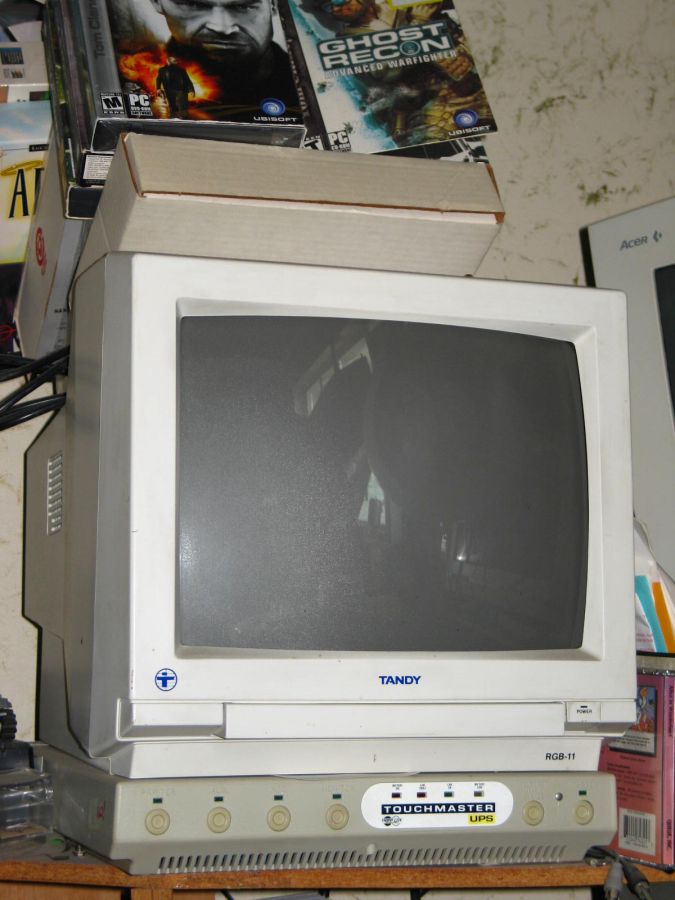
Yes there were interlaced resolutions back in the CGA and EGA days (pre=VGA adaptors) on PC's. That was more when you had 40 column and 80 column displays and RGB monitors that ran at 15KHz or 320x240 with up to 16 colors!. I have one here Tandy brand OEMed by Magnavox. It worked well on the 1980's IBM XT's and 286's and the Tandy COCO 2 computers.
However when we got VGA starting at 640x480 things got de-interlaced or aka progressive scanned.
By the way, next time you watch T2 check out the computers they are shooting up. You'll see the same monitor as the on I have.
| Description: |
|
| Filesize: |
81.52 KB |
| Viewed: |
6833 Time(s) |
|
_________________
Tech support for nothing
CRT.
HD done right!
|
|
| Back to top |
|
|
the big E
Joined: 20 Apr 2013
Posts: 1928
Location: speedwell Tn.
|
| Posted: Sat May 24, 2014 3:33 pm Post subject: |
|
|
I never thought I would see one owned by someone who wasn't a movie company nice
I have a few vintage macs that Were made in the early 90's(they were nice)
I didn't like the interlaced monitor I had(it would give me headaches after long use)so I gave it away
_________________
crt king of black
|
|
| Back to top |
|
|
ecrabb
Forum Moderator

Joined: 13 Mar 2006
Posts: 15909
Location: Utah
TV/Projector: JVC RS40, Epson 5010
|
| Posted: Sat May 24, 2014 4:04 pm Post subject: |
|
|
That was a fun little detour you guys took. 
To get back to Shelley's question, as Jeremy mentioned, the "lines of resolution" specification is, for the most part, an antiquated specification because it applied to analog technologies only, i.e. analog over-the-air TV, VHS, S-VHS, beta, laserdisc, etc. Once we started using digital transports like HDMI and DVI, the horizontal resolution spec essentially became the same as lines of resolution. That's a big oversimplification, but it's adequate enough for the purposes of this discussion.
First, it's very common for people to confuse "lines of resolution" (which is horizontal) with vertical resolution. All NTSC consumer electronics were based on NTSC's 525-line standard, which is the "480" you hear sometimes. 480 interlaced, to be exact, or 480i, with blanking, for a total of 525.
"Lines of resolution" referred to horizontal resolution, or how many vertical lines the format could resolve before they blurred together. The main formats broke down about like this:
VHS - 240 lines
Beta - 290 lines
Analog/cable TV - 330 lines
S-VHS - 400 lines
Laserdisc - 425 lines
ED Beta - 500 lines
DVD (using SD analog output) - 540 lines
Like I mentioned earlier, it's a little deeper subject than it appears, though. Those figures refer to luma resolution, which is essentially back/white resolution. Chroma resolution on all those formats was much lower, often half or even 1/3. Back then, it was analog chroma subsampling, while today, digital codecs use digital chroma subsampling. It becomes painfully obvious when you see things like titles or graphics which are all red, where resolution is subsampled to 1/4 as in H264 AVC even on Blu-ray.
Cheers,
SC
|
|
| Back to top |
|
|
shelleybear
Joined: 18 Jul 2013
Posts: 70
|
| Posted: Sat May 24, 2014 5:54 pm Post subject: |
|
|
| ecrabb wrote: | That was a fun little detour you guys took.
To get back to Shelley's question, as Jeremy mentioned, the "lines of resolution" specification is, for the most part, an antiquated specification because it applied to analog technologies only, i.e. analog over-the-air TV, VHS, S-VHS, beta, laserdisc, etc. Once we started using digital transports like HDMI and DVI, the horizontal resolution spec essentially became the same as lines of resolution. That's a big oversimplification, but it's adequate enough for the purposes of this discussion.
First, it's very common for people to confuse "lines of resolution" (which is horizontal) with vertical resolution. All NTSC consumer electronics were based on NTSC's 525-line standard, which is the "480" you hear sometimes. 480 interlaced, to be exact, or 480i, with blanking, for a total of 525.
"Lines of resolution" referred to horizontal resolution, or how many vertical lines the format could resolve before they blurred together. The main formats broke down about like this:
VHS - 240 lines
Beta - 290 lines
Analog/cable TV - 330 lines
S-VHS - 400 lines
Laserdisc - 425 lines
ED Beta - 500 lines
DVD (using SD analog output) - 540 lines
Like I mentioned earlier, it's a little deeper subject than it appears, though. Those figures refer to luma resolution, which is essentially back/white resolution. Chroma resolution on all those formats was much lower, often half or even 1/3. Back then, it was analog chroma subsampling, while today, digital codecs use digital chroma subsampling. It becomes painfully obvious when you see things like titles or graphics which are all red, where resolution is subsampled to 1/4 as in H264 AVC even on Blu-ray.
Cheers,
SC |
I think we almost have a winner (as well as the faq I mentioned that started this thread).
I'm running my lovely barco 808s.
So, all I need to do is convert the lines to DPI and the faq will be done (Curt, can I upload it to the faq section when complete?).
That said, I' going to have to sample all the provided VGA settings and see which ones work best for my computer.
I can deal with that, as it's a one - off process.
Hopefully this thread will provide lots of useful information for curious C.R.T. owners.
kisses to all the participants.
*C.R.T. projectors, the perfect indoor hobby for when it's too cold or wet to work on the Harley outside*
|
|
| Back to top |
|
|
the big E
Joined: 20 Apr 2013
Posts: 1928
Location: speedwell Tn.
|
| Posted: Sat May 24, 2014 5:58 pm Post subject: |
|
|
Keep in mind the native resolution that a projector can handle varies from set to set
My dwin handles 1024x768 in 4:3 on a pc if I don't use a custom setting
Most are listed in the rankings list(I think)
_________________
crt king of black
|
|
| Back to top |
|
|
AnalogRocks
Forum Moderator
Joined: 08 Mar 2006
Posts: 26706
Location: Toronto, Ontario, Canada
TV/Projector: Sony 1252Q, AMPRO 4000G
|
| Posted: Sat May 24, 2014 6:06 pm Post subject: |
|
|
| the big E wrote: | Keep in mind the native resolution that a projector can handle varies from set to set
My dwin handles 1024x768 in 4:3 on a pc if I don't use a custom setting
Most are listed in the rankings list(I think) |
Hate to correct you, but none of the CRT's have a native resolution. That's digitals that do. CRT's have a max resolving power before the lines overlap. So they have a max sweet spot but can scan all sorts of resolutions up to their max resolving power before you get line overlap or run into video chain limitations.
_________________
Tech support for nothing
CRT.
HD done right!
|
|
| Back to top |
|
|
|
|




