| Author |
Message |
winny

Joined: 09 Oct 2013
Posts: 403
Location: Sweden
TV/Projector: BD808s, BG1209/2
|
| Posted: Wed Oct 09, 2013 5:34 pm Post subject: (Newbie) Recommended beam angle of 808s and 1209/2 |
|
|
First time poster here.
I did try to download the lens information from the sticky thread which I suppose would contain the information I need but I only got download.php. Here goes...
Last weekend I finally bought my first CRT projector. Original plan was a Sony super fine pitch tv in order to get both high resultion and black black. The digital processing was terrible and the dvi option available in the us-version was disabled in so many ways throughout the input boards in the EU version that I gave up and bought an LCD-tv. Razor sharp but the backlight bleeding through bugs me to no end.
Settled on a 1209/2 complete with screen, hd fury and so on but just as the seller turned it on to take a photo of the wear one last time before the sale, the red tube failed. More on that in a separate thread. Picked up a 808s with iris2 too in order to get started.
Before I start drilling into the ceiling, I would like to know what the recommended output horizontal light angle (not sure about the English terminology) is for both machines. The 1209/2 has HD120 lenses and I assume the 808s comes standard. I would prefer to just make one set of holes and compromise the 808 if needed since I will change to the 1209 once I get hold of a red tube for it.
Last edited by winny on Thu Oct 10, 2013 9:04 am; edited 1 time in total
|
|
| Back to top |
|
 |
CasetheCorvetteman

Joined: 09 Nov 2008
Posts: 6326
Location: Australia
|
| Posted: Wed Oct 09, 2013 8:38 pm Post subject: |
|
|
Use the Barco lens calculator in the Barco downloads section on here, it will draw you a sketch with all you need 
|
|
| Back to top |
|
|
winny
Joined: 09 Oct 2013
Posts: 403
Location: Sweden
TV/Projector: BD808s, BG1209/2
|
| Posted: Thu Oct 10, 2013 8:54 am Post subject: |
|
|
Thank you for the prompt reply.
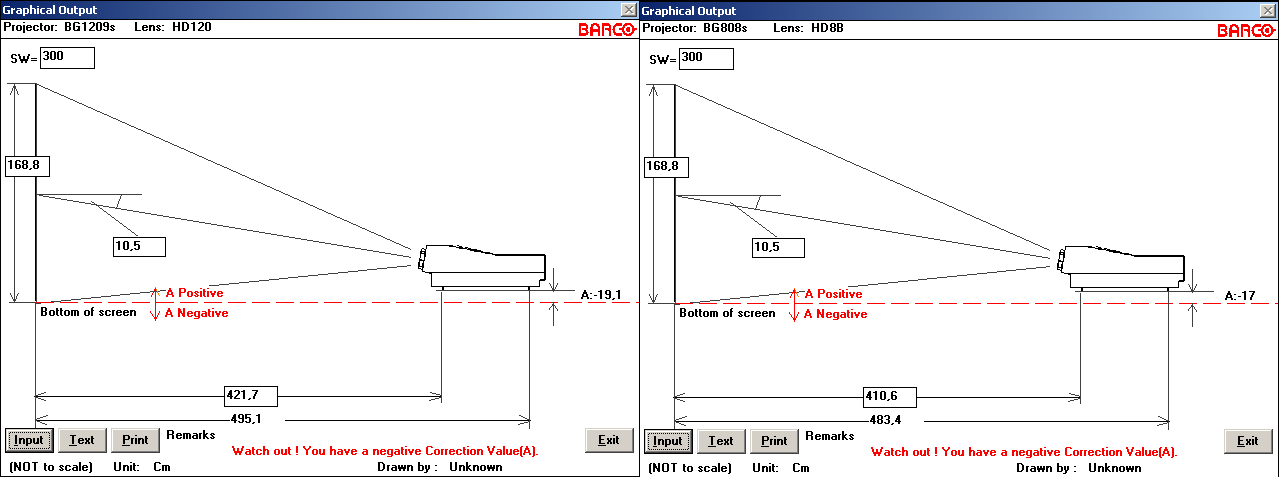
The software showed similar results for both projectors.

The official Barco figures from the software, are they conservative as in there is margin for a bigger picture/not all phosphor in use? I'm thinking that running out of margin and ending up with a white edge would be a disaster (need to move either the projector or screen closer) whereas zooming in the picture to get longer throw will be bad in the long run with lower resolution and more phosphor wear so I need to choose wisely from the start.
| Description: |
|
| Filesize: |
27.1 KB |
| Viewed: |
10249 Time(s) |
|
Last edited by winny on Thu Oct 10, 2013 9:06 am; edited 1 time in total
|
|
| Back to top |
|
|
fragzero
Joined: 30 Aug 2012
Posts: 344
|
| Posted: Thu Oct 10, 2013 9:04 am Post subject: |
|
|
| winny wrote: |
The official Barco figures from the software, are they conservative as in there is margin for a bigger picture/not all phosphor in use? |
Yes the Barco figures are very conservative, To get near 100% phosphor usage you will have to move it a bit closer.
How will you mount the projector?
Maybe 2 long pieces of unistrut? You will be able to move it towards the screen to maximize phosphor usage and when you get the 1209s up and running you can use the same rails but installed the projector a bit more to the back!
Last edited by fragzero on Thu Oct 10, 2013 9:12 am; edited 1 time in total
|
|
| Back to top |
|
|
winny
Joined: 09 Oct 2013
Posts: 403
Location: Sweden
TV/Projector: BD808s, BG1209/2
|
| Posted: Thu Oct 10, 2013 9:10 am Post subject: |
|
|
The 808 came with unistrut, although not long enough to change the throw distance more than perhaps 5 %. The 1209 came with what looks like the official steel bracket from Barco, where you slide in the projector from the side and have no adjustments available.
You say very conservative. How much would you recommend me to shorten the throw distance over the official figures?
|
|
| Back to top |
|
|
fragzero
Joined: 30 Aug 2012
Posts: 344
|
| Posted: Thu Oct 10, 2013 9:18 am Post subject: |
|
|
Hmm good question, a bit more than 10 cm? ( i have a smaller screen so my projector is closer, % based it was around 5%)
Maybe "very" was a bit too much said 
How is the height screen - ceiling - projector? If possible you could mount 2 unistrut rails and mount the barco bracket to these rails?
|
|
| Back to top |
|
|
CasetheCorvetteman
Joined: 09 Nov 2008
Posts: 6326
Location: Australia
|
| Posted: Thu Oct 10, 2013 9:49 am Post subject: |
|
|
|
Not in my experience they arent, but im using a CineMAX with HQF900 lenses, so im not sure how it pans out for a different machine.
|
|
| Back to top |
|
|
Decibel

Joined: 31 May 2007
Posts: 904
Location: Roma - Italia
|
| Posted: Thu Oct 10, 2013 10:05 am Post subject: |
|
|
Here a simply tip for correct distance.
Place the projector on a carpet
Cover lenses of red and blue.
Play a video from a source.
Look into the green lens and widens the image until it go out from surface of the tube (the image must pass over the edges).
Then move the projector forward or backward until the image (only green, the reference) comes out of a 5/10 cm left and right edges of the screen.
That's the ideal distance.
_________________
Domenico (Barco fan!)
Last edited by Decibel on Thu Oct 10, 2013 10:54 am; edited 2 times in total
|
|
| Back to top |
|
|
CasetheCorvetteman
Joined: 09 Nov 2008
Posts: 6326
Location: Australia
|
| Posted: Thu Oct 10, 2013 10:19 am Post subject: |
|
|
|
Never run the image past the edges.
|
|
| Back to top |
|
|
Decibel
Joined: 31 May 2007
Posts: 904
Location: Roma - Italia
|
| Posted: Thu Oct 10, 2013 10:32 am Post subject: |
|
|
| CasetheCorvetteman wrote: | | Never run the image past the edges. |
Obviously shall exceed the phosphors only to determine the ideal distance.
When our friend will place the projector in his definitive position, he will be forced to decrease the horizontal size of the raster (then image) for no to go the image beyond the screen.
Then the image will be place on the inside surface of the phosphors at the minimum safe distance from the edges of the tubes.
_________________
Domenico (Barco fan!)
Last edited by Decibel on Thu Oct 10, 2013 11:14 pm; edited 1 time in total
|
|
| Back to top |
|
|
winny
Joined: 09 Oct 2013
Posts: 403
Location: Sweden
TV/Projector: BD808s, BG1209/2
|
| Posted: Thu Oct 10, 2013 1:05 pm Post subject: |
|
|
| fragzero wrote: | | How is the height screen - ceiling - projector? If possible you could mount 2 unistrut rails and mount the barco bracket to these rails? |
I'll try to get a picture of the screen. It's motorized so the screen starts a bit lower than most fixed ones, also my ceiling height is 2.60 meter which I suppose will be uncomfortably high to look at so my plan is to run the screen down and use the top masking to move the picture down a bit. Might take some experimentation.
I need to check what options I have for using the same mounting bracket for both projectors. They did look different when we loaded up the projectors in my car but I haven't had the possibility to compare them side by side yet. My college has offered to help me carry them inside tonight so I can do an update then.
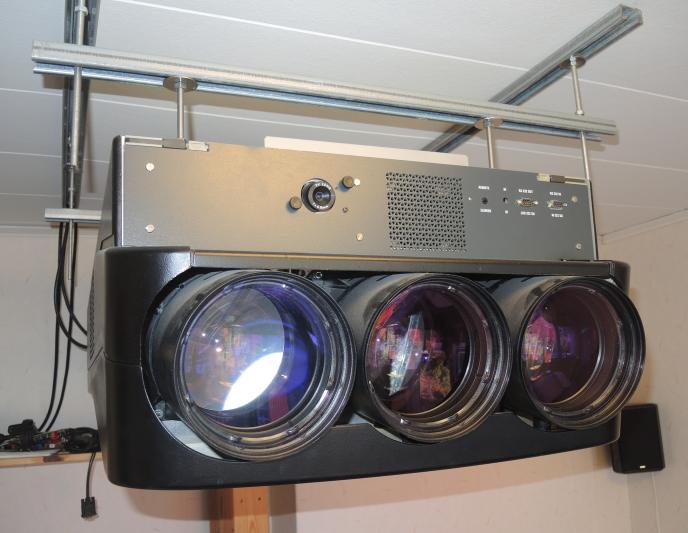
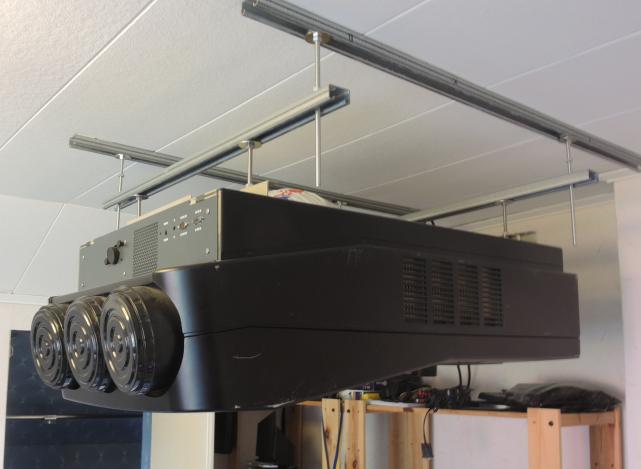
Here are two pictures of the 808 setup before we took it down at the seller. Quite low WAF!


| Decibel wrote: | | Look into the green lens and widens the image until it go out from surface of the tube (the image must pass over the edges). |
Right. Can I see this just by looking into the assembled front end or do I need to remove the lens to determine this?
| Description: |
|
| Filesize: |
55.15 KB |
| Viewed: |
10200 Time(s) |
|
| Description: |
|
| Filesize: |
38.48 KB |
| Viewed: |
10200 Time(s) |
|
Last edited by winny on Thu Oct 10, 2013 2:20 pm; edited 1 time in total
|
|
| Back to top |
|
|
fragzero
Joined: 30 Aug 2012
Posts: 344
|
| Posted: Thu Oct 10, 2013 1:12 pm Post subject: Re: (Newbie) Recommended beam angle of 808s and 1209/2 |
|
|
| winny wrote: |
I would prefer to just make one set of holes and compromise the 808 if needed since I will change to the 1209 once I get hold of a red tube for it. |
This will be you main problem! The throw distance of a 1209s with HD120 is different from a 808 HD8's You won't be able to use only 1 set of holes with a static mounting bracket.
Well what you could do is figure out the exact mounting point for the 1209 - mount the bracket and hang the 808, it will be back a little bit too much. This means you will have to reduce the size of the image on the phosphor reducing lightoutput and resolving capabilities.
If i were you I'd search for 2 long pieces of unistrut, figure out the ideal mounting distance of the 808, hang the unistrut. Once the 1209s is fixed you will be able to mount it on the same rails but a bit more to the back.
Either that or get a new red tube and immediately hang the 1209s, red tubes aren't nearly as expensive as blue or green tubes, they last a lot longer!
|
|
| Back to top |
|
|
Decibel
Joined: 31 May 2007
Posts: 904
Location: Roma - Italia
|
| Posted: Thu Oct 10, 2013 1:54 pm Post subject: |
|
|
I do not understand which projector you will use.
However ... in my opinion the system of ceiling mount that you showed in the two pictures is the BETTER for a CRT's installations.
The projector can move forward and backward, to left and to right.
This system greatly simplifies the correct positioning of the projector

If you can not use this system, I suggest a simple trick that I wrote.
| Decibel wrote: | | Look into the green lens and widens the image until it go out from surface of the tube (the image must pass over the edges). |
| winny wrote: | | Right. Can I see this just by looking into the assembled front end or do I need to remove the lens to determine this? |
No remove lens.
Look into the lens (use sunglasses).
REMEMBER!!!
You will resize the image until go out the tubes ONLY one time and only for determine correct position using the trick that i suggested.
As Casethecorvetteman said ... the image should never go out from the edges of the tubes during normal use of the projector.
So not extend too much time in which the image will be out of the edges.
_________________
Domenico (Barco fan!)
|
|
| Back to top |
|
|
fragzero
Joined: 30 Aug 2012
Posts: 344
|
| Posted: Thu Oct 10, 2013 1:56 pm Post subject: |
|
|
| Decibel wrote: | I do not understand which projector you will use.
|
He wants to use a 808s and afterwards a 1209s (the 1209s has a broken tube) but only use 1 set of holes in the ceiling.
And yes, unistrut is great for mounting crt projectors!
|
|
| Back to top |
|
|
Decibel
Joined: 31 May 2007
Posts: 904
Location: Roma - Italia
|
| Posted: Thu Oct 10, 2013 2:21 pm Post subject: |
|
|
| fragzero wrote: |
He wants to use a 808s and afterwards a 1209s (the 1209s has a broken tube) but only use 1 set of: holes in the ceiling. |
Absolutely NO!
I agree with Fragzero: you can use at least the two rails for move forward or backward now the 808 and in the future the 1209.
_________________
Domenico (Barco fan!)
|
|
| Back to top |
|
|
CasetheCorvetteman
Joined: 09 Nov 2008
Posts: 6326
Location: Australia
|
| Posted: Thu Oct 10, 2013 3:45 pm Post subject: |
|
|
The best way to get correct distance back is not run the image off the edges, set the image up to the correct size on the tube face, then fill the screen with it and measure.
Dont run the active image off the tube face, for anything, ever.
|
|
| Back to top |
|
|
winny
Joined: 09 Oct 2013
Posts: 403
Location: Sweden
TV/Projector: BD808s, BG1209/2
|
| Posted: Thu Oct 10, 2013 7:44 pm Post subject: |
|
|
| fragzero wrote: | | He wants to use a 808s and afterwards a 1209s (the 1209s has a broken tube) but only use 1 set of holes in the ceiling. |
Correct. Drilling into concrete and adding concrete expanders/wedge anchors will bother the neighbours and will also be a pain in the rear to remove when I move so I want to minimize the amount from the start. Also, the 808s has got an IRIS2 which I suppose will help a newbie get started a little quicker.
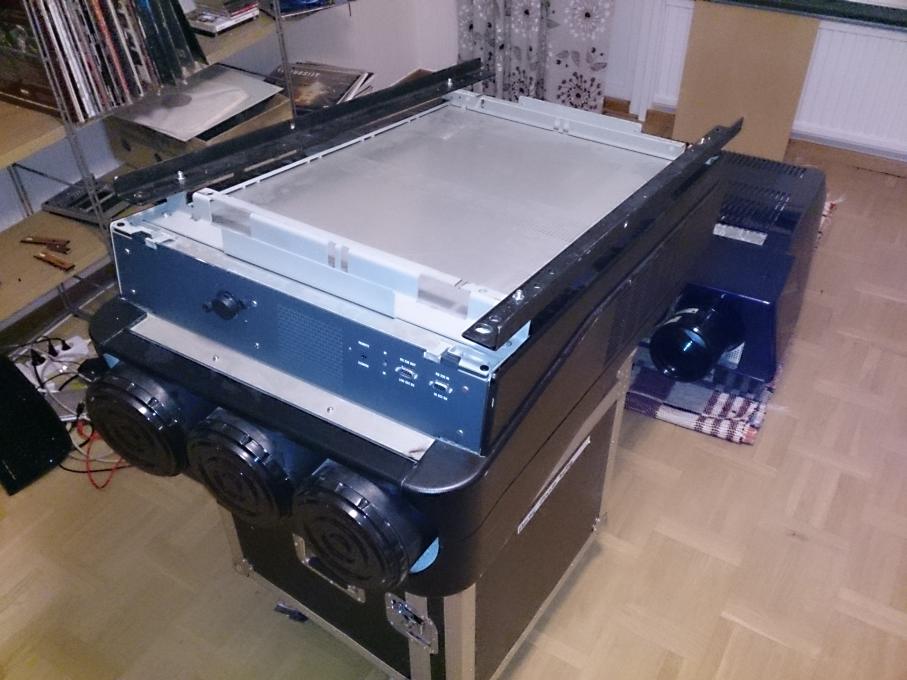
Finally got the screen and projectors inside. Used my amplifier rack case with feature the wonderful invention of wheels which made everything much simpler. Put the 1209 on a carpet for screen width trials next week and flipped the 808s on it's correct side for the same trial then hoisting it using a supplied rope and block. Should be interesting.
The bracket was identical for both projectors which means I can reuse the 808s unistruts for the 1209 later on.
The topic of running outside the phosphor seems to be a hot topic... I'll be careful.
Is the setting as simple as going to the setup menu and adjusting h and v size and move the raster using only the grid/setup picture? Should it be done for each color individually to make sure that like the green is doing fine but the red or blue is touching the edge?
| Description: |
|
| Filesize: |
80.86 KB |
| Viewed: |
10106 Time(s) |
|
|
|
| Back to top |
|
|
Decibel
Joined: 31 May 2007
Posts: 904
Location: Roma - Italia
|
| Posted: Thu Oct 10, 2013 8:42 pm Post subject: |
|
|
| winny wrote: | | The topic of running outside the phosphor seems to be a hot topic... I'll be careful. |
Each users have his opinion.
My opinion is that filling the tube surface for a few seconds not break nothing and simplify the measures of positioning.
_________________
Domenico (Barco fan!)
|
|
| Back to top |
|
|
ecrabb
Forum Moderator

Joined: 13 Mar 2006
Posts: 15909
Location: Utah
TV/Projector: JVC RS40, Epson 5010
|
| Posted: Thu Oct 10, 2013 10:07 pm Post subject: |
|
|
| Decibel wrote: | | winny wrote: | | The topic of running outside the phosphor seems to be a hot topic... I'll be careful. |
Each users have his opinion.
My opinion is that filling the tube surface for a few seconds not break nothing and simplify the measures of positioning. |
I don't understand the rationale in even risking it? What point does running the raster off the tube face serve? None! Just set up an input with rough keystone, maximize (roughly) the image on the tube face, and move the projector around until you get the correct image size, measure and record the throw.
SC
|
|
| Back to top |
|
|
Decibel
Joined: 31 May 2007
Posts: 904
Location: Roma - Italia
|
| Posted: Thu Oct 10, 2013 10:59 pm Post subject: |
|
|
| ecrabb wrote: | | I don't understand the rationale in even risking it? What point does running the raster off the tube face serve? None! Just set up an input with rough keystone, maximize (roughly) the image on the tube face, and move the projector around until you get the correct image size, measure and record the throw. |
The raster is out the tube surface in almost all installations.
Someone like to have both raster and image into tube surface?
Points of view. In that condition the image could be too little and the portion unused of tube's surface could be too large.
I prefer minimize the unused portion of the raster trying to coincide the image as more possibile into raster with manage the timings.
Despite this, the raster will be obviously a little bit large than the image.
So during the normal use the image will be very close to edge, and raster go out, no problem.
For safe I use the "blanking" feature for cover the unused raster and only the image will be inscribed in the tube surface.
I know that I wrote in previous posts a concept that could be misunderstood.
Yes, is possible, during the measure throw distance, set the geometry for adapt the image near edges without go out, but most likely in a not calibrated projector the raster will be too large respect the image and go out the same.
_________________
Domenico (Barco fan!)
|
|
| Back to top |
|
|
|
|





