| Author |
Message |
bpdski
Joined: 29 Apr 2012
Posts: 54
Location: Atlanta, GA
|
| Posted: Sat Mar 16, 2013 10:44 pm Post subject: Best refresh for watching movies |
|
|
Hi, I was wondering what is the consensus for how to watch movies through and HTPC on a CRT? I have a 9500 that I've always just run at the stock 1080p60 refresh but I believe it's better to watch it at a multiple of 24 or maybe even 93.976. By default, my computer (Win 7) will not allow me to display anything higher than 60Hz at 1080p. I am wondering what is the generally accepted best refresh rate and also the best way to update the computer to allow that refresh?
I am also using a Moome card. I have experimented with PowerStrip and I can get 72Hz through the analog VGA connector but when I try it through the Moome card I get some odd tearing in the picture. Is PowerStrip the best way to do this and does the Moome card accept 1080p72?
Thanks,
Brian
|
|
| Back to top |
|
 |
gjaky

Joined: 05 Jun 2010
Posts: 2802
Location: Budapest, Hungary
|
| Posted: Sat Mar 16, 2013 11:28 pm Post subject: |
|
|
I think the Moome card only useful if you have BR player as a source, with htpc you'd fine with standard analog cable (unless you have really long distance betwee the htpc and pj). Using the analog VGA gives you more flexible timings via powerstrip. For smooth motion it is mandatory to set the refreshrate matching the source refreshrate (or the multiple of it). So 72Hz would be a good choice, but 1920x1080@72Hz needs too much bandwidth for any CRT projector, resulting reduced sharpness, so you have to make a decision here:
a.) If you watch a lot of 2.35:1 movies you can apply the so called 'active area scanning' which means you create a custom resolution of 1920*817@ 72 Hz so you save the unused lines for the sake of higher refreshrate, this results an overall good compromise, but works only 2.35:1 movies.
b.) Using interlaced resolutions. Using for example 1080i@120Hz have the advantage to match both 30fps and 24fps sources, needs only the bandwidth of the 1080P 60Hz and flickers much less than that, but it has drawbacks: the scanlines may become visible with sharp, gently rising horizontal lines on screen.
I prefer the interlaced solution myself.
_________________
projectors in the past : NEC 6-9PG xtra, Electrohome Marquee 6-7500, NEC XG 1351 LC ( with super modified Electrohome VNB neckboard !!!)
current: VDC Marquee 9500LC
The MOD: VNB-DB, VIM-DB
|
|
| Back to top |
|
|
bpdski
Joined: 29 Apr 2012
Posts: 54
Location: Atlanta, GA
|
| Posted: Sun Mar 17, 2013 12:36 am Post subject: |
|
|
I don't have any problem using the RGBVH input for the HTPC for watching BR and HD files, I don't see any difference in PQ with one vs the other so that's fine. I do have a 9500LC Ultra through with the MP mods so I wouldn't think there's any issues running 1080p72 on this particular CRT. If that's not the case then I can try the 1080i120. I do notice the scan lines though when using my cable box so I imagine I would with the HTPC as well.
How does the higher resolution cause a decrease in sharpness?
|
|
| Back to top |
|
|
gjaky
Joined: 05 Jun 2010
Posts: 2802
Location: Budapest, Hungary
|
| Posted: Sun Mar 17, 2013 7:52 am Post subject: |
|
|
The cable box puts out 1080i@60Hz, not @120Hz, that makes sense. I don't know much about your pj's capabilities, the best is if you try all the resolutions and choose whatever you like, this is purely personal preference.
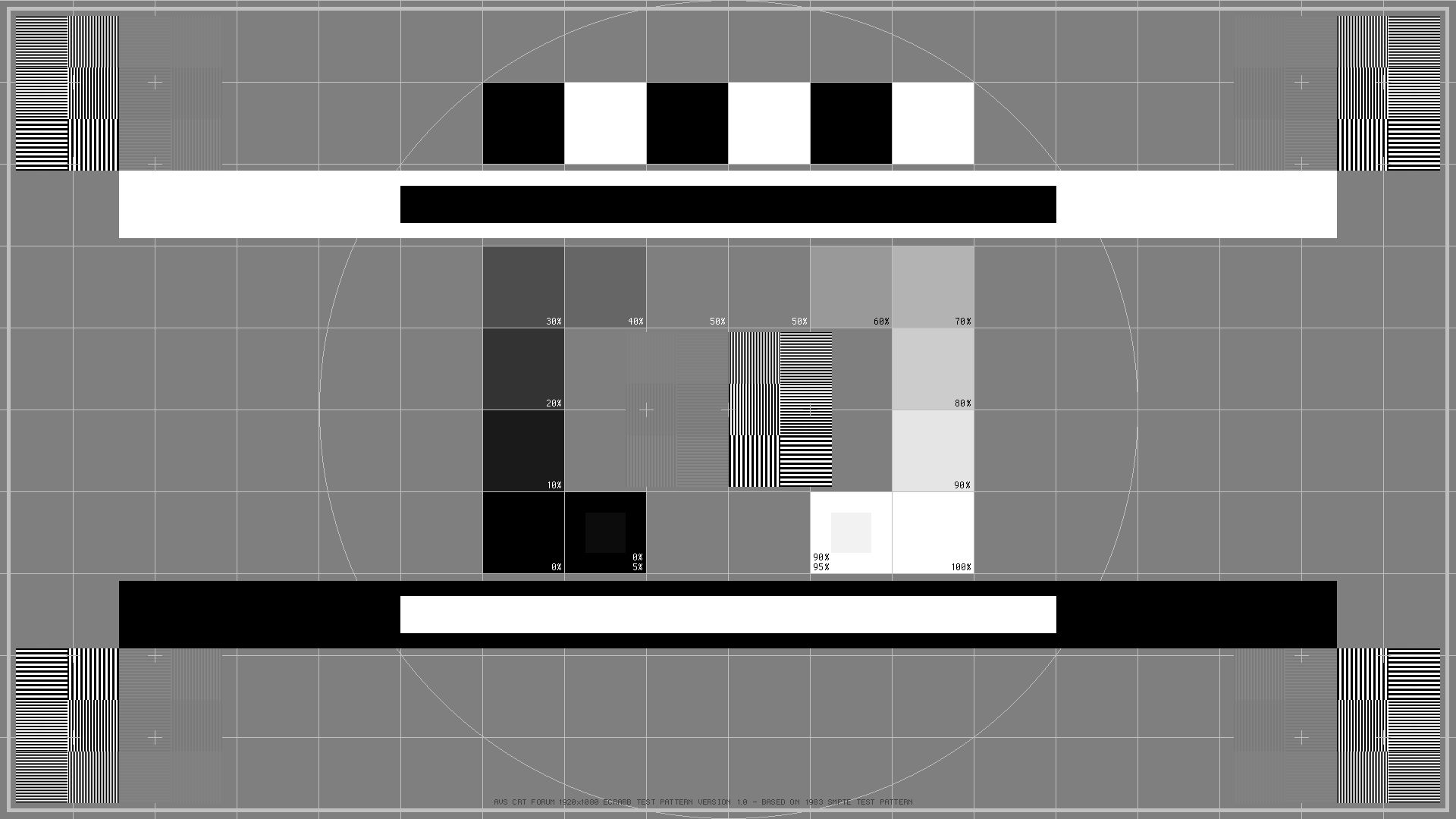
Try some resolution test patterns (eizo monitor test, nokia monitor test, ...) and see how the vertical and horizontal on/off line pattern looks like. Assuming good astigmatism the horizontal lines usually representing the focusing capabilities of the pj, while the vertical lines meaning the electronic bandwidth. The focusing capability of the pj is not depending on the actual resolution, but when you use 1080p 72Hz instead of 60Hz you will see slight or huge sharpness loss at the vertical lines, due to the restrictions of the bandwidth of the pj. Test patterns are not everything, check out each resolution with movies as well, and choose what you like the most 
| Description: |
| Ecrabb's SMPTE testpattern |
|
| Filesize: |
46.95 KB |
| Viewed: |
5268 Time(s) |
|
| Description: |
| 1on:1off; 2on:2off; 3on:3off lines |
|
| Filesize: |
1.85 KB |
| Viewed: |
6122 Time(s) |

|
_________________
projectors in the past : NEC 6-9PG xtra, Electrohome Marquee 6-7500, NEC XG 1351 LC ( with super modified Electrohome VNB neckboard !!!)
current: VDC Marquee 9500LC
The MOD: VNB-DB, VIM-DB
|
|
| Back to top |
|
|
dvh99

Joined: 25 Dec 2009
Posts: 2158
Location: nederland
|
| Posted: Mon Mar 18, 2013 3:39 pm Post subject: |
|
|
the mighty marquee with the peaking circuit can handle it but you will have a very hot running hdm.
don`t use rgbhv if possible as it will attenuate the signal with long cable runs.
_________________
1 answer always poses multiple questions.
marquee 9500ultra HD10L moome hdmi1.3 v3+ some mods.
|
|
| Back to top |
|
|
bpdski
Joined: 29 Apr 2012
Posts: 54
Location: Atlanta, GA
|
| Posted: Mon Mar 18, 2013 5:07 pm Post subject: |
|
|
Thanks for the info, I don't think I'm interested in trying to run 72 Hz at the expense of sharpness or reliability. How do other people here watch 24 fps digital movie files, just the standard 60 Hz with 3:2 pulldown? That's what I've always done before, just had this idea to try 72 Hz but maybe was barking up the wrong tree
Thanks
|
|
| Back to top |
|
|
fuchs
Joined: 27 Jun 2012
Posts: 153
Location: the NL
|
| Posted: Wed Mar 20, 2013 11:58 am Post subject: |
|
|
| gjaky wrote: | | resolution test patterns |
thanks for posting this!
I'm currently running 1280x720@72Hz, thinking of 1920x1080i in 72(144) or 60(120) or whatever.
Now I can check if it would make the picture better or worse.
| bpdski wrote: | | I don't think I'm interested in trying to run 72 Hz at the expense of sharpness or reliability |
It depends a bit on yourself and on the projector.
Some people find the 60Hz flicker unacceptable, other people don't generally see it.
_________________
onkel fuchs' cheapskate cinema
NEC plain 9PG
|
|
| Back to top |
|
|
mp20748
Joined: 12 Sep 2006
Posts: 5689
Location: Maryland
TV/Projector: 9500LC Ultra / Super 02 and 03 VIM
|
| Posted: Wed Mar 20, 2013 12:14 pm Post subject: |
|
|
| bpdski wrote: | Thanks for the info, I don't think I'm interested in trying to run 72 Hz at the expense of sharpness or reliability. How do other people here watch 24 fps digital movie files, just the standard 60 Hz with 3:2 pulldown? That's what I've always done before, just had this idea to try 72 Hz but maybe was barking up the wrong tree
Thanks |
Yes the HDM does run hotter at full 1080P /72hz, but its not like it can't handle it or would cause failure down the road. that's far from the truth.
The Mighty Marquee has run 24/7 for years on end in a many application running vertical rates well over 96hz and I don't recall ever having to change an HDM. I've run mine at 72hz when I had the Lumagen, and my choice would be to run it at 72hz and I would do so with zero concern for failure.
the softness is another issue, but not one of my issues either.
The Ultra was designed primarily to handle higher scan rates. But even before the Ultra, the plain Jane 9500LC built in 95 and after could handle full 1080P 72hz easily and it still can.
The problems of HDM failure were solved with the XXX-07P version of the HDM and It has been very stable since.
I still service and maintain a few Marquees that are running various scan rates @ 104hz vertical and I had not once replaced an HDM in the past ten years.
Not sure where this reliability issue came from associated with the Marquee and it's inability to handle higher than 720P scan rates.
|
|
| Back to top |
|
|
bpdski
Joined: 29 Apr 2012
Posts: 54
Location: Atlanta, GA
|
| Posted: Wed Mar 20, 2013 2:25 pm Post subject: |
|
|
|
Thanks Mike, that's good to know. Do you have any tips on how to compensate for the softer image at 72Hz? If you used to run it, then I guess the softness was not too noticeable. What are you running now?
|
|
| Back to top |
|
|
mp20748
Joined: 12 Sep 2006
Posts: 5689
Location: Maryland
TV/Projector: 9500LC Ultra / Super 02 and 03 VIM
|
|
| Back to top |
|
|
gjaky
Joined: 05 Jun 2010
Posts: 2802
Location: Budapest, Hungary
|
| Posted: Wed Mar 20, 2013 6:21 pm Post subject: |
|
|
| fuchs wrote: | | gjaky wrote: | | resolution test patterns |
thanks for posting this!
I'm currently running 1280x720@72Hz, thinking of 1920x1080i in 72(144) or 60(120) or whatever.
Now I can check if it would make the picture better or worse.
|
1920x1080i @ 144Hz is crazy on a PG plain, it really wont't do that well. Maybe 1080i96Hz (that is my current resolution on my 6PG xtra) or 1080i72Hz, but that uses 2:1 frame multiplying. I achieved good results with 1600x900p 72Hz too.
_________________
projectors in the past : NEC 6-9PG xtra, Electrohome Marquee 6-7500, NEC XG 1351 LC ( with super modified Electrohome VNB neckboard !!!)
current: VDC Marquee 9500LC
The MOD: VNB-DB, VIM-DB
|
|
| Back to top |
|
|
|
|





