|
As this forum is rarely used anymore, we've locked it. Feel free to browse and read. Questions? Please reach out to us directly. Cheers! |

|
 |
|
|
| Author |
Message |
noos@xp37+
Joined: 17 Jun 2008
Posts: 464
Location: Berlin/Munich
|
| Posted: Thu Feb 07, 2013 11:51 am Post subject: Finally 2d/3d interlaced-PCs all resolutions/refreshrates |
|
|
Hello,
found a way to enable interlaced in other resolutions than 1920/1080i60/50 - and also a way to activate this if not available for you device. I do 2.40 aspect ratio, so do not wonder if I speak about 1920/800i 72/96/120/144/150. This will allow you (full screen!) movie and film playback and anything on the desktop, but software rendering (games) fails in interlaced 3d.
I use the moome ext.3 for digital-analog conversion and for 3d sync (more precise than the nvidia usb emitter). A Pc with Win764bit, geforce 280gtx, 3dvision, forceware 310xxx - but it should work no matter the details.....
And a tool called custom resolution utility - it allows to to add res. directly to the registry of your system. So what ever you add there, will be thought by Win/nvidia a natural res. for your device.
Additionally if you monitor driver does not support 3d via framesequential (100/120) and only does framepacked, use an inf file like the one from Acer H5360. It will allow 3d framesequential with nvidia. Than add res. like you prefer to the system.
If you get an red error message: Warning: Attempt to run stereoscopic 3D in non-stereo display mode, please change to a acceptable mode...then use the solution of post two from here: http://3dvision-blog.com/forum/viewtopic.php?f=9&t=30&start=30&sid=d05ab7c339ff4fa46a9e5fcac0ad916e
How to use the custom resolution utility:
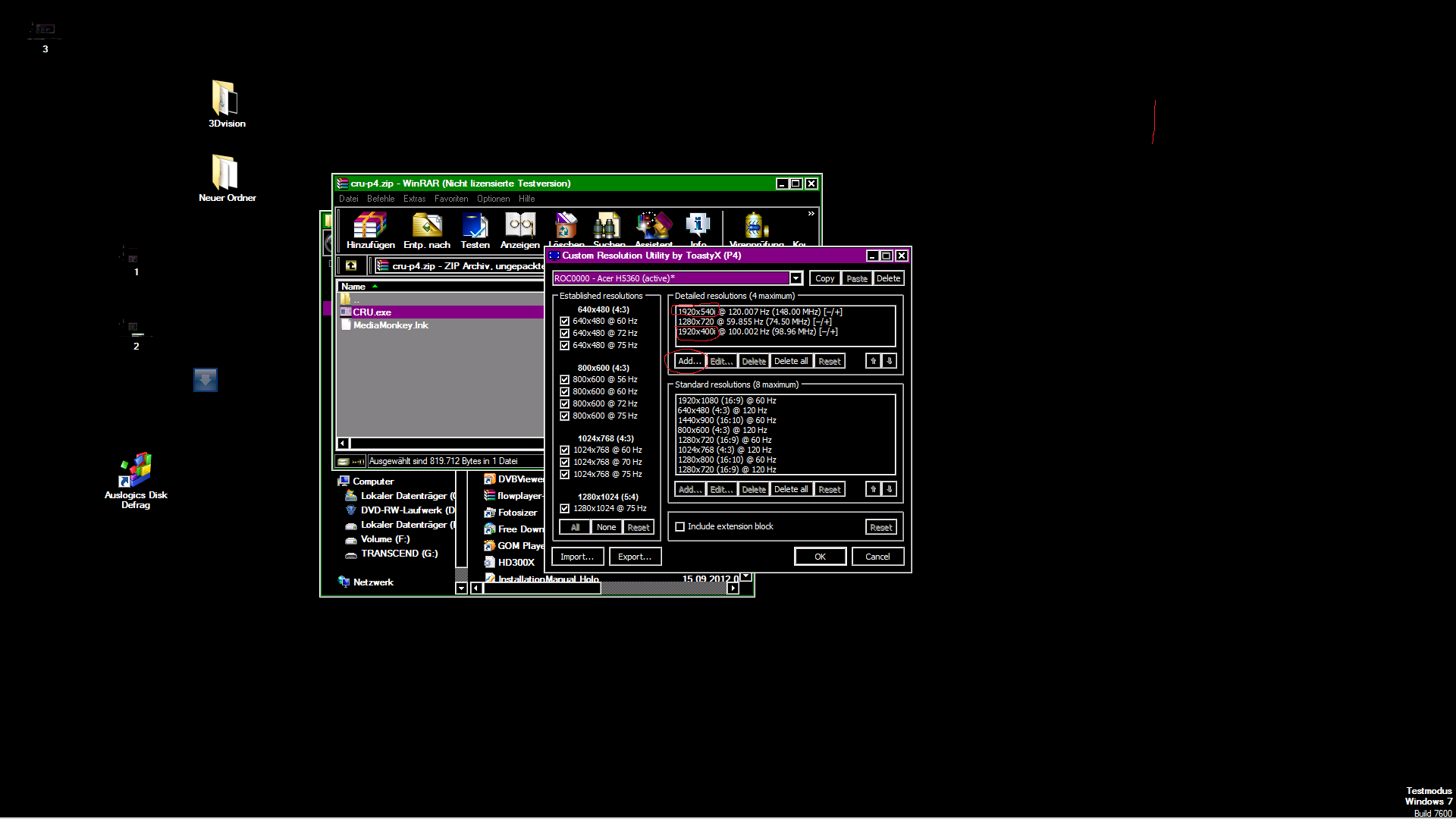
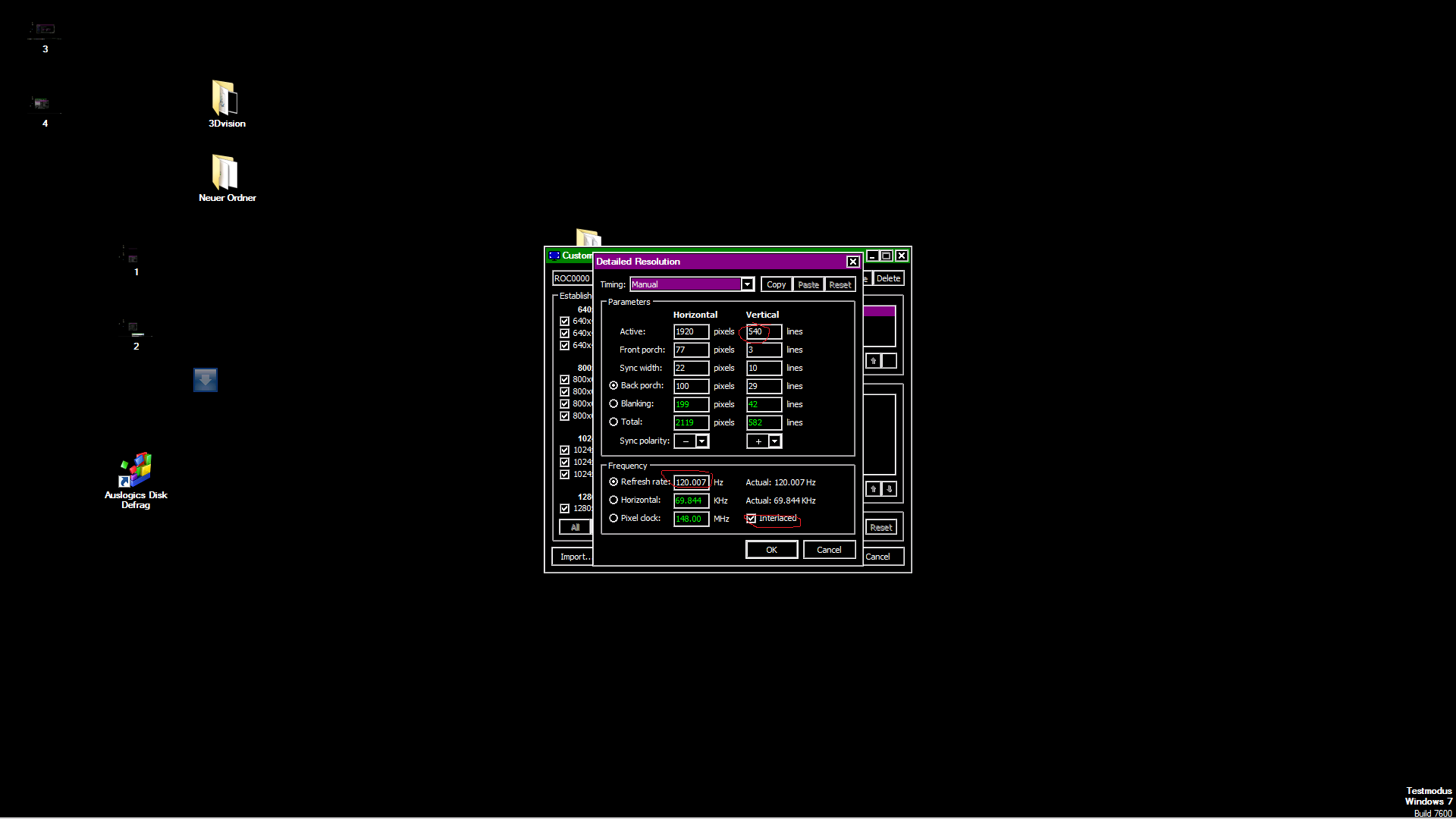
Well, for 1920x1080i 120, you have to create a resolution 1920x540i 120. Nvidia manager will correctly show 1920x1080, but not with an i, but if you switch to it, you will see it works. It will not end up 540p. there will be perfect high rez interlaced with 120hz! If you enter 1920x1080i 120 in the utility, you will have windows display1920x2160, and mess up the aspect ratio. With all interlaced resolutions you want to create, you will have to enter half vertical!
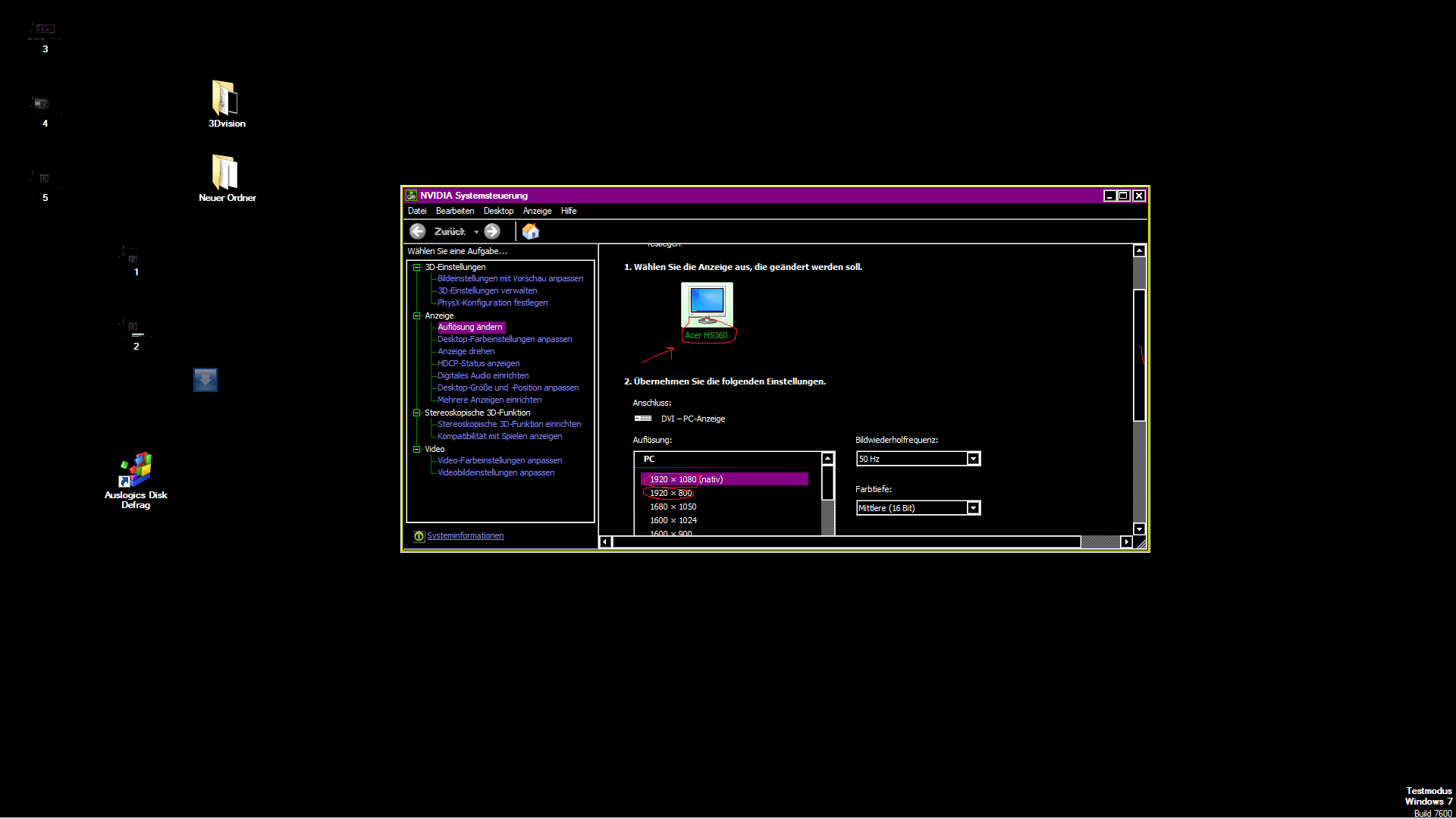
The first res. in the box of the utility will always be window´s and nvidia´s native resolution of your screen device! After you have added resolutions, and arranged them, close the utility and restart Windows. After boot up, you will be able to choose 1920x1080 60hz (you might have two now - but one will be interlaced with 120hz). I will add a few screenshots from the utility, and from the Nvidia panel showing 1920x800 in the normal resolution area, not under customized ones. If I would move 1920x800 in the utility on position number one, it would be native! And 1920x800 is interlaced at 100/120 hz! Please also notice 1920x1080 as native resolution in the nvidia panel - the acer is 720 native! And now he is also interlaced...
Have fun with Bluray playback. As i do not have a drive yet, so I tested it with windvd and fullhd3d files and other 3d files. Perfect!
Regards
Marc
| Description: |
|
| Filesize: |
110.99 KB |
| Viewed: |
7622 Time(s) |
|
| Description: |
|
| Filesize: |
68.38 KB |
| Viewed: |
7595 Time(s) |
|
| Description: |
|
| Filesize: |
78.11 KB |
| Viewed: |
7590 Time(s) |
|
Last edited by noos@xp37+ on Sat Feb 09, 2013 2:49 pm; edited 2 times in total
|
|
| Back to top |
|
 |
dvh99

Joined: 25 Dec 2009
Posts: 2158
Location: nederland
|
| Posted: Thu Feb 07, 2013 3:12 pm Post subject: |
|
|
does this program leave the porch settings unchanged?
if so i will give it a try.
_________________
1 answer always poses multiple questions.
marquee 9500ultra HD10L moome hdmi1.3 v3+ some mods.
|
|
| Back to top |
|
|
noos@xp37+
Joined: 17 Jun 2008
Posts: 464
Location: Berlin/Munich
|
| Posted: Thu Feb 07, 2013 3:45 pm Post subject: |
|
|
| dvh99 wrote: | does this program leave the porch settings unchanged?
if so i will give it a try. |
....you can customize your resolution as you want.
|
|
| Back to top |
|
|
CasetheCorvetteman

Joined: 09 Nov 2008
Posts: 6326
Location: Australia
|
| Posted: Fri Feb 08, 2013 7:08 am Post subject: |
|
|
Good stuff, i was playing with this a while back but just didnt have enough time.
How does 1080i look on 3D? No ghosting? I use the nVIDIA USB emitter and find on 16:9 movies there is a slight ghosting on the bottom edge, 2.35:1 is perfect. I had a feeling it was the emitter that is to blame cause it does it on my F700P no matter what refresh rate, and it flickers like a barstard on 72Hz or less, so its not decay issues!!
|
|
| Back to top |
|
|
noos@xp37+
Joined: 17 Jun 2008
Posts: 464
Location: Berlin/Munich
|
| Posted: Fri Feb 08, 2013 8:01 am Post subject: |
|
|
| CasetheCorvetteman wrote: | Good stuff, i was playing with this a while back but just didnt have enough time.
How does 1080i look on 3D? No ghosting? I use the nVIDIA USB emitter and find on 16:9 movies there is a slight ghosting on the bottom edge, 2.35:1 is perfect. I had a feeling it was the emitter that is to blame cause it does it on my F700P no matter what refresh rate, and it flickers like a barstard on 72Hz or less, so its not decay issues!! |
Hello,
my Ultra has a P43 green. But if 1080i or p, that should not matter with ghosting, or?
The nvidia usb emitter/software knows the processing time of the nvidia 3d vision ready display device - and that is a small number of devices. (That is why nvidia tells you on the support hotline when you call them because of ghosting: Your device is not officially supported...). But if you have a slight USB delay in your PC, you might have ghosting with a 3d vision ready device, as the sync is too late with the usb emitter. ....bottom ghosting (red/green/blue, as normal "non P43 ghosting" would be green only.) But it can be solved:
At first, you can have this right, by inputting the sync signal of the moome card (or a digital projector) into the nvidia usb emitter. There is an input!
But, your projector might still handle the data on a slightly different speed, so I use porches (about 100 @ my Ultra) to move the picture into the sync of the glasses. Or you get glasses that can adjust the shutter timing - that should solves all problems at once (but might be adjusted for every resolution).
Regards
Marc
|
|
| Back to top |
|
|
CasetheCorvetteman
Joined: 09 Nov 2008
Posts: 6326
Location: Australia
|
| Posted: Fri Feb 08, 2013 12:43 pm Post subject: |
|
|
|
The F700P has a very fast decay on green, its not that. My computer has no lag on USB, its not that. Moome is built into the XG, but i use RGB HV input.
|
|
| Back to top |
|
|
noos@xp37+
Joined: 17 Jun 2008
Posts: 464
Location: Berlin/Munich
|
| Posted: Fri Feb 08, 2013 2:15 pm Post subject: |
|
|
| CasetheCorvetteman wrote: | | The F700P has a very fast decay on green, its not that. My computer has no lag on USB, its not that. Moome is built into the XG, but i use RGB HV input. |
Right, so do you have ghosting on blue and red? If yes, than it is sync related. Must not be a usb delay, but might be wrong calcualted for your display device by the nvidia software. Try to get the sync from a moome box, or a "DVI HDMi 3d sync stripper". Or test glasses with adjustable timings...
(there are also analog 3d sync strippers - but you do not want them in your video chain....)
|
|
| Back to top |
|
|
CasetheCorvetteman
Joined: 09 Nov 2008
Posts: 6326
Location: Australia
|
| Posted: Sat Feb 09, 2013 2:52 am Post subject: |
|
|
|
Yep, blue and red indeed.
|
|
| Back to top |
|
|
noos@xp37+
Joined: 17 Jun 2008
Posts: 464
Location: Berlin/Munich
|
| Posted: Fri Feb 15, 2013 9:08 am Post subject: |
|
|
|
Just a note: If you do not want to mess around with inf files to get framesequential to work, or avoid the red warning message, just use nvidia forceware drives up 280.somthing or below. With this, you will be able to chose and use the CRT mode for 3d!
|
|
| Back to top |
|
|
|
|
|
|
|
You cannot post new topics in this forum
You cannot reply to topics in this forum
You cannot edit your posts in this forum
You cannot delete your posts in this forum
You cannot vote in polls in this forum
You cannot attach files in this forum
You can download files in this forum
|
Forum powered by phpBB © phpBB Group
|
|



