| Author |
Message |
dirk37
Joined: 23 Dec 2012
Posts: 9
Location: Washington
|
| Posted: Sun Dec 23, 2012 10:46 pm Post subject: Runco DTV 1100 Inputs not working |
|
|
|
Hey everyone, I'm pretty new to CRT projectors so this may just be a simple problem, but I haven't been able to figure anything out even after hours of searching. So I picked up a Runco DTV 1100 at the local goodwill for $80, the tubes only have about 800 hours on them and I believe it came out of a Church so it was only run for a few hours a day. I brought it home and hooked it up to a DVD player with a component cable I made with component connectors on one side and coaxial ones on the other, but only the green channel worked. All of the colors work in the menu and I'm able to change settings no problem, but for whatever reason I cannot get it to recognize any input. I purchased an RGB to RGBHV cable and connected it to several computers, and I can hear the frequency of the power supply change but nothing comes up on the screen. I tried reconnecting it to the DVD player like I originally had it but now none of the channels work. I made my own cable that adapted RGB to a serial for port 3 (following wiring diagrams) and once again I could hear the frequency change when I connected my computer, but still no picture. I think one of the input boards has failed but I'm not sure where to start looking or what to do at this point, all of the diagnostic lights inside show no problems so I'm kind of lost. I'd really love to get this working because it looks awesome and I would be sad to have to get rid of it. Thanks in advance!
|
|
| Back to top |
|
 |
Curt Palme
CRT Tech
Joined: 08 Mar 2006
Posts: 24396
Location: Langley, BC
TV/Projector: All of them!
|
| Posted: Sun Dec 23, 2012 10:58 pm Post subject: |
|
|
First thing, you need to read this:
http://curtpalme.com/CRTPrimer.shtm
Component out of the DVD player is NOT the same as RGBHV, you need a transcoder. The Runco does not have video or Svideo inputs, so the best you can do right now is check to see if the internal test patterns work. I'd get a VGA to 5 BNC cable, making sure that the computer is outputting negative sync, then select input 5 to see if you get an image.
While it is possible that the input board has failed, it's doubtful, as they are pretty reliable.
Get that VGA to 5 BNC cable at a computer store, should be under $20 for a 6' one.
|
|
| Back to top |
|
|
Phoenixed
Joined: 13 Oct 2011
Posts: 514
Location: The mitten
|
| Posted: Sun Dec 23, 2012 11:00 pm Post subject: |
|
|
Firsts to say "You Suck!" 
_________________
Planar PD-8150/Runco LS-5
|
|
| Back to top |
|
|
dirk37
Joined: 23 Dec 2012
Posts: 9
Location: Washington
|
| Posted: Sun Dec 23, 2012 11:11 pm Post subject: |
|
|
Alright I read through that and I see why nothing is working  I have a VGA to RGBHV (That's what I meant to say instead of RGB to RBGHV in my post), how would one determine if the computer is putting out a negative sync or not? I've hooked it up before with no results and perhaps that is the problem. I have a VGA to RGBHV (That's what I meant to say instead of RGB to RBGHV in my post), how would one determine if the computer is putting out a negative sync or not? I've hooked it up before with no results and perhaps that is the problem.
|
|
| Back to top |
|
|
Curt Palme
CRT Tech
Joined: 08 Mar 2006
Posts: 24396
Location: Langley, BC
TV/Projector: All of them!
|
| Posted: Sun Dec 23, 2012 11:28 pm Post subject: |
|
|
|
Some video drivers will give you an option to select positive or negative sync, but I'll let some computer guys chime in on this one..
|
|
| Back to top |
|
|
dirk37
Joined: 23 Dec 2012
Posts: 9
Location: Washington
|
| Posted: Sun Dec 23, 2012 11:59 pm Post subject: |
|
|
So I just did some tests with my oscilloscope and and the VGA to RGBHV and got some interesting results:
On my laptop:
R,G and B had no signal out
V and H sync had +4.5 volts
On my Desktop:
R,G and B had what looked to be proper video signals
V Sync was positive
H Sync had a very high frequency signal
Since I first tested the projector with the cable connected to my laptop, I'm wondering if perhaps that 4.5 volt signal messed something up. I'm going to see if I can change the V-Sync polarity and test to see if that's the problem.
|
|
| Back to top |
|
|
Curt Palme
CRT Tech
Joined: 08 Mar 2006
Posts: 24396
Location: Langley, BC
TV/Projector: All of them!
|
| Posted: Mon Dec 24, 2012 12:08 am Post subject: |
|
|
WEll if you're that much of a tech, port 3 will take positive sync signals, you just need to wire the 9 pin connector properly.
Yay, a tech! Makes life here so much easier.
THe 5 volts shouldn't have done anything...
Laptop maybe isn't selected to output on the VGA connector? If you don't boot up without something plugged into it, they are usually dead.
|
|
| Back to top |
|
|
dirk37
Joined: 23 Dec 2012
Posts: 9
Location: Washington
|
| Posted: Mon Dec 24, 2012 12:36 am Post subject: |
|
|
I try my best to understand what I'm messing with I built a cable using the information on this page:
http://www.curtpalme.com/Barco_Port3_Input.shtm as I understand that Barco 1209's and Runco DTV 1100's are essentially equivalent. I hooked it up but once again nothing shows up. I built the cable in a haste so it may be faulty, I'm going to build another one and see if that works. As for the laptop there wasn't any output set to the port which was why the port was dead.
|
|
| Back to top |
|
|
dirk37
Joined: 23 Dec 2012
Posts: 9
Location: Washington
|
| Posted: Mon Dec 24, 2012 1:14 am Post subject: |
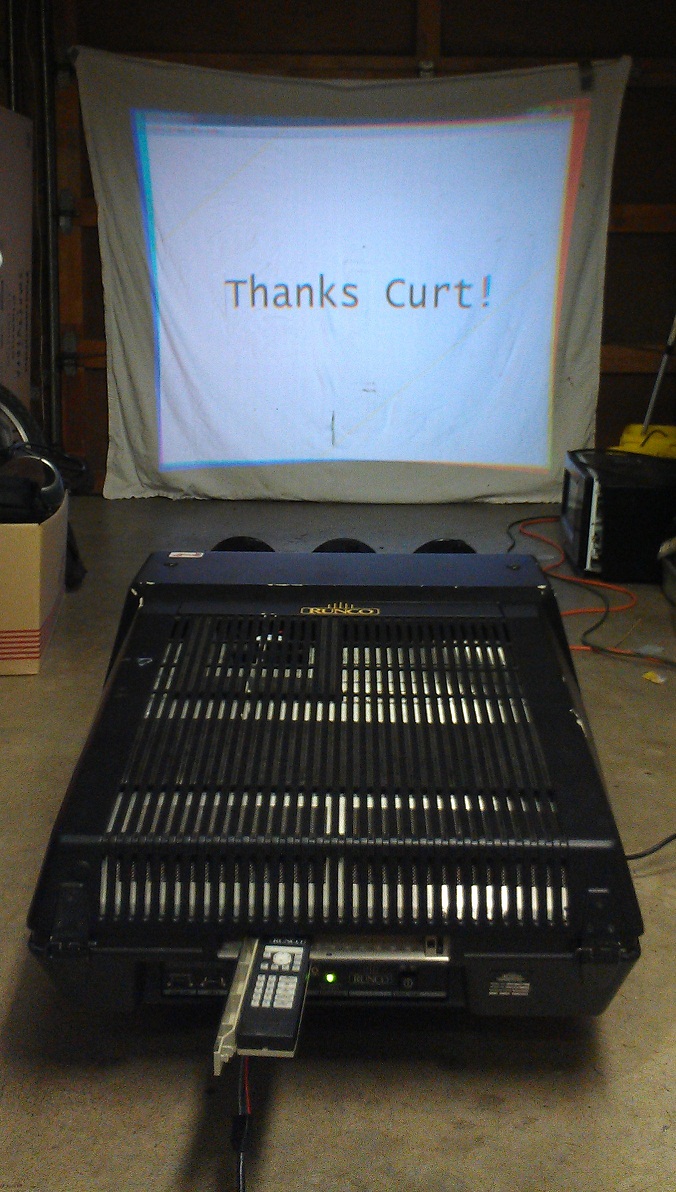
|
|
I made and tested the new cable but still nothing. I can hear the frequency change but the Adjust menu always says no source on both port 3 and port 5, what to do?
Edit:
Turns out I just wasn't selecting the input! 
| Description: |
|
| Filesize: |
298.42 KB |
| Viewed: |
6156 Time(s) |
|
|
|
| Back to top |
|
|
Curt Palme
CRT Tech
Joined: 08 Mar 2006
Posts: 24396
Location: Langley, BC
TV/Projector: All of them!
|
| Posted: Mon Dec 24, 2012 2:57 am Post subject: |
|
|
Nice! Now go converge.
Follow the guided setup, and make sure that you're using a live input along with the 'genlocked' test pattern. THe manual isn't clear about that.
|
|
| Back to top |
|
|
Decibel

Joined: 31 May 2007
Posts: 904
Location: Roma - Italia
|
| Posted: Mon Dec 24, 2012 9:08 am Post subject: |
|
|
80$
I would die!
You suck!!!!
_________________
Domenico (Barco fan!)
|
|
| Back to top |
|
|
ElTopo

Joined: 07 Nov 2006
Posts: 1640
|
| Posted: Mon Dec 24, 2012 11:14 am Post subject: |
|
|
Ultra nice score, congrats!
_________________
Barco Cine 9 the one and only
|
|
| Back to top |
|
|
dirk37
Joined: 23 Dec 2012
Posts: 9
Location: Washington
|
| Posted: Tue Dec 25, 2012 1:20 am Post subject: |
|
|
Thanks! The more I think about it the more I realize how lucky I was to find it and buy it even though at the time I didn't even know what it was  I'm excited to get it mounted on the ceiling and start building a home theater I'm excited to get it mounted on the ceiling and start building a home theater
|
|
| Back to top |
|
|
secstate
Joined: 20 Mar 2006
Posts: 720
|
| Posted: Tue Jan 01, 2013 4:59 pm Post subject: |
|
|
|
Cograts! You have now set a new low price for Runco 1100s. I paid $100/each for my two some years ago but they did have like 14-15k hours on them. So I had to get a new green from Greg and swap out the quad in the one I used. They throw an amazing picture even with 15k hours mine is pretty much still rock solid and the picture is amazing. At this point I probably will not swap over to digital until is has a major failure. Mostly because I am cheap and happy with the picture.
|
|
| Back to top |
|
|
|
|




