| Author |
Message |
elastikman
Joined: 22 Jun 2012
Posts: 8
|
| Posted: Sat Jun 23, 2012 11:57 am Post subject: I got a Barco 1029s Graphics!! Some newbie questions..:) |
|
|
Hi to all!
My name is Luis i am from Portugal.
I got a 1029s Graphics + Iris 3 with HD120 lens.
it was from a guy that is dad ask him to got rid of this because he want free space on garage.
The guy put this online offering free of charge to anyone that could pick this up at is adress.
After some quick reading about this projector.
I could not refuse this oportunity.. : ) i went to his place...
 I was astonished by the size!! I was astonished by the size!!
it barely fit on my car truck!! 
At this moment i have the projector sit still on a bench.
I already turn it on and it seens working normaly, no sparks at least , light beams on all lens. 
But now i got questions...
This is good model?
its worth spend time and..some money on it?
I already read many info about this projector. But some question still preveals.
I am rebuilding my attic and my ideia is to build a economic home theather with this projector
There is any steps to check general conditions of it?
I dont have a clue how to start....
i got more question but i will ask later
Thanks.
|
|
| Back to top |
|
 |
gjaky

Joined: 05 Jun 2010
Posts: 2802
Location: Budapest, Hungary
|
| Posted: Sat Jun 23, 2012 1:01 pm Post subject: |
|
|
As you can see here: http://www.curtpalme.com/Projector_Rankings.shtm your new pj belongs to the top class, it can do decent 1080P, it is a very desirable projector.
the biggest concern is the condition of the tubes, barco guys surely chimne in soon and tell you how to check the runtime of the pj. But the best you can do is get the lenses off and watch the tubes for burn-in, or any brownish sign on the tubeface, if you have heavy wear you most likely need to replace the bad tubes, which is not cheap (depending on which tubes need to be replaced)
_________________
projectors in the past : NEC 6-9PG xtra, Electrohome Marquee 6-7500, NEC XG 1351 LC ( with super modified Electrohome VNB neckboard !!!)
current: VDC Marquee 9500LC
The MOD: VNB-DB, VIM-DB
|
|
| Back to top |
|
|
macgyver655
Joined: 22 Aug 2007
Posts: 8508
|
| Posted: Sat Jun 23, 2012 1:51 pm Post subject: |
|
|
|
Gjaky has good suggestions but I say just hook a source up to it and see if it has a picture. If it does then learn how to set it up. After setup up just enjoy some movies. Don't even worry about tube condition. I wouldn't throw money at anything until it has had a good test drive.....
|
|
| Back to top |
|
|
Curt Palme
CRT Tech
Joined: 08 Mar 2006
Posts: 24396
Location: Langley, BC
TV/Projector: All of them!
|
| Posted: Sat Jun 23, 2012 2:12 pm Post subject: |
|
|
It's a great model, but first you have to get the model right. It's a 1209s!
Welcome to the forum! Download the manuals here:
http://www.curtpalme.com/Barco1208.shtm
You can start very simply with a video or Svideo signal from a DVD player, then once you get used to the setup, you can go to a computer or an HDMI signal with an adapter. Pull the lenses off the front of the set, and post a pix of the tube faces so we can tell you what condition they are. I think you need 5 posts to post pictures, so go to the forum test area to post some to get to 5 posts.
|
|
| Back to top |
|
|
CasetheCorvetteman

Joined: 09 Nov 2008
Posts: 6326
Location: Australia
|
| Posted: Sun Jun 24, 2012 12:57 am Post subject: |
|
|
| macgyver655 wrote: | | Gjaky has good suggestions but I say just hook a source up to it and see if it has a picture. If it does then learn how to set it up. After setup up just enjoy some movies. Don't even worry about tube condition. I wouldn't throw money at anything until it has had a good test drive..... |
That is also very good advice, never know what can go wrong!!
|
|
| Back to top |
|
|
jeffslife

Joined: 17 Apr 2010
Posts: 4190
Location: ohio usa
|
| Posted: Sun Jun 24, 2012 12:57 am Post subject: |
|
|
This is how we do it !
_________________
We are ALL job creators !
|
|
| Back to top |
|
|
elastikman
Joined: 22 Jun 2012
Posts: 8
|
| Posted: Sun Jun 24, 2012 5:09 pm Post subject: |
|
|
Thanks to all for the reply.
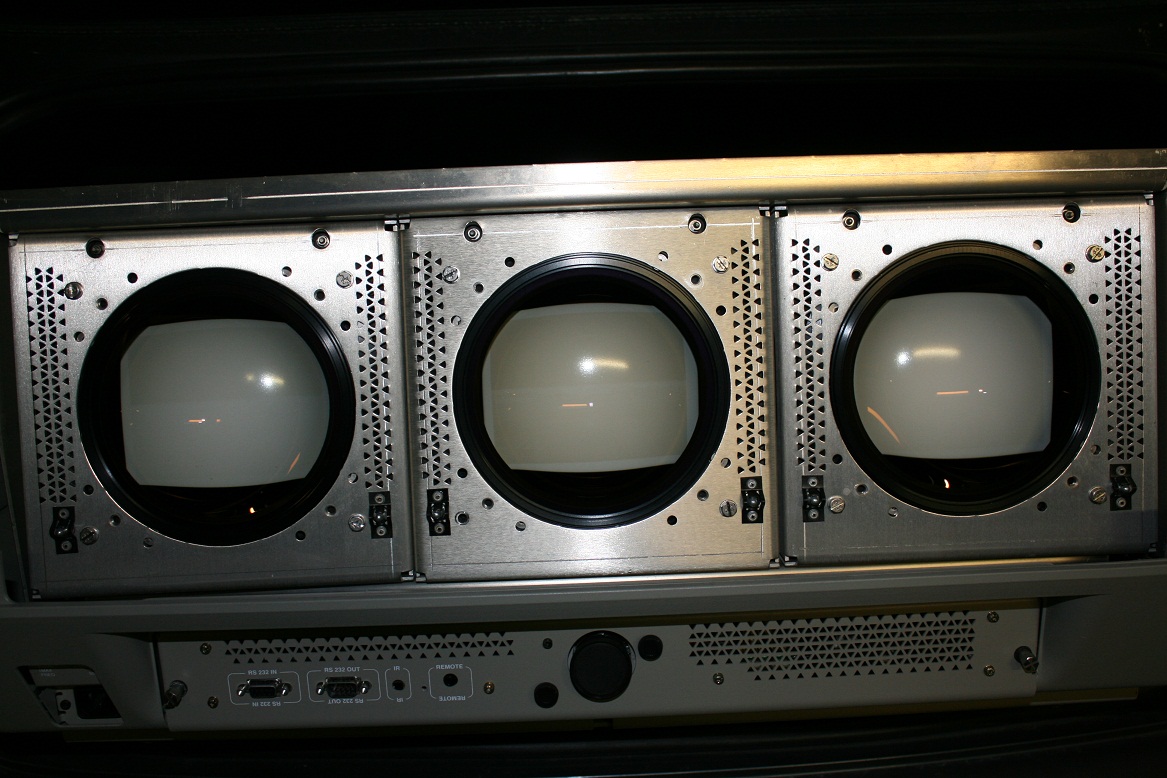
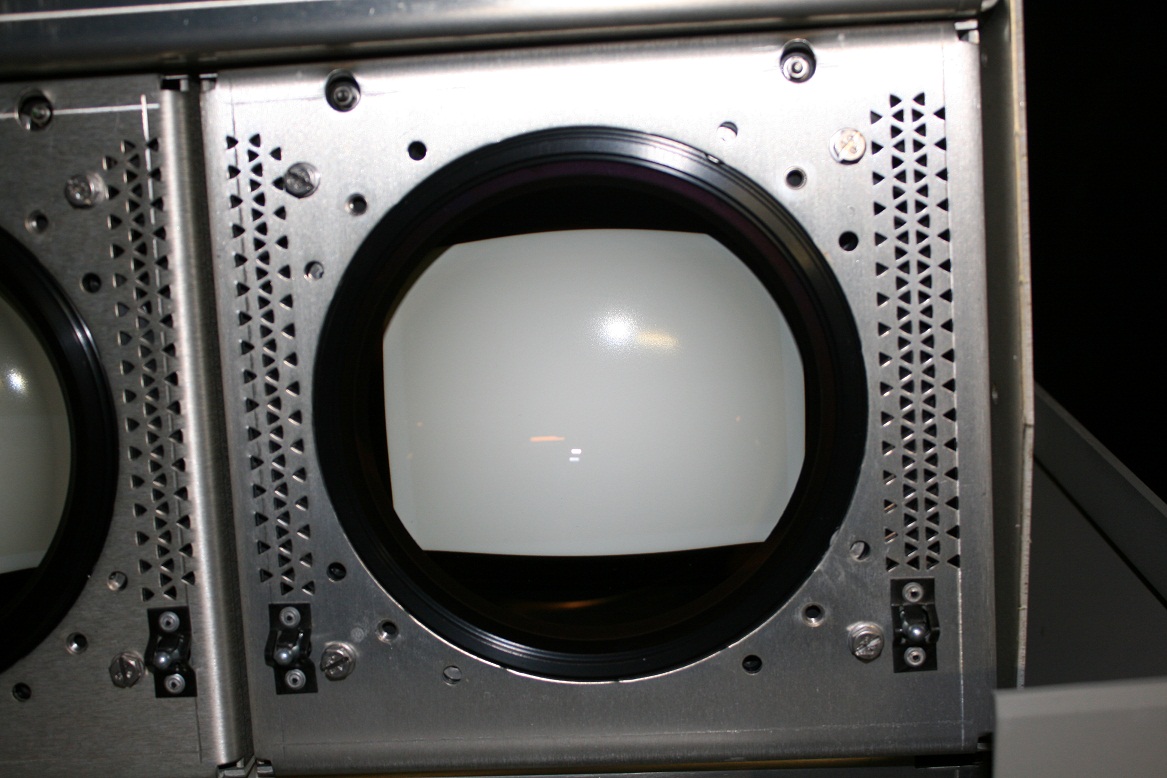
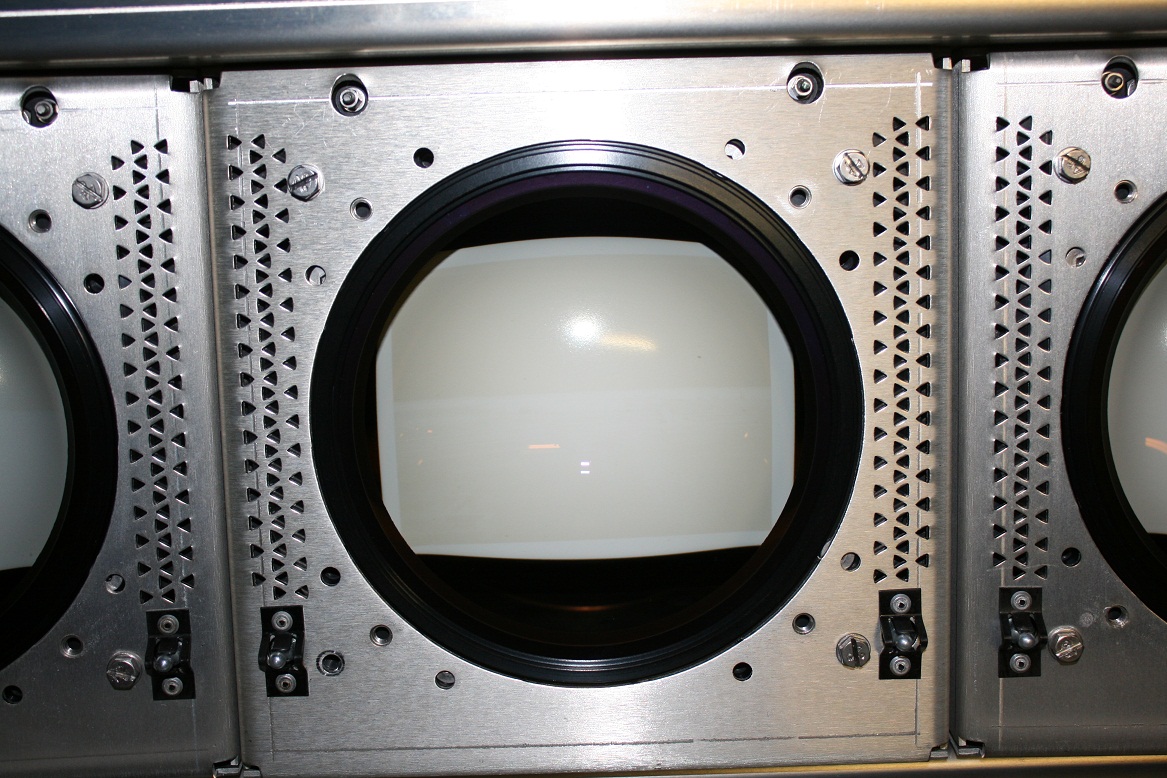
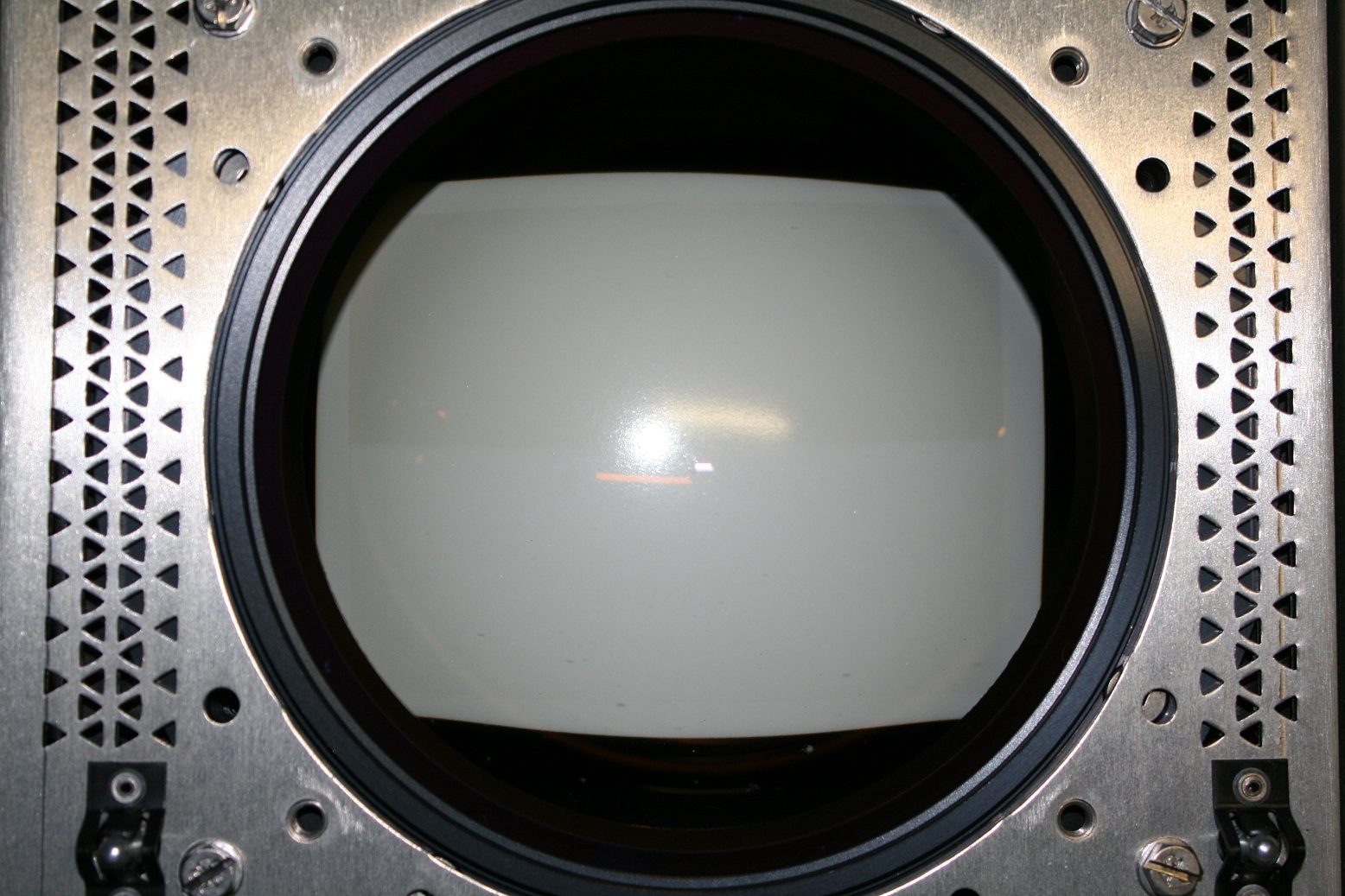
I remove the lens and took some pictures.
the middle tube (green) is the one that see more discoloration.
What do you think??
| Description: |
|
| Filesize: |
273.88 KB |
| Viewed: |
9014 Time(s) |
|
| Description: |
|
| Filesize: |
231.49 KB |
| Viewed: |
8979 Time(s) |
|
| Description: |
|
| Filesize: |
344.1 KB |
| Viewed: |
9010 Time(s) |
|
| Description: |
|
| Filesize: |
469.6 KB |
| Viewed: |
8984 Time(s) |
|
|
|
| Back to top |
|
|
Boilermaker
Joined: 21 May 2006
Posts: 527
|
| Posted: Sun Jun 24, 2012 5:26 pm Post subject: |
|
|
Very unusual wear pattern. It looks as though it was used for a 2.4 AR and he was using the top half of the tubes so he could use the bottom half when the tops got worn bad enough. Looks to me like you could finish what he started by setting it up with a 2.4 screen and use the bottom half.
Also looks like it was used in rear configuration as there is no keystone evident.
You got lucky!
Bob
|
|
| Back to top |
|
|
barclay66

Joined: 27 Jun 2011
Posts: 1304
Location: Germany
TV/Projector: Marquee 9500 Ultra
|
| Posted: Sun Jun 24, 2012 5:42 pm Post subject: |
|
|
Hi,
looks more to me that it came out of a simulator. The horizon was at the middle. Therefore the blue and green tubes are more worn above that line.
Regards,
barclay66
|
|
| Back to top |
|
|
Boilermaker
Joined: 21 May 2006
Posts: 527
|
| Posted: Sun Jun 24, 2012 5:46 pm Post subject: |
|
|
Yes - That makes more sense! Even with the pretty good wear, he should be able to set it up for a scope screen and get many hours out of the bottom with a beautiful picture.
Bob
|
|
| Back to top |
|
|
elastikman
Joined: 22 Jun 2012
Posts: 8
|
| Posted: Sun Jun 24, 2012 6:22 pm Post subject: |
|
|
Hi!
You are saying that the best option is to use the bottom for a 2:4 ratio screen?
or still use the top until it have more wear ?
|
|
| Back to top |
|
|
Curt Palme
CRT Tech
Joined: 08 Mar 2006
Posts: 24396
Location: Langley, BC
TV/Projector: All of them!
|
| Posted: Sun Jun 24, 2012 6:22 pm Post subject: |
|
|
I guess it depends on how picky you are. That change of color would drive me nuts, but do set the projector up with the tubes as is, see if you like it, etc.
I do have some lightly worn G and B tubes, that are far from perfect, but will give a better image than what you have.
|
|
| Back to top |
|
|
elastikman
Joined: 22 Jun 2012
Posts: 8
|
| Posted: Sun Jun 24, 2012 6:37 pm Post subject: |
|
|
Thanks for the advise
one last question for now...
Can i use the "Barco Throw Distance Calculator" to help set the projector?
Or is need to change some values in that?
i read a member post he says "It will not allow you to maximise phosphor usage"
|
|
| Back to top |
|
|
Phoenixed
Joined: 13 Oct 2011
Posts: 514
Location: The mitten
|
| Posted: Sun Jun 24, 2012 11:54 pm Post subject: |
|
|
It will give you a rough guideline, but its b est to Max out the image on the tube face or in this case within the wear pattern and scoot the PJ.till it fills the screen.
_________________
Planar PD-8150/Runco LS-5
|
|
| Back to top |
|
|
CasetheCorvetteman
Joined: 09 Nov 2008
Posts: 6326
Location: Australia
|
| Posted: Mon Jun 25, 2012 9:48 am Post subject: |
|
|
|
They sure did use alot of the surface area there is no doubt about that!!
|
|
| Back to top |
|
|
kal
Forum Administrator

Joined: 06 Mar 2006
Posts: 18114
Location: Ottawa, Canada
TV/Projector: JVC DLA-NZ7
|
| Posted: Mon Jun 25, 2012 3:02 pm Post subject: |
|
|
| Curt Palme wrote: | I guess it depends on how picky you are. That change of color would drive me nuts, but do set the projector up with the tubes as is, see if you like it, etc.
|
+1.
I saw a set of Barco 808 projectors many years ago that came out of a simulator as well that also had uneven wear due to horizon just like these tubes. Except that with these 808 units it was extremely hard to see the wear on the tube surfaces. You had to project an image and then the uneven brightness was really obvious.
In the case of your projector, you can very easily see the uneven wear so it'll look 10 times worse up on the screen. You can try it yourself. Just throw a quick picture or even internal test pattern up on a white-ish wall and you'll see. These tubes are (in my humble opinion) unsuable.
You can't only use the top or bottom half of the tube and do a 2.40:1 setup. It won't fit. You'd be pushing the circuitry too hard anyway.
You'll need to replace the tubes or ditch the projector. You can try evening out the wear but it's very difficult to do exactly. If slightly off it'll make it worse.
Kal
_________________

Support our site by using our affiliate links. We thank you!
My basement/HT/bar/brewery build 2.0
|
|
| Back to top |
|
|
zGman
Joined: 22 May 2006
Posts: 599
|
| Posted: Tue Jun 26, 2012 5:38 am Post subject: |
|
|
This is a very nice PJ - really easy to work with and will run all the HD graphics you can throw at it.
Spend some time with it - if you have a laptop or PC some inexpensive cables (Dsub15 to bnc)
will provide a link for high resolution graphics and you can get some experience. The tubes will
be good for experimentation (no need to worry about using them up).
Once you get a feel for what the machine can do then you can decide whether you want to
retube. I would say enjoy what you have and learn all you can and then decide what to do.
And yes I have a 1209S, and use it often... also a BG808S LC, and two 9500 Ultra - I like crt pj's....
Welcome to CRT and Enjoy!
G
|
|
| Back to top |
|
|
garyfritz

Joined: 08 Apr 2006
Posts: 12088
Location: Fort Collins, CO
|
| Posted: Tue Jun 26, 2012 7:15 pm Post subject: |
|
|
| barclay66 wrote: | | looks more to me that it came out of a simulator. The horizon was at the middle. Therefore the blue and green tubes are more worn above that line. |
Most of the time  sky is "up" and grass is "down." Why would both of them be worn above the horizon line?? I would expect the green to be worn above (inverted image) and the blue below. sky is "up" and grass is "down." Why would both of them be worn above the horizon line?? I would expect the green to be worn above (inverted image) and the blue below.
|
|
| Back to top |
|
|
gjaky
Joined: 05 Jun 2010
Posts: 2802
Location: Budapest, Hungary
|
|
| Back to top |
|
|
ecrabb
Forum Moderator

Joined: 13 Mar 2006
Posts: 15909
Location: Utah
TV/Projector: JVC RS40, Epson 5010
|
| Posted: Tue Jun 26, 2012 7:57 pm Post subject: |
|
|
| garyfritz wrote: | | Most of the time sky is "up" and grass is "down." Why would both of them be worn above the horizon line?? I would expect the green to be worn above (inverted image) and the blue below. |
You're thinking of the grass as the "cartoon green", Gary... It's not. Especially in the last 10 years as sims have started using more satellite imagery, the APL below the horizon is much, much lower... Compared to the sky, it's darker, mottled/mixed colors, and it results in a more even wear between the tubes, and much less of it.
Look at a few of these sim images, and you can see why the sky wears the blow so much more...


In the military (who had/has so many of these projectors), most flight sims aren't even really "flight sims" as much as they're "mission trainers". With mission trainers, the emphasis is on the trainees honing operational skills. So, they're practicing strategy, communication, coordination, execution, etc. For example, two guys in 'virtual' A-10s flying a close air support mission together, supporting a virtual blue force on the ground, working with a virtual forward air controller (FAC), to take out a convoy or destroy an enemy emplacement.
With most of the mission trainers, the guys running the sim load a scenario, and it starts with the plane sitting on the runway ready for takeoff or even "parked" in the air. So, the projector sees a static image like this as almost as much as it sees a moving image...

If anybody's interested, I'll see if I can find an unclassified video I created for a National Guard group that runs the training exercises... Pretty cool seeing/hearing how they do it.
SC
|
|
| Back to top |
|
|
|
|





