| Author |
Message |
jeffslife

Joined: 17 Apr 2010
Posts: 4190
Location: ohio usa
|
| Posted: Thu Apr 19, 2012 10:02 pm Post subject: What is the best screen size and aspect ratio ? |
|
|
I currently have 110" 16 9 screen. I use black velvet masking when I have a 2 30 or 2 40 aspect ratio. Its about 50-50
between the 2 aspect ratios. I would prefer the 16 9 all the time just for the larger screen size. If I use a VP I can set the aspect ratio, BUT does that just stretch the image, basically distorting it or does the VP make the image correct to the aspect ratio ?
So I am taking a poll, what size screen and aspect ratio do you use ? What pj and why ?
I am asking for tips on the installation of my G90.
I have an 11' X 7' screen to work with.
Still using the G70 for now.
Thanks for the input.
_________________
We are ALL job creators !
|
|
| Back to top |
|
 |
CasetheCorvetteman

Joined: 09 Nov 2008
Posts: 6326
Location: Australia
|
| Posted: Fri Apr 20, 2012 1:55 am Post subject: |
|
|
I use a 5:4 for video games, and a 1.78:1 for 1.78 and 1.85 movies, and 2.35:1 for 2.35 and 2.4 movies. Runco DTV991 and cause i can 
|
|
| Back to top |
|
|
jeffslife
Joined: 17 Apr 2010
Posts: 4190
Location: ohio usa
|
| Posted: Fri Apr 20, 2012 5:48 am Post subject: |
|
|
So do you mask it or what ?
_________________
We are ALL job creators !
|
|
| Back to top |
|
|
CasetheCorvetteman
Joined: 09 Nov 2008
Posts: 6326
Location: Australia
|
| Posted: Fri Apr 20, 2012 7:04 am Post subject: |
|
|
Yeah mate, i use black curtains. Its not finished yet, but still useable, just need to finish it all off so i can quickly change screen aspects.
Here are some pics ive posted a few times before:
1.78:1

2.35:1

|
|
| Back to top |
|
|
RogerH
Joined: 14 Jul 2010
Posts: 64
Location: Minneapolis
|
| Posted: Fri Apr 20, 2012 3:29 pm Post subject: |
|
|
I built my screen with variable shades before I went HD and when I would still sometimes use the full screen for 4:3. The velvet shades are motorized and can adjust from full 4:3 to something wider than the widest aspect I ever expected to display.
Since I went to HD the projector setup was optimized for 16x9 (right or wrong). I can no longer go full screen, but with 4x3 material (very rare now) I run it pillarboxed within the 16x9 shade opening. Since 2.35 movies are played more often I will usually move the shades to fit but I use the video processor to keep the black bars above and below the 2.35 image slightly illuminated to keep the tube wear even over the full 16 x 9 area. The 20%-30% border illumination on the top and bottom of 2.35 movies does not illuminate the black velvet at all.
Sometimes depending on the 2.35 movie I will just use the VP to zoom in to fit the 16x9 space. If I had a different projection system and a larger screen I would personally prefer settling on a huge 2.35 aspect.
I'm using an NEC XG projector with a 120" (4:3) screen.


|
|
| Back to top |
|
|
TheVerge
Joined: 19 Jul 2009
Posts: 928
|
| Posted: Fri Apr 20, 2012 7:00 pm Post subject: |
|
|
| CasetheCorvetteman wrote: | Yeah mate, i use black curtains. Its not finished yet, but still useable, just need to finish it all off so i can quickly change screen aspects.
Here are some pics ive posted a few times before:
1.78:1
2.35:1
|
Sidetrack, do you have a Sega Saturn?
|
|
| Back to top |
|
|
jeffslife
Joined: 17 Apr 2010
Posts: 4190
Location: ohio usa
|
| Posted: Fri Apr 20, 2012 11:06 pm Post subject: |
|
|
I wish someone would explain the whole VP thing to me I am still unclear on that.
_________________
We are ALL job creators !
|
|
| Back to top |
|
|
CasetheCorvetteman
Joined: 09 Nov 2008
Posts: 6326
Location: Australia
|
| Posted: Sat Apr 21, 2012 7:30 am Post subject: |
|
|
RogerH, that is a work of art mate, looks brilliant!! I also have settings in my projector for zoomed versions of the 2 aspects for content that doesnt automatically fill the screen in its correct ratio ( there is abit of that getting around on DVD these days over here... )
| jeffslife wrote: | | I wish someone would explain the whole VP thing to me I am still unclear on that. |
Video Processor. It takes a signal in, and processes it to what you want to send to the projector.
| TheVerge wrote: |
Sidetrack, do you have a Sega Saturn? |
Yes, i have 3 of them A white and skeleton Japan versions, and a model 1 Euro version.

|
|
| Back to top |
|
|
jeffslife
Joined: 17 Apr 2010
Posts: 4190
Location: ohio usa
|
| Posted: Sat Apr 21, 2012 2:58 pm Post subject: |
|
|
So what is the largest 2 35 screen I could run 1080p on my g90 with ?
_________________
We are ALL job creators !
|
|
| Back to top |
|
|
KrisRoberts
Joined: 21 Jan 2007
Posts: 115
Location: San Diego
|
| Posted: Sat Apr 21, 2012 3:27 pm Post subject: |
|
|
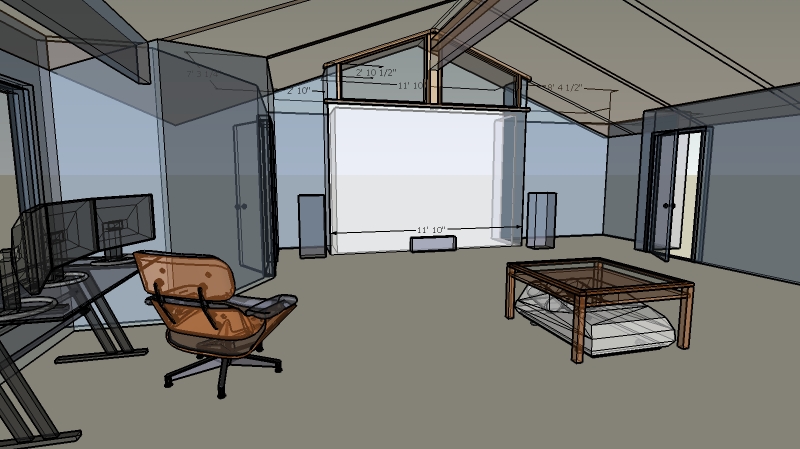
I run my G90 with an 11'10" wide screen which comes out to 168" diagonally for 16:9. I dont have a system for matting it down for other aspect ratios and it doesn't bother me.
I have the rasters maximized on the tube face and have gone over the physical setup many times before I was really happy with it - but its been a few years now since the last time I tweaked with it and its been rock solid.
Many said a screen that big was just way too much for a single G90, but in my space its the most natural size for the room. I did experiment with alternatives and ultimately decided that pulling it back and utilizing the entire surface I have was what I liked the best. It makes me very happy.
|
|
| Back to top |
|
|
HaydnG90

Joined: 22 May 2006
Posts: 1356
|
| Posted: Sat Apr 21, 2012 9:10 pm Post subject: |
|
|
Kris,
How many ft lamberts are you getting off a 168" diag screen? Whats the gain. I'm impressed you're happy projecting an image that size from a single G90. I've been nervous about the thought of going from a 100" to 123" StudioTek 130 G3 screen.
|
|
| Back to top |
|
|
KrisRoberts
Joined: 21 Jan 2007
Posts: 115
Location: San Diego
|
| Posted: Sun Apr 22, 2012 6:46 am Post subject: |
|
|
I'll see if I can dig out the files from HCFR on the last color/greyscale runs I did, I think that had the ft lamberts in there. The screen itself is a diy behr upw with the pearlescent top coat, I dont know how to measure it but I doubt its much or at all above 1.
My room is pretty effectively light controlled and I have two other projectors - a 720p DLP Acer H5360 for stereo 3d stuff and a 1080p LCD Epson 8350 for general PC stuff and games. The G90 beats both of them with no question and when they are set to run in their cinema modes, their light output isnt that much higher...
|
|
| Back to top |
|
|
CIR Engineering

Joined: 25 Aug 2008
Posts: 4269
Location: Chicago USA & Berlin Germany
|
| Posted: Sun Apr 22, 2012 4:16 pm Post subject: |
|
|
| jeffslife wrote: | | So what is the largest 2 35 screen I could run 1080p on my g90 with ? |
Jeff, you don't run 1080p with a VP on a 2.35 aspect ratio screen. You are mising the point of the VP. With 2.35 we will use your lumagen to crop the black bars off the top and bottom of a 2.35 aspect ratio movie. This leaves just the part of the picture that is the image (minus the black bars). When we project the cropped 2.35 aspect image what is left is 818x1920p, not 1080p. With the Vision processor you we will also have enough bandwidth to run the 818x1920 at 72Hz instead of just 60Hz.
For 16x9 you use 1080p because the lines for 1080p are 1080x1920.
Don't make this overly complicated. Just setup a 16x9 screen that is around 96"x54." You can go large if you like, but the 96x54 is ideal for the G90. Larger means dimmer and also the image will begin to seem less sharp the bigger you go above 96x54.
The other option is to use a 2.35 aspect screen that runs 818x1920. But than when you want to watch 16x9 you will have black bars on the sides of your 2.35 screen. You will also use a very small amount of tube phosphor because the 16x9 image will not be very large inside the 2.35 aspect.
If you want more info on masking, check out the thread I posted a while back abou my masking build.
https://www.curtpalme.com/forum_archived/viewtopic.php@t=21688.html
craigr
_________________
JETI 1501-HiRes 2nm Spectroradiometer
JETI 1211 Spectroradiometer
Photo Research PR-650 Spectroradiometer
Klein K10-A Colorimeter
Murideo Fresco SIX-G HDMI 2.x Multimedia Generator
Murideo Fresco SIX-A HDMI 2.x Analyzer
Light Illusion ColourSpace XPT Color Calibration Software
Light Illusion LightSpace XPT Pro Version 10.x Color Calibration Software
OMARDRIS JVC Software Patch to use K10-A and Jeti with JVC OEM AutoCal Software!
Sencore CR7000 CRT Tube Analyzer / Rejuvenater
Authorized Dealer for Lumagen & just about everything worth buying
www.CIR-Engineering.com - craigr@cir-engineering.com
Phone: 865-405-6892
|
|
| Back to top |
|
|
milknuggets
Joined: 27 Apr 2012
Posts: 8
|
| Posted: Sat Apr 28, 2012 9:05 am Post subject: saturn |
|
|
|
Sorry about the tangent but I must say I love the Virua fighter pic. I actually bought my crt projector for classic gaming.
|
|
| Back to top |
|
|
CasetheCorvetteman
Joined: 09 Nov 2008
Posts: 6326
Location: Australia
|
| Posted: Sat Apr 28, 2012 10:35 am Post subject: |
|
|
|
Cheers mate, thats even from a real Sega Saturn too... That is one of the reasons i stay with a CRT, for retro gaming the picture is WAY better on a CRT, in every single way, there is not one single thing that digital can do better with retro games.
|
|
| Back to top |
|
|
|
|




