| Author |
Message |
gjaky

Joined: 05 Jun 2010
Posts: 2802
Location: Budapest, Hungary
|
| Posted: Mon Jan 30, 2012 7:35 am Post subject: picture banding on my NEC |
|
|
Yesterday I managed a full setup from zero and I realized that I can't get rid of my picture banding issue on my NEC 6PG xtra. Even with all settings zeroed out with only green on screen I see banding if bright areas on the right edge of the screen (or at least near to it, but only on the right), the machine is floor-front aligned, I don't have point board installed in it. I can live with this but I'm curious about other's opinion. Could this be a timing issue or what?
_________________
projectors in the past : NEC 6-9PG xtra, Electrohome Marquee 6-7500, NEC XG 1351 LC ( with super modified Electrohome VNB neckboard !!!)
current: VDC Marquee 9500LC
The MOD: VNB-DB, VIM-DB
|
|
| Back to top |
|
 |
CasetheCorvetteman

Joined: 09 Nov 2008
Posts: 6326
Location: Australia
|
| Posted: Mon Jan 30, 2012 9:16 am Post subject: |
|
|
|
What does banding look like?
|
|
| Back to top |
|
|
AnalogRocks
Forum Moderator

Joined: 08 Mar 2006
Posts: 26706
Location: Toronto, Ontario, Canada
TV/Projector: Sony 1252Q, AMPRO 4000G
|
| Posted: Mon Jan 30, 2012 9:47 am Post subject: |
|
|
| CasetheCorvetteman wrote: | | What does banding look like? |
Something like this?:
| Description: |
|
| Filesize: |
12.52 KB |
| Viewed: |
4371 Time(s) |

|
_________________
Tech support for nothing
CRT.
HD done right!
|
|
| Back to top |
|
|
CasetheCorvetteman
Joined: 09 Nov 2008
Posts: 6326
Location: Australia
|
| Posted: Mon Jan 30, 2012 10:33 am Post subject: |
|
|
Should be pretty easy to fix!!! 
|
|
| Back to top |
|
|
gjaky
Joined: 05 Jun 2010
Posts: 2802
Location: Budapest, Hungary
|
| Posted: Mon Jan 30, 2012 2:35 pm Post subject: |
|
|
Haha guys 
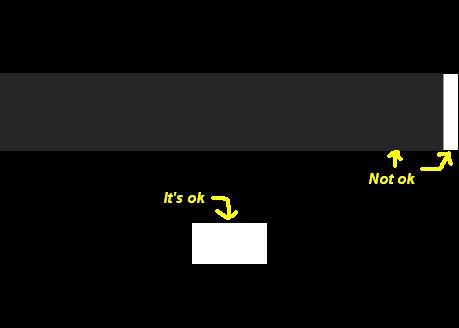
I did a little picture to describe. So if the picture is dark and there is some (very)light area in the right edge the picture is lightens up in that band all over horizontally, but if the light are is not in the right edge then no problem
| Description: |
|
| Filesize: |
6.71 KB |
| Viewed: |
4346 Time(s) |
|
_________________
projectors in the past : NEC 6-9PG xtra, Electrohome Marquee 6-7500, NEC XG 1351 LC ( with super modified Electrohome VNB neckboard !!!)
current: VDC Marquee 9500LC
The MOD: VNB-DB, VIM-DB
|
|
| Back to top |
|
|
hansilili

Joined: 09 Mar 2007
Posts: 302
Location: Köln, Germany
|
| Posted: Mon Jan 30, 2012 7:54 pm Post subject: |
|
|
sorry, never had that
_________________
HansA, alles andere ist euer Bier!
|
|
| Back to top |
|
|
amigaman
Joined: 07 Mar 2011
Posts: 50
Location: Missouri, United States
|
| Posted: Mon Jan 30, 2012 8:53 pm Post subject: |
|
|
It looks like the image is getting into the clamp circuitry. The projector is using what it thinks is blanking as the black level reference, but it's getting the edge of the image instead.
Try tweaking the image shift (not static alignment) and see if it changes anything. I forget where the adjustment is exactly, but it's next to brightness and contrast in the menu I think. If that doesn't work, the video signal may be shifted too far, or the porches may be too small. I had the same issue with my XG, and shifting the image left or right a little with an HDFury III helped. I only had the problem with 1080p, and I use 1080i primarily now.
|
|
| Back to top |
|
|
Jeremy112

Joined: 28 Sep 2006
Posts: 2649
Location: Fond du Lac, WI
|
| Posted: Mon Jan 30, 2012 9:03 pm Post subject: |
|
|
I think I know what you are describing as I have a similar sounding issue. On my NEC XG the right side of the image is lighter than the left, the blue raster is visible on that side and not on the left.
Messing with blanking changes how it looks, but I do not beleive it is a setting in the projector. I think the image timings/porch settings are off and need adjustment. It is a known thing that NECs do not play nice with source devices, hence why I bought a DVDO VP30 video processor. Since I will be able to adjust the timings, I beleive I should be able to take care of my issues with the raster.
In short, hook it up to a computer, and see how it acts with the signal from that. I'll bet its the timings.
_________________
When I'm asking for a Model number, that doesn't mean I'm asking for a nude photo with your number on it
|
|
| Back to top |
|
|
Jeremy112
Joined: 28 Sep 2006
Posts: 2649
Location: Fond du Lac, WI
|
| Posted: Mon Jan 30, 2012 9:06 pm Post subject: |
|
|
I should note that this issue does not affect all NEC projectors. My NEC 9PG Xtra at the same resolution I use from the same source device I use going to my XG does not have any issues at all. The 9PG Xtra I have loves anything I throw at it. I have not tried 1080p but I don't think the tubes would resolve the image very well. 1680x1050 seems to be a good sweet spot for it if you want a nice progressive resolution
_________________
When I'm asking for a Model number, that doesn't mean I'm asking for a nude photo with your number on it
|
|
| Back to top |
|
|
CasetheCorvetteman
Joined: 09 Nov 2008
Posts: 6326
Location: Australia
|
| Posted: Tue Jan 31, 2012 7:10 am Post subject: |
|
|
|
Oh yes, so what youre saying here is there is a bright item, and horizontally across the screen is a blightened band? My 9PG did that, then the next time i set it up i neutralized the HD Fury 3 side shift and it doesnt do it any more... I never really thought about it much, could barely tell it was there, i could only see it on 1080i
|
|
| Back to top |
|
|
gjaky
Joined: 05 Jun 2010
Posts: 2802
Location: Budapest, Hungary
|
| Posted: Tue Jan 31, 2012 7:33 am Post subject: |
|
|
| amigaman wrote: | It looks like the image is getting into the clamp circuitry. The projector is using what it thinks is blanking as the black level reference, but it's getting the edge of the image instead.
Try tweaking the image shift (not static alignment) and see if it changes anything. I forget where the adjustment is exactly, but it's next to brightness and contrast in the menu I think. If that doesn't work, the video signal may be shifted too far, or the porches may be too small. I had the same issue with my XG, and shifting the image left or right a little with an HDFury III helped. I only had the problem with 1080p, and I use 1080i primarily now. |
Thanks! I connect via RGBHV directly to my PC I use 720p@72Hz, increased the front porch and that's solved the problem!
_________________
projectors in the past : NEC 6-9PG xtra, Electrohome Marquee 6-7500, NEC XG 1351 LC ( with super modified Electrohome VNB neckboard !!!)
current: VDC Marquee 9500LC
The MOD: VNB-DB, VIM-DB
|
|
| Back to top |
|
|
|
|




