| Author |
Message |
Das444
Joined: 22 Dec 2006
Posts: 145
|
| Posted: Fri Jan 13, 2012 10:44 pm Post subject: Optimal screen size |
|
|
Hi,
What would be a good screen size for a Nec 1350 Xg. I just put new tubes and have converted it to a LC.
My plan is to use PS3>>>Lumagen vision HDP>>>Moome NEC XG Full HD card. What I'm looking for is the best possible 1080p picture quality.
Thanks,
Dan
|
|
| Back to top |
|
 |
Spanky Ham

Joined: 22 Mar 2006
Posts: 5643
Location: Comedy Central
|
| Posted: Fri Jan 13, 2012 11:49 pm Post subject: |
|
|
|
I would say 64" screen width.
|
|
| Back to top |
|
|
gjaky

Joined: 05 Jun 2010
Posts: 2802
Location: Budapest, Hungary
|
| Posted: Sat Jan 14, 2012 8:30 am Post subject: |
|
|
| Spanky Ham wrote: | | I would say 64" screen width. |
I have a slightly bigger screen than that (68") and it is a very tube saver size in my opinion (I have 6PG xtra). A friend of mine had a 9PG xtra and projected a 7 foot wide screen with success (the tubes wasn't driven hard).
I would say you can go much larger than 68" with it.
_________________
projectors in the past : NEC 6-9PG xtra, Electrohome Marquee 6-7500, NEC XG 1351 LC ( with super modified Electrohome VNB neckboard !!!)
current: VDC Marquee 9500LC
The MOD: VNB-DB, VIM-DB
|
|
| Back to top |
|
|
CasetheCorvetteman

Joined: 09 Nov 2008
Posts: 6326
Location: Australia
|
| Posted: Sat Jan 14, 2012 9:58 am Post subject: |
|
|
|
Mine is 120 inch diagonal 4:3, using a 9PG, and it eats it no worries.
|
|
| Back to top |
|
|
kal
Forum Administrator

Joined: 06 Mar 2006
Posts: 18114
Location: Ottawa, Canada
TV/Projector: JVC DLA-NZ7
|
| Posted: Sat Jan 14, 2012 2:33 pm Post subject: |
|
|
For best possible image quality go with the smallest screen possible.
Most people do not want to do this. Everything else is a compromise.
That said, that projector will have no problems lighting up a an 8 foot wide screen of gain 1.3 or so to the required 10-14 ft/L light output that most would expect to get.
All depends on the room too. Make sure there's no light bouncing back on to the screen.
Kal
_________________

Support our site by using our affiliate links. We thank you!
My basement/HT/bar/brewery build 2.0
Last edited by kal on Sat Jan 14, 2012 2:34 pm; edited 1 time in total
|
|
| Back to top |
|
|
MikeEby

Joined: 24 Jun 2007
Posts: 5237
Location: Osceola, Indiana
|
| Posted: Sat Jan 14, 2012 2:34 pm Post subject: |
|
|
IMO it depends on your room and how you like to watch movies. My room has full light control and is totally dark. IMO you can go up to 90-96" wide (110" Diag 16:9) and still have a nice image. It won't be torch the screen bright but really watchable. If you don't have a screen yet and your room can support it consider a Da-Lite High Power Screen.
Mike
_________________
Doing HD since the last century!
|
|
| Back to top |
|
|
zaphod

Joined: 16 Jun 2006
Posts: 2002
Location: Cloverdale
|
| Posted: Sat Jan 14, 2012 3:13 pm Post subject: |
|
|
on my XG i ran 72 wide (4:3) with seating about 1.5 times that. worked very well.
but that screen to seating ratio is less than where i like in a theatre so i'm bumping up to 109" wide with a blend.
if i get off my *ss and build the new room. i have everything for the blend but the screen. sigh.
_________________
walk gently. leave a good impression.
|
|
| Back to top |
|
|
Das444
Joined: 22 Dec 2006
Posts: 145
|
| Posted: Sat Jan 14, 2012 3:55 pm Post subject: |
|
|
I'm building a new theater room 19'x24' 1st row seating will be about 13' 2nd row will be on a 12"riser at about 17'.
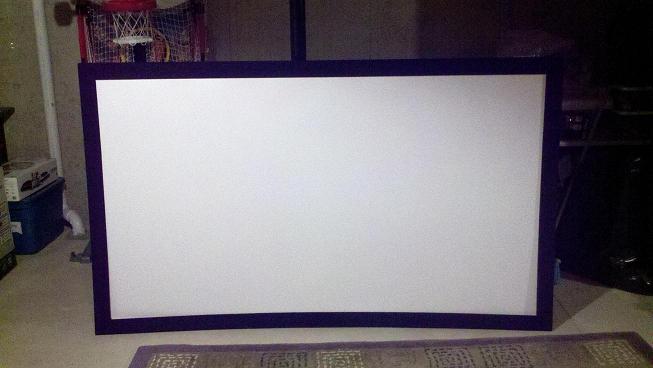
I have 60" panny plasma for the small stuff. Kal 96" (110) is what I was thinking. I just built a Torus Screen out of Wilsonart laminate that is 47"x 84" It just looks small on the wall for the size room. Photo is from my Droid Phone.
| Description: |
|
| Filesize: |
55.13 KB |
| Viewed: |
4841 Time(s) |
|
|
|
| Back to top |
|
|
dturco

Joined: 06 Feb 2009
Posts: 3778
Location: Eastern Shore Maryland
TV/Projector: Runco DLP VX-3000i Marquee 9500 parts doner
|
| Posted: Sat Jan 14, 2012 4:03 pm Post subject: |
|
|
| Das444 wrote: | I'm building a new theater room 19'x24' 1st row seating will be about 13' 2nd row will be on a 12"riser at about 17'.
I have 60" panny plasma for the small stuff. Kal 96" (110) is what I was thinking. I just built a Torus Screen out of Wilsonart laminate that is 47"x 84" It just looks small on the wall for the size room. Photo is from my Droid Phone. |
Yep, that is the right size. I have had a 100" diagonal 16x9 screen, then I built a 120" diagonal screen with the Wilsonart DW-354. It is dimmer then I'd like.
100 was to small 120 was the "right size" for feel, but too dim.
I think 110" is the compromise that will work best for CRT. It is the next size I will be using with Seymour screen A/T material.
_________________
Firefly rules. Can't stop the signal.
http://www.hulu.com/firefly
|
|
| Back to top |
|
|
Spanky Ham
Joined: 22 Mar 2006
Posts: 5643
Location: Comedy Central
|
| Posted: Sun Jan 15, 2012 2:59 am Post subject: |
|
|
|
I let everyone else comment, but in the end is it depends on you. How bright do you like an image? Do you care about running through tubes or not? How far do you sit from the screen? What aspect ratio for the screen? What do you watch on the pj? I personally love a really bright image, which means either a small screen or lots of gain.
|
|
| Back to top |
|
|
|
|




