| Author |
Message |
v1rtu0s1ty
Joined: 29 Oct 2007
Posts: 110
|
| Posted: Wed Dec 14, 2011 10:21 pm Post subject: other solutions for my Barco 808 projector |
|
|
So far, I'm very impressed with my Barco 808 projector. Here is my current setup
bd player --> hdmi--> hdfury 1 --> signal inverter --> barco 808
The signal inverter was just made by me -> http://www.youtube.com/watch?v=6WdxnOQC4hM
Today, I hooked my ps3. Some games would show on screen but some doesn't. I tried 1080i and 1080p on those games that wouldn't show but no luck. Game is loaded because I can hear the audio very loud and clear. I'm sure the culprit is the device I made not being able to cope quickly with PS3's signal, I think.
What are some devices I can use as replacement for my current HDFury and my inverter?
Thanks!
|
|
| Back to top |
|
 |
barclay66

Joined: 27 Jun 2011
Posts: 1304
Location: Germany
TV/Projector: Marquee 9500 Ultra
|
| Posted: Wed Dec 14, 2011 11:56 pm Post subject: |
|
|
Hi,
are You feeding the Signal to port 3?
If Yes then try Port 5 instead. The Port 5 sync circuits are much more capable of handling different sync signals...
Regards,
barclay66
|
|
| Back to top |
|
|
v1rtu0s1ty
Joined: 29 Oct 2007
Posts: 110
|
| Posted: Wed Dec 14, 2011 11:59 pm Post subject: |
|
|
|
What resolution can Port 5 handle? I remember the reason I used port 3 is because it is better quality and sharper.
|
|
| Back to top |
|
|
v1rtu0s1ty
Joined: 29 Oct 2007
Posts: 110
|
| Posted: Thu Dec 15, 2011 12:00 am Post subject: |
|
|
|
Do you think that if I buy the latest hd fury, the problem will still be there?
|
|
| Back to top |
|
|
barclay66
Joined: 27 Jun 2011
Posts: 1304
Location: Germany
TV/Projector: Marquee 9500 Ultra
|
| Posted: Thu Dec 15, 2011 12:09 am Post subject: |
|
|
Hi,
Resolution for both Ports is the same. Some say that the bandwith on Port 3 is somewhat higher and therefore the picture is sharper. I can't confirm this as with my BG801s it was the other way around.
Using a HDFury 3 would give You the advantage that you can set it to a fixed sync polarity output no matter what the input polarity is -> no need for the inverter any more.
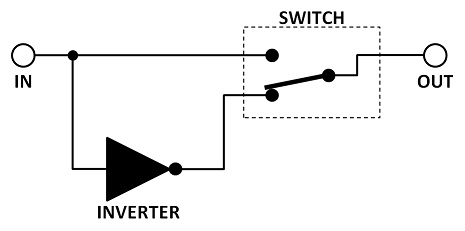
You first could try to add two bypass switches to Your converter (one for H, one for V). Then You could test if You get a picture when bypassing H, V or both...
Regards,
barclay66
|
|
| Back to top |
|
|
barclay66
Joined: 27 Jun 2011
Posts: 1304
Location: Germany
TV/Projector: Marquee 9500 Ultra
|
| Posted: Thu Dec 15, 2011 12:14 am Post subject: |
|
|
BTW, I use a similar setup:
BD Player \
TV-Box ----- > HDMI Switcher > HDFury3 > BG801s (Port5)
Computer /
The HDFury is set to forced negative sync for H and V and everything works perfect. No need for a scaler or anything...
Regards,
barclay66
|
|
| Back to top |
|
|
v1rtu0s1ty
Joined: 29 Oct 2007
Posts: 110
|
| Posted: Thu Dec 15, 2011 1:01 am Post subject: |
|
|
Ok, I will save up on it then. I think HDfury 1 can't handle it. 
Thanks a lot!
|
|
| Back to top |
|
|
v1rtu0s1ty
Joined: 29 Oct 2007
Posts: 110
|
| Posted: Thu Dec 15, 2011 1:02 am Post subject: |
|
|
|
Forgot to mention, it's currently connected to port 4/5. I made a 9db cable before but I am not sure where I placed it.
|
|
| Back to top |
|
|
v1rtu0s1ty
Joined: 29 Oct 2007
Posts: 110
|
| Posted: Thu Dec 15, 2011 1:05 am Post subject: |
|
|
| barclay66 wrote: | Hi,
........
You first could try to add two bypass switches to Your converter (one for H, one for V). Then You could test if You get a picture when bypassing H, V or both...
Regards,
barclay66 |
Yes, the converter I built has 2 input ports and 2 output ports. That means, H and V are separate.
|
|
| Back to top |
|
|
v1rtu0s1ty
Joined: 29 Oct 2007
Posts: 110
|
|
| Back to top |
|
|
barclay66
Joined: 27 Jun 2011
Posts: 1304
Location: Germany
TV/Projector: Marquee 9500 Ultra
|
| Posted: Thu Dec 15, 2011 1:31 pm Post subject: |
|
|
Hi,
| v1rtu0s1ty wrote: | | Yes, the converter I built has 2 input ports and 2 output ports. That means, H and V are separate. |
Then Try first with the additional bypass switches. The picture below should show You what I'm thinking of.
| v1rtu0s1ty wrote: | | Another question, can my Barco 808 accept RGB? I'm currently outputting RGBHV from my HdFury. |
RGBHV is RGB, just plus the sync signals needed (H+V). Maybe it's a good idea that You first read some of the many documents available. See here: http://www.curtpalme.com/Barco808_Downloads.shtm
I'd recommend starting with the Install and Owner Manuals.
Regards,
barclay66
| Description: |
|
| Filesize: |
15.22 KB |
| Viewed: |
11345 Time(s) |
|
|
|
| Back to top |
|
|
v1rtu0s1ty
Joined: 29 Oct 2007
Posts: 110
|
| Posted: Thu Dec 15, 2011 6:32 pm Post subject: |
|
|
|
Got it! What I will do is load up the game that wasn't displaying then remove the input from the device I made and hook it directly to the projector. I'll let you know.
|
|
| Back to top |
|
|
v1rtu0s1ty
Joined: 29 Oct 2007
Posts: 110
|
| Posted: Thu Dec 15, 2011 11:30 pm Post subject: |
|
|
|
barclay, it worked when I transferred the H&v cable from my device then directly to the h&v of port 4/5 on the barco. What is PS3 doing? I don't want to put a switch because today, I tried bypassing and it was annoying. I had to use ladders.
|
|
| Back to top |
|
|
barclay66
Joined: 27 Jun 2011
Posts: 1304
Location: Germany
TV/Projector: Marquee 9500 Ultra
|
| Posted: Fri Dec 16, 2011 8:57 am Post subject: |
|
|
Hi,
Obviously the source is providing sync with different polarity depending on the output resolution. I might be able to dig up a schematic for a sync sensing and inverting circuit. I have seen it somewhere. This circuit will only invert either sync signal if it arrives with "wrong" polarity, thus no switch needed. Maybe I can post it tomorrow...
Regards,
barclay66
|
|
| Back to top |
|
|
v1rtu0s1ty
Joined: 29 Oct 2007
Posts: 110
|
| Posted: Fri Dec 16, 2011 2:55 pm Post subject: |
|
|
|
Awesome!!!
|
|
| Back to top |
|
|
barclay66
Joined: 27 Jun 2011
Posts: 1304
Location: Germany
TV/Projector: Marquee 9500 Ultra
|
| Posted: Mon Dec 19, 2011 8:26 am Post subject: |
|
|
Hi,
Sorry, took me a little longer than expected. Check out the first circuit on this site: http://www.epanorama.net/circuits/vga2rgbs.html
It will generate RGB + Composite Sync (connect this to the HS/CS-Connector of the Barco) regardless of input sync polarity and You will need only four cables (RGBs) instead of five (RGBHV)...
Regards,
barclay66
|
|
| Back to top |
|
|
v1rtu0s1ty
Joined: 29 Oct 2007
Posts: 110
|
| Posted: Mon Dec 19, 2011 8:20 pm Post subject: |
|
|
|
No problem bud. I'll check it out! Thanks a lot!!!
|
|
| Back to top |
|
|
v1rtu0s1ty
Joined: 29 Oct 2007
Posts: 110
|
| Posted: Mon Dec 19, 2011 8:33 pm Post subject: |
|
|
barclay,
A bit complicated for me. However, I can follow instructions.
Right now, hdfury's output is 5 bnc cables. Which diagram from your link I should use? I noticed that the sync output is one cable. Am I right? If so, where in the projector should it be connected?
|
|
| Back to top |
|
|
barclay66
Joined: 27 Jun 2011
Posts: 1304
Location: Germany
TV/Projector: Marquee 9500 Ultra
|
| Posted: Mon Dec 19, 2011 9:18 pm Post subject: |
|
|
Umm,
It's all written above. First diagram, connect resulting composite sync to HS/CS (input for H-Sync / Composite Sync)...
Regards,
barclay66
|
|
| Back to top |
|
|
v1rtu0s1ty
Joined: 29 Oct 2007
Posts: 110
|
| Posted: Mon Dec 19, 2011 10:58 pm Post subject: |
|
|
ok, I will check the projector. I understand the diagram now
EDIT:
barclay66,
I saw the port. It's beside B port of RGB on port 4/5
Am I right that I won't use my 7404 anymore?
Also, since the output from my HDFury is 5 BNC, I'll just have to make sure to find Hsync and Vsync outputs as inputs to your device.
|
|
| Back to top |
|
|
|
|





