| Author |
Message |
WanMan

Joined: 19 Mar 2006
Posts: 10270
|
| Posted: Sat Feb 12, 2011 5:56 pm Post subject: Anyone using iTunes? Need to solve quirky ripping behavior. |
|
|
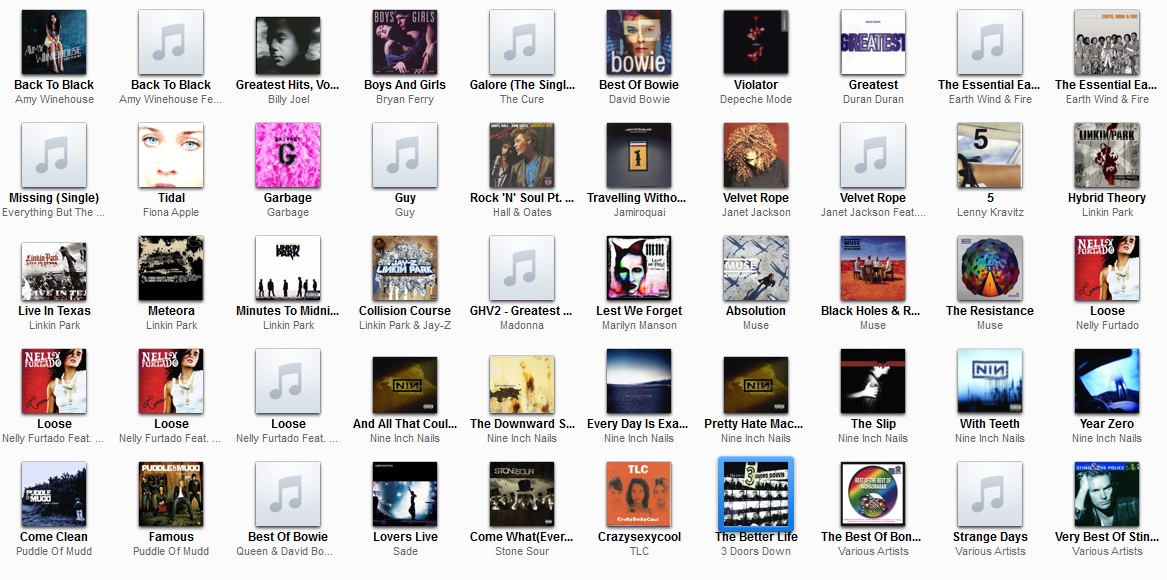
Look at the attached file. You will see multiple instances in which the same album appears more than once. This occurs when ripping CD's using iTunes. For instance, Nelly Furtado's Loose album appears four (4) times, which I presume is because some tracks are identified by the addition of another artist.
While in the mall, I stopped by the Apple store figuring I could ask on the SJD's and asked if there was a way to merge these into a single 'album' folder and he was not aware. I asked him about certain albums ripping and Gracenote not finding cover art, especially for some of these spawn child entries and again he did not know.
For instance, one of the four entries for Nelly Furtado's Loose didn't have cover art that could be retrieved from Gracenote. Also, the same cover art source couldn't find anything for disk #1 in Earth, Wind and Fire's Greatest Hits but could for disk #2. Gracenote on bad drugs?
If any of you are using iTunes for ripping store-bought CD's and know how to work around these quirks I'd be much appreciated. These are the 'honey dew' items the wife is expecting me to work on. 
| Description: |
|
| Filesize: |
244.67 KB |
| Viewed: |
1650 Time(s) |
|
_________________
Trust no one. Absolutely no one. Advice of the board.
|
|
| Back to top |
|
 |
zaphod

Joined: 16 Jun 2006
Posts: 2002
Location: Cloverdale
|
| Posted: Sat Feb 12, 2011 6:20 pm Post subject: |
|
|
i had the same issue and here's how i fixed it. i lied to iTunes.
go to list view instead of album cover view. you will see the sort field darkened - probably Artist. scroll down to Nelly's album and you'll see that the Artist field is different for the different sorts - like you said, it's because of the addition of another artist. Sometimes "Album Artist" is a better sort field for a collection, but it's really sparsely filled out (at least for my collection).
what i did was select all the music/tracks that I think are in the same album and then right click for Get Info. in the pop-up i set the Artist to what i want and then click OK. that will stamp your preference for artist into those tracks (what a liar I am) and iTunes will collapse them into one album for sorting.
for some pesky albums i had to set a couple of fields - like artist and album as well. sigh.
as for album covers, i find that googling the album name, looking for a 400x400 (or better) image works. right click the image to copy and then in the GetInfo panel for the album right click and paste into the artwork square.
and for the really pesky ones (blue note's 199 festival in canada album) the scanner works wonders 
_________________
walk gently. leave a good impression.
|
|
| Back to top |
|
|
WanMan
Joined: 19 Mar 2006
Posts: 10270
|
| Posted: Sat Feb 12, 2011 6:30 pm Post subject: |
|
|
Sounds like a plan. Funny thing is that I opened Windows Media Player and I can navigate to the iTunes music folder and all the way down to the artist>album>track level and even play the tracks that iTunes ripped, but for some odd reason it will not import the music. I tried to get it to pay attention to the individual folders and no dice.
I'll try your suggestions and work from there. Much obliged. 
_________________
Trust no one. Absolutely no one. Advice of the board.
|
|
| Back to top |
|
|
zaphod
Joined: 16 Jun 2006
Posts: 2002
Location: Cloverdale
|
| Posted: Sat Feb 12, 2011 6:45 pm Post subject: |
|
|
glad to help
i don't use WMP much anymore, i'm pretty much down to iTunes. even the squeezebox uses it for fodder.
they're all bad, it just depends which kool-aid tastes the least bad...
_________________
walk gently. leave a good impression.
|
|
| Back to top |
|
|
|
|




