| Author |
Message |
ramoneo14
Joined: 11 Feb 2011
Posts: 6
Location: Minneapolis, MN
|
| Posted: Fri Feb 11, 2011 2:06 pm Post subject: EH Marquee 8000 Picture Cuts out!! |
|
|
Need your expert opinion:
Picture keeps cutting out for about 30 seconds and then refocuses and comes back only for a few seconds and it cuts out again!! This happens constantly now. It used to happen infrequently but now I cant even watch a 10mn movie.
While the picture is out- I look at the back of the projector and the "H" error light is lit up. As the picture comes back the light disappears of course. Does this mean I need a HV power supply?
Any/every help will be greatly appreciated.
Kind regards,
Ramon Villanueva
Minneapolis, MN
|
|
| Back to top |
|
 |
Curt Palme
CRT Tech
Joined: 08 Mar 2006
Posts: 24396
Location: Langley, BC
TV/Projector: All of them!
|
| Posted: Fri Feb 11, 2011 2:53 pm Post subject: |
|
|
Try reseating the HDM. It sounds like internal arcing in the HVPS. I can test it for you if you want.
It can also be a bad neck board, arcing within a tube, or any other issue that tells the HVPS to shut down at random.
|
|
| Back to top |
|
|
ramoneo14
Joined: 11 Feb 2011
Posts: 6
Location: Minneapolis, MN
|
| Posted: Fri Feb 18, 2011 4:34 pm Post subject: |
|
|
| Curt Palme wrote: | Try reseating the HDM. It sounds like internal arcing in the HVPS. I can test it for you if you want.
It can also be a bad neck board, arcing within a tube, or any other issue that tells the HVPS to shut down at random. |
Can you walk me through how to re-seat the HDM? How would you test this? If it's a bad neck board, how do I go about getting that checked? I dont have much $$ which is why I purchased this unit instead of the newer projector types. Please help Curt!
|
|
| Back to top |
|
|
Curt Palme
CRT Tech
Joined: 08 Mar 2006
Posts: 24396
Location: Langley, BC
TV/Projector: All of them!
|
| Posted: Fri Feb 18, 2011 8:24 pm Post subject: |
|
|
|
You can't test a problem like this, you must swap out boards. I can sell you a working 8000 neck board for $25 and an HDM for $40 plus shipping, unless you can find someone in Mn that is willing to let you put your boards into their set for testing.
|
|
| Back to top |
|
|
ramoneo14
Joined: 11 Feb 2011
Posts: 6
Location: Minneapolis, MN
|
| Posted: Fri Feb 18, 2011 8:32 pm Post subject: |
|
|
|
Does the projector have to come down from the ceiling? If so- forget it! But if not, is this something I can do myself? I've only swapped out the HVPS previously.
|
|
| Back to top |
|
|
Curt Palme
CRT Tech
Joined: 08 Mar 2006
Posts: 24396
Location: Langley, BC
TV/Projector: All of them!
|
| Posted: Fri Feb 18, 2011 8:43 pm Post subject: |
|
|
|
No, you can swap the parts out while on the ceiling. Check the FAQ section of the main site, it's got all the board locations clearly shown..
|
|
| Back to top |
|
|
ramoneo14
Joined: 11 Feb 2011
Posts: 6
Location: Minneapolis, MN
|
| Posted: Fri Feb 18, 2011 8:47 pm Post subject: |
|
|
|
If you had to choose, which one should I try replacing first, the neck board? or the HDM? I definitely do not want to replace both if not absolutely needed.
|
|
| Back to top |
|
|
ramoneo14
Joined: 11 Feb 2011
Posts: 6
Location: Minneapolis, MN
|
| Posted: Fri Feb 18, 2011 8:48 pm Post subject: |
|
|
|
If I'm able to remove both, should I send you both? That way you can test each one and send me back the working parts? And also include the parts that I need?
|
|
| Back to top |
|
|
Nashou66

Joined: 12 Jan 2007
Posts: 16171
Location: West Seneca NY
|
| Posted: Fri Feb 18, 2011 8:49 pm Post subject: |
|
|
To re seat the HDM you have to remove the front cover over the lens's to expose two screws that hold on the back rear top cover.
The rear cover slides towards the back to release it from the rear heat sink cover. Then it can be lifted off or in your case pulled down.
Do this slowly as one of the boards and its cover might not be secured and it can fall out and damage the board.
The HDM is located between the Green and Blue Tube. If it did not fall out( lets hope not) when removing the top rear cover then
remove the HDM cover and once again watch for the loose board so it wont fall out. If it is in place firmly grab the heat sink and
at the rear of the board an open area of PCB an pull it down and then slide it back in a few times to clean the contacts.
Replace the HDM cover, look at the foam on the inside of the cover to make sure it still has enough cushion/spring to push the HDM board up and hold into place. you can leave the covers off while powering up the PJ to see if it works.
There are a few other things to clean as well. how long has it been since any contacts have been cleaned on any boards?
Athanasios
_________________
Don't blame your underwear for your crooked ass~ unknown Greek philosopher
"Republicans believe every day is the Fourth of July, but the Democrats believe every day is April 15." --- President Reagan
One Smart Dog!!!
Marquee High Performance Bellows now shipping!!
Marquee Modifications and Performance Enhancement
Marquee C-element and Bellow removal
|
|
| Back to top |
|
|
ramoneo14
Joined: 11 Feb 2011
Posts: 6
Location: Minneapolis, MN
|
| Posted: Fri Feb 18, 2011 8:54 pm Post subject: |
|
|
| Nashou66 wrote: | To re seat the HDM you have to remove the front cover over the lens's to expose two screws that hold on the back rear top cover.
The rear cover slides towards the back to release it from the rear heat sink cover. Then it can be lifted off or in your case pulled down.
Do this slowly as one of the boards and its cover might not be secured and it can fall out and damage the board.
The HDM is located between the Green and Blue Tube. If it did not fall out( lets hope not) when removing the top rear cover then
remove the HDM cover and once again watch for the loose board so it wont fall out. If it is in place firmly grab the heat sink and
at the rear of the board an open area of PCB an pull it down and then slide it back in a few times to clean the contacts.
Replace the HDM cover, look at the foam on the inside of the cover to make sure it still has enough cushion/spring to push the HDM board up and hold into place. you can leave the covers off while powering up the PJ to see if it works.
There are a few other things to clean as well. how long has it been since any contacts have been cleaned on any boards?
Athanasios |
The projector was purchased 5 years ago. I never cleaned it nor have I cleaned it since! Thanks! more help with other routine maintenance would be greatly appreciated.
|
|
| Back to top |
|
|
dturco

Joined: 06 Feb 2009
Posts: 3778
Location: Eastern Shore Maryland
TV/Projector: Runco DLP VX-3000i Marquee 9500 parts doner
|
| Posted: Fri Feb 18, 2011 9:25 pm Post subject: |
|
|
| ramoneo14 wrote: | | The projector was purchased 5 years ago. I never cleaned it nor have I cleaned it since! Thanks! more help with other routine maintenance would be greatly appreciated. |
http://www.curtpalme.com/Marquee_Teardown1.shtm
It's not your exact projector but fairly close. You machines back heatsink does not fold down like this one but again it is very similar.
Picture always help me. 
_________________
Firefly rules. Can't stop the signal.
http://www.hulu.com/firefly
|
|
| Back to top |
|
|
Nashou66
Joined: 12 Jan 2007
Posts: 16171
Location: West Seneca NY
|
| Posted: Fri Feb 18, 2011 9:43 pm Post subject: |
|
|
Reposted from an AVS thread I answered.
Probably a good cleaning and reseating of all the boards is what's needed.
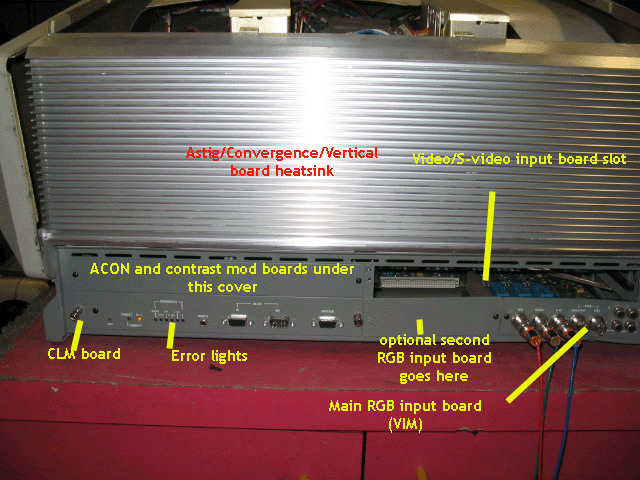
Here is a link to parts and boards of the Marquee. Reseating of the Focus board and HDM is just pulling it out and putting in in a few times to clean the contacts, you dont have to remove any connections to do this. Just pull up and put back in a few times. http://www.curtpalme.com/ElectrohomeMarquee_Layout1.shtm
Location of FCM and HDM.

on the hdm their is a daughter board that also need to be removed and reconected.
HDM Pic

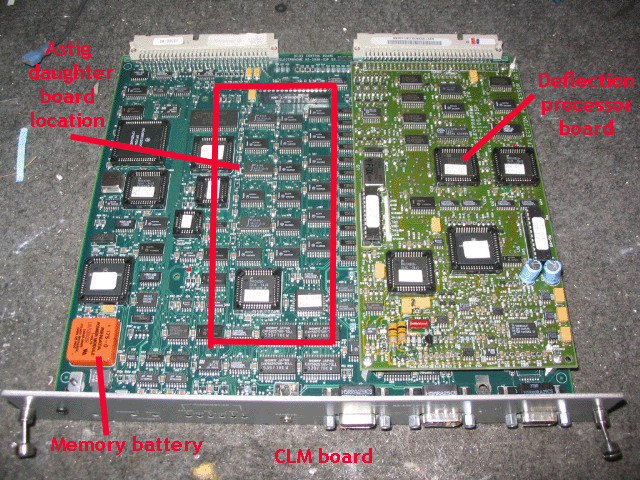
Next on the CLM there are some chips that can be taken out from their
sockets, do one at a time. you will need a IC puller from radio shack to do this.
Location of CLM:
CLM out of Set showing chips.
chip puller pic:

Clean all chips with some contact cleaner or Denatured Alcohol.
I use DeOxit:
[IMG]http://store.caig.com/core/media/media.nl?id=1491&c=ACCT113328&h=e3c3a4a7806d4b7935fd[/IMG]
Do one chip at a time and remember how it came out so you put it back in the same way.
Athanasios
_________________
Don't blame your underwear for your crooked ass~ unknown Greek philosopher
"Republicans believe every day is the Fourth of July, but the Democrats believe every day is April 15." --- President Reagan
One Smart Dog!!!
Marquee High Performance Bellows now shipping!!
Marquee Modifications and Performance Enhancement
Marquee C-element and Bellow removal
|
|
| Back to top |
|
|
draganm

Joined: 08 Mar 2006
Posts: 8990
Location: Colorado
|
| Posted: Fri Feb 18, 2011 10:17 pm Post subject: |
|
|
| ramoneo14 wrote: | | The projector was purchased 5 years ago. I never cleaned it nor have I cleaned it since! Thanks! more help with other routine maintenance would be greatly appreciated. |
your best upgrade is to replace all the parts to 8500 standard but that maybe more than your willing to tackle?
|
|
| Back to top |
|
|
|
|




