| Author |
Message |
mistagreg
Joined: 09 Jul 2008
Posts: 47
|
| Posted: Fri Jan 28, 2011 5:09 am Post subject: help me understand bandwidth |
|
|
|
I see 1080p @ ##kHz. Then I see 120Mhz bandwidth as a projector stat. And I see a range for scanning freq. I don't understand what these stats mean? How does it determine the max @## kHz?
|
|
| Back to top |
|
 |
friedwart
Joined: 07 Jul 2010
Posts: 54
Location: Earth, Europe, Germany @ N 51°43'10.73'' E 14°39'05.52''
|
| Posted: Fri Jan 28, 2011 8:15 am Post subject: Re: help me understand bandwidth |
|
|
| mistagreg wrote: | | I see 1080p @ ##kHz. Then I see 120Mhz bandwidth as a projector stat. And I see a range for scanning freq. I don't understand what these stats mean? How does it determine the max @## kHz? |
There are 1920 pixel/line x 1080 lines x 60 Pics/sec = 124+ Mpixel/sec -> needs 124+ MHz Bandwidth. 1080 lines/frame x 60 frames/sec = 64.8 kHz scanning freq.
cheers
Last edited by friedwart on Sat Jan 29, 2011 3:29 pm; edited 1 time in total
|
|
| Back to top |
|
|
Ile

Joined: 09 Mar 2006
Posts: 1491
Location: Jyväskylä, Finland
|
| Posted: Fri Jan 28, 2011 1:49 pm Post subject: |
|
|
Bandwidth (MHz) is not limited, picture just start to get softer when you go higher. Rated max BW is just for reference, under that picture should be decently sharp. Usually you can go bit higher without too soft image.
Horizontal scanning freq (kHz) have range where projector will scan properly. Outside this range projector wont show picture.
Same thing with Vertical scanning freq (Hz).
You can calculate Horizontal scanning freq with this.
http://myhometheater.homestead.com/bandwidthcalculator.html
Use only for estimation, because your sources timings (front/back porch, sync width) are probably bit different that calculator use in "with estimated retrace" window. BW values from calculator are much higher compared to straight pixel clock value (above post)...
|
|
| Back to top |
|
|
garyfritz

Joined: 08 Apr 2006
Posts: 12088
Location: Fort Collins, CO
|
| Posted: Fri Jan 28, 2011 6:57 pm Post subject: Re: help me understand bandwidth |
|
|
| mistagreg wrote: | | I see 1080p @ ##kHz. Then I see 120Mhz bandwidth as a projector stat. And I see a range for scanning freq. I don't understand what these stats mean? How does it determine the max @## kHz? |
1080p@## *Hz* refers to the refresh rate -- frames per second. Usually 24 or 60 or 72 or thereabouts.
Horiz/Vert scanning freq is how fast the electron gun scans over the screen face. Vert rate is equivalent to refresh rate, since it scans top-to-bottom once for each frame refresh. Horiz rate is much higher because it has to scan left-to-right 1080 or 720 or howevermany times for each frame refresh.
Overall required bandwidth is the signal rate for the video signal that's screaming into the CRT to produce the resulting image. The higher the refresh rate & the higher the resolution, the higher the required bandwidth. E.g. 1080p takes 2x more bandwidth than 1080i, because it has twice as many lines. 720p has 2/3 as many vertical lines as 1080p but it also has 2/3 as many horizontal pixels, so it takes 0.66*0.66 = 43.6% as much bandwidth.
Like Ile said, your projector has a maximum bandwidth it can accurately display. As you approach and exceed the max bandwidth the projector can handle, it basically starts distorting the signal. Details that should be sharp get soft and smeary. (Sharp details are "high-frequency" signals. If the projector can't accurately present the high-frequency signal, it basically chops off the high-frequency stuff and what's left is lower-frequency -- which is less detailed and smearier.) It's exactly like playing an audio signal through a cheap speaker. If the speaker can't handle the higher frequency signals -- the 12kHz-and-up range that gives you sibilants, cymbal sizzle, etc -- then the sound gets "smeary" and loses the high-frequency detail. In sound, the result is that you don't hear those sibilants &etc. In video, it means you can't see 1080p HD signals in full resolution.
|
|
| Back to top |
|
|
cmjohnson

Joined: 03 Apr 2006
Posts: 5180
Location: Buried under G90s
|
| Posted: Fri Jan 28, 2011 11:18 pm Post subject: |
|
|
Just think about how fast the CRT's amplifier has to respond in order to modulate the strength of the electron beam, which is moving across the CRT face. At higher resolutions or higher scan rates, the amplifier has to be able to respond more quickly, and is able to generate higher frequencies, or greater bandwidth.
The formula, in its basic form, for how much bandwith you need is simple: Horizontal pixels x vertical pixels x frames per second, x a compensating factor for signal overhead, providing sync and timing information that isn't displayed in the picture but still takes time to deliver to the sync and timing circuits.
In the case of 1080p-60, it's 1920 x 1080 x 60, or 124,416,000 displayed pixels per second. Add in some compensation for sync and
timing information and you're at a pixel rate of about 140 million pixels per second. If you don't have at LEAST 140 MHz bandwidth,
you can't fully resolve the image. In fact, to FULLY resolve the image with a high MTF value (Modulation Transfer Function, the difference
between the bright section of scan lines and the dark space between them), then ideally you want DOUBLE that bandwidth in the amplifier circuit.
A full bandwidth of 300 MHz through the entire video chain is the Holy Grail of video bandwidth performance, if your top resolution is 1080P-60.
Double it if you need 2x1080P-60 for 3D. But there isn't a CRT projector on the planet that has anywhere close to an honest 600 MHz bandwidth. It just doesn't exist except maybe in a laboratory somewhere. At that rate, the cathode capacitance itself is likely to be
a limiting performance factor.
CJ
|
|
| Back to top |
|
|
ecrabb
Forum Moderator

Joined: 13 Mar 2006
Posts: 15909
Location: Utah
TV/Projector: JVC RS40, Epson 5010
|
| Posted: Fri Jan 28, 2011 11:49 pm Post subject: |
|
|
Enough of this technical talk... Time for a silly metaphor.
OP, think of a water pipe... The water pipe has a cross-section that defines how much water is in one section at any given slice of time. That's like spacial resolution - or 1920x1080 in your example. Bigger resolution, bigger cross section of pipe.
The velocity at which the water is flowing through the pipe is then like refresh rate... It's running at 60hz. How often is that same cross-section of pipe getting "refreshed" with new water... 60hz is 60 times a second.
The total amount of water per second is like bandwidth, then. Bigger resolution, bigger bandwidth. More refreshes, bigger bandwidth.

SC
|
|
| Back to top |
|
|
garyfritz
Joined: 08 Apr 2006
Posts: 12088
Location: Fort Collins, CO
|
| Posted: Sat Jan 29, 2011 12:28 am Post subject: |
|
|
Good analogy, Steve!
Now your projector is a sink that's being filled by that pipe. It has a maximum "bandwidth" it can handle based on the size of the drain. If water comes pouring in faster than the sink can drain, you have a mess.  That's what happens when you feed your projector more bandwidth than it can handle. Except instead of flooding the floor, it just smears the picture. That's what happens when you feed your projector more bandwidth than it can handle. Except instead of flooding the floor, it just smears the picture.
|
|
| Back to top |
|
|
Curt Palme
CRT Tech
Joined: 08 Mar 2006
Posts: 24396
Location: Langley, BC
TV/Projector: All of them!
|
| Posted: Sat Jan 29, 2011 1:22 am Post subject: |
|
|
| garyfritz wrote: | | Except instead of flooding the floor, it just smears the picture. |
Unless you have an old 9500LC. Then, if you're unlucky, it can also flood the floor.
|
|
| Back to top |
|
|
dturco

Joined: 06 Feb 2009
Posts: 3778
Location: Eastern Shore Maryland
TV/Projector: Runco DLP VX-3000i Marquee 9500 parts doner
|
| Posted: Sat Jan 29, 2011 1:35 am Post subject: |
|
|
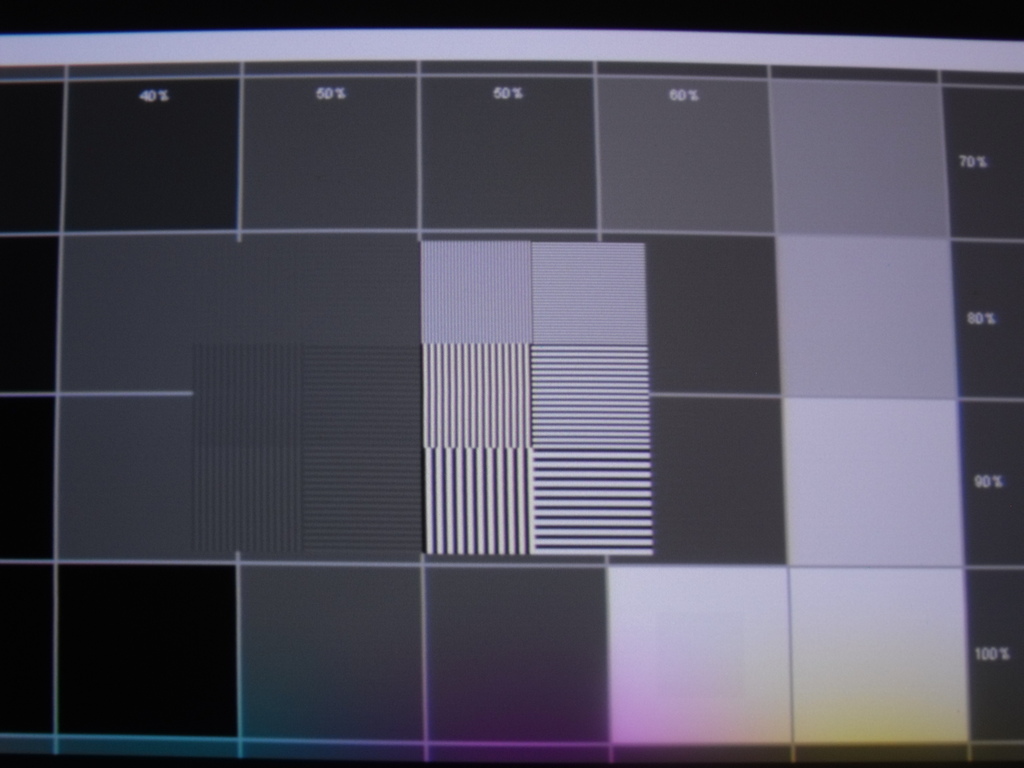
OK since were talking about bandwidth here, I have a questions. On the DVE test disc the medical test pattern that has the Alphabet on the sides and top and bottom, there are 2 groupings of test lines, 6 boxes each, [pixel frames? one on one off].
Anyway the 6 boxes on the right are fully resolved but the area that should have 6 boxes on the left only has four boxes that are lighter and softer than the other side and the top 2 just aren't there.
Did I run out of bandwidth here? Is that what's going on? Or is that what's supposed to be there?
1080p60hz Blu-ray direct from Sony BDPs550> HDMI> Moome input card.
_________________
Firefly rules. Can't stop the signal.
http://www.hulu.com/firefly
|
|
| Back to top |
|
|
mistagreg
Joined: 09 Jul 2008
Posts: 47
|
| Posted: Sat Jan 29, 2011 2:11 am Post subject: |
|
|
Thanks for the responses, it helped a lot. I asked because I just got a Vision 1. The specs say a bandwidth of 120, but there are posts of people doing 1080p@72. Which, according to the math puts it over the bandwidth marker. According to the explanation here, this means the picture may be less sharp using that much bandwidth.
-Greg
|
|
| Back to top |
|
|
cmjohnson
Joined: 03 Apr 2006
Posts: 5180
Location: Buried under G90s
|
| Posted: Sat Jan 29, 2011 2:37 pm Post subject: |
|
|
1080p-60 is really quite adequate. I don't notice flicker at 60 Hz and I'd rather stay in bandwidth (or real close to it) and get a sharper image.
I think that those who are running 72 Hz should try going back down to 60 and compare sharpness in complex scenes.
Better yet, use the resolution test patterns. I'm sure that 60 Hz will come out sharper.
However, at 1080p, you have to have your Marquee aligned and tweaked to perfection in order to fully get the best out of the picture,
and even then, it may not be perfect for the simple reason that the smallest convergence steps in a Marquee are more than a pixel in
width at 1080p. This little issue has made me consider modding the convergence system. Reducing the gain on the convergence amps is probably the best approach but it also reduces the total range of convergence adjustment possible. This makes mechanical
setup even more important. But if done right, it would improve the fineness of convergence adjustments.
It's an experiment I want to try.
CJ
|
|
| Back to top |
|
|
Spanky Ham

Joined: 22 Mar 2006
Posts: 5643
Location: Comedy Central
|
| Posted: Sat Jan 29, 2011 2:43 pm Post subject: |
|
|
|
I am not going to look for the link, but there was an excellent discussion on bandwidth about four years ago over at AVS.
|
|
| Back to top |
|
|
garyfritz
Joined: 08 Apr 2006
Posts: 12088
Location: Fort Collins, CO
|
| Posted: Sat Jan 29, 2011 4:51 pm Post subject: |
|
|
| dturco wrote: | Anyway the 6 boxes on the right are fully resolved but the area that should have 6 boxes on the left only has four boxes that are lighter and softer than the other side and the top 2 just aren't there.
Did I run out of bandwidth here? |
Doubtful. If your projector can't handle the bandwidth, the *whole* picture will be affected. If you had fully-resolved patterns in one area, I'd say the bandwidth is OK. Area-specific issues are more likely electric focus or astig.
|
|
| Back to top |
|
|
dturco
Joined: 06 Feb 2009
Posts: 3778
Location: Eastern Shore Maryland
TV/Projector: Runco DLP VX-3000i Marquee 9500 parts doner
|
| Posted: Sat Jan 29, 2011 5:24 pm Post subject: |
|
|
| garyfritz wrote: | | dturco wrote: | Anyway the 6 boxes on the right are fully resolved but the area that should have 6 boxes on the left only has four boxes that are lighter and softer than the other side and the top 2 just aren't there.
Did I run out of bandwidth here? |
Doubtful. If your projector can't handle the bandwidth, the *whole* picture will be affected. If you had fully-resolved patterns in one area, I'd say the bandwidth is OK. Area-specific issues are more likely electric focus or astig. |
Yeah I thought that too.
Here is a picture of what I'm talking about this is from M/P's thread where it is showing, on my screen it's not.[The 2 upper boxes to the left] I just have an outside shape no lines there. The lines are hard to see but the do show.
So I must be real close huh?
| Description: |
|
| Filesize: |
174.25 KB |
| Viewed: |
5024 Time(s) |
|
_________________
Firefly rules. Can't stop the signal.
http://www.hulu.com/firefly
|
|
| Back to top |
|
|
garyfritz
Joined: 08 Apr 2006
Posts: 12088
Location: Fort Collins, CO
|
| Posted: Sat Jan 29, 2011 5:35 pm Post subject: |
|
|
Those top boxes are the most-detailed and highest-frequency areas of the test pattern, so those are the ones that suffer if you're short on bandwidth. If you're fully resolving the pattern, it looks like your picture. If you're not quite resolving it, you might see lines in both horiz & vert areas, but the horiz pattern will look darker than the the vert. It's easy to do horiz lines -- just turn the gun on (or off) and keep scanning -- but the vert lines require on/off/on/off/on/off really rapidly. If you're bandwidth-limited, instead of getting full-on / full-off in that vert pattern, you end up with a kind of sine-wave-shaped pattern of brightness: mostly on, declining to mostly off, then back up again to mostly on. Because there's no fully-off *black* area in the pattern, it looks brighter than the horiz pattern.
But: if it's due to bandwidth, you should see the same result in all areas of the screen. If you've got good horiz&vert resolution in one area, it's probably not bandwidth. You can get similar effects because your lines aren't sharp due to other causes: poor optical focus (unlikely but possible) due to rings or scheimpflug; poor electrical zone focus; poor zone astig; maybe even poor convergence, though you'd see color fringing with that.
Bottom line: I don't think it's a fundamental limitation of your projector, i.e. bandwidth. I think it's a shortcoming in your setup, and you can probably improve it with careful tweaking.
|
|
| Back to top |
|
|
dturco
Joined: 06 Feb 2009
Posts: 3778
Location: Eastern Shore Maryland
TV/Projector: Runco DLP VX-3000i Marquee 9500 parts doner
|
| Posted: Sat Jan 29, 2011 5:44 pm Post subject: |
|
|
GaryFritz Wrote: | Quote: | | Bottom line: I don't think it's a fundamental limitation of your projector, i.e. bandwidth. I think it's a shortcoming in your setup, and you can probably improve it with careful tweaking. |
Tweak some more your say?.... Balls, Balls I say. 
That pattern is in five different places and those 2 boxes never resolve for me in any of them. Still me then?
_________________
Firefly rules. Can't stop the signal.
http://www.hulu.com/firefly
|
|
| Back to top |
|
|
|
|




