| Author |
Message |
ronaldus
Joined: 25 Dec 2010
Posts: 183
Location: france
|
| Posted: Tue Jan 11, 2011 3:52 pm Post subject: bad focus on marquee 9500lc |
|
|
Hi everybody,
It's me again (the guy from the scratches on the tube face)
by the way the scratches was no more than fungus and i could scratch it off with my finger nails.
I've just assembled my 9500LC after the bellow change and I have a problem with the focus.
When I first switched it on everything came on but the image on all tubes was not very sharp. I tried to adjust the lenses but it was impossible to get a sharp image. i could read the text on the menus but that's all. The image was also too far to one side of the tube so I reduced the brightness and contrast immediately to a low value in order to safe the tubes.
Then I played a little bit with the focus setting in the setup menu and when I was increasing it from it's initial value (32 if I remember well) up to around 80 (this defocused even more)the projector suddenly switched off. Now It doesn't want to start anymore.
If I switch it on I hear the HV coming up and a few seconds later the projector switches off. I didn't see any red leds coming up. I have already taken out the focus board and have also reseated the daughter board.
I had the brightness and contrast values very low during this process. Since I have bought this projector disassembled i could have made an error while connecting it but I followed all the instructions on curts site. The guy I bought it from said the projector worked well before he took it apart.
Is there a way to reset to factory settings without the projector switched on?
Close to the status leds on the back there is a small hole which is marked reset.
If I press this maybe the projector fires up again and i could do some more diagnostics?
any help would be appreciated.
Best regards,
Ron.
|
|
| Back to top |
|
 |
Tim in Phoenix

Joined: 21 Oct 2006
Posts: 4409
Location: Phoenix
|
| Posted: Tue Jan 11, 2011 7:07 pm Post subject: |
|
|
Hello
If ceiling mounted, make sure the focus board is seated well into its' connector.
.
|
|
| Back to top |
|
|
Nashou66

Joined: 12 Jan 2007
Posts: 16171
Location: West Seneca NY
|
|
| Back to top |
|
|
ronaldus
Joined: 25 Dec 2010
Posts: 183
Location: france
|
| Posted: Tue Jan 11, 2011 8:05 pm Post subject: |
|
|
Hello,
I just checked again and when it switches off the LVPS red led lights up for a moment.
In the mean time I'm checking and cleaning contacts
Regards,
Ron
|
|
| Back to top |
|
|
Nashou66
Joined: 12 Jan 2007
Posts: 16171
Location: West Seneca NY
|
|
| Back to top |
|
|
ronaldus
Joined: 25 Dec 2010
Posts: 183
Location: france
|
| Posted: Tue Jan 11, 2011 8:44 pm Post subject: |
|
|
Bingo,
The projector works again!
I've cleaned the contacts on the focus board and HDM (I've found some brown dirt on the connector between two pins) I've cleaned the connectors on the ribbon cables that go from the motherboard to the VDM and the convergence module)
Now I have to check the focus again.
Thanks guys!
|
|
| Back to top |
|
|
ronaldus
Joined: 25 Dec 2010
Posts: 183
Location: france
|
| Posted: Tue Jan 11, 2011 11:04 pm Post subject: |
|
|
Me again,
The focus is OK now for green and red and I think also for blue.
I did a reset to default values for the current settings and centered the raster on all crt's (lenses removed) and i see the green and red have a nice rectangle but the blue rectangle is distorted. this distortion flips while I increase or decrease the brightness and where it distorts the raster is also heavely out of focus.
i guess i have to clean more connectors and this would be a convergence problem?
regards,
ron
|
|
| Back to top |
|
|
Tim in Phoenix
Joined: 21 Oct 2006
Posts: 4409
Location: Phoenix
|
| Posted: Tue Jan 11, 2011 11:23 pm Post subject: |
|
|
| ronaldus wrote: | Me again,
The focus is OK now for green and red and I think also for blue.
I did a reset to default values for the current settings and centered the raster on all crt's (lenses removed) and i see the green and red have a nice rectangle but the blue rectangle is distorted. this distortion flips while I increase or decrease the brightness and where it distorts the raster is also heavely out of focus.
i guess i have to clean more connectors and this would be a convergence problem?
regards,
ron |
Hello
If you could post a picture of the blue test grid on your screen it would help us help you, push # then Color 3 for blue only, later push exit for normal viewing .
.
|
|
| Back to top |
|
|
ronaldus
Joined: 25 Dec 2010
Posts: 183
Location: france
|
| Posted: Tue Jan 11, 2011 11:31 pm Post subject: |
|
|
I'll do that tomorrow because it's allready late in the night her in france.
Good night and thanks for helping me out so far.
regards ron
|
|
| Back to top |
|
|
ronaldus
Joined: 25 Dec 2010
Posts: 183
Location: france
|
| Posted: Wed Jan 12, 2011 10:21 pm Post subject: |
|
|
Hi all,
As promised a picture and small clip about the blue convergence problem
In the clip you see the shape of the grid changing while i change contrast or brightness.
have fun!
regards,
Ron.
| Description: |
|

Download |
| Filename: |
Blue_tube.mov.zip |
| Filesize: |
327.32 KB |
| Downloaded: |
145 Time(s) |
| Description: |
|
Download |
| Filename: |
blue_tube_conv.jpg |
| Filesize: |
115.3 KB |
| Downloaded: |
167 Time(s) |
|
|
| Back to top |
|
|
Nashou66
Joined: 12 Jan 2007
Posts: 16171
Location: West Seneca NY
|
|
| Back to top |
|
|
ronaldus
Joined: 25 Dec 2010
Posts: 183
Location: france
|
| Posted: Wed Jan 12, 2011 11:05 pm Post subject: |
|
|
Hello Athanasios,
Yes this is happening when i change the contrast and I did a reset from current setting from the source setup menu but not from the service menu.
All the keystone correction dissappeared when I did this reset and the other two tubes give a perfect rectangle on the tube.
I didn't clean any chips only connectors.
I'll give that a try tomorrow.
By the way it's a very nice machine.
I've worked on TV sets but never on a crt projector
regards,
Ron
Thanks
|
|
| Back to top |
|
|
Nashou66
Joined: 12 Jan 2007
Posts: 16171
Location: West Seneca NY
|
|
| Back to top |
|
|
Tim in Phoenix
Joined: 21 Oct 2006
Posts: 4409
Location: Phoenix
|
| Posted: Thu Jan 13, 2011 12:59 am Post subject: |
|
|
Hello
Unplug the blue convergence yoke to see if that is the origin of the distortion. I have never seen this problem before.
.
|
|
| Back to top |
|
|
ronaldus
Joined: 25 Dec 2010
Posts: 183
Location: france
|
| Posted: Thu Jan 13, 2011 3:38 pm Post subject: |
|
|
one more remark,
I don't have the metal covers on the boxes where the focus and the VDM are sitting. This could have an influence on the shielding of this cards. I've stored them in such a safe place that I can't find them back anymore 
Anyway I'll check all this tonight.
regards,
Ron.
|
|
| Back to top |
|
|
ronaldus
Joined: 25 Dec 2010
Posts: 183
Location: france
|
| Posted: Thu Jan 13, 2011 11:36 pm Post subject: |
|
|
Bingo again!
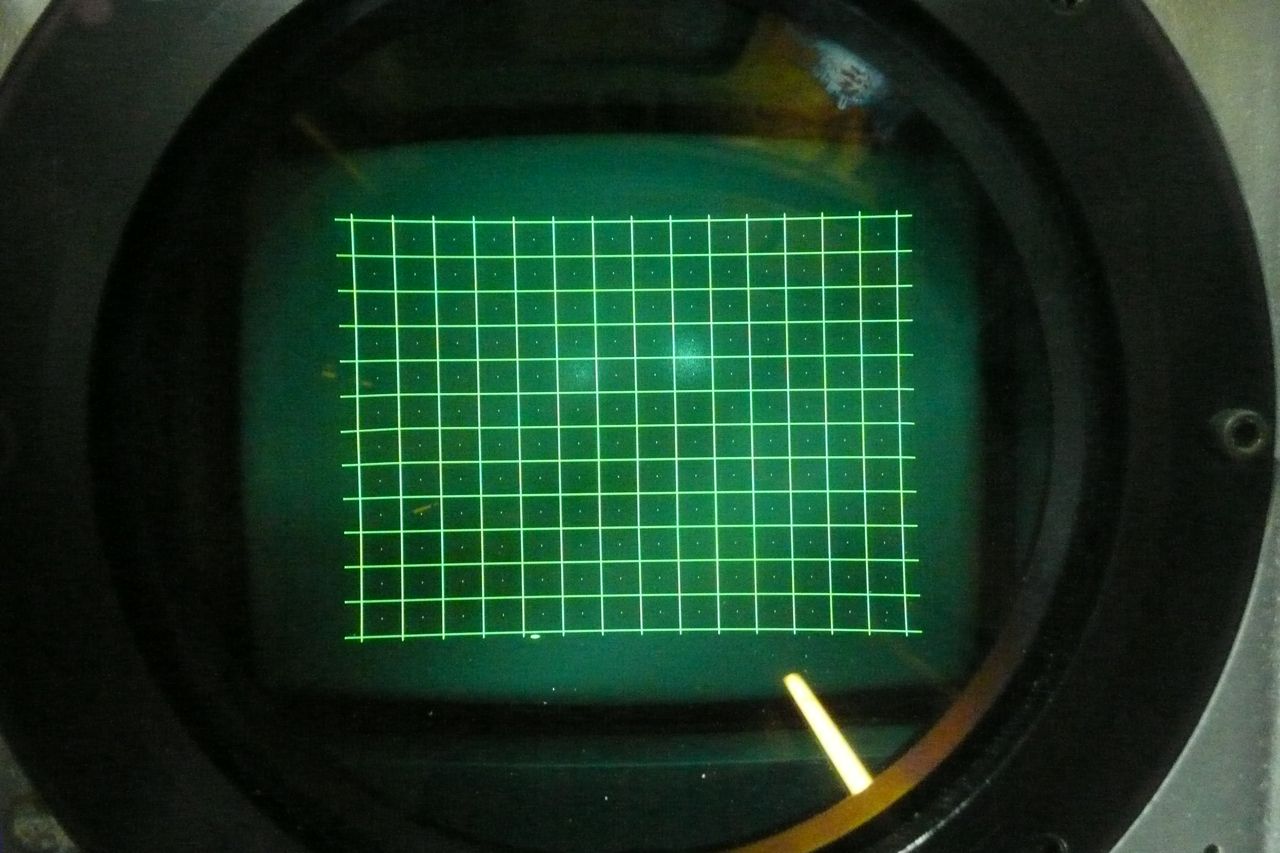
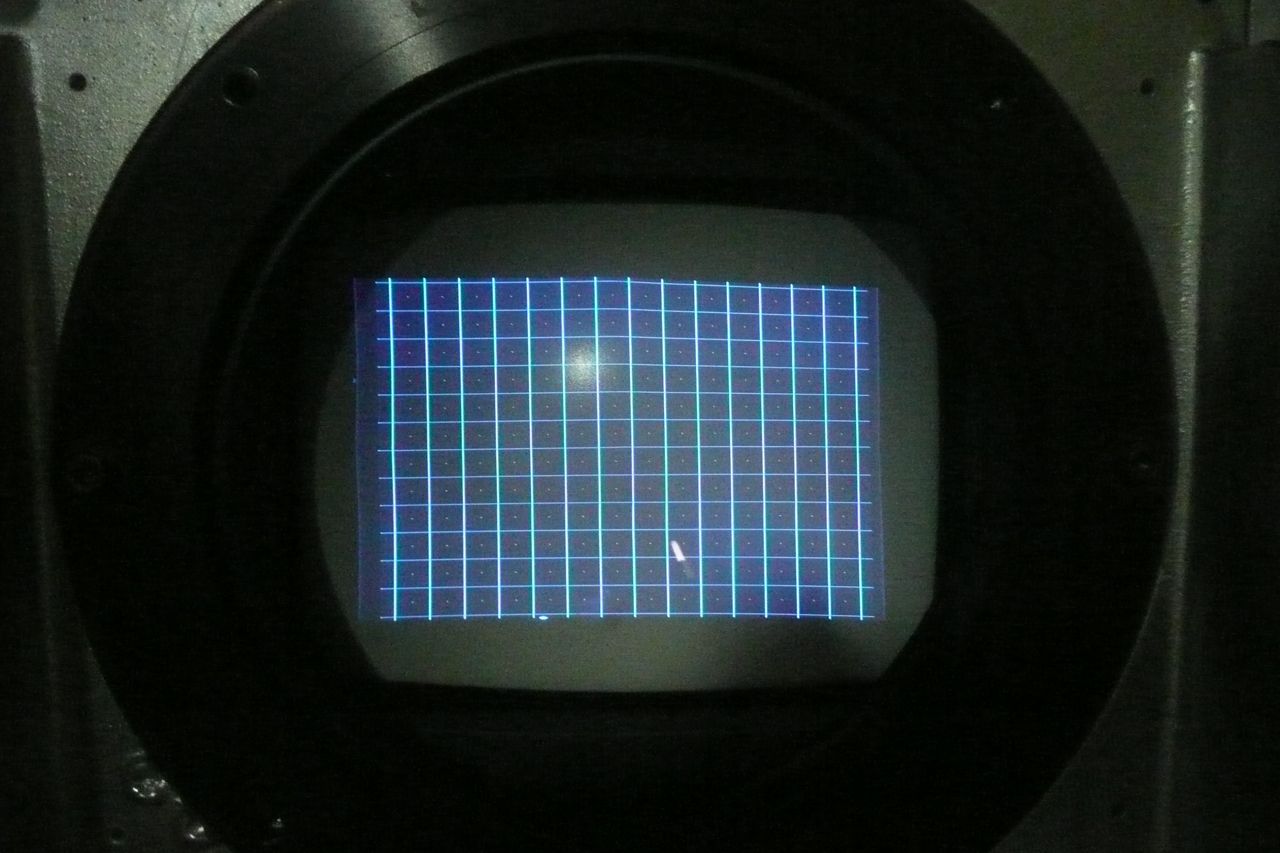
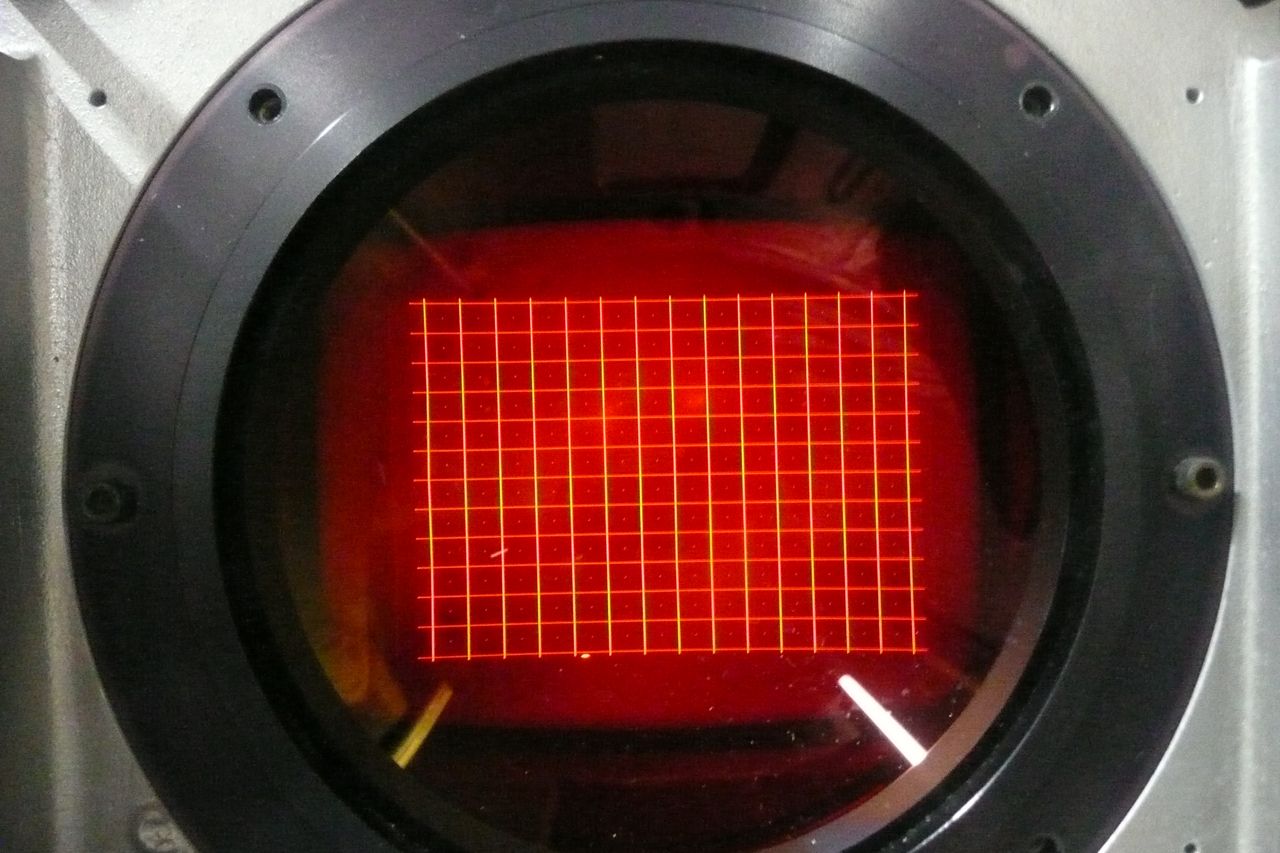
I cleaned all the daugther boards on the CLM and did a complete reinitialisation (that didn't solve the problem) and now all three pictures are nice but blue is still a little bit distorted (see the picture)
I noticed before cleaning the CLM that in the service menu the sigmator was not installed. After the cleaning however I was able to adjust the stigmator.
The cleaning did the job. I checked the hours and it was around 1000 hours with crt's on and 17 hours on standby. I Don't know if I can believe this but I think it has been retubed once because I have two tube modules that have a small sticker that says green to my knowledge there only on green tube in the projector 
I went through a rough (guided) convergence setup and there I noticed that the convergence adjustments for blue only work in the center but every other zone around it doesn't move when I press the buttons.
i think this is the last problem that's left before everything works. i guess some more cleaning is needed
I have also added a picture of the raster size on every tube after the total reset and i have the opinion that the image could be bigger. How far should i stay away from the sides a few mm?
This is important for me because i'm in the proces of building my home theatre and I would like to position my screen exacly so that I use the maximum phosfor area. As soon as I have that distance then I store the projector and finish the theater before really install it.
Thanks again for all your help.
regards,
Ron
| Description: |
|
| Filesize: |
133 KB |
| Viewed: |
4553 Time(s) |
|
| Description: |
|
| Filesize: |
112.92 KB |
| Viewed: |
4555 Time(s) |
|
| Description: |
|
| Filesize: |
144.58 KB |
| Viewed: |
4537 Time(s) |
|
|
|
| Back to top |
|
|
Nashou66
Joined: 12 Jan 2007
Posts: 16171
Location: West Seneca NY
|
| Posted: Fri Jan 14, 2011 12:32 am Post subject: |
|
|
Hi Ron, every think looks good. Blue G2 needs to be turned down a bit so the raster is not showing. Also not sure but the red horizontal lines in the grid look a out of focus it could be the camera.
To do a proper set up use the Onscreen set up mechanical guide. this will adjust grid size etc. id go about 5 mm away from tube edge with all corners.
press help button to find the OnScreen set up guide.
Now for the convergence. double check the HDM cable connections, clean them well.
Aslo you can swap the CVA connectors to check the blue convergence, put the red on blue and blue on red.
go into random convergence and see if blue convergence moves the red grids. Press the color button to get to the right color because the program will adjust blue when you really want to adjust red. that is adjusting red will adjust blue. you will have to
flip back on forth through the two colors to look for the change. so do an extreame move for red and then go look at blue to see if that zone moved.
Understand?
its a bit confusing.
Athanasiois
_________________
Don't blame your underwear for your crooked ass~ unknown Greek philosopher
"Republicans believe every day is the Fourth of July, but the Democrats believe every day is April 15." --- President Reagan
One Smart Dog!!!
Marquee High Performance Bellows now shipping!!
Marquee Modifications and Performance Enhancement
Marquee C-element and Bellow removal
|
|
| Back to top |
|
|
ronaldus
Joined: 25 Dec 2010
Posts: 183
Location: france
|
| Posted: Wed Jan 19, 2011 12:19 am Post subject: |
|
|
Hi Athanasios,
I've tried to swap the convergence connectors and when i powerd up I saw immediatly the same disturbance but now on the red color. so it must come from the conv board.
I didn't manage to test if the convergence would move because as you said it's quite confusing.
I had the impression that no red and no blue were moving ut I'm not 100% sure.
I'll test more tomorrow.
I've cleaned every connector that i could find but no chips.
Because I would need a special tool to get those out.
Is my convergence board broken?
Regards,
Ron.
|
|
| Back to top |
|
|
Nashou66
Joined: 12 Jan 2007
Posts: 16171
Location: West Seneca NY
|
| Posted: Wed Jan 19, 2011 2:39 am Post subject: |
|
|
Well now you narrowed it down to either A CLM or CVA issue. First lets clean the CLM chips before saying its the CVA for sure.
it be better if you had another CLM to test. I have a CLM here that does something similar to yours but on a vertical Grid line.
Try to find a spare CLM to test if you can.
Andre(Antorsae) in Spain is the closets marquee owner I know of to you and I know he has extras.
Athanasios
_________________
Don't blame your underwear for your crooked ass~ unknown Greek philosopher
"Republicans believe every day is the Fourth of July, but the Democrats believe every day is April 15." --- President Reagan
One Smart Dog!!!
Marquee High Performance Bellows now shipping!!
Marquee Modifications and Performance Enhancement
Marquee C-element and Bellow removal
|
|
| Back to top |
|
|
ronaldus
Joined: 25 Dec 2010
Posts: 183
Location: france
|
| Posted: Wed Jan 19, 2011 11:04 pm Post subject: |
|
|
Hi it's me again,
I played around a little bit I think I also have another convergence issue on the green or red tube.
If I go through the guided convergence setup then after the center adjustment (I guess this is called the static convergence) Then the next step is a zone on the left side of the screen. If I move the up and down keys the Horizontal red lines can be adjusted on top of the green but if I press on the left and right keys then the vertical red AND green lines move at the same time and they don't converge.
In the beginning I thought this was normal but I think we have an issue here.
CVA board broken?
Tomorrow I take the CLM board to work because there they have a special extraction tool to get the chips out and put them in again.
Any comments are welcome
regards,
Ron.
|
|
| Back to top |
|
|
|
|





