| Author |
Message |
halcyon1234
Joined: 21 May 2006
Posts: 39
|
| Posted: Mon Dec 20, 2010 4:10 am Post subject: Ampro 4600 - Error 08 At 44 |
|
|
My father-in-law's basement is done, and the Ampro's been ceiling mounted. I turned it on for the first time. None of the lenses come on, and I get Error 08 At 44. After a while it shuts down and shows "+20 Volt Failure".
I haven't had a chance to pop the hood (I was wiring up the sound system), but will be up at his place again over Christmas. I suspect something's come loose when it was flipped and mounted. Any hints as to where I should start prodding? Or will I be taking advantage of Curt's "$30 for anything" sale?
|
|
| Back to top |
|
 |
Curt Palme
CRT Tech
Joined: 08 Mar 2006
Posts: 24396
Location: Langley, BC
TV/Projector: All of them!
|
| Posted: Mon Dec 20, 2010 6:41 am Post subject: |
|
|
|
First thing to check is the 20 volt fuse. They can blow for no reason and cause that. Otherwise it can be a CPU board or reggie board problem. Rare, but possible.
|
|
| Back to top |
|
|
halcyon1234
Joined: 21 May 2006
Posts: 39
|
| Posted: Sat Dec 25, 2010 3:56 am Post subject: |
|
|
Merry x-mas to all. =)
Checking it out now. The +20v fuse is good and not blown. I checked it manually, and the green LED on the power supply turn on.
The power supply fans turn on, but nothing else does. The two case fans don't spin, and the tubes don't come on.
The controller says both ERROR 08 AT 44 and ERROR 08 AT 46. It doesn't respond to any commands, and then after about 2 minutes shuts down the unit with the +20 error message (what a lie!)
I don't see any obvious loose or missing connections, but I'll keep trying. I'll try taking out the CPU and/or Reg board and try again.
|
|
| Back to top |
|
|
stefuel

Joined: 07 Mar 2006
Posts: 3353
Location: Green Harbor MA USA
|
| Posted: Sun Dec 26, 2010 4:28 pm Post subject: |
|
|
Pull and re-seat the vertical board (44).
08 is a I2c error and 44 is the vertical board. Usually AmPro problems are resolved by solving the first error.
The vertical board is not communicating with the CPU.
46 is the focus modulator.
_________________
Chip
A Barco is only a AmPro with training wheels
Card carrying member of the AVS chain gang.
|
|
| Back to top |
|
|
halcyon1234
Joined: 21 May 2006
Posts: 39
|
| Posted: Sun Jan 09, 2011 1:44 am Post subject: |
|
|
| stefuel wrote: | Pull and re-seat the vertical board (44).
08 is a I2c error and 44 is the vertical board. Usually AmPro problems are resolved by solving the first error.
The vertical board is not communicating with the CPU.
46 is the focus modulator. |
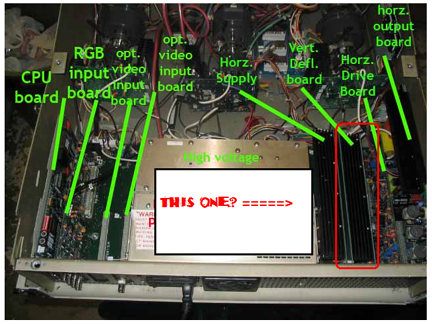
I'm still trying to get the Ampro up and running. I think I've pulled and reseated the vert board, but I'm not 100% sure it's the right one. Is it this one (pictured in the attachment... the second one beside the HVPS)
| Description: |
|
| Filesize: |
228.64 KB |
| Viewed: |
4548 Time(s) |
|
|
|
| Back to top |
|
|
halcyon1234
Joined: 21 May 2006
Posts: 39
|
| Posted: Sun Jan 09, 2011 4:04 am Post subject: |
|
|
Read through the Ampro I2C Error guide posted on Curt's site. I'm getting error 08 (No Acknowledge from this device) for (seemingly at random):
40 CPU - Octal DAC
4A Horizontal - Octal DAC
44 Vertical - Octal DAC
46 Focus Mod - Octal DAC
48 Focus Mod - Octal DAC
So I guess the problem is with the Octal DAC. Not sure what that is.
I've tried unplugging and replugging everything I can get my hands on, reseated all the boards (except for the Horzontal Output board, because I can't figure out how to take it out).
I'm at a loss of what to do at this point. Anything else I can pull/reseat? Is there a module I need to buy from Curt and replace? Is this something a technician needs to come and fix?
Thanks for the guidance.
|
|
| Back to top |
|
|
tse
Joined: 03 May 2006
Posts: 1014
Location: Sweatbucket, Fl.
|
| Posted: Sun Jan 09, 2011 5:47 pm Post subject: |
|
|
If you can, get a DVM and measure the voltages on the fuses under the cover on the LVPS. Be careful not to short the probe tip to the chassis when it is on a fuse.
Often these problems on octal DACs and stuff are caused by improper LVPS outputs.
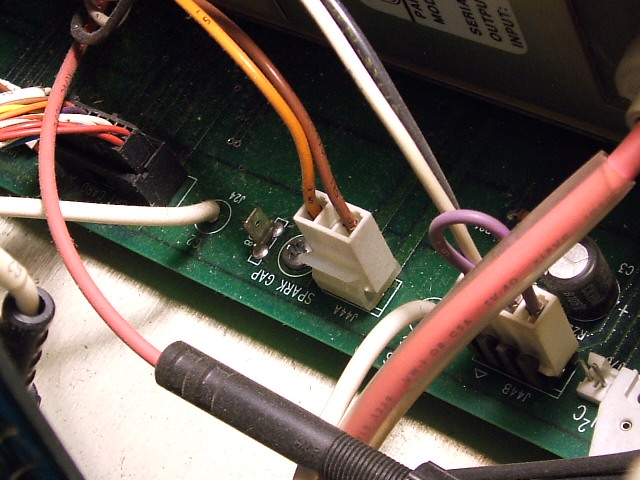
It will be a good idea to prevent the HV from coming up until you fix the unit. That will protect the CRTs from potential damage. Unplug projector from AC power and after a couple of minutes unplug P44A from the mother board and position somewhere safe from contact with chassis. P44A is a two wire connector coming from the HVPS.
Scott
| Description: |
|
| Filesize: |
116.11 KB |
| Viewed: |
4518 Time(s) |
|
_________________
"Were we directed from Washington when to sow and when to reap, we would soon want bread."
Thomas Jefferson
|
|
| Back to top |
|
|
macgyver655
Joined: 22 Aug 2007
Posts: 8508
|
| Posted: Sun Jan 09, 2011 6:49 pm Post subject: |
|
|
Funny thing is that DAC does not use +20v. I would also check the +5v and +12v lines.
Edit: Scratch that. the +20v is used to make the +12v. +9v makes +5v.
Last edited by macgyver655 on Sun Jan 09, 2011 7:02 pm; edited 3 times in total
|
|
| Back to top |
|
|
macgyver655
Joined: 22 Aug 2007
Posts: 8508
|
| Posted: Sun Jan 09, 2011 6:53 pm Post subject: |
|
|
|
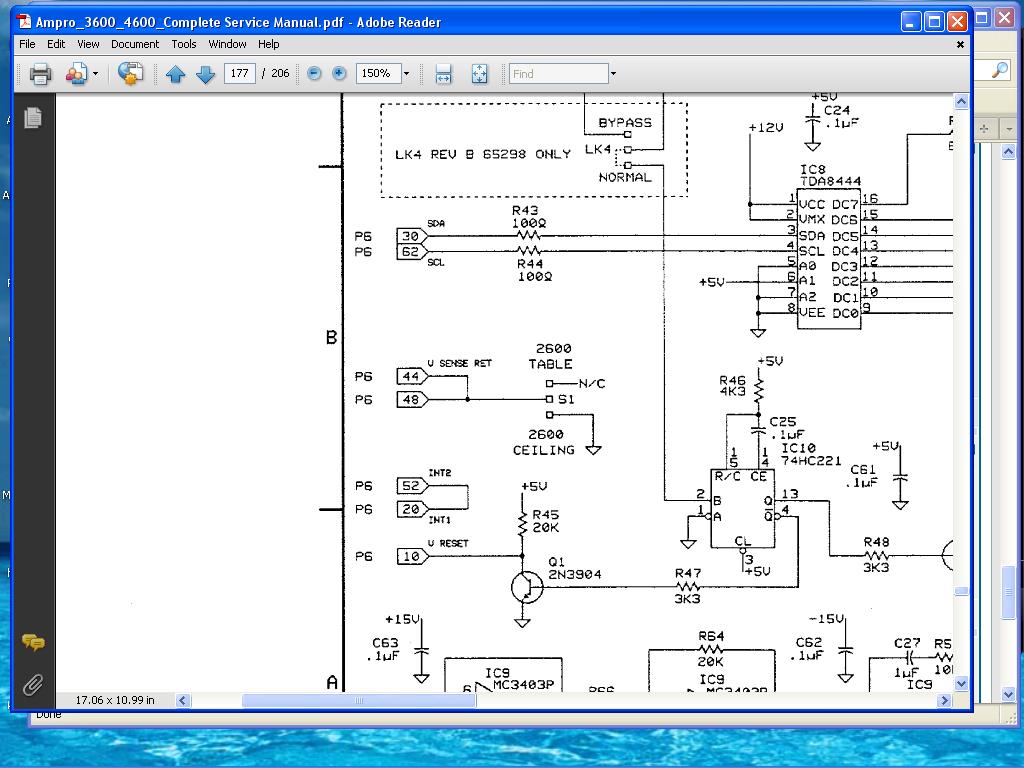
Hey. The schematic shows a switch on the vert board for table or ceiling but also says 2600. Does it apply to the 4600 vertical board?
|
|
| Back to top |
|
|
papalek

Joined: 08 Mar 2006
Posts: 1536
Location: Longs SC
|
| Posted: Sun Jan 09, 2011 9:17 pm Post subject: |
|
|
| macgyver655 wrote: | | Hey. The schematic shows a switch on the vert board for table or ceiling but also says 2600. Does it apply to the 4600 vertical board? |
I have never seen the switch on the 4600 o3600. They use cards to flip the image. I do think I seen it on the 4000. and on my 2600. The 2600 is basically a 2000 with the newer remote and menus.
_________________
My current list of PJ's AmPro 1 1/2-4600,4200, 1/2-3600,2600.
I do love my AmPro's
|
|
| Back to top |
|
|
Curt Palme
CRT Tech
Joined: 08 Mar 2006
Posts: 24396
Location: Langley, BC
TV/Projector: All of them!
|
| Posted: Sun Jan 09, 2011 9:29 pm Post subject: |
|
|
|
That switch is only on the 2000 series. It corrects geometry or something like that when inverting the image. THe actual deflection yoke changes are made with 2 pin connectors on the yoke on the 2000 series, and with inverting a PC board with changing board traces on it on the 3300, 3600 and 4600.
|
|
| Back to top |
|
|
macgyver655
Joined: 22 Aug 2007
Posts: 8508
|
| Posted: Sun Jan 09, 2011 10:10 pm Post subject: |
|
|
It does say 2600 so I dont know.
| Description: |
|
| Filesize: |
114.67 KB |
| Viewed: |
4492 Time(s) |
|
|
|
| Back to top |
|
|
halcyon1234
Joined: 21 May 2006
Posts: 39
|
| Posted: Mon Jan 10, 2011 4:06 am Post subject: |
|
|
Found the problem!
I took out the LVPS to ship back to Curt, and lo and behold... there's a bent pin. I unbent it with some needlenoses, reseated everything-- and power!
I was a bit excited, and forgot to take a picture of the exact pin-- but if the PJ is ceiling mounted, and you were standing behind it looking up, it would be the bank of pins on the left, on the row further away from you, the second pin from the right (it might have been the third pin, damn memory).
I can only assume the LVPS shifted a bit when the PJ was being mounted.
Thanks for everyone's help!
|
|
| Back to top |
|
|
|
|





