| Author |
Message |
haireez
Joined: 14 Jun 2007
Posts: 207
Location: singapore
TV/Projector: Vidikron Vision 1 - Ultra
|
| Posted: Wed Nov 24, 2010 7:48 pm Post subject: Green Tube Very Dim During Startup & Intermittent Bright |
|
|
Guys,
I just did some maintenance to my Vidikron Vision 1 last weekend by changing to high performance bellow & replaced with new glycol on all the 3 tubes.
I also replaced 3 HV leads to eliminate constant noise due to arching and this really stop arching completely.
I also upgraded my Vision 1 to Ultra model by replacing motherboard, focus board, convergence board, CLM and vertical board last Sunday.
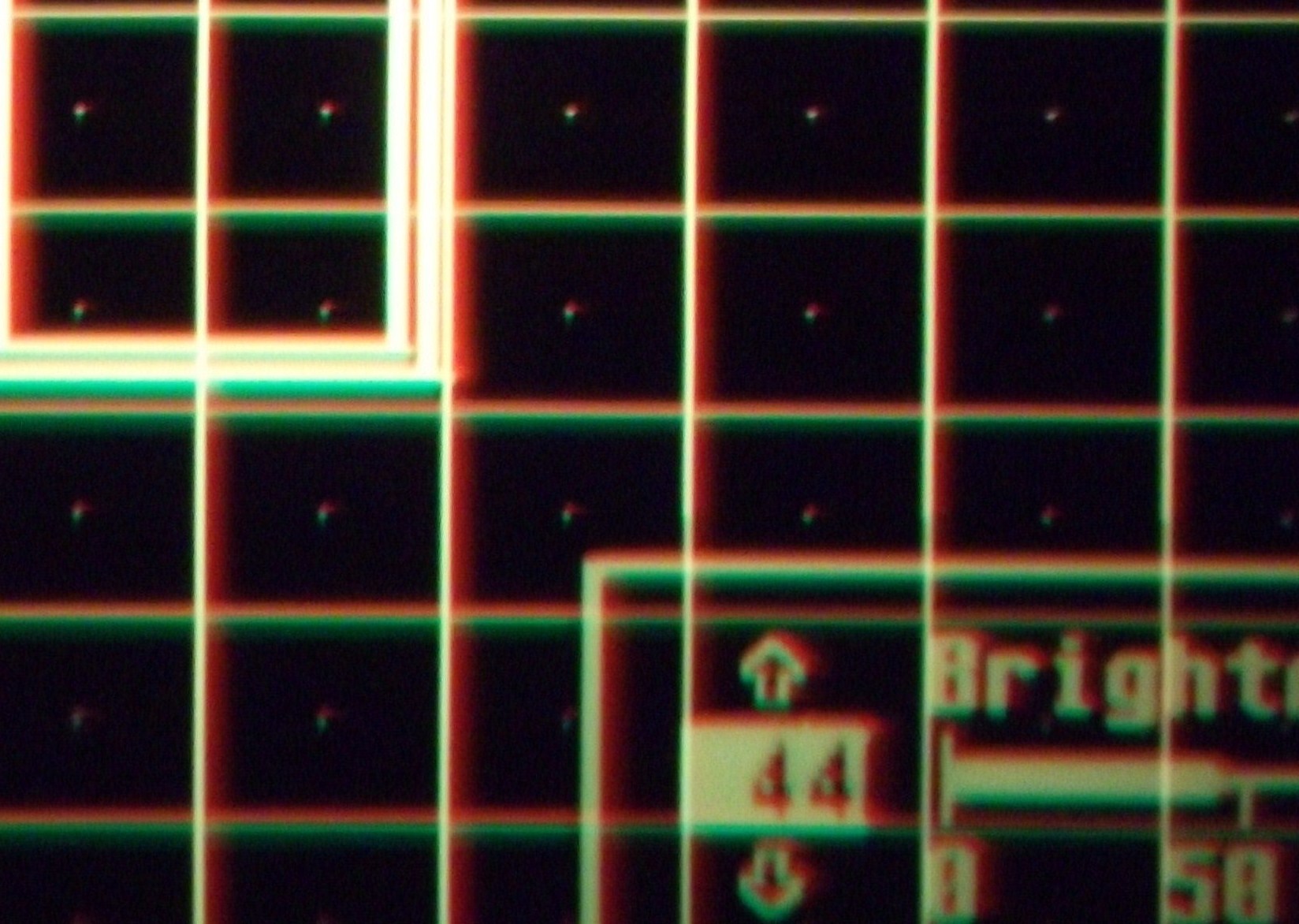
Upon start-up, the picture was awesome and I'm really impressed with the picture Quality. However, I had some problem yesterday when I start to 'ON' my projector and the green tube was very dim and you can see that the colour was way off very badly. I tried to adjust G2 & Drive on green tube to see if I can compensate it but still very dim even though you adjust to 100.
After about an hour or so trying to trouble shoot it, I turn 'OFF' the projector and remove the CLM & re-seat it and suddenly, the green tube is back to normal and the picture is awesome again. I played some movies for 4 hours without any problem.
This morning, I 'ON' the projector and the same problem happen again. I tried removing the CLM again but this time it does not work. While doing troubleshooting, the picture suddenly back to normal which I don't understand why and another new problem occured.
Whenever I adjust either brightness or contrast up, the picture will be very bright whenever I pressed the 'UP' button. When it's too bright, I will toggle either the 'UP' or 'Down' button again to get the correct brighness and leave it as is. This also happen during red convergence only as you can see the eratic brightness causing both red & green colour to bloom. After adjusting to normal brightness, the picture looks stable after that. But if I want to adjust brightness or contrast again, I will face the sudden or intermittent brightness again.
Apart from this issue, my colour correction board suddently shown as card not installed in the menu but all along, I've been using it without any issue. All problem seem to happen at the same time.
Please advise what could go wrong or whether is there any compatible issue using non ultra with ultra boards etc...
| Description: |
|
| Filesize: |
360.8 KB |
| Viewed: |
3583 Time(s) |
|
|
|
| Back to top |
|
 |
haireez
Joined: 14 Jun 2007
Posts: 207
Location: singapore
TV/Projector: Vidikron Vision 1 - Ultra
|
| Posted: Wed Nov 24, 2010 7:52 pm Post subject: |
|
|
Another photo showing eratic brightness gone after careful adjustment on the brightness mode.
| Description: |
|

Download |
| Filename: |
Eractic brighness gone after pressing 'UP' or 'Down button.JPG |
| Filesize: |
463.88 KB |
| Downloaded: |
364 Time(s) |
|
|
| Back to top |
|
|
Nashou66

Joined: 12 Jan 2007
Posts: 16171
Location: West Seneca NY
|
|
| Back to top |
|
|
Curt Palme
CRT Tech
Joined: 08 Mar 2006
Posts: 24396
Location: Langley, BC
TV/Projector: All of them!
|
| Posted: Thu Nov 25, 2010 12:17 am Post subject: |
|
|
The CLM, motherboard, focus board and V and C boards came from me as a set to convert Haireez to an Ultra. I tested the functions here overnight, and it worked fine, although I did not check the CCM function, as I never use them. Why the CCM won't show in the menu is beyond me.
I'd suspect glycol leakage from a tube onto the backplane, I've seen that before for the changing brightness issue.
|
|
| Back to top |
|
|
haireez
Joined: 14 Jun 2007
Posts: 207
Location: singapore
TV/Projector: Vidikron Vision 1 - Ultra
|
| Posted: Thu Nov 25, 2010 4:09 pm Post subject: |
|
|
I did a full initialization several times but the problem still exist.
I've check and cannot find any sign of glycol leakage at all. The bellows are well made and I have full confident with my new bellow.
I swapped back all my old boards except for new motherboard just to ensure that those new boards are not the root cause for this problem and indeed the same problem still exist. Curt boards are good.
Another thing I notice is that the intermittent brightness also happens when you adjust most of the keypad on the remote control such as :1. Color Temperature Setup, 2. RGB Focus Adjustment, 3. Brightness, 4. Contrast, 5. Convergence etc...
It seem that when you press the button once, it became extremely bright and when you pressed again, it's back to normal and this keep on repeating again and again. This make the calibration on the projector very difficult as the blooming is 'OFF' and 'ON' everytime you calibrate.
I'm not too sure if there is anything to do with one of the Tech bulletin TB94-09 mentioning about keypad eratic operations '' or is it something else.
_________________
2 White Vision 1
|
|
| Back to top |
|
|
Curt Palme
CRT Tech
Joined: 08 Mar 2006
Posts: 24396
Location: Langley, BC
TV/Projector: All of them!
|
| Posted: Thu Nov 25, 2010 4:34 pm Post subject: |
|
|
|
Since it's only the green tube, swap the video input and G2 wires between the red and green neck boards. We need to find out whether this is a VIM problem, or perhaps the HVPS is changing the G2 level at random to the green tube.
|
|
| Back to top |
|
|
haireez
Joined: 14 Jun 2007
Posts: 207
Location: singapore
TV/Projector: Vidikron Vision 1 - Ultra
|
| Posted: Thu Nov 25, 2010 5:08 pm Post subject: |
|
|
The intermittent brightness or blooming happens on every color and not restricted to green tube. However, the initial start-up problem only happen to green tube and found to be very dim and it will take awhile before it get fire-up. (5-10 minutes)
I forgot to mention that I did swapped between green & red VNB and the green tube seems fine during start-up. I did not experience dim light on green tube anymore. However, I will try to re-confirm this again later after the projector has cooled down.
Just for everyone info is that I did use 'BOSNY' high temperature paint (1200 degrees) on the LC housing to protect from glycol and I don't think this will cause any problem.
Any chances of HDM failure or HVPS? Sometime, the picture intermittent blooming and out of focus and re-focus again.
_________________
2 White Vision 1
|
|
| Back to top |
|
|
dvh99

Joined: 25 Dec 2009
Posts: 2158
Location: nederland
|
| Posted: Thu Nov 25, 2010 5:29 pm Post subject: |
|
|
maybe cleaning the contacts on the tube and vnb helps use alcohol.
dirty contacts do very funny things.
also make sure the hv leads are really well secured in the splitter.
_________________
1 answer always poses multiple questions.
marquee 9500ultra HD10L moome hdmi1.3 v3+ some mods.
|
|
| Back to top |
|
|
Nashou66
Joined: 12 Jan 2007
Posts: 16171
Location: West Seneca NY
|
| Posted: Thu Nov 25, 2010 7:26 pm Post subject: |
|
|
Change the Batteries in the remote.
If you want to avoid the remote use the Marquee Loader program.
http://vdcds.com/utilities/Marquee23.zip
From here you can do everything and never use the remote. You need a RS 232 to USB adaptor like the Keyspan version.
Dont use the belken brand, it seams the FTDI chip set works the best with the marquee from my experience.
Another great feature is you can keep menus off. this comes in handy when setting Black level and Contrast
by not having the bright menu box contaminating the Pluge pattern your using to set Brightness and Contrast.
I love the Program, especially if your controlling two PJ's like in my blend 
Athanasios
_________________
Don't blame your underwear for your crooked ass~ unknown Greek philosopher
"Republicans believe every day is the Fourth of July, but the Democrats believe every day is April 15." --- President Reagan
One Smart Dog!!!
Marquee High Performance Bellows now shipping!!
Marquee Modifications and Performance Enhancement
Marquee C-element and Bellow removal
|
|
| Back to top |
|
|
haireez
Joined: 14 Jun 2007
Posts: 207
Location: singapore
TV/Projector: Vidikron Vision 1 - Ultra
|
| Posted: Fri Nov 26, 2010 1:49 pm Post subject: |
|
|
Just to update that swapping VNB between green & red tube yesterday solve my first problem with regards to green tube dim during start-up. However, intermittent brightness still exist and I might want to remove all the tubes again to access & clean all contact at the backpane.
Why is it that there is a weird sound (about 10 minutes only) coming from the 3 tubes whenever I turn 'ON' the projector after it has been 'OFF' for 8 hours? I'm not too sure how to describe the sound but it's definitely not arching. After about 10 minutes, the tubes will be totally silent without any weird sound even after you 'OFF' and turn 'ON' immediately.
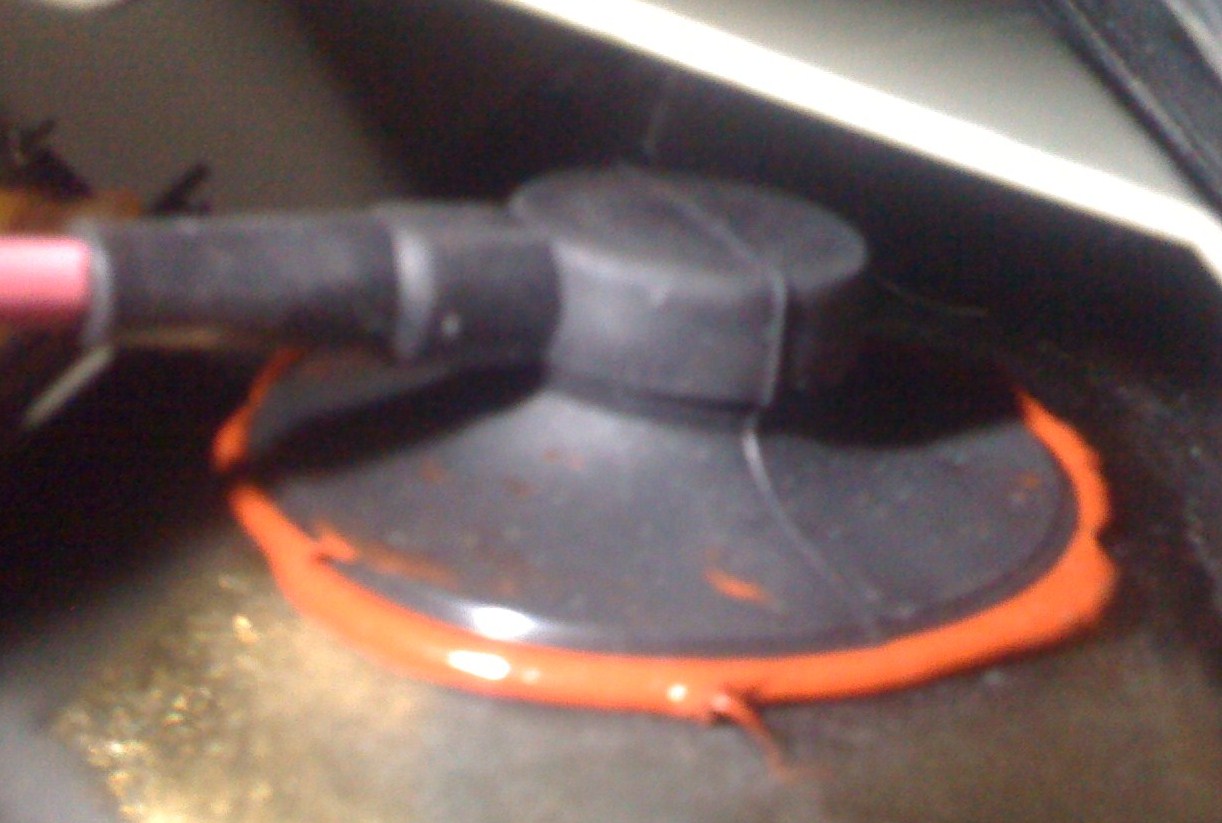
Can this happen if the HV lead are not installed correctly? Attach is the picture that I replaced with a new HV lead on the red tube. Please feel free to comment if you suspect the sound is due to improper installation.
| Description: |
|
| Filesize: |
157.56 KB |
| Viewed: |
3787 Time(s) |
|
|
|
| Back to top |
|
|
haireez
Joined: 14 Jun 2007
Posts: 207
Location: singapore
TV/Projector: Vidikron Vision 1 - Ultra
|
| Posted: Sat Nov 27, 2010 12:09 pm Post subject: |
|
|
Guys,
Thanks for all the advice. The intermittent problem is now solved. I cleaned the VIM board and backpane contacts using contact cleaner and after installation, the problem is gone.
Thanks to all of you for being helpful- that's why I love this forum 
|
|
| Back to top |
|
|
|
|




