| Author |
Message |
rtart
Joined: 16 Jun 2008
Posts: 132
|
| Posted: Tue Nov 09, 2010 2:37 pm Post subject: How to make sure the PJ is square to the screen? |
|
|
Hi,
Sort of a dumb question, but one that I have thought about a while. How do you ensure that the PJ is square to the screen? I mean REALLY accurately placed?
Using a tape measure and a side wall as reference, getting very close on putting the PJ in the center of the room pretty straightforward. However, squaring up the PJ seems to be more of a challenge. I've basically measured to the center of the PJ's green lens from a side wall, then marked the middle of the screen using the same distance from the same side wall. Then I put the vertical green center pattern on the center mark I made on the screen wall.
After this, if the screen wall and the side wall are square, and the green raster is centered on the tube, the PJ's image should be square to the screen wall as well?
I've considered using a laser level to physically check alignment of the PJ's case and/or mounting brackets with the screen as well, but it seems to me that the method described above should work as well.
Is there a simple way to check that the PJ is square to the wall after doing the method above? If the room is not square (could happen) it will obviously throw off any adjustments and could cause problems going forward.
Again, kind of a dumb question, but if it ain't square to start with, it ain't never gonna be set up correctly.
|
|
| Back to top |
|
 |
Elaine Benes
Joined: 25 Apr 2006
Posts: 1416
|
| Posted: Tue Nov 09, 2010 2:44 pm Post subject: |
|
|
Crossed corner measurements all need to be exactly the same.
I measure from the top corner of the screen to the opposite front and rear corner of the projector, then do the same from the other top corner of the screen. That gets the projector both centered and squared to the screen. Who cares how its oriented to the walls, its how its oriented to the screen that matters...
|
|
| Back to top |
|
|
jeffslife

Joined: 17 Apr 2010
Posts: 4190
Location: ohio usa
|
| Posted: Tue Nov 09, 2010 2:44 pm Post subject: |
|
|
I am REALLY no expert , but first of all what kind of pj do you have?
Is your screen mounted to the wall? Is the wall your screen?
IS your pj floor mounted or ceiling mounted?
_________________
We are ALL job creators !
|
|
| Back to top |
|
|
rtart
Joined: 16 Jun 2008
Posts: 132
|
| Posted: Tue Nov 09, 2010 2:53 pm Post subject: |
|
|
| jeffslife wrote: | I am REALLY no expert , but first of all what kind of pj do you have?
Is your screen mounted to the wall? Is the wall your screen?
IS your pj floor mounted or ceiling mounted? |
I have an NEC 10PG (9" LC tubes). Ceiling mounted using unistrut and the screen is mounted to the wall. It's a Draper AT 16:9 96" wide screen.
I've run this setup for about a year and a half and before that a 9PGXtra for about 5 years on a 4:3 Stewart screen. I have a great picture, and think I'm pretty close as far as physical location. My adjustment ranges are fairly close to the middle, as I recall. I just bought a set of GT17 lenses to upgrade my HD10's and thought since I'm tweaking a little, I might as well check everything at the same time. Square is pretty basic so it has to be as close as possible. Thought you guys might have another way for me to verify it, so I thought I would ask.
|
|
| Back to top |
|
|
jeffslife
Joined: 17 Apr 2010
Posts: 4190
Location: ohio usa
|
| Posted: Tue Nov 09, 2010 2:53 pm Post subject: |
|
|
Elaine-benes is absolutly correct.
if your pj is floor mounted height is important too,
also a ROCK SOLID base that NEVER moves.
_________________
We are ALL job creators !
|
|
| Back to top |
|
|
jeffslife
Joined: 17 Apr 2010
Posts: 4190
Location: ohio usa
|
| Posted: Tue Nov 09, 2010 2:57 pm Post subject: |
|
|
sounds like its all good to me, enjoy!
_________________
We are ALL job creators !
|
|
| Back to top |
|
|
rtart
Joined: 16 Jun 2008
Posts: 132
|
| Posted: Tue Nov 09, 2010 3:10 pm Post subject: |
|
|
| Elaine Benes wrote: | Crossed corner measurements all need to be exactly the same.
I measure from the top corner of the screen to the opposite front and rear corner of the projector, then do the same from the other top corner of the screen. That gets the projector both centered and squared to the screen. Who cares how its oriented to the walls, its how its oriented to the screen that matters... |
These measurements are all within 1/8" or less of each other.
I guess I'm good to go. Never hurts to check, though.
Thanks!
|
|
| Back to top |
|
|
garyfritz

Joined: 08 Apr 2006
Posts: 12088
Location: Fort Collins, CO
|
| Posted: Tue Nov 09, 2010 3:58 pm Post subject: |
|
|
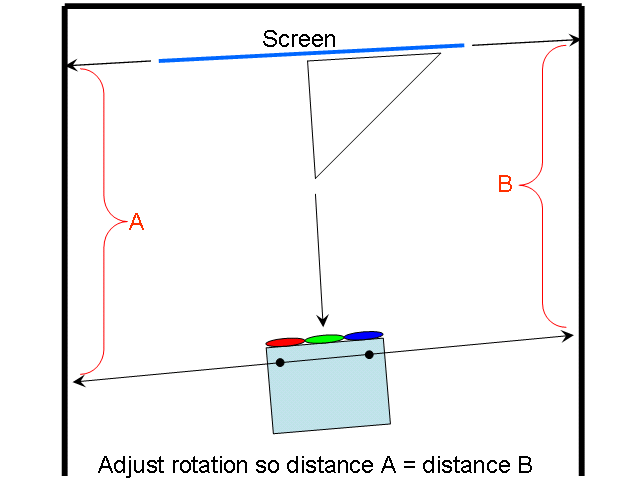
IMHO this is by far the easiest and most accurate way to square the projector:
Sight along a square edge of the projector, or maybe along the feet -- anything that's known to be perpendicular to the pj-to-screen line. A laser pointer can be helpful for this, but I think sighting is best. Measure where that sightline hits on both walls. (I taped "measuring sticks" on the wall -- I drew a "ruler" on a piece of paper, and taped it on the wall so the 120" mark on the ruler was exactly 120" from the screen. Then I could just look to see where on the ruler the sightline fell.) Adjust the PJ until the sightline-to-screen distance is the same on both sides.
It's very easy to get the PJ aligned within 1/8 degree that way.
| Description: |
|
| Filesize: |
12.41 KB |
| Viewed: |
3184 Time(s) |
|
|
|
| Back to top |
|
|
rtart
Joined: 16 Jun 2008
Posts: 132
|
| Posted: Tue Nov 09, 2010 4:39 pm Post subject: |
|
|
|
Great idea! This compensates for non-square walls.
|
|
| Back to top |
|
|
akajester

Joined: 09 Jul 2008
Posts: 934
Location: Wisconsin
|
| Posted: Tue Nov 09, 2010 5:22 pm Post subject: |
|
|
I like your method Gary. Very simple and effective.
Dale
|
|
| Back to top |
|
|
Artinaz
Joined: 15 Jun 2009
Posts: 110
Location: SF Bay Area
|
| Posted: Tue Nov 09, 2010 9:27 pm Post subject: |
|
|
|
This method works mostly with the NECs which has the cross test pattern. Hold a mirror against the screen. If its indeed square, the green vertical line will reflect back to the center of the green tube.
|
|
| Back to top |
|
|
AnalogRocks
Forum Moderator

Joined: 08 Mar 2006
Posts: 26706
Location: Toronto, Ontario, Canada
TV/Projector: Sony 1252Q, AMPRO 4000G
|
| Posted: Tue Nov 09, 2010 11:03 pm Post subject: |
|
|
I use to do that with my 1252. I moved it allot so I had 2 pieces of string, one off each front corner. I'd set up the tripod screen and stretch out the two pieces of string to the screen and I was square. I usually didn't even need to adjust focus. It felt like cheating 
_________________
Tech support for nothing
CRT.
HD done right!
|
|
| Back to top |
|
|
ecrabb
Forum Moderator

Joined: 13 Mar 2006
Posts: 15909
Location: Utah
TV/Projector: JVC RS40, Epson 5010
|
|
| Back to top |
|
|
CasetheCorvetteman

Joined: 09 Nov 2008
Posts: 6326
Location: Australia
|
| Posted: Wed Nov 10, 2010 3:03 am Post subject: |
|
|
Its only cheating if you get caught Jeremy 
|
|
| Back to top |
|
|
|
|




