| Author |
Message |
opv
Joined: 18 May 2010
Posts: 202
Location: Emek Hefer,Israel
|
| Posted: Tue Nov 02, 2010 8:27 am Post subject: mounting a Barco G1209s |
|
|
Hi everyone,
After my BG808s decided to retire a couple of weeks ago, I took the chance and made a dream come true by upgrading to a BG1209s beast.
The unit is in great condition, it was installed as a demo unit fro a seller.
I going to hang it to the ceiling using a unistart ceiling mount.
I have several questions:
1) my room is quite small, ~3.5m length. I know that I will not get a huge picture but I want to make sure I will not have any optical focus issues
2) The projector was ceiling mounted with an angle so that the lenses are parallel to the ceiling. Barco recommends to keep the lense angle and hang the projector so that the projector top is parallel to the ceiling. what should I do, hang it like Barco recommends or like it was mounted before?
3) In what distance from the ceiling should I hang the PJ, should it be facing the top of the projection screen?
If you have any more tips for good installation, for getting a god picture and not damaging the tubes I'd be happy to hear.
Thanks,
Or
|
|
| Back to top |
|
 |
Ile

Joined: 09 Mar 2006
Posts: 1491
Location: Jyväskylä, Finland
|
| Posted: Tue Nov 02, 2010 9:44 am Post subject: |
|
|
Usually it's not very practical to install crt projector to zero angle like it was before, because then projector will hang very low. Lenses will be at center of the screen. When projector bottom are at level, lenses are 10.5 degree angle.
Projector position depends where you want to install your screen and how big it must be.
First you should install your projector to floor to test if lenses even focus to that small projection distance.
HD120 lenses are specsed for 200-300 cm width screen. Projection distance is 292 cm for 200 cm width, when you ad 100 cm (distance from front bracket to back of projector+ few cm air space) to that you are 42 cm out of your room.
If lenses aren't focusing proberly to that small screen, you need to find HD10L lenses. These are for 130-190cm width screens.
Is there colored c-elements installed in your 1209s?
Last edited by Ile on Tue Nov 02, 2010 10:12 am; edited 1 time in total
|
|
| Back to top |
|
|
jkruger

Joined: 24 Oct 2007
Posts: 2435
Location: Carlsbad, CA
|
| Posted: Tue Nov 02, 2010 10:07 am Post subject: |
|
|
|
I have an extra set of HD10L lenses and a Barco pulley mount for the 1209s if you are interested. Mine is mounted with the lenses at about 5 degrees of angle and it works okay, my ceiling is 9 feet high.
|
|
| Back to top |
|
|
opv
Joined: 18 May 2010
Posts: 202
Location: Emek Hefer,Israel
|
| Posted: Tue Nov 02, 2010 10:13 am Post subject: |
|
|
As far as I know, the HD120 have the shortest throw between all the optional lenses. If I change to other lenses, won't I get a much smaller picture?
Since I'm using UNISTRUT and very long bolts, I will have the ability to play with the projector height afterwards.
Which one of the options, PJ parallel to ceiling or lense parallel to ceiling will give me better usage of the phosphor and less keystone?
The projector was mounted so that it's bottom was at 1.7m height. that's quite low, but if it's better I can live with it.
|
|
| Back to top |
|
|
jkruger
Joined: 24 Oct 2007
Posts: 2435
Location: Carlsbad, CA
|
| Posted: Tue Nov 02, 2010 10:17 am Post subject: |
|
|
|
The top of my screen is at 8 feet and the centerline of the lenses is at 7 feet.
|
|
| Back to top |
|
|
opv
Joined: 18 May 2010
Posts: 202
Location: Emek Hefer,Israel
|
| Posted: Tue Nov 02, 2010 10:18 am Post subject: |
|
|
|
by the way, I have the original C elements, I assume it isn't colored.
|
|
| Back to top |
|
|
opv
Joined: 18 May 2010
Posts: 202
Location: Emek Hefer,Israel
|
| Posted: Tue Nov 02, 2010 10:20 am Post subject: |
|
|
| jkruger wrote: | | The top of my screen is at 8 feet and the centerline of the lenses is at 7 feet. |
what is your projection distance and screen size?
|
|
| Back to top |
|
|
jkruger
Joined: 24 Oct 2007
Posts: 2435
Location: Carlsbad, CA
|
| Posted: Tue Nov 02, 2010 10:27 am Post subject: |
|
|
|
I have a 100 inch diagonal 16:9 screen and a 120 inch distance. I'm using the original lenses that came with the Runco 1100. Someone told me they were the HD10-GT-17 lenses but I can't tell, there are no markings on them.
|
|
| Back to top |
|
|
opv
Joined: 18 May 2010
Posts: 202
Location: Emek Hefer,Israel
|
| Posted: Tue Nov 02, 2010 10:29 am Post subject: |
|
|
| jkruger wrote: | | I have a 100 inch diagonal 16:9 screen and a 120 inch distance. I'm using the original lenses that came with the Runco 1100. Someone told me they were the HD10-GT-17 lenses but I can't tell, there are no markings on them. |
by 120inch, are you reffering to the distance from the lens or from the back of the PJ?
|
|
| Back to top |
|
|
jkruger
Joined: 24 Oct 2007
Posts: 2435
Location: Carlsbad, CA
|
| Posted: Tue Nov 02, 2010 10:33 am Post subject: |
|
|
|
That is from screen to front of lenses. The distance to the rear of the projector is about 170 inches. The horizontal width of the screen is 87 inches.
|
|
| Back to top |
|
|
opv
Joined: 18 May 2010
Posts: 202
Location: Emek Hefer,Israel
|
| Posted: Tue Nov 02, 2010 10:36 am Post subject: |
|
|
| jkruger wrote: | | That is from screen to front of lenses. The distance to the rear of the projector is about 170 inches. The horizontal width of the screen is 87 inches. |
well, 170" are 30" more than what I have. I'll have to see if I can get a good focus from this short distance.
|
|
| Back to top |
|
|
jkruger
Joined: 24 Oct 2007
Posts: 2435
Location: Carlsbad, CA
|
| Posted: Tue Nov 02, 2010 10:39 am Post subject: |
|
|
|
When mounting remember that the projector case needs some room at the back to swing open. I would test focus before mounting.
|
|
| Back to top |
|
|
Ile
Joined: 09 Mar 2006
Posts: 1491
Location: Jyväskylä, Finland
|
| Posted: Tue Nov 02, 2010 10:43 am Post subject: |
|
|
| opv wrote: | Which one of the options, PJ parallel to ceiling or lense parallel to ceiling will give me better usage of the phosphor and less keystone?
The projector was mounted so that it's bottom was at 1.7m height. that's quite low, but if it's better I can live with it. |
Zero projection angle is best, but that usually means that screen must start from ceiling and projector still hangs very low. Most prefer lower screen position and better head room over few % better sharpness and brightness that extra phosphorus gives. That small difference is hard to notice with normal movie material.
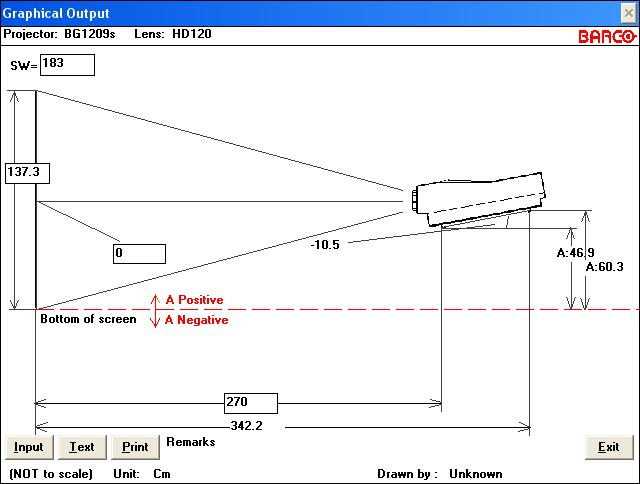
Barco lens program doesn't allow simulation with smaller than 200 cm width screen with HD120, so here's SW200 with 0 degree angle. Usually I have installed projector about 10 cm closer that program suggest, so I can max phosphor usage.
Last edited by Ile on Tue Nov 02, 2010 10:50 am; edited 2 times in total
|
|
| Back to top |
|
|
opv
Joined: 18 May 2010
Posts: 202
Location: Emek Hefer,Israel
|
| Posted: Tue Nov 02, 2010 10:44 am Post subject: |
|
|
| jkruger wrote: | | When mounting remember that the projector case needs some room at the back to swing open. I would test focus before mounting. |
yes, I'll do that.
What about my question regarding projection angle and better usage of Phosphor?
|
|
| Back to top |
|
|
Ile
Joined: 09 Mar 2006
Posts: 1491
Location: Jyväskylä, Finland
|
| Posted: Tue Nov 02, 2010 10:47 am Post subject: |
|
|
| opv wrote: | | What about my question regarding projection angle and better usage of Phosphor? |
Check one post up.  This turned real time chat. This turned real time chat.
|
|
| Back to top |
|
|
jkruger
Joined: 24 Oct 2007
Posts: 2435
Location: Carlsbad, CA
|
| Posted: Tue Nov 02, 2010 10:49 am Post subject: |
|
|
|
I maximized the raster to use as much phosphor as possible and then adjusted the projector to fill the screen. I have a large room with open beam ceilings so it was easy for me to do.
|
|
| Back to top |
|
|
opv
Joined: 18 May 2010
Posts: 202
Location: Emek Hefer,Israel
|
| Posted: Tue Nov 02, 2010 10:50 am Post subject: |
|
|
| Ile wrote: | | opv wrote: | Which one of the options, PJ parallel to ceiling or lense parallel to ceiling will give me better usage of the phosphor and less keystone?
The projector was mounted so that it's bottom was at 1.7m height. that's quite low, but if it's better I can live with it. |
Zero projection angle is best, but that usually means that screen must start from ceiling and projector still hangs very low. Most prefer lower screen position and better head room over few % better sharpness and brightness that extra phosphorus gives. That small difference is hard to notice with normal movie material.
Barco lens program doesn't allow simulation with smaller than 200 cm width screen with HD120, so here's SW200 with 0 degree angle. In real worl I have installed projector about 10 cm closer that program suggest, so I can max phosphor usage. |
it doesn't allow this width in the input, but you can change it in the figure itself:
| Description: |
|
| Filesize: |
39.44 KB |
| Viewed: |
6821 Time(s) |
|
|
|
| Back to top |
|
|
Ile
Joined: 09 Mar 2006
Posts: 1491
Location: Jyväskylä, Finland
|
| Posted: Tue Nov 02, 2010 10:52 am Post subject: |
|
|
|
I use same method, but calculator is good help when considering screen sizes and height of projector and etc.
|
|
| Back to top |
|
|
opv
Joined: 18 May 2010
Posts: 202
Location: Emek Hefer,Israel
|
| Posted: Tue Nov 02, 2010 10:55 am Post subject: |
|
|
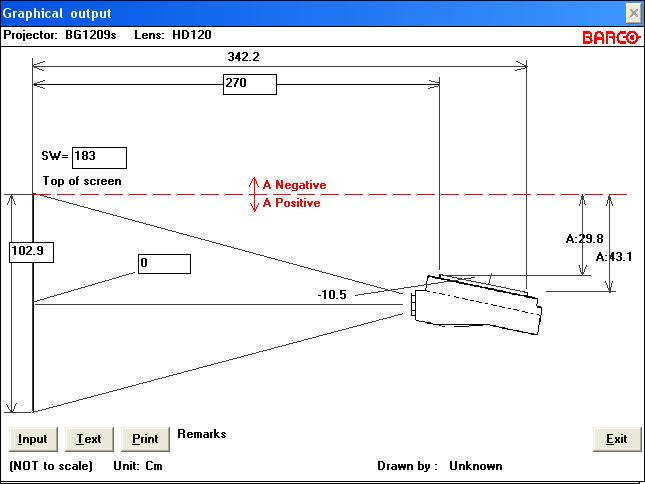
oops, that wasn't ceiling mounted:
| Description: |
|
| Filesize: |
39.31 KB |
| Viewed: |
6814 Time(s) |
|
|
|
| Back to top |
|
|
opv
Joined: 18 May 2010
Posts: 202
Location: Emek Hefer,Israel
|
| Posted: Tue Nov 02, 2010 10:57 am Post subject: |
|
|
|
I think there is another problem with hanging the PJ so low, the light from the screen comes back into the tubes and damages the contrast, am I right?
|
|
| Back to top |
|
|
|
|




