| Author |
Message |
dturco

Joined: 06 Feb 2009
Posts: 3778
Location: Eastern Shore Maryland
TV/Projector: Runco DLP VX-3000i Marquee 9500 parts doner
|
| Posted: Wed Oct 06, 2010 8:06 pm Post subject: Marquee Magnetics |
|
|
Ok I'm doing the Magnetics again. It looks like the center is perfect[I think] I can't seem to get the red to reign in. The grid is too large. Turning the red high and low band slugs has had no affect whatsoever. is it time for the SUPER SECRET menu timings.
The CVA and STIG cables are not plugged in in these photo and no convergence or geometry has been done either.
http://s955.photobucket.com/albums/ae34/dturco/Marquee%20Magnetics/?action=view¤t=marquuemagnetics001.jpg
The double images in some off the photos is not from me. The camera is on a tripod and I can see that ghosting shaking on the screen too. What's that from?
_________________
Firefly rules. Can't stop the signal.
http://www.hulu.com/firefly
Last edited by dturco on Thu Oct 07, 2010 2:14 am; edited 1 time in total
|
|
| Back to top |
|
 |
Nashou66

Joined: 12 Jan 2007
Posts: 16171
Location: West Seneca NY
|
|
| Back to top |
|
|
dvh99

Joined: 25 Dec 2009
Posts: 2158
Location: nederland
|
| Posted: Wed Oct 06, 2010 10:41 pm Post subject: |
|
|
i havent touched them ever but maybe you need to put the size on 50 first(hor) before adjusting.
_________________
1 answer always poses multiple questions.
marquee 9500ultra HD10L moome hdmi1.3 v3+ some mods.
|
|
| Back to top |
|
|
tse
Joined: 03 May 2006
Posts: 1014
Location: Sweatbucket, Fl.
|
| Posted: Thu Oct 07, 2010 12:00 am Post subject: |
|
|
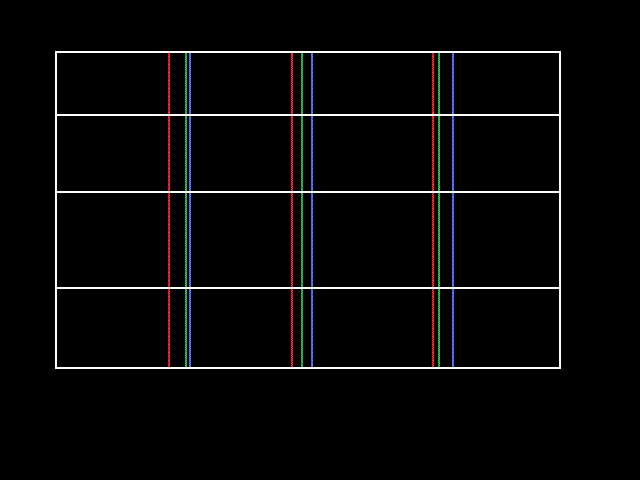
Remember, when you do the tube pivot and before doing the convergence the edges should be aligned. The middle will not be.
Scott
| Description: |
|
| Filesize: |
7 KB |
| Viewed: |
4002 Time(s) |
|
_________________
"Were we directed from Washington when to sow and when to reap, we would soon want bread."
Thomas Jefferson
|
|
| Back to top |
|
|
Nashou66
Joined: 12 Jan 2007
Posts: 16171
Location: West Seneca NY
|
|
| Back to top |
|
|
dturco
Joined: 06 Feb 2009
Posts: 3778
Location: Eastern Shore Maryland
TV/Projector: Runco DLP VX-3000i Marquee 9500 parts doner
|
| Posted: Thu Oct 07, 2010 1:10 am Post subject: |
|
|
Hey Scott thanks, even that way the RED Grid is much larger then the green and blue. The green and blue will line up edge to edge like your picture, but not the red, is always larger.
What's causing that?
I was just about to take a picture of that way too for comparison. I will post it shortly.
_________________
Firefly rules. Can't stop the signal.
http://www.hulu.com/firefly
|
|
| Back to top |
|
|
CRT_Ben
Joined: 28 Aug 2006
Posts: 1684
Location: Northern Virginia
|
| Posted: Thu Oct 07, 2010 1:16 am Post subject: |
|
|
| tse wrote: | Remember, when you do the tube pivot and before doing the convergence the edges should be aligned. The middle will not be.
Scott |
I've read this many times, but never been able to put it into practice, and maybe adjusting the linearity is the key - because when you adjust the center convergence point, it moves the whole grid! Is it linearity that is used to line up the center prior to convergence?
|
|
| Back to top |
|
|
tse
Joined: 03 May 2006
Posts: 1014
Location: Sweatbucket, Fl.
|
| Posted: Thu Oct 07, 2010 12:40 pm Post subject: |
|
|
The whole grid moves when you set the centers to match but that is ok. The point convergence will pull things in. Try the guided convergence once the zeroed out convergence and tube pivots are set like the picture.
Dturco, is your red deflection yoke pushed all the way forward against the bell of the tube? The red image shouldn't be dramtically larger than the other two.
Scott
_________________
"Were we directed from Washington when to sow and when to reap, we would soon want bread."
Thomas Jefferson
|
|
| Back to top |
|
|
dturco
Joined: 06 Feb 2009
Posts: 3778
Location: Eastern Shore Maryland
TV/Projector: Runco DLP VX-3000i Marquee 9500 parts doner
|
| Posted: Thu Oct 07, 2010 12:45 pm Post subject: |
|
|
| tse wrote: | The whole grid moves when you set the centers to match but that is ok. The point convergence will pull things in. Try the guided convergence once the zeroed out convergence and tube pivots are set like the picture.
Dturco, is your red deflection yoke pushed all the way forward against the bell of the tube? The red image shouldn't be dramtically larger than the other two.
Scott |
Good question, I don't know I'll check it out. [Knowing you, you already know it's not.] 
Thanks again TSE rocks
_________________
Firefly rules. Can't stop the signal.
http://www.hulu.com/firefly
|
|
| Back to top |
|
|
dvh99
Joined: 25 Dec 2009
Posts: 2158
Location: nederland
|
| Posted: Thu Oct 07, 2010 2:33 pm Post subject: |
|
|
can you do s & c linearity for the colours separately?
_________________
1 answer always poses multiple questions.
marquee 9500ultra HD10L moome hdmi1.3 v3+ some mods.
|
|
| Back to top |
|
|
virusc
Joined: 11 Apr 2007
Posts: 358
Location: Massachusetts
|
| Posted: Thu Oct 07, 2010 2:43 pm Post subject: |
|
|
|
I'm confused. That pic looks OK to me and I have never seen much better than that. It's due to the limitation of the 3 CRTS are not on the same vertical plane like horizontally. I thought you are supposed to center raster by viewing edges then measure width for red and adjust width for B+G to match red then tube pivot R+B in center which should avoid drift in center then adjust the rest with geometry and convergence?
|
|
| Back to top |
|
|
dturco
Joined: 06 Feb 2009
Posts: 3778
Location: Eastern Shore Maryland
TV/Projector: Runco DLP VX-3000i Marquee 9500 parts doner
|
| Posted: Thu Oct 07, 2010 3:12 pm Post subject: |
|
|
| dvh99 wrote: | | can you do s & c linearity for the colours separately? |
Not that I can find.
_________________
Firefly rules. Can't stop the signal.
http://www.hulu.com/firefly
|
|
| Back to top |
|
|
dturco
Joined: 06 Feb 2009
Posts: 3778
Location: Eastern Shore Maryland
TV/Projector: Runco DLP VX-3000i Marquee 9500 parts doner
|
| Posted: Thu Oct 07, 2010 3:13 pm Post subject: |
|
|
| virusc wrote: | | I'm confused. That pic looks OK to me and I have never seen much better than that. It's due to the limitation of the 3 CRTS are not on the same vertical plane like horizontally. I thought you are supposed to center raster by viewing edges then measure width for red and adjust width for B+G to match red then tube pivot R+B in center which should avoid drift in center then adjust the rest with geometry and convergence? |
how are you adjusting the width for each color separately? I have tried the width slugs they do nothing at all.
_________________
Firefly rules. Can't stop the signal.
http://www.hulu.com/firefly
|
|
| Back to top |
|
|
dturco
Joined: 06 Feb 2009
Posts: 3778
Location: Eastern Shore Maryland
TV/Projector: Runco DLP VX-3000i Marquee 9500 parts doner
|
| Posted: Thu Oct 07, 2010 3:18 pm Post subject: |
|
|
The red sweep coil might not have been not fully against the tube face, it was very easy to swing. I did push it tightly forward and then all of the other magnetic coils too. There was very little movement if at all. The red is still larger then the green and blue.
Could the CLM be weak, and cause this?
_________________
Firefly rules. Can't stop the signal.
http://www.hulu.com/firefly
|
|
| Back to top |
|
|
draganm

Joined: 08 Mar 2006
Posts: 8990
Location: Colorado
|
| Posted: Thu Oct 07, 2010 3:28 pm Post subject: |
|
|
| virusc wrote: | | I thought you are supposed to center raster by viewing edges then measure width for red and adjust width for B+G to match red then tube pivot R+B in center which should avoid drift in center then adjust the rest with geometry and convergence? |
you adjust the green coils to get the raster as large as possible. then adjust R + B to match green. I've never had a problem doing except for the coils that got bound up in the paper tube and cracked/crumbled. Those I had to replace.
your lining up the edges like Scott showed, convergence will push/pull/stretch the center zones to match green. That's the way the machines is designed to be set-up.
|
|
| Back to top |
|
|
|
|





