| Author |
Message |
kenwrob
Joined: 21 Jul 2008
Posts: 26
|
| Posted: Wed Sep 01, 2010 4:27 am Post subject: Shadows on a G90 |
|
|
Hello,
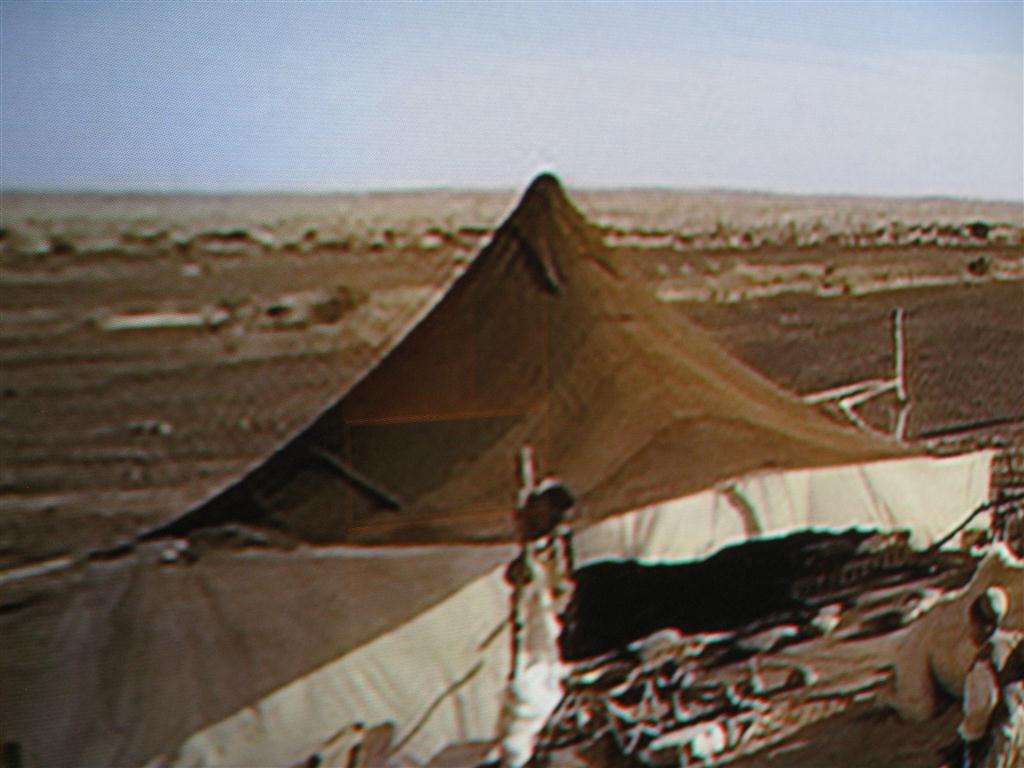
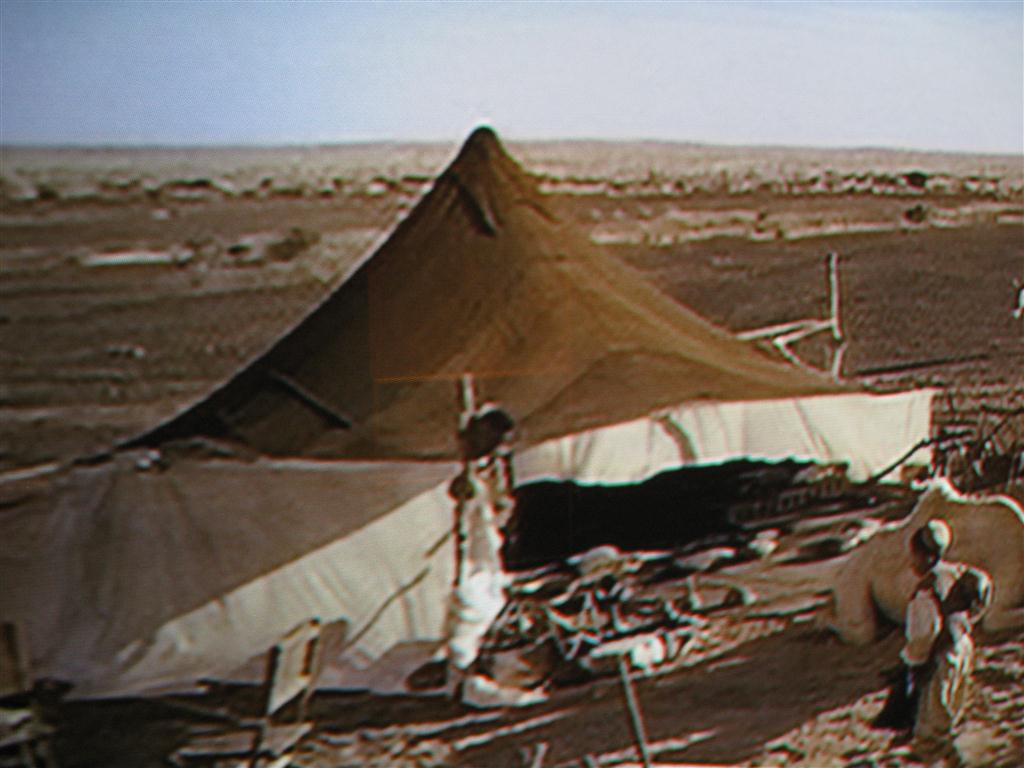
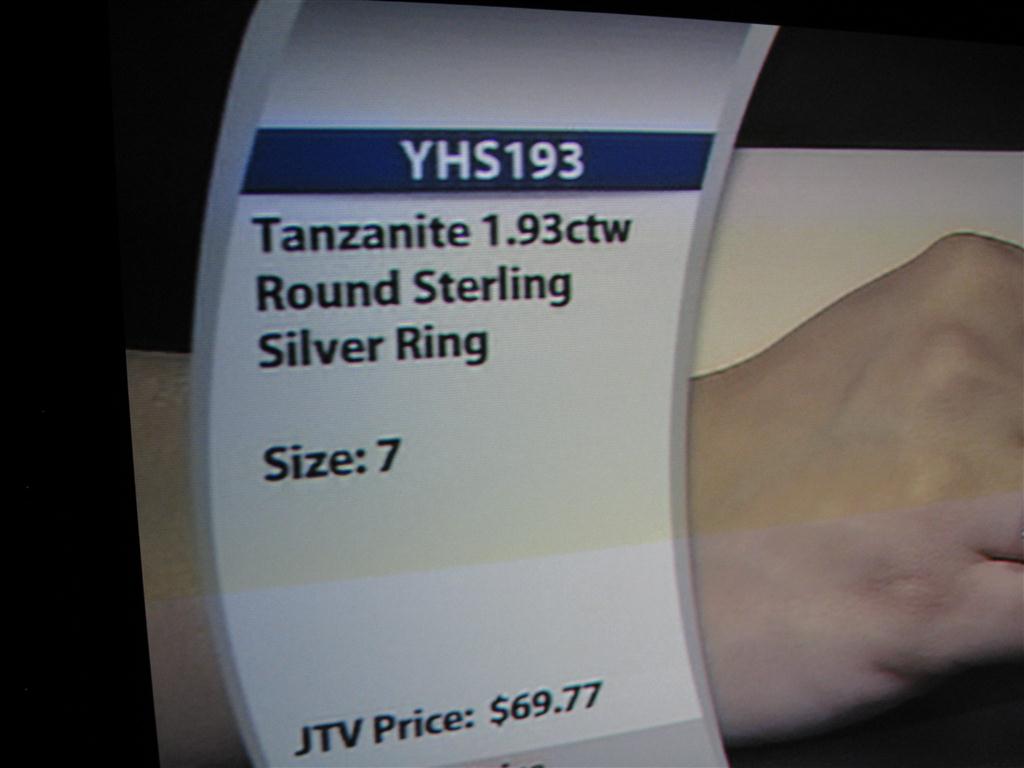
I am having a problem with my Sony G90 that I would like some help with.The best way I can describe it is that
it looks like shadows and ghosts that you are all familiar with on broadcast TV with bad reception. No, this is not a
convergence problem. It is present on both inputs A and B and is particularly noticeable on high contrast,sharply
defined images like lettering.The signal source is either a Sony DVD player (DVP-S530D) or a Comcast cable box.
The signal path from those outputs is through an Onkyo AV Receiver (TX-SR805) to a DVDO iScan VP50 through a
35 ft Belden 7712A cable to the G90.The screen is a 120" 4:3 Stewart Studio Tek 130 microperf w\ a flying mount.
As a test, I ran a 12ft S-video cable from the DVD player directly to the B input on the G90 with the only signal
processing being the DRC in the G90. The results were the same,leading me to believe that the problem is in the G90.
The PJ is ceiling mounting and has about 1400 hrs. on the original chassis and tubes. About a year ago I replaced the
Dallas chip before it could cause any problems. I also have a Moome IFB-HD card installed but am not using. I am
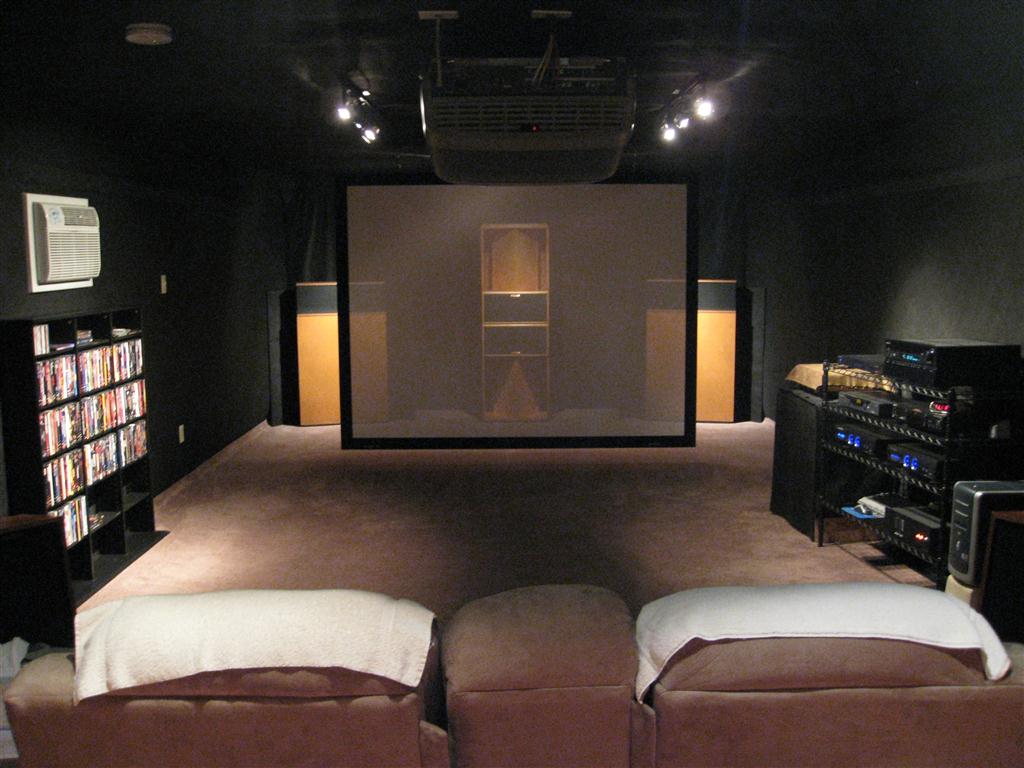
posting a couple of pics of the problem that may be helpful; the tent pic is from the Fifth Element. Also,as the screen
is fully perfed and I have some lights on in the room, you can see my center channel speakers, a pair of stacked
Klipsch LaScala's through the screen. As I was experimenting with different inputs and settings on the PJ and the
VP50, the focus and convergence aren't spot-on in the pics, but this also makes the "shadows" more visible.
Thanks in advance for any help!
Edit: I didn't mention any thing about the power supply side of system,but it is pretty straightforward. I have 2x
20 amp dedicated cicuits supplying power to 2 Panamax M5400-pm power conditioners. All the components except
for the G90 and the Panamax's are equipped with 2 wire power cords.
| Description: |
|
| Filesize: |
82.74 KB |
| Viewed: |
5764 Time(s) |
|
| Description: |
|
| Filesize: |
88.42 KB |
| Viewed: |
5764 Time(s) |
|
| Description: |
|
| Filesize: |
55.17 KB |
| Viewed: |
5764 Time(s) |
|
| Description: |
|
| Filesize: |
104.18 KB |
| Viewed: |
5774 Time(s) |
|
Last edited by kenwrob on Wed Sep 01, 2010 6:00 pm; edited 2 times in total
|
|
| Back to top |
|
 |
rwallmow
Joined: 19 Jul 2010
Posts: 29
Location: Minneapolis, MN, USA
|
| Posted: Wed Sep 01, 2010 6:41 am Post subject: |
|
|
I used to get this due to a ground loop from my comcast and later dish network boxes, I was able to resolve all my ghosting issues by grounding the chassis of all my non-grounded av gear in the video chain to a common ground. I just used some cheap light gauge copper wire to any screw on the chassis of the equipment then all back to the ground of the outlet.
One way to test if this is the problem is to use common 3prong to 2prong plug adapters and "unground" anything with a 3prong plug, however I do not recommend this as a permanent fix, it's much safer to ground EVERYTHING than nothing, but it makes it easy to see if a ground loop is the problem. This is a fairly common problem and if I were a betting man I would bet on this (google comcast ground loop and see what I mean).
EDIT: I should note that my comcast and later dish ground blocks were grounded to the common ground in the house, if they are not on common ground, you should contact your provider to see if they will come out and properly ground the lines.
Double EDIT: Ok blame it on lack of sleep, just came to me that an easier way to isolate to see if this is a ground loop would be just to temporarily unhook the power and all AV & coax lines from your comcast box, take it out of the loop entirely, if this is caused by a ground loop on comcasts coax, with the box COMPLETELY unhooked it would eliminate any ground loop and you should no longer have any ghosting on the DVD player.
If I triple edit this, someone make me go to bed...
_________________
Long time LCD/DLP user (dating back to the 90's) tired of lamps, DLP rainbows, and screen door look of LCD, took the plunge with a dang near new BG 801s (no wear on tubes at all)
|
|
| Back to top |
|
|
CIR Engineering

Joined: 25 Aug 2008
Posts: 4269
Location: Chicago USA & Berlin Germany
|
| Posted: Wed Sep 01, 2010 1:18 pm Post subject: |
|
|
ringing
Don't ever use s-vid for anything.
You need to run a high quality source connected with HDMI or with a very good set of RGBHV cables without scaling.
craigr
_________________
JETI 1501-HiRes 2nm Spectroradiometer
JETI 1211 Spectroradiometer
Photo Research PR-650 Spectroradiometer
Klein K10-A Colorimeter
Murideo Fresco SIX-G HDMI 2.x Multimedia Generator
Murideo Fresco SIX-A HDMI 2.x Analyzer
Light Illusion ColourSpace XPT Color Calibration Software
Light Illusion LightSpace XPT Pro Version 10.x Color Calibration Software
OMARDRIS JVC Software Patch to use K10-A and Jeti with JVC OEM AutoCal Software!
Sencore CR7000 CRT Tube Analyzer / Rejuvenater
Authorized Dealer for Lumagen & just about everything worth buying 
www.CIR-Engineering.com - craigr@cir-engineering.com
Phone: 865-405-6892
|
|
| Back to top |
|
|
CIR Engineering
Joined: 25 Aug 2008
Posts: 4269
Location: Chicago USA & Berlin Germany
|
| Posted: Wed Sep 01, 2010 1:20 pm Post subject: |
|
|
Also, 5th Element and most TV broadcasts have ringing in them. Use DVE-BD to look at patterns that have no ringing. Many newer BD discs also don't have ringing, but many do.
craigr
_________________
JETI 1501-HiRes 2nm Spectroradiometer
JETI 1211 Spectroradiometer
Photo Research PR-650 Spectroradiometer
Klein K10-A Colorimeter
Murideo Fresco SIX-G HDMI 2.x Multimedia Generator
Murideo Fresco SIX-A HDMI 2.x Analyzer
Light Illusion ColourSpace XPT Color Calibration Software
Light Illusion LightSpace XPT Pro Version 10.x Color Calibration Software
OMARDRIS JVC Software Patch to use K10-A and Jeti with JVC OEM AutoCal Software!
Sencore CR7000 CRT Tube Analyzer / Rejuvenater
Authorized Dealer for Lumagen & just about everything worth buying
www.CIR-Engineering.com - craigr@cir-engineering.com
Phone: 865-405-6892
|
|
| Back to top |
|
|
rwallmow
Joined: 19 Jul 2010
Posts: 29
Location: Minneapolis, MN, USA
|
| Posted: Wed Sep 01, 2010 3:56 pm Post subject: |
|
|
| CIR Engineering wrote: | ringing
Don't ever use s-vid for anything.
You need to run a high quality source connected with HDMI or with a very good set of RGBHV cables without scaling.
craigr |
I agree s-video is less than ideal, but as long as its a quality cable at a reasonable length it should still not ghost or shadow, and I read this as he was just testing with s-video to rule out input problems anyways, not that he uses s-vid on a normal basis.
That said, go HDMI, you have a Moome card, use it.
However I tend to stick to my original post, comcast boxes are TERRIBLE for ground loops, till I grounded every component in my AV rack, we used to unplug the comcast box when we watched movies, the ghosting/shadows were that bad, didn't matter which input on the projector we used: composite, s, component, RGB all of them ghosted while the comcast box was plugged in (This was a few years back on my Infocus X1, and later my roommates Panny PT AE2000U digital PJs).
_________________
Long time LCD/DLP user (dating back to the 90's) tired of lamps, DLP rainbows, and screen door look of LCD, took the plunge with a dang near new BG 801s (no wear on tubes at all)
|
|
| Back to top |
|
|
kenwrob
Joined: 21 Jul 2008
Posts: 26
|
| Posted: Wed Sep 01, 2010 6:37 pm Post subject: |
|
|
Good suggestion about possible ground loop problem, but none of the components (see edited original) including the cable box have
a ground.
As rwallmow correctly surmised, the s-video cable was just a test tool.
My original suspicion was ringing in the 35 ft rgbhv cable as craigr suggests and I was trying to eliminate that and the vp50 by
running the 12 ft s-video direct from dvd player to the g90.
The 35 ft Belden 7712a rgbhv is a custom cable from Ram Electronics and I assumed was of a high enough quality that I wouldn't
have any problems with it. Link to Ram-
http://www.ramelectronics.net/audio-video/custom-audio-and-video-cables/bulk-cable/belden-7712a-bulk-cable/prod7712A.html
If this cable isn't adequate, what is an appropriate replacement?
Since I have seen the shadows on different inputs and sources, I tend to think it is a problem with the input processing on the g90.
|
|
| Back to top |
|
|
Curt Palme
CRT Tech
Joined: 08 Mar 2006
Posts: 24396
Location: Langley, BC
TV/Projector: All of them!
|
| Posted: Wed Sep 01, 2010 6:56 pm Post subject: |
|
|
|
Your cable box DOES have a ground connection.. the one coming in from the cable line itself, that grounded up to several 100 feet away, causing the ground loop. I'm not convinced that it's a problem in the projector.. yet.. but it could be. I'd run a bluray player into the Moome card, and disconnect the RGBHV input cable from the projector. Plug the BR player into the projector outlet, use a short 6' HDMI cable, and don't connect any audio. that way you've eliminated cable and ground loop issues. Let us know if that still show the ringing.
|
|
| Back to top |
|
|
rwallmow
Joined: 19 Jul 2010
Posts: 29
Location: Minneapolis, MN, USA
|
| Posted: Wed Sep 01, 2010 7:05 pm Post subject: |
|
|
| Curt Palme wrote: | | Your cable box DOES have a ground connection.. the one coming in from the cable line itself, that grounded up to several 100 feet away, causing the ground loop. I'm not convinced that it's a problem in the projector.. yet.. but it could be. I'd run a bluray player into the Moome card, and disconnect the RGBHV input cable from the projector. Plug the BR player into the projector outlet, use a short 6' HDMI cable, and don't connect any audio. that way you've eliminated cable and ground loop issues. Let us know if that still show the ringing. |
Ditto. 
_________________
Long time LCD/DLP user (dating back to the 90's) tired of lamps, DLP rainbows, and screen door look of LCD, took the plunge with a dang near new BG 801s (no wear on tubes at all)
|
|
| Back to top |
|
|
rwallmow
Joined: 19 Jul 2010
Posts: 29
Location: Minneapolis, MN, USA
|
| Posted: Wed Sep 01, 2010 7:17 pm Post subject: |
|
|
You know I should point out some "power conditioners" and "surge protectors" can isolate ground, and actually cause or exacerbate ground loops as well. Good ones like yours are typically fine and I doubt that's the problem here, but I though I would point that out in case someone with similar symptoms ever stumbles upon this.
_________________
Long time LCD/DLP user (dating back to the 90's) tired of lamps, DLP rainbows, and screen door look of LCD, took the plunge with a dang near new BG 801s (no wear on tubes at all)
|
|
| Back to top |
|
|
CIR Engineering
Joined: 25 Aug 2008
Posts: 4269
Location: Chicago USA & Berlin Germany
|
| Posted: Thu Sep 02, 2010 1:37 pm Post subject: |
|
|
It's not impossible that the problem is in the G90, but it is very unlikely because all three channels are ringing with the same amount identically. If it were in the projector it's more likely that just one color would be ringing.
S-Video is not a valid test for ringing isolation. S-Video from most sources is coming through multiple conversions and is being scaled from a higher resolution, or from low quality 480i. Furthermore, the G90 has a built in line doubler that is crappy and may cause ringing for 480i. Anytime you scale (except with Lumagen) there is always some ringing as a result.
You should try what Curt suggested; hook the BD player directly up to the G90 through DVI/HDMI and run 1080p 60Hz with nothing else hooked to the G90. I suggest running the sharpness test pattern from DVE-BD because it is well mastered and is known to have no ringing. That being said, there are well mastered movies that don't ring at all, but it is hit or miss for testing purposes.
Another issue is that some BD players can add "enhancements" to edges that result in visible ringing especially on larger screens (the bigger the screen the easier it is to see). Another pitfall is that some Moome DVI boards may have ringing as well. Moome had an issue with this at one point. None of his latest HDMI boards ring at all and they have the best BW ever in an IFB.
Good luck
craigr
_________________
JETI 1501-HiRes 2nm Spectroradiometer
JETI 1211 Spectroradiometer
Photo Research PR-650 Spectroradiometer
Klein K10-A Colorimeter
Murideo Fresco SIX-G HDMI 2.x Multimedia Generator
Murideo Fresco SIX-A HDMI 2.x Analyzer
Light Illusion ColourSpace XPT Color Calibration Software
Light Illusion LightSpace XPT Pro Version 10.x Color Calibration Software
OMARDRIS JVC Software Patch to use K10-A and Jeti with JVC OEM AutoCal Software!
Sencore CR7000 CRT Tube Analyzer / Rejuvenater
Authorized Dealer for Lumagen & just about everything worth buying
www.CIR-Engineering.com - craigr@cir-engineering.com
Phone: 865-405-6892
|
|
| Back to top |
|
|
CIR Engineering
Joined: 25 Aug 2008
Posts: 4269
Location: Chicago USA & Berlin Germany
|
| Posted: Thu Sep 02, 2010 1:39 pm Post subject: |
|
|
Also, like I said, 5th Element has lots of ringing in the transfer. It is a great reference for everything except for ringing. I wish they would have fixed this in the BD remaster, but they didn't.
And don't look at cable or sat for ringing tests either. Compression always results in ringing and you just can't expect the source to be reliable with these.
What you posted for screen shots is not unlike what I might expect to see on 5th Element or on a home shopping network. It is hard to tell on a posted photo though for sure.
craigr
_________________
JETI 1501-HiRes 2nm Spectroradiometer
JETI 1211 Spectroradiometer
Photo Research PR-650 Spectroradiometer
Klein K10-A Colorimeter
Murideo Fresco SIX-G HDMI 2.x Multimedia Generator
Murideo Fresco SIX-A HDMI 2.x Analyzer
Light Illusion ColourSpace XPT Color Calibration Software
Light Illusion LightSpace XPT Pro Version 10.x Color Calibration Software
OMARDRIS JVC Software Patch to use K10-A and Jeti with JVC OEM AutoCal Software!
Sencore CR7000 CRT Tube Analyzer / Rejuvenater
Authorized Dealer for Lumagen & just about everything worth buying
www.CIR-Engineering.com - craigr@cir-engineering.com
Phone: 865-405-6892
|
|
| Back to top |
|
|
CIR Engineering
Joined: 25 Aug 2008
Posts: 4269
Location: Chicago USA & Berlin Germany
|
| Posted: Thu Sep 02, 2010 1:40 pm Post subject: |
|
|
Also, if you are running analog into the scaler and then analog out you will get ringing. A/D and D/A conversions cause ringing.
craigr
_________________
JETI 1501-HiRes 2nm Spectroradiometer
JETI 1211 Spectroradiometer
Photo Research PR-650 Spectroradiometer
Klein K10-A Colorimeter
Murideo Fresco SIX-G HDMI 2.x Multimedia Generator
Murideo Fresco SIX-A HDMI 2.x Analyzer
Light Illusion ColourSpace XPT Color Calibration Software
Light Illusion LightSpace XPT Pro Version 10.x Color Calibration Software
OMARDRIS JVC Software Patch to use K10-A and Jeti with JVC OEM AutoCal Software!
Sencore CR7000 CRT Tube Analyzer / Rejuvenater
Authorized Dealer for Lumagen & just about everything worth buying
www.CIR-Engineering.com - craigr@cir-engineering.com
Phone: 865-405-6892
|
|
| Back to top |
|
|
kenwrob
Joined: 21 Jul 2008
Posts: 26
|
| Posted: Fri Sep 03, 2010 8:54 pm Post subject: |
|
|
Thank you Curt and rwallmow for pointing out that the system has multiple ground sources. Attempting to be thorough and not,I was
only thinking about the power supply grounding.Also thanks to craigr for his continued input or output?!
I have decided to replace the 10 yr old dvd player and have purchased a new Sony BDP-S570 blue ray. Now I need some suggestions for hooking it all up. Should I route the signal thru the vp50? I first tried hooking up player with an hdmi cable to the moome card
and could not get the two synched,the pic kept flashing like a film projector on slomo.I am not sure if there are any adjustments
available for the moome card.It came with no documentation and the I can't get the remote to do anything.I know the remote is
woking, I can see the ir flashes on my cell phone camera.
So I hooked it up though the component outputs following same path as the old dvd and it looks good so far at 1400 x 1050p. I need
to find more time to tinker with the system.
|
|
| Back to top |
|
|
CIR Engineering
Joined: 25 Aug 2008
Posts: 4269
Location: Chicago USA & Berlin Germany
|
| Posted: Fri Sep 03, 2010 11:08 pm Post subject: |
|
|
| kenwrob wrote: | Thank you Curt and rwallmow for pointing out that the system has multiple ground sources. Attempting to be thorough and not,I was
only thinking about the power supply grounding.Also thanks to craigr for his continued input or output?!
I have decided to replace the 10 yr old dvd player and have purchased a new Sony BDP-S570 blue ray. Now I need some suggestions for hooking it all up. Should I route the signal thru the vp50? I first tried hooking up player with an hdmi cable to the moome card
and could not get the two synched,the pic kept flashing like a film projector on slomo.I am not sure if there are any adjustments
available for the moome card.It came with no documentation and the I can't get the remote to do anything.I know the remote is
woking, I can see the ir flashes on my cell phone camera.
So I hooked it up though the component outputs following same path as the old dvd and it looks good so far at 1400 x 1050p. I need
to find more time to tinker with the system. |
Your BD player was probably set to 24Hz. Change the output for HDMI on the BD player to 1080p 60Hz or 1080i 60Hz.
craigr
_________________
JETI 1501-HiRes 2nm Spectroradiometer
JETI 1211 Spectroradiometer
Photo Research PR-650 Spectroradiometer
Klein K10-A Colorimeter
Murideo Fresco SIX-G HDMI 2.x Multimedia Generator
Murideo Fresco SIX-A HDMI 2.x Analyzer
Light Illusion ColourSpace XPT Color Calibration Software
Light Illusion LightSpace XPT Pro Version 10.x Color Calibration Software
OMARDRIS JVC Software Patch to use K10-A and Jeti with JVC OEM AutoCal Software!
Sencore CR7000 CRT Tube Analyzer / Rejuvenater
Authorized Dealer for Lumagen & just about everything worth buying
www.CIR-Engineering.com - craigr@cir-engineering.com
Phone: 865-405-6892
|
|
| Back to top |
|
|
kenwrob
Joined: 21 Jul 2008
Posts: 26
|
| Posted: Sat Sep 04, 2010 12:50 am Post subject: |
|
|
|
In looking thru the player menu, I can't find an option for 60hz, only 1080\24. It seems the only option is on or off.
|
|
| Back to top |
|
|
CIR Engineering
Joined: 25 Aug 2008
Posts: 4269
Location: Chicago USA & Berlin Germany
|
| Posted: Sat Sep 04, 2010 12:53 am Post subject: |
|
|
| kenwrob wrote: | | In looking thru the player menu, I can't find an option for 60hz, only 1080\24. It seems the only option is on or off. |
So you might want to turn it off then
Usually on the remote there is a dedicated button to toggle through output resolutions. It's there so that if the BD player puts out a resolution that the TV does not support, the resolution can be changed. Otherwise you couldn't see the menus to make the change.
craigr
_________________
JETI 1501-HiRes 2nm Spectroradiometer
JETI 1211 Spectroradiometer
Photo Research PR-650 Spectroradiometer
Klein K10-A Colorimeter
Murideo Fresco SIX-G HDMI 2.x Multimedia Generator
Murideo Fresco SIX-A HDMI 2.x Analyzer
Light Illusion ColourSpace XPT Color Calibration Software
Light Illusion LightSpace XPT Pro Version 10.x Color Calibration Software
OMARDRIS JVC Software Patch to use K10-A and Jeti with JVC OEM AutoCal Software!
Sencore CR7000 CRT Tube Analyzer / Rejuvenater
Authorized Dealer for Lumagen & just about everything worth buying
www.CIR-Engineering.com - craigr@cir-engineering.com
Phone: 865-405-6892
|
|
| Back to top |
|
|
CIR Engineering
Joined: 25 Aug 2008
Posts: 4269
Location: Chicago USA & Berlin Germany
|
| Posted: Sat Sep 04, 2010 12:54 am Post subject: |
|
|
I think the G90 is the only CRT that can actually sync up to 1080p 24Hz. It's not watchable, but no other CRT can even put up an image.
craigr
_________________
JETI 1501-HiRes 2nm Spectroradiometer
JETI 1211 Spectroradiometer
Photo Research PR-650 Spectroradiometer
Klein K10-A Colorimeter
Murideo Fresco SIX-G HDMI 2.x Multimedia Generator
Murideo Fresco SIX-A HDMI 2.x Analyzer
Light Illusion ColourSpace XPT Color Calibration Software
Light Illusion LightSpace XPT Pro Version 10.x Color Calibration Software
OMARDRIS JVC Software Patch to use K10-A and Jeti with JVC OEM AutoCal Software!
Sencore CR7000 CRT Tube Analyzer / Rejuvenater
Authorized Dealer for Lumagen & just about everything worth buying
www.CIR-Engineering.com - craigr@cir-engineering.com
Phone: 865-405-6892
|
|
| Back to top |
|
|
kenwrob
Joined: 21 Jul 2008
Posts: 26
|
| Posted: Sat Sep 04, 2010 1:07 am Post subject: |
|
|
If I can't use the hdmi output on this player then I can't take advantage of the BD technology can I?
What brands and model BD player will give me the output options I need?
If I run the sony bd thru the vp50, will that allow me to change the frequency to what will work?
|
|
| Back to top |
|
|
CIR Engineering
Joined: 25 Aug 2008
Posts: 4269
Location: Chicago USA & Berlin Germany
|
| Posted: Sat Sep 04, 2010 1:31 pm Post subject: |
|
|
| kenwrob wrote: | If I can't use the hdmi output on this player then I can't take advantage of the BD technology can I?
What brands and model BD player will give me the output options I need?
If I run the sony bd thru the vp50, will that allow me to change the frequency to what will work? |
Get an Oppo BD player. Any of their players will do all that you need in terms of video.
Running through the DVDO will probably allow you to see the BD menus.
craigr
_________________
JETI 1501-HiRes 2nm Spectroradiometer
JETI 1211 Spectroradiometer
Photo Research PR-650 Spectroradiometer
Klein K10-A Colorimeter
Murideo Fresco SIX-G HDMI 2.x Multimedia Generator
Murideo Fresco SIX-A HDMI 2.x Analyzer
Light Illusion ColourSpace XPT Color Calibration Software
Light Illusion LightSpace XPT Pro Version 10.x Color Calibration Software
OMARDRIS JVC Software Patch to use K10-A and Jeti with JVC OEM AutoCal Software!
Sencore CR7000 CRT Tube Analyzer / Rejuvenater
Authorized Dealer for Lumagen & just about everything worth buying
www.CIR-Engineering.com - craigr@cir-engineering.com
Phone: 865-405-6892
|
|
| Back to top |
|
|
kenwrob
Joined: 21 Jul 2008
Posts: 26
|
| Posted: Sun Sep 05, 2010 12:23 am Post subject: |
|
|
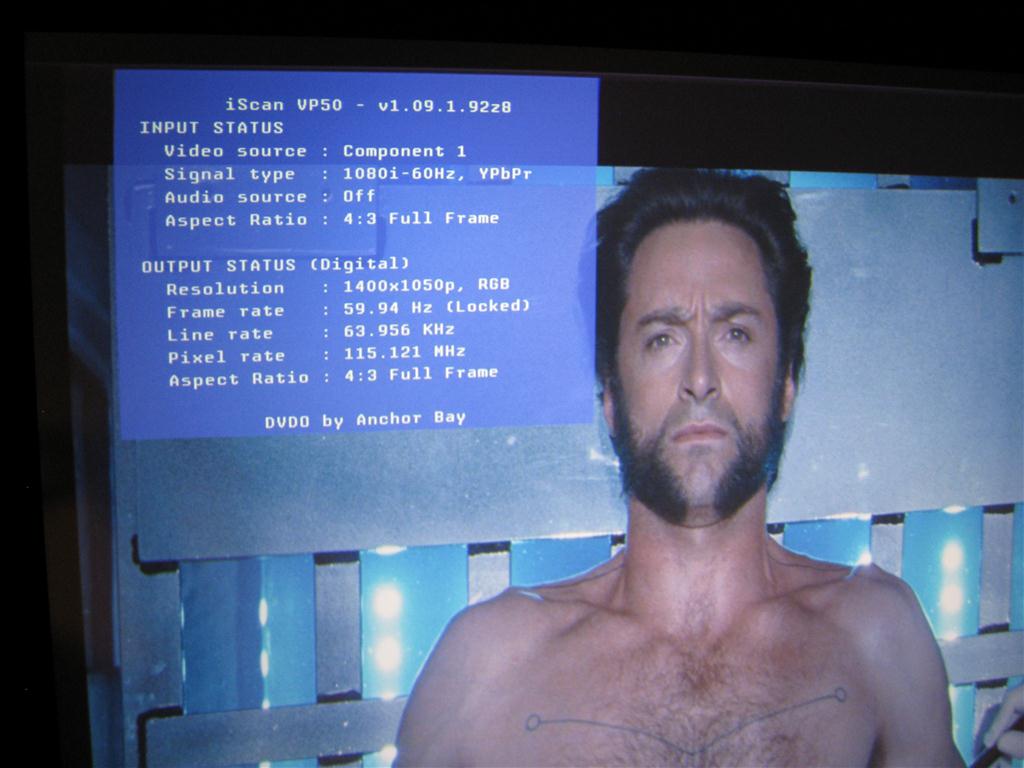
Ivestigating the Oppo players, I find their scaling technology is built around the same dvdo vrs chip that is in my vp50.
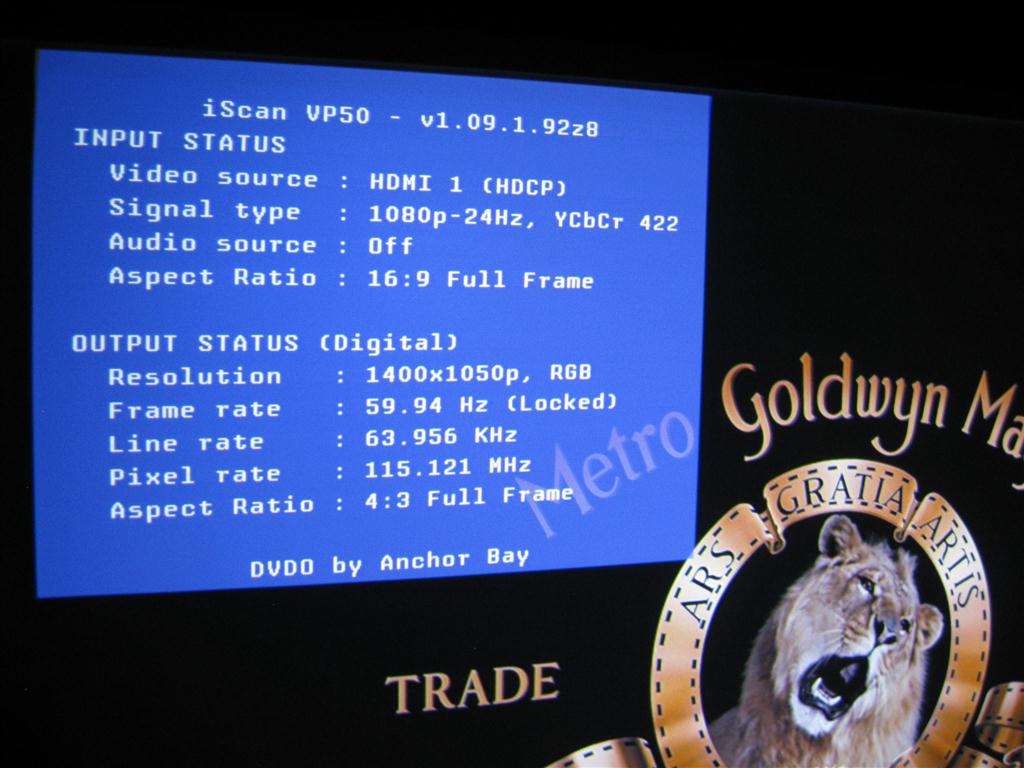
I have had no problems seeing the menus of the bd player and I don't find any option for a 60 hz output.
I thought I would have to route the hdmi signal thru my av reciever to get audio, but I find that the digital optical outut
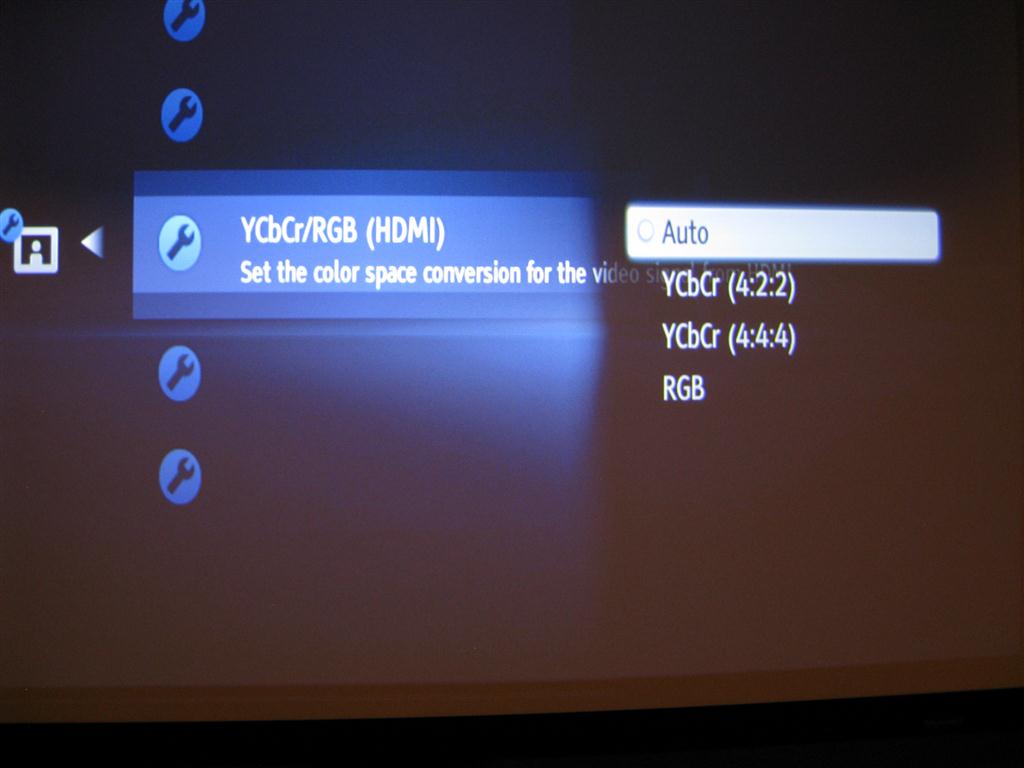
works ok in that mode. I find I can get a decent pic from either hdmi or component thru the vp50, though hdmi gives
me 1080p vs comp 1080i. I am also not sure which color space setting to choose.
What would be the recommended connection choices and preferred settings for the equipment I have?
I am also not sure about the clamp setting on the pj.
what is a good resolution to run on a g90,
Amazing pic quality, looks like film; no pixels or scan lines.
| Description: |
|
| Filesize: |
50.77 KB |
| Viewed: |
5444 Time(s) |
|
| Description: |
|
| Filesize: |
82.27 KB |
| Viewed: |
5444 Time(s) |
|
| Description: |
|
| Filesize: |
92.88 KB |
| Viewed: |
5443 Time(s) |
|
|
|
| Back to top |
|
|
|
|




