| Author |
Message |
antorsae
Joined: 16 Jul 2006
Posts: 297
|
| Posted: Wed Jun 30, 2010 9:28 am Post subject: How do you test bandwidth, e.g. compare VIMs/etc? |
|
|
Hi,
Yesterday I made the following experiment:
I fed one of my 9500 Ultras with a 1px or 2px wide 1080p vertical bar test pattern both on my Moome VIM-HD card (Input 2) and RGBHV (Input 1) using a 03P VIM. I went with a 1px and 2px verticals bars as they are bandwidth intensive (not interested in horizontal lines since they really represent beam shape more than bandwidth)
I had the signal be output by a dual head PC video card in clone mode (which basically outputs the same signal in RGBHV and DVI).
I copied the Source settings so both inputs share exactly the same settings (focus, stig, etc.etc.) which allows for fairly easy switching across inputs to visually compare the images just by pressing S01 and S02 in the remote.
I expected the DVI signal to be sharper than the RGBHV one however to my surprise both were exactly the same (at least visually... which is all that matters, right?). This is me looking at the screen from 30 cms (1ft) switch back and forth with the remote. Moome VIM-HD (not the latest FULL-HD v2) is the best I have but I did not see any difference. I also did a blind test (having my wife switch the sources w/o telling me which one was on) and could not reliably pick any as the best.
What do you use (which test patterns/why?) to test sources for bandwidth? Your experience testing RGBHV vs. digital?
Help/comments much appreciated!
Andres
|
|
| Back to top |
|
 |
Sparky015

Joined: 12 May 2009
Posts: 1185
Location: Cleveland / Akron, OH
|
| Posted: Wed Jun 30, 2010 7:40 pm Post subject: |
|
|
I have not done the test you describe, but I know the original moome was not optimized compared to the version 2 HDMI version that utilizes some work by MP. I believe MP has some data though around this very test.
_________________
~Paul
|
|
| Back to top |
|
|
dturco

Joined: 06 Feb 2009
Posts: 3778
Location: Eastern Shore Maryland
TV/Projector: Runco DLP VX-3000i Marquee 9500 parts doner
|
| Posted: Thu Jul 01, 2010 12:29 am Post subject: |
|
|
Comment, The help part I'm not to sure about. No matter what card is in the Marquee's VIM, Moome v-1 v-2 or Full HD V-2 none of them can ever display a cleaner signal than what the Marquee's actual VIM can handle. Remember the Moome cards are in slot 2 of the Marquee's input module.
So what your comparing is the Moome card to the computer card. What the Marquee sees at the end is always analog, never digital.
As I understand it the Moome cards have a pretty high quality Digital Analog Converter on them,so your comparison is of that DAC to the computers DAC.
I may be completely wrong and your computer may always be using it's DAC to do a conversion before sending which would certainly explain why it always looks the same.
If that's the case as long as the computer's bandwidth is lower then the Moome card, then it will be the same. However, if your computer's card is a higher bandwidth than the Moome card, you could and should see a difference.
Sounds right to me.
Let the arrows fly 
_________________
Firefly rules. Can't stop the signal.
http://www.hulu.com/firefly
|
|
| Back to top |
|
|
Nashou66

Joined: 12 Jan 2007
Posts: 16171
Location: West Seneca NY
|
| Posted: Thu Jul 01, 2010 12:34 am Post subject: |
|
|
I say I would agree with your statement, and just add the quality of RGBHV cables and distance also matters more than for HDMI.
I too, Andres, did not see too much a difference in sharpness but i mst say the new Moom card has more detail due to the better colors it reproduces and less noise over my older moome card and over my Lumagen HDQ RGBHV outs.
Athanasios
_________________
Don't blame your underwear for your crooked ass~ unknown Greek philosopher
"Republicans believe every day is the Fourth of July, but the Democrats believe every day is April 15." --- President Reagan
One Smart Dog!!!
Marquee High Performance Bellows now shipping!!
Marquee Modifications and Performance Enhancement
Marquee C-element and Bellow removal
|
|
| Back to top |
|
|
CIR Engineering

Joined: 25 Aug 2008
Posts: 4269
Location: Chicago USA & Berlin Germany
|
| Posted: Thu Jul 01, 2010 1:15 pm Post subject: |
|
|
If you aren't able to fully resolve (or close to it) the 1:1 pattern it will be a difficult comparison by looking on the screen. It is like looking at slightly different degrees of blurriness. On screen comparisons are better when comparing something that is fully resolved to something that isn't.
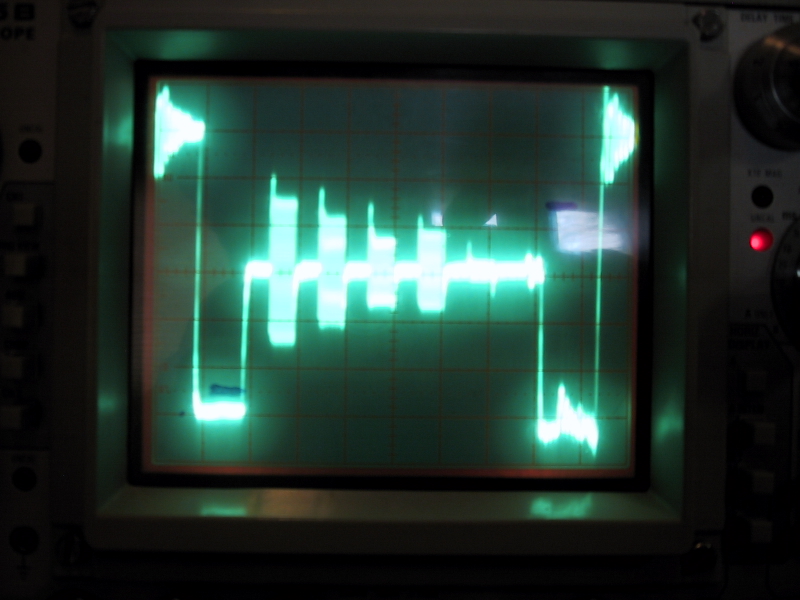
If you want to know for sure, hook an oscilloscope up to the green output from the HTPC and from the green output of the Moome. Use a multiburst pattern that goes all the way from 1/2 MHz to full 1:1 of the resolution you are sending. What you want to see is the same (or close to the same) amplitude from the 1/2 MHz patter compared to the 1:1 part of the burst.
Here is a photo of my G90 on screen comparing a 1:1 1080p 60Hz burst on my G90. The almost fully resolved 1:1 is the new Moome FULLHD and the blurry one is the original FULLHD before I tested the new mods.

craigr
_________________
JETI 1501-HiRes 2nm Spectroradiometer
JETI 1211 Spectroradiometer
Photo Research PR-650 Spectroradiometer
Klein K10-A Colorimeter
Murideo Fresco SIX-G HDMI 2.x Multimedia Generator
Murideo Fresco SIX-A HDMI 2.x Analyzer
Light Illusion ColourSpace XPT Color Calibration Software
Light Illusion LightSpace XPT Pro Version 10.x Color Calibration Software
OMARDRIS JVC Software Patch to use K10-A and Jeti with JVC OEM AutoCal Software!
Sencore CR7000 CRT Tube Analyzer / Rejuvenater
Authorized Dealer for Lumagen & just about everything worth buying
www.CIR-Engineering.com - craigr@cir-engineering.com
Phone: 865-405-6892
|
|
| Back to top |
|
|
CIR Engineering
Joined: 25 Aug 2008
Posts: 4269
Location: Chicago USA & Berlin Germany
|
| Posted: Thu Jul 01, 2010 2:18 pm Post subject: |
|
|
Good BW on multiburst.
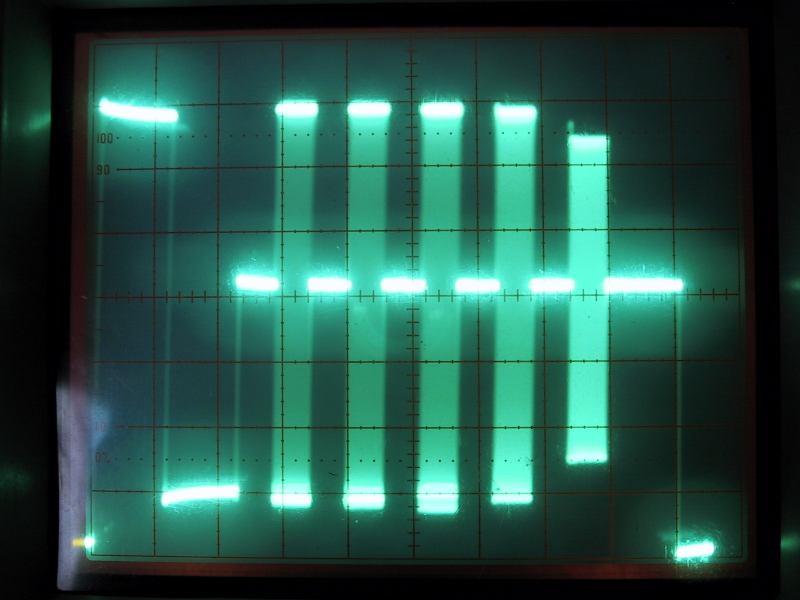
Bad BW on Multiburst.

Very bad BW on Multiburst.
craigr
_________________
JETI 1501-HiRes 2nm Spectroradiometer
JETI 1211 Spectroradiometer
Photo Research PR-650 Spectroradiometer
Klein K10-A Colorimeter
Murideo Fresco SIX-G HDMI 2.x Multimedia Generator
Murideo Fresco SIX-A HDMI 2.x Analyzer
Light Illusion ColourSpace XPT Color Calibration Software
Light Illusion LightSpace XPT Pro Version 10.x Color Calibration Software
OMARDRIS JVC Software Patch to use K10-A and Jeti with JVC OEM AutoCal Software!
Sencore CR7000 CRT Tube Analyzer / Rejuvenater
Authorized Dealer for Lumagen & just about everything worth buying
www.CIR-Engineering.com - craigr@cir-engineering.com
Phone: 865-405-6892
Last edited by CIR Engineering on Thu Jul 01, 2010 7:40 pm; edited 1 time in total
|
|
| Back to top |
|
|
Nashou66
Joined: 12 Jan 2007
Posts: 16171
Location: West Seneca NY
|
|
| Back to top |
|
|
antorsae
Joined: 16 Jul 2006
Posts: 297
|
| Posted: Thu Jul 01, 2010 9:08 pm Post subject: |
|
|
Thank you very much Craig. Do you have that test pattern (multi-burst) in a GIF or similar format for download?
Thanks!
|
|
| Back to top |
|
|
mp20748
Joined: 12 Sep 2006
Posts: 5689
Location: Maryland
TV/Projector: 9500LC Ultra / Super 02 and 03 VIM
|
| Posted: Thu Jul 01, 2010 10:00 pm Post subject: |
|
|
There are four patterns if you really want to look at bandwidth performance...
1, The commonly used SMPTE pattern.
2, The Line Test - which is a bandwidth test pattern that has black on the bottom and white on the top of the pattern, with groups of lines running from the top to the bottom. The lines when in the white section are black and vice versa for the black
3, Multiburst, which is really better for looking at the actual signal itself (what Craig is showing).
4, Multipulse. a little different from the multiburst, that will allow you to look at the second lines before 100IRE and check for distortions.
The line test is one of my favorites, after things checks well with the SMPTE, it will reveal how clean the bandwidth is. The black and white lines will show up; ringing, overshoot, peaking noise and any other distortions that are not present in the other test. It can also be used as a quick performance bandwidth test, because if there's any noise or distortions on any of the lines, it's not properly resolving the bandwidth, and that's regardless of what the SMPTE test shows.
I think Craig has it in his generator. I use the DisplayMate version on PC.
here's a link to the Displaymate bandwidth test pattern (click on it):
http://www.displaymate.com/dwsvb.html
|
|
| Back to top |
|
|
tse
Joined: 03 May 2006
Posts: 1014
Location: Sweatbucket, Fl.
|
| Posted: Fri Jul 02, 2010 1:43 am Post subject: |
|
|
Your projector is the best o'scope there is for displaying high BW test patterns. Copy this little bmp file to your computer and display at the higher resolutions that your video card/projector can display. Use Paint or some other viewer that does no compression. Leave it a bitmap file, no jpg, no png, nothing but *.bmp. The upper left corner is the highest frequency signal at the resolution that you are showing. If the BW is good the upper left corner will be the same brightness as the upper right corner. As the resolution is increased (and also the refresh rate is increased) a point will be achieved where the upper left corner becomes less bright than the upper right box. That is where your BW is starting to drop off.
Bah. Can't upload *.bmp file. Rename the attached *.txt file to *.bmp and open in Paint.
Scott
| Description: |
|

Download |
| Filename: |
SMPTE_RES-01.txt |
| Filesize: |
3.09 KB |
| Downloaded: |
408 Time(s) |
_________________
"Were we directed from Washington when to sow and when to reap, we would soon want bread."
Thomas Jefferson
|
|
| Back to top |
|
|
CIR Engineering
Joined: 25 Aug 2008
Posts: 4269
Location: Chicago USA & Berlin Germany
|
| Posted: Fri Jul 02, 2010 1:30 pm Post subject: |
|
|
I'd like to see the pattern Scott. If you want, email it to me and I can put it on my server and link it to this thread.
What resolution is the pattern? As you know, if one starts to scale the pattern to their resolution, there will be banding artifacts in a high frequency burst that show up on screen. Scaling can of course also cause other distrotions to the pattern. This can look like reduced BW, but it is actually scaling artifacts.
I usually find it best to use a test pattern for BW that is the exact resolution as the projector resolution to avoid this type of problem.
Also, a very good and simple pattern to look for overshoot using an oscilloscope is a 30IRE or 50IRE gray window. If there is overshoot you can easily see it on the scope. Below is a photo of the overshoot circled in yellow.

However, just because you see overshoot somewhere in the signal, does not mean that it necessarily should not be there. Many circuits require some preshoot to compensate for roll off. However, on the input stage like a Moome external, you really shouldn't see preshoot like this.
It all depends on what you want to evaluate. If you want to evaluate the input to the projector a scope is a good tool to isolate just that. This is because a projector will impart its own characteristics on the video signal. If all you care about is the on screen image, evaluating the entire signal chain (including projector) is fine. But if you want to find a specific problem along the analog chain a scope is the tool to use.
craigr
_________________
JETI 1501-HiRes 2nm Spectroradiometer
JETI 1211 Spectroradiometer
Photo Research PR-650 Spectroradiometer
Klein K10-A Colorimeter
Murideo Fresco SIX-G HDMI 2.x Multimedia Generator
Murideo Fresco SIX-A HDMI 2.x Analyzer
Light Illusion ColourSpace XPT Color Calibration Software
Light Illusion LightSpace XPT Pro Version 10.x Color Calibration Software
OMARDRIS JVC Software Patch to use K10-A and Jeti with JVC OEM AutoCal Software!
Sencore CR7000 CRT Tube Analyzer / Rejuvenater
Authorized Dealer for Lumagen & just about everything worth buying
www.CIR-Engineering.com - craigr@cir-engineering.com
Phone: 865-405-6892
|
|
| Back to top |
|
|
tse
Joined: 03 May 2006
Posts: 1014
Location: Sweatbucket, Fl.
|
| Posted: Sat Jul 03, 2010 12:53 am Post subject: |
|
|
The pattern is like the one showing in the before mods and after mods pics above. It is the SMPTE resolution boxes. Top portion is one on/one off pixels then one on/ one off lines. Middle section is two on/off then bottom section is three on/off. If you open it in "Paint" or other viewer that doesn't "tinker" with it it is valid. Start at lower resolution like 1024x768 and view in Paint. Change to 1280x1024 and open in Paint. Increase resolution to 1600x1200 and open in Paint. Try 1920x1080 and view in Paint. You will probably see the top left box getting less bright as resolution goes up. That shows where your BW is starting to drop off.
Scott
_________________
"Were we directed from Washington when to sow and when to reap, we would soon want bread."
Thomas Jefferson
|
|
| Back to top |
|
|
|
|




