| Author |
Message |
cmjohnson

Joined: 03 Apr 2006
Posts: 5180
Location: Buried under G90s
|
| Posted: Thu Jun 03, 2010 1:33 pm Post subject: Blu-Ray color space setting |
|
|
My BD player has three color space settings. Component (YCrCb), 0-255, and 16-235.
Which of these is best for use with a CRT projector and under what circumstances? I've been playing with all three
and they do have visible differences but frankly I'm not sure which is "correct".
I know, I know...I've been playing with PJs for a long time and should know this. But I haven't really paid a lot of
attention to the differences between the different color spaces as it's only fairly recently that I could change them at will.
CJ
|
|
| Back to top |
|
 |
emdawgz1

Joined: 14 Mar 2006
Posts: 7949
|
| Posted: Thu Jun 03, 2010 1:36 pm Post subject: |
|
|
What B/R player allows you to set the color space...
_________________
Follow my blog
www.thesinglebrother.com
|
|
| Back to top |
|
|
cmjohnson
Joined: 03 Apr 2006
Posts: 5180
Location: Buried under G90s
|
| Posted: Thu Jun 03, 2010 1:43 pm Post subject: |
|
|
Sony BDP-S300, for one, in the setup menu.
CJ
|
|
| Back to top |
|
|
CIR Engineering

Joined: 25 Aug 2008
Posts: 4269
Location: Chicago USA & Berlin Germany
|
| Posted: Thu Jun 03, 2010 2:18 pm Post subject: Re: Blu-Ray color space setting |
|
|
| cmjohnson wrote: | My BD player has three color space settings. Component (YCrCb), 0-255, and 16-235.
Which of these is best for use with a CRT projector and under what circumstances? I've been playing with all three
and they do have visible differences but frankly I'm not sure which is "correct".
I know, I know...I've been playing with PJs for a long time and should know this. But I haven't really paid a lot of
attention to the differences between the different color spaces as it's only fairly recently that I could change them at will.
CJ |
It somewhat depends on the HDMI / DVI input device you are using with the projector. However, for video the rules are 16-235 for luma.
YCbCr is (supposed to be) always 16-235 and that is why you don't have the option on YCbCr. RGB can be either 0-255 for computer use or it can be 16-235 for video.
If your HDMI / DVI device supports YCbCr you should always use YCbCr because the colors have more detail. For YCbCr there are now two primary options; 422 and 444. If your devices support 422 you should choose 422 because 422 is 10-bit color and all the others are only 8-bit.
Best to worst:
YCbCr 422
YCbCr 444
RBG 16-236
RGB 0-255
If you were using 0-255 you will need to recalibrate your display for the new luma range when switching to any space that is 16-235.
craigr
_________________
JETI 1501-HiRes 2nm Spectroradiometer
JETI 1211 Spectroradiometer
Photo Research PR-650 Spectroradiometer
Klein K10-A Colorimeter
Murideo Fresco SIX-G HDMI 2.x Multimedia Generator
Murideo Fresco SIX-A HDMI 2.x Analyzer
Light Illusion ColourSpace XPT Color Calibration Software
Light Illusion LightSpace XPT Pro Version 10.x Color Calibration Software
OMARDRIS JVC Software Patch to use K10-A and Jeti with JVC OEM AutoCal Software!
Sencore CR7000 CRT Tube Analyzer / Rejuvenater
Authorized Dealer for Lumagen & just about everything worth buying 
www.CIR-Engineering.com - craigr@cir-engineering.com
Phone: 865-405-6892
|
|
| Back to top |
|
|
CIR Engineering
Joined: 25 Aug 2008
Posts: 4269
Location: Chicago USA & Berlin Germany
|
| Posted: Thu Jun 03, 2010 2:19 pm Post subject: |
|
|
| emdawgz1 wrote: | | What B/R player allows you to set the color space... |
Almost all of them produced in the past 18 months. Many DVD players and set top boxes also support multiple color spaces.
craigr
_________________
JETI 1501-HiRes 2nm Spectroradiometer
JETI 1211 Spectroradiometer
Photo Research PR-650 Spectroradiometer
Klein K10-A Colorimeter
Murideo Fresco SIX-G HDMI 2.x Multimedia Generator
Murideo Fresco SIX-A HDMI 2.x Analyzer
Light Illusion ColourSpace XPT Color Calibration Software
Light Illusion LightSpace XPT Pro Version 10.x Color Calibration Software
OMARDRIS JVC Software Patch to use K10-A and Jeti with JVC OEM AutoCal Software!
Sencore CR7000 CRT Tube Analyzer / Rejuvenater
Authorized Dealer for Lumagen & just about everything worth buying
www.CIR-Engineering.com - craigr@cir-engineering.com
Phone: 865-405-6892
|
|
| Back to top |
|
|
draganm

Joined: 08 Mar 2006
Posts: 8990
Location: Colorado
|
| Posted: Thu Jun 03, 2010 2:34 pm Post subject: |
|
|
| cmjohnson wrote: | I know, I know...I've been playing with PJs for a long time and should know this. But I haven't really paid a lot of attention to the differences between the different color spaces as it's only fairly recently that I could change them at will.
CJ |
i'm in the same boat, i know thew marquee inside out but video calibration is still a mystery
| CIR Engineering wrote: | | emdawgz1 wrote: | | What B/R player allows you to set the color space... |
Almost all of them produced in the past 18 months. Many DVD players and set top boxes also support multiple color spaces.
craigr |
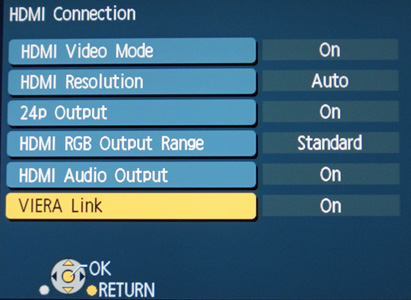
Craig on my BD-80 it shows "HDMI RGB output range". Is this the same thing?
| Description: |
|
| Filesize: |
48.54 KB |
| Viewed: |
37716 Time(s) |
|
|
|
| Back to top |
|
|
CIR Engineering
Joined: 25 Aug 2008
Posts: 4269
Location: Chicago USA & Berlin Germany
|
| Posted: Thu Jun 03, 2010 4:36 pm Post subject: |
|
|
| CIR Engineering wrote: | | emdawgz1 wrote: | | What B/R player allows you to set the color space... |
Almost all of them produced in the past 18 months. Many DVD players and set top boxes also support multiple color spaces.
craigr |
Craig on my BD-80 it shows "HDMI RGB output range". Is this the same thing?[/quote]
Yes draganm, it's the same thing.
Part of the problem is that manufacturers of BD players and other source devices often do not use industry standard terms in their menus. Often for RGB you will have an option for "Lighter" or "Darker" instead of 0-255 and 16-235. In this case, you want "Darker" as this correlates to 16-235. You will find manufacturers that use other terms as well, but the right one to use is always the one that makes the image appear darker when switched.
Another term for HDMI color space can be "Enhanced" and "Standard" instead of 16-235 or 0-255. This one is worse because Standard is not always 16-235 or 0-255 and same with Enhanced. Often you need to work with test patterns to determine what setting you should be using. And the manual for the device will not help as it's explanation will not mean anything that makes sense.
Test patterns make it easy. If you can see blacker than black in a test pattern you can be pretty sure that you are at least on the correct setting for luma.
If you have the option for YCbCr you will get better color, but it is also easier because industry standard dictates only the 16-235 luma range for component digital.
However, I have found Denon and Marantz (Denon clones) actually have the wrong luma range with YCbCr and they use 0-255 incorrectly; WRONG WRONG WRONG  With these players there is a "PIC Adj" button on the remote that you must press while a disc is playing. In the menu that comes up with Pic Adj you will find an option for either "0 or 7.5 IRE" or you will see "Lighter" and "Darker." Again, select Darker or 7.5IRE if that is there... With these players there is a "PIC Adj" button on the remote that you must press while a disc is playing. In the menu that comes up with Pic Adj you will find an option for either "0 or 7.5 IRE" or you will see "Lighter" and "Darker." Again, select Darker or 7.5IRE if that is there...
...this is infuriating to me because there is no such thing as an "IRE" in digital space. Not only did Denon not follow industry spec here, they also used a nomenclature that is absurd and wholly inaccurate to depict what the player will do.
craigr
_________________
JETI 1501-HiRes 2nm Spectroradiometer
JETI 1211 Spectroradiometer
Photo Research PR-650 Spectroradiometer
Klein K10-A Colorimeter
Murideo Fresco SIX-G HDMI 2.x Multimedia Generator
Murideo Fresco SIX-A HDMI 2.x Analyzer
Light Illusion ColourSpace XPT Color Calibration Software
Light Illusion LightSpace XPT Pro Version 10.x Color Calibration Software
OMARDRIS JVC Software Patch to use K10-A and Jeti with JVC OEM AutoCal Software!
Sencore CR7000 CRT Tube Analyzer / Rejuvenater
Authorized Dealer for Lumagen & just about everything worth buying
www.CIR-Engineering.com - craigr@cir-engineering.com
Phone: 865-405-6892
|
|
| Back to top |
|
|
draganm
Joined: 08 Mar 2006
Posts: 8990
Location: Colorado
|
| Posted: Thu Jun 03, 2010 5:15 pm Post subject: |
|
|
| CIR Engineering wrote: | | CIR Engineering wrote: | | draganm wrote: | | ] Craig on my BD-80 it shows "HDMI RGB output range". Is this the same thing? |
Yes draganm, it's the same thing. |
Part of the problem is that manufacturers of BD players and other source devices often do not use industry standard terms in their menus. Often for RGB you will have an option for "Lighter" or "Darker" instead of 0-255 and 16-235. In this case, you want "Darker" as this correlates to 16-235. You will find manufacturers that use other terms as well, but the right one to use is always the one that makes the image appear darker when switched.
Another term for HDMI color space can be "Enhanced" and "Standard" instead of 16-235 or 0-255. This one is worse because Standard is not always 16-235 or 0-255 and same with Enhanced. craigr |
thanks, it took 6 months but I can finally nail down now why I couldn't get BTB with Moome card set to 16-235. On the Panasonic BD80, i'm betting "standard" is 0-255.
I'll have to try Enhanced with Moome at 16-235.
Last edited by draganm on Thu Jun 03, 2010 9:17 pm; edited 1 time in total
|
|
| Back to top |
|
|
garyfritz

Joined: 08 Apr 2006
Posts: 12088
Location: Fort Collins, CO
|
| Posted: Thu Jun 03, 2010 5:26 pm Post subject: |
|
|
|
Trying to remember what setting I have on my PS3... I think it's an "enhanced" equivalent. Craig, do you happen to know the right setting for feeding a Moome EXT-HD from a PS3?
|
|
| Back to top |
|
|
Artinaz
Joined: 15 Jun 2009
Posts: 110
Location: SF Bay Area
|
| Posted: Thu Jun 03, 2010 5:38 pm Post subject: |
|
|
This is how I understand it.
Your dvd data is in Ycbcr, this needs to be converted to RGB when its hits the projector. You can do this conversion in the DVD or your video processor/scaler etc. Most people choose to do this inthe scaler/receiver.
Ycbcr 422 is recommened by lumagen over ycbcr 444.
As for teh enhanced or lighter darker options for rgb, your best bet it to use the video essentials/avia test pattern to see if you can blacker than black (the brightness contrast test pattern usually). Play with the setting till you can. For video, usually it is the 16-235 setting.
|
|
| Back to top |
|
|
CIR Engineering
Joined: 25 Aug 2008
Posts: 4269
Location: Chicago USA & Berlin Germany
|
| Posted: Thu Jun 03, 2010 6:07 pm Post subject: |
|
|
| garyfritz wrote: | | Trying to remember what setting I have on my PS3... I think it's an "enhanced" equivalent. Craig, do you happen to know the right setting for feeding a Moome EXT-HD from a PS3? |
I am sorry but I don't recall. I think that Sony actually switched the two during a FW change at some point. You have to just use a test patter and find the right one.
craigr
_________________
JETI 1501-HiRes 2nm Spectroradiometer
JETI 1211 Spectroradiometer
Photo Research PR-650 Spectroradiometer
Klein K10-A Colorimeter
Murideo Fresco SIX-G HDMI 2.x Multimedia Generator
Murideo Fresco SIX-A HDMI 2.x Analyzer
Light Illusion ColourSpace XPT Color Calibration Software
Light Illusion LightSpace XPT Pro Version 10.x Color Calibration Software
OMARDRIS JVC Software Patch to use K10-A and Jeti with JVC OEM AutoCal Software!
Sencore CR7000 CRT Tube Analyzer / Rejuvenater
Authorized Dealer for Lumagen & just about everything worth buying
www.CIR-Engineering.com - craigr@cir-engineering.com
Phone: 865-405-6892
|
|
| Back to top |
|
|
Tom.W

Joined: 09 Mar 2006
Posts: 6635
|
|
| Back to top |
|
|
CIR Engineering
Joined: 25 Aug 2008
Posts: 4269
Location: Chicago USA & Berlin Germany
|
| Posted: Thu Jun 03, 2010 6:27 pm Post subject: |
|
|
| Artinaz wrote: | This is how I understand it.
Your dvd data is in Ycbcr, this needs to be converted to RGB when its hits the projector. You can do this conversion in the DVD or your video processor/scaler etc. Most people choose to do this inthe scaler/receiver... |
Well, not exactly, but admittedly I used to be under the same misconception when YCbCr was first rolled out into the HDMI standard.
The thing is that each digital device in a signal chain (except a switch or repeater or some other devices maybe) is going to process the signal and perform a conversion or alteration to the video of some sort. The ideal here is to maintain the highest amount of the original data as long as possible. Most conversions (except color gamut) done by all video devices are done in component space, not RGB.
Because of this, if you send RGB to a video processor, the processor will have to convert back to YCbCr when it receives the video and this results in a conversion which will always have errors and loss. So what you have now done is a conversion from YCbCr to RGB in the BD player and then converted back to YCbCr in the VP. Now data from the original signal has been trimmed off twice already. If you then were to convert to RGB when leaving the VP, the next device in the chain will most likely need to convert back to YCbCr...
And this part is very important... Even if you were to connect a BD player with HDMI directly to an DA converter (Moome or HDF2/3), you will still get a much better image with YCbCr 422 than with the lesser bit standards. The reason for this is that the DAC (digital to analog converter) in the DA converter will be able to use the 10-bit space in the YCbCr signal when it converts the digital HDMI signal to analog RGB. The more bits of data in the HDMI signal the smoother the conversion will be to analog and the more colors that will be rendered. The DA conversion will have less gaps between data points with YCbCr 422 than with the other standards.
So if you send just digital RGB to the HDMI to RGB analog converter, you loose data before the DA conversion and then again during the DA conversion there is less information for the DAC to work with. Both of these result in an image quality hit.
You can easily see this for yourself if you have an input card that supports YCbCr 422 and a good BD player. Find a scene in a BD that has lots of colors and pause it. Try switching between RGB and YCbCr and look at the subtle differences between colors. One of my favorite demos for this in on the new Battlestar Galactica BD's where a few frames show an arm that covers most of the screen. There is a bright light shining on the person's arm resulting in overexposure of the skin.
With RGB you see three main colors in the scene. The brightest part of the arm is white and then as the light rolls off around the arm it turns brownish.
With YCbCr the brightest part of the skin is again white and the darkest part again brownish, but in between the white and brown you will see a greenish tinge to the skin and then an orange tinge and then finally brownish.
With RGB these colors are lost and are totally absent from the image. The colors are present on the BD, but they don't make it to the screen unless you use HDMI YCbCr.
craigr
_________________
JETI 1501-HiRes 2nm Spectroradiometer
JETI 1211 Spectroradiometer
Photo Research PR-650 Spectroradiometer
Klein K10-A Colorimeter
Murideo Fresco SIX-G HDMI 2.x Multimedia Generator
Murideo Fresco SIX-A HDMI 2.x Analyzer
Light Illusion ColourSpace XPT Color Calibration Software
Light Illusion LightSpace XPT Pro Version 10.x Color Calibration Software
OMARDRIS JVC Software Patch to use K10-A and Jeti with JVC OEM AutoCal Software!
Sencore CR7000 CRT Tube Analyzer / Rejuvenater
Authorized Dealer for Lumagen & just about everything worth buying
www.CIR-Engineering.com - craigr@cir-engineering.com
Phone: 865-405-6892
|
|
| Back to top |
|
|
garyfritz
Joined: 08 Apr 2006
Posts: 12088
Location: Fort Collins, CO
|
| Posted: Thu Jun 03, 2010 8:14 pm Post subject: |
|
|
| CIR Engineering wrote: | | garyfritz wrote: | | Trying to remember what setting I have on my PS3... I think it's an "enhanced" equivalent. Craig, do you happen to know the right setting for feeding a Moome EXT-HD from a PS3? |
I am sorry but I don't recall. I think that Sony actually switched the two during a FW change at some point. You have to just use a test patter and find the right one. |
Just checking to see if you can see BtB? Or is there more to it? This is one area that always confuses me...
From Tom's article it sounds like you do just have to make sure you can see BtB. Set the output to YCbCr and probably "Limited Range" (16-235), then verify you can see BtB, and you should be good. I think.
On PS3 I think that means:
Under the Settings menu:
Video settings: http://manuals.playstation.net/document/en/ps3/current/settings/index_bdsettings.html
BD / DVD Video Output Format: Y Pb / Cb Pr / Cr
And while you're in there:
BD 1080p 24 Hz Output: Turn this Off unless you use a VP that supports it
BD / DVD Audio Output Format (HDMI): Linear PCM?? (if feeding audio via HDMI)
BD Audio Output Format (Optical Digital): Linear PCM?? (if feeding audio via optical)
Display settings: http://manuals.playstation.net/document/en/ps3/current/settings/index_display.html
Video Output Settings: HDMI
RGB Full Range: Set to Limited range (16-235)
Y Pb / Cb Pr / Cr Super-White: I think "Off"
Sound right?
|
|
| Back to top |
|
|
David_Web
Joined: 02 May 2007
Posts: 418
Location: Sweden
|
| Posted: Fri Jun 04, 2010 2:30 pm Post subject: |
|
|
""With RGB you see three main colors in the scene. The brightest part of the arm is white and then as the light rolls off around the arm it turns brownish.
With YCbCr the brightest part of the skin is again white and the darkest part again brownish, but in between the white and brown you will see a greenish tinge to the skin and then an orange tinge and then finally brownish. ""
Could you post a screenshot/photo of the two examples?
_________________
SNR of people are ridiculously low.
|
|
| Back to top |
|
|
draganm
Joined: 08 Mar 2006
Posts: 8990
Location: Colorado
|
| Posted: Mon Jun 07, 2010 2:45 pm Post subject: |
|
|
I want to say how glad I am CJ started this thread. i've had my Panasonic BD-80 for months now and had no idea what "HDMI RGB output range" was or how it affected the pic.Last night I switched the output range from "standard" to "enhanced" and OMG , it was like a new projector. I thought my picture was great before but the FFTB and color saturation went up significantly.
FFTB was always something I had trouble with on this player and now I know why. There should be a sticky warning CRT users that the players factory default is sh*t.
|
|
| Back to top |
|
|
CIR Engineering
Joined: 25 Aug 2008
Posts: 4269
Location: Chicago USA & Berlin Germany
|
| Posted: Tue Jun 08, 2010 3:51 pm Post subject: |
|
|
| draganm wrote: | I want to say how glad I am CJ started this thread. i've had my Panasonic BD-80 for months now and had no idea what "HDMI RGB output range" was or how it affected the pic.Last night I switched the output range from "standard" to "enhanced" and OMG , it was like a new projector. I thought my picture was great before but the FFTB and color saturation went up significantly.
FFTB was always something I had trouble with on this player and now I know why. There should be a sticky warning CRT users that the players factory default is sh*t. |
Glad you are happy with the improvement Draganm 
But for the record, this is not just for CRT. Color space and luma range is relevant to all projector technologies. In fact, using YCbCr 422 is even more important on digital projectors than it is on CRT. With CRT you get more and better colors with 422, but on digitals without 422 you actually can often see banding in the colorful parts of the image. CRT has the advantage with 8-bit color of naturally blending the bands away. But digital just draws the color bands right on the screen with 8-bit color spaces.
Any projector that supports 422 has an advantage over a projector that does not. And don't forget to optimize your signal chain the entire way. Set your receiver to "pass through" or 422 if you are using it's processor. Set your video processor to 422 wherever it is supported.
And incidentally, when I am hired to calibrate a system I always include signal chain optimization with my services. I often don't mention it, but I always go through and make sure that the best combination of settings is used on a client's system to make sure the best possible signal is sent all the way to the projector I do a lot more than just calibrate the projector when I come in for service.
craigr
_________________
JETI 1501-HiRes 2nm Spectroradiometer
JETI 1211 Spectroradiometer
Photo Research PR-650 Spectroradiometer
Klein K10-A Colorimeter
Murideo Fresco SIX-G HDMI 2.x Multimedia Generator
Murideo Fresco SIX-A HDMI 2.x Analyzer
Light Illusion ColourSpace XPT Color Calibration Software
Light Illusion LightSpace XPT Pro Version 10.x Color Calibration Software
OMARDRIS JVC Software Patch to use K10-A and Jeti with JVC OEM AutoCal Software!
Sencore CR7000 CRT Tube Analyzer / Rejuvenater
Authorized Dealer for Lumagen & just about everything worth buying
www.CIR-Engineering.com - craigr@cir-engineering.com
Phone: 865-405-6892
|
|
| Back to top |
|
|
CIR Engineering
Joined: 25 Aug 2008
Posts: 4269
Location: Chicago USA & Berlin Germany
|
| Posted: Tue Jun 08, 2010 3:58 pm Post subject: |
|
|
| garyfritz wrote: |
Just checking to see if you can see BtB? Or is there more to it? This is one area that always confuses me...
From Tom's article it sounds like you do just have to make sure you can see BtB. Set the output to YCbCr and probably "Limited Range" (16-235), then verify you can see BtB, and you should be good. I think...
...Sound right? |
That is pretty much it for almost all modern situations. Use YCbCr 422, if no 422 then use 444, if no 444 then use RGB... Always check to make sure that you can see BTB.
However, if you are using an older input board like the HDF1 or older Moome, than you may be better off with RGB 0-255. This is because these input boards were designed to work with the "PC" luma range of 0-255. If you use 16-235 on an HDFI your gamma will be way off and be much too low. This results in a washed out image with no pop. When you use 0-255 there will be no BTB or WTW because they no longer have any space to exist. So when you set your source to 0-255 PC luma, do not expect to see BTB because you shouldn't be able to
You do have to understand the entire signal chain, not just the source. So if you have an older Moome or HDF1 use RGB 0-255. If you are not sure what your input board supports, and if you have a colorimiter, you can do a grayscale and gamma tracking with your software, If you find that the gamma is totally wrong (well below 2.2 across the luma range) than you can be pretty sure that you are using the wrong luma range for your IFB, or that you have the black level set much too high in the projector (or VP).
craigr
_________________
JETI 1501-HiRes 2nm Spectroradiometer
JETI 1211 Spectroradiometer
Photo Research PR-650 Spectroradiometer
Klein K10-A Colorimeter
Murideo Fresco SIX-G HDMI 2.x Multimedia Generator
Murideo Fresco SIX-A HDMI 2.x Analyzer
Light Illusion ColourSpace XPT Color Calibration Software
Light Illusion LightSpace XPT Pro Version 10.x Color Calibration Software
OMARDRIS JVC Software Patch to use K10-A and Jeti with JVC OEM AutoCal Software!
Sencore CR7000 CRT Tube Analyzer / Rejuvenater
Authorized Dealer for Lumagen & just about everything worth buying
www.CIR-Engineering.com - craigr@cir-engineering.com
Phone: 865-405-6892
|
|
| Back to top |
|
|
dochlywd
Joined: 25 Apr 2006
Posts: 346
Location: Saint Louis, Missouri
|
| Posted: Tue Jun 08, 2010 6:05 pm Post subject: |
|
|
So Craig,
When I put in the Avia HD and display it via my PS3, I forget why I don't get BTB. Was it because of my John DVI card, the PS3, or the Integra? I'm almost positive that you set the Integra on pass through but does it still have a layer of processing on it? From what I remember, when you displayed the pixel mapping pattern, the small square in the upper right of the pattern wasn't displaying correctly but I forget why.
The more I read about this stuff, the more I think I understand until I read about real world situations. It's then that I'm reminded that I don't really know squat!!!!!! Which makes me also wonder how many guys there are out there with only a little more knowledge than me actually charging people for calibrations! 
There's no training in the world that can replace the field hours and knowledge gained from them to bring the average individual up to someone like Craig's level. I can't stress enough that just having three initials behind someone's name doesn't mean they are qualified. If seeking the best picture possible from your current situation, always, always, always ask about their field experience and check with references so you end up with someone as qualified (well, almost ) and having the expertise that Craig has showing up at your door to dial you in!!!!!!!!!
Doc
|
|
| Back to top |
|
|
perisoft

Joined: 29 Aug 2007
Posts: 2920
Location: Ithaca, NY
|
| Posted: Tue Jun 08, 2010 10:59 pm Post subject: |
|
|
| CIR Engineering wrote: |
With RGB you see three main colors in the scene. The brightest part of the arm is white and then as the light rolls off around the arm it turns brownish.
With YCbCr the brightest part of the skin is again white and the darkest part again brownish, but in between the white and brown you will see a greenish tinge to the skin and then an orange tinge and then finally brownish. |
Hmm... if it were me, I'd suspect that the one with -more- colors is wrong. White-green-orange-brown seems more like a failure mode than white-brown to me...
_________________

|
|
| Back to top |
|
|
|
|




