| Author |
Message |
Pol Walrant
Joined: 05 Jul 2007
Posts: 16
Location: Barchon-Belgium
TV/Projector: BarcoGraphics 1209s Iris2
|
| Posted: Mon May 24, 2010 11:48 am Post subject: Barco 1209s nearly new ..... many problems |
|
|
Hello Everydody,
I have sold my BG808s because I had the opprtunity to buy in U.K. a 1209s that had only 374hrs (in Barco's showroom at the time, never used after !!!!!).
I thought "Whow I'm gone till the end of my life as I'm 67". I have installed it attached on my ceiling and went though all adjustments and very fast had to "cool down" due to all the more or less important problems I found.
Below you will find a detailled summary of these problems. I think some have a common cause but I am not experienced enough to find the clue.
I did use HDFury1, HDfury2 and Moome V2 and a Fury3 from a friend. The problem are the same all the time and obviously come from inside the 1209s itself.
Could anybody please give me your opinion about the problems and being the case let me know the adjustment to do.
Description: Barco Graphics 129s + Iris2 - Model: R9000972 - S/N: 1114562 - MFG: March 1998
Lens: HD-120 - Run Hours: 396 - Screen: 16/9 Base 2m
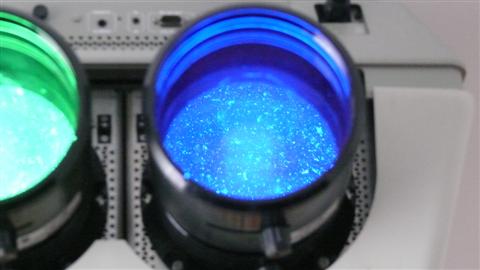
Problem 1: Snow Flakes (kind of)
They are some kind of slowly moving snowlflake that you can see through the lenses.
When the projector is off you can see the snowflakes with a flashlight. (they are steady in this case)
Problem 2: Brighter screen center
The picture is whiter (brighter) in the center. Practically there is like a shade on both sides.
Problem 3: 1080i50 not accepted
Though the projector is given for an horizontal scanning of 15-135Khz, the format 1080i50 (28.1Khz) is very badly recognized, but the format 1080i60 (37.7Khz) has no problem at all.
Problem 4: 1080p60 faulty (but 1060p50 is good).
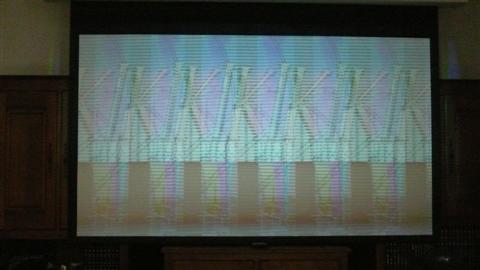
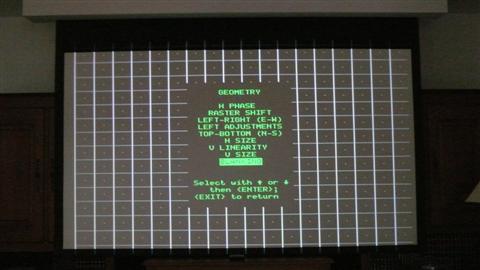
The barco grid does not fill the screen, there is missing about 6cm on the left and 3cm on the right (tought the rectangles have the same dimensions). Practically that give an horizontal distortion on the left and some chromatic faults on the left and the right. (Notice that the faults happen exactly where the Barco grid is empty)
Problem 5: Some definitions (p.ex. 720p) do not reach the with of the screen (Hsize limit reached)
Problem 6: On the sources 1 (C) and 2 (S-vhs) the rectangles on the Barco grid are horizontally extended on
the left, what give a bad left distortion of the picture. (Notice that with the LiDo ON -line doubler- the problem disappear). 
| Description: |
|
| Filesize: |
21.24 KB |
| Viewed: |
11072 Time(s) |
|
| Description: |
|
| Filesize: |
24.95 KB |
| Viewed: |
11072 Time(s) |
|
| Description: |
|
| Filesize: |
26.66 KB |
| Viewed: |
11072 Time(s) |
|
|
|
| Back to top |
|
 |
Nashou66

Joined: 12 Jan 2007
Posts: 16171
Location: West Seneca NY
|
| Posted: Mon May 24, 2010 11:55 am Post subject: |
|
|
I can help you with problem 1 and 2. sounds like you need to change the Glycol in the cooling chambers . you'll need to remove the tubes from the PJ to do this.
It is probably fungus and you will have to flush clean the chamber before you add new Glycol.
The brighter center is from the Glycol as well due the convex shape of the C-element. the outer edges have more glycol for the light to pass through if its yellow or cloudy then that would happen.
Athanasios
_________________
Don't blame your underwear for your crooked ass~ unknown Greek philosopher
"Republicans believe every day is the Fourth of July, but the Democrats believe every day is April 15." --- President Reagan
One Smart Dog!!!
Marquee High Performance Bellows now shipping!!
Marquee Modifications and Performance Enhancement
Marquee C-element and Bellow removal
|
|
| Back to top |
|
|
mp20748
Joined: 12 Sep 2006
Posts: 5689
Location: Maryland
TV/Projector: 9500LC Ultra / Super 02 and 03 VIM
|
| Posted: Mon May 24, 2010 12:02 pm Post subject: |
|
|
The snow flakes I can't help you with, but the scan problem I may be able to help if you needs a few boards.
I have a few brand new Horizontal modules and power supplies for the 1209s Barco.
|
|
| Back to top |
|
|
Ile

Joined: 09 Mar 2006
Posts: 1491
Location: Jyväskylä, Finland
|
| Posted: Mon May 24, 2010 1:24 pm Post subject: Re: Barco 1209s nearly new ..... many problems |
|
|
| Pol Walrant wrote: | Problem 1: Snow Flakes (kind of)
They are some kind of slowly moving snowlflake that you can see through the lenses.
When the projector is off you can see the snowflakes with a flashlight. (they are steady in this case)
Problem 2: Brighter screen center
The picture is whiter (brighter) in the center. Practically there is like a shade on both sides. |
Chance glycols and clean lenses back surfaces.
| Pol Walrant wrote: | Problem 3: 1080i50 not accepted
Though the projector is given for an horizontal scanning of 15-135Khz, the format 1080i50 (28.1Khz) is very badly recognized, but the format 1080i60 (37.7Khz) has no problem at all.
Problem 4: 1080p60 faulty (but 1060p50 is good).
The barco grid does not fill the screen, there is missing about 6cm on the left and 3cm on the right (tought the rectangles have the same dimensions). Practically that give an horizontal distortion on the left and some chromatic faults on the left and the right. (Notice that the faults happen exactly where the Barco grid is empty)
Problem 5: Some definitions (p.ex. 720p) do not reach the with of the screen (Hsize limit reached)
Problem 6: On the sources 1 (C) and 2 (S-vhs) the rectangles on the Barco grid are horizontally extended on
the left, what give a bad left distortion of the picture. (Notice that with the LiDo ON -line doubler- the problem disappear). |
Problem is your sources timings and you need scaler or pc to fix this.
Scaler or pc is must with any crt projector, custom timings is key to good picture. There is too many problems with stand alone players, even more here in Europe. Bad timings (cropped picture, raster ringing and etc.), flicker from too low refresh rate (50/60 Hz) and stutter from field rate conversion like 24p -> 60Hz.
Forgot those internal patterns, those doesn't work right with wide hd picture. Those were designed to work right with vesa standard 4:3 resolutions in 90's. Use test patterns only from source (test disc, scaler, pc) for geometry, then you will know what you are adjusting.
Same thing with internal genlocked patterns, these use timings from source and problems follows.
After you have got your timings right and if picture is still too narrow, it's possible to adjust from smps sub boards pot. But don't touch to it yet.
With sources 1 and 2 you have fixed bad timings with lido and problems are gone. 
You can test this with pc and custom timings...
|
|
| Back to top |
|
|
-Pjackso
Joined: 31 Mar 2006
Posts: 791
Location: Oklahoma
|
| Posted: Tue May 25, 2010 10:15 pm Post subject: |
|
|
As already stated, the 'Snowflakes' look like fungus.
Ref:
http://www.curtpalme.com/Fungus_Removal1.shtm
BTW, congrat on the low hour (NEW) 1209!
... even though you've got some clean-up to do.
_________________
-Nothing relevant to add.
|
|
| Back to top |
|
|
secstate
Joined: 20 Mar 2006
Posts: 720
|
| Posted: Wed May 26, 2010 2:23 pm Post subject: |
|
|
|
Horizontal width is a challenge on the later 120xs series. You have to adjust the pot on the SMPS to widen the screen. I usually take the electronic control to about 95 or so and then adjust the SMPS pot to expand the horizontal width to what I need. Curt's tips on the 120x series I believe calsl out this pot. The catch is that the "early" S model 120x Barcos (1997/98/99) had a weak part installed that will cause the horizontal width to be unstable (the whole screen or portions will shrink/shake randomonly). If you see this problem you will need to either get a replacement board (Mike's SMPS are the later corrected ones I believe) or mod your board per the service note that Curt has posted on the 120x page. I agree with the others on the Glycol causing some of your other issues.
|
|
| Back to top |
|
|
Pol Walrant
Joined: 05 Jul 2007
Posts: 16
Location: Barchon-Belgium
TV/Projector: BarcoGraphics 1209s Iris2
|
| Posted: Wed May 26, 2010 6:20 pm Post subject: |
|
|
I might look stupid, but what do you mean by SMPS......how to put the electronic control to 95%.....and where is located the the SMPS pot.
Are you talking about the Horizontal Control board and where to get Mike's SMPS.
|
|
| Back to top |
|
|
arbey
Joined: 08 Mar 2006
Posts: 27
|
| Posted: Wed May 26, 2010 7:31 pm Post subject: |
|
|
Pol
you received a mail, I can help you out.
It's to dangerous to put your hands in a barco without knowing what/where/how/which/...
Just a bit worried here.
regards
_________________
crttime
|
|
| Back to top |
|
|
secstate
Joined: 20 Mar 2006
Posts: 720
|
| Posted: Thu May 27, 2010 11:43 am Post subject: |
|
|
| Pol Walrant wrote: | I might look stupid, but what do you mean by SMPS......how to put the electronic control to 95%.....and where is located the the SMPS pot.
Are you talking about the Horizontal Control board and where to get Mike's SMPS. |
SMPS is the power supply in the Barco projector. There is a pot on it that controls H-width. If you are unfamilar with working in the back of the projector, I suggest you do some reading here: http://www.curtpalme.com/Barco1208.shtm. The pot is on a subboard as highlilghted in Curt's tutorial. Taking the electronic control to 95% means going into the menu and puttting the horizontal width to 95. Should be in the geometry submenu if I recall correctly.
|
|
| Back to top |
|
|
donaldk
Joined: 17 Jun 2008
Posts: 308
|
| Posted: Thu May 27, 2010 9:42 pm Post subject: |
|
|
|
Better let Arbey help out his fellow countryman, before he doesn't make it past his 68th year.
|
|
| Back to top |
|
|
JustGreg

Joined: 07 Mar 2006
Posts: 3098
Location: Kenosha, WI
|
| Posted: Fri May 28, 2010 3:45 am Post subject: |
|
|
| donaldk wrote: | | Better let Arbey help out his fellow countryman, before he doesn't make it past his 68th year. |
Excellent advice.
To a much lesser degree disaster could loom just giving the LC chambers a good flush if he's not familiar with this make/model pj. Do it wrong and glycol goes where it shouldn't. 
_________________
Greg
"Is it ignorance or apathy? Hey, I don't know and I don't care!" --Jimmy Buffett
|
|
| Back to top |
|
|
|
|





