| Author |
Message |
Ben851
Joined: 13 Sep 2008
Posts: 221
Location: Ottawa, Ontario
|
| Posted: Fri Apr 30, 2010 12:53 pm Post subject: NEC XG Maintenance Thread... |
|
|
...So I managed to snag the last set P16 tubes off of Terry - while I anxiously wait for them to arrive, I thought I'd put some feelers out to see if anyone (Mark?) has any maintenance tips for an XG. I figure it would be a good time to perform these tasks while I rip the set apart to put the new tubes in. I'm already going to give it a good cleaning - is there anything I should be looking at?
EDIT: Just clued in that perhaps the reason I haven't seen a thread like this before is because of all the different variations of the XG?
_________________
Thanks,
Ben
|
|
| Back to top |
|
 |
jarseneau

Joined: 06 Nov 2007
Posts: 323
Location: WI
|
| Posted: Sat May 01, 2010 9:02 pm Post subject: |
|
|
Not sure if you already included this in the 'good cleaning' but I would clean every connection with a good contact cleaner such as De-oxit. Helps reduce video noise and makes things more stable.
_________________
Jerry
|
|
| Back to top |
|
|
Mark_A_W
Joined: 15 Mar 2006
Posts: 3068
Location: Sunny Melbourne Australia
|
| Posted: Sun May 02, 2010 6:19 am Post subject: |
|
|
Other than making sure the deflection coil connections (the big plugs on the def board that swap around for front/rear/ceiling/floor) are clean.
I don't really think there is any XG specific maintenance required.
All I've done to mine is:
- Slowed all the fans with diodes
- Flipped rear fans around
- Forced evacuation through chassis
- Hushbox
- PC overclocking style temp sensor and alarm fitted in input slot in rear
Soon it will have some Mike Parker mods.
But nothing "preventative".
NEC made them well. The glycol doesn't even go cloudy on an NEC.
|
|
| Back to top |
|
|
BradTheAggie

Joined: 08 Mar 2006
Posts: 651
Location: Oak Point, Texas
|
| Posted: Mon May 03, 2010 2:03 pm Post subject: |
|
|
I'm working on getting a Runco 991 (XG75) ready to ship to a buyer in California (he bought it off fleabay here in Arlington and I volunteered to take the neck cards off and pack it to him). According to instructions, I've removed 5 screws from the back of the card cage (the instructions say 4, but there is a 5th screw in the top center of the cage), and what I believe to be the two "hidden screws" near the front of the cage, and moved the retention clips toward the center of the projector. At this point the structure obscuring access to the neck cards should be "swung out of the way". So far, it is not moving. My question is should this swing up, and where is the pivot point? Does it slide straight up, or swing up and towards the front of the projector?
Brad
_________________
(bholman on the AVS forum)
|
|
| Back to top |
|
|
Mark_A_W
Joined: 15 Mar 2006
Posts: 3068
Location: Sunny Melbourne Australia
|
| Posted: Mon May 03, 2010 2:17 pm Post subject: |
|
|
It slides up - but you have to go forwards or backwards first I think.
Look at the slots (with pins) in the sides of the cage.
Be careful that the cables don't get yanked.
|
|
| Back to top |
|
|
BradTheAggie
Joined: 08 Mar 2006
Posts: 651
Location: Oak Point, Texas
|
| Posted: Mon May 03, 2010 3:47 pm Post subject: |
|
|
That kinda makes sense. I'll try it tonight. Thanks! I'm taking copious pics of what I am doing, so I can give the owner instructions on how to replace the neck cards once he gets the projector.
Brad
_________________
(bholman on the AVS forum)
|
|
| Back to top |
|
|
Elaine Benes
Joined: 25 Apr 2006
Posts: 1416
|
| Posted: Tue May 04, 2010 1:35 am Post subject: |
|
|
That card cage is one of the most thoughtful maintenance features I've ever seen on ANYTHING. I had to replace a focus board in an XG and was wondering what all crap I'd have to remove to get it out, but moving the card cage to its "UP" position allowed free and easy access to all boards in the main body of the projector, including all the neckboards and focus and convergence boards...
Its dead easy to use too, as you've already been advised, looking at the slots on the sides tells you which way to move the cage before elevating it...
|
|
| Back to top |
|
|
BradTheAggie
Joined: 08 Mar 2006
Posts: 651
Location: Oak Point, Texas
|
| Posted: Thu May 06, 2010 2:22 am Post subject: |
|
|
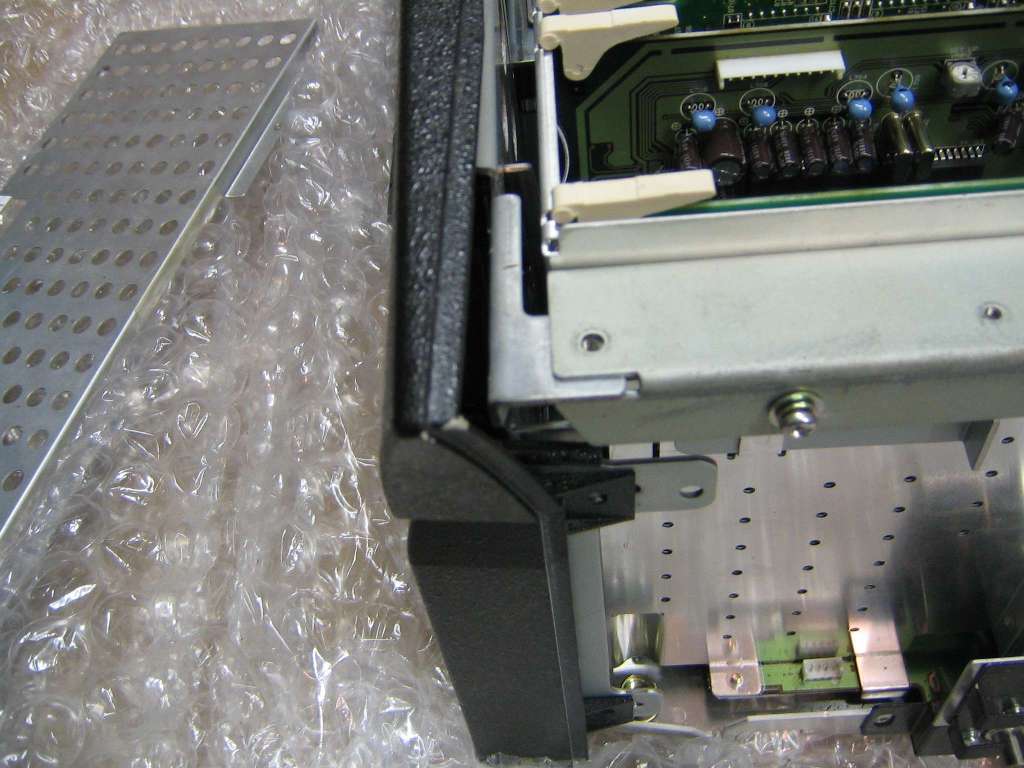
Sorry to be such a noob, but since it isn't my projector I want to be really careful. Attached is a pic of the rear left corner of the cage. I assume I need to pull the cage back to disengage the cage, then pull up, is that right? It seems to be taking more "pull" than I thought it should to move it back...
| Description: |
|
| Filesize: |
81.17 KB |
| Viewed: |
4657 Time(s) |
|
_________________
(bholman on the AVS forum)
|
|
| Back to top |
|
|
Mark_A_W
Joined: 15 Mar 2006
Posts: 3068
Location: Sunny Melbourne Australia
|
| Posted: Thu May 06, 2010 2:31 am Post subject: |
|
|
|
Take the side cover off.
|
|
| Back to top |
|
|
Elaine Benes
Joined: 25 Apr 2006
Posts: 1416
|
| Posted: Thu May 06, 2010 4:18 am Post subject: |
|
|
As Mark says, after you've taken the sides off, you'll be able to SEE the snap latches at the back that hold the cage down, and the slots on the sides that tell you the direction to move the cage. I believe its back up and forward to the hold position, but you'll see them.
The snap latches just slide in towards the middle you can see them at the back, one on either side in the top corners. I the picture it looks like you've already disengaged that one...
|
|
| Back to top |
|
|
BradTheAggie
Joined: 08 Mar 2006
Posts: 651
Location: Oak Point, Texas
|
| Posted: Mon May 10, 2010 1:13 am Post subject: |
|
|
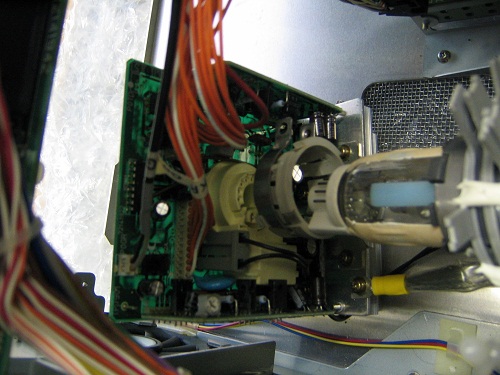
Yep, it took me a minute to realize there are channels cut into the sides of the projector chassis, and tongues that engage those channels. As suggested, once I looked at the sides of the chassis underneath the side panels, I could plainly see those guides and how to move the card cage back towards me, then the chassis slides up. One note, the XG hints section does not mention that the top mounted circuit card must be unscrewed and lifted out of the way before that card cage is lifted. Anyway, I have done so, and have unplugged one of the neck cards.
Since this neck card is no longer attached to the tube, I think it would be easier to just leave it in the projector, with the wires attached. Perhaps wrap some bubble wrap to it to hold it loosely in place and ship it like that. This way, the owner only has to plug the neck card back in without worrying what card goes to what tube, and what wires plug into what sockets. Attached is a picture of the detached but still installed neck card. What do you think of that idea?
| Description: |
|
| Filesize: |
82.58 KB |
| Viewed: |
4562 Time(s) |
|
_________________
(bholman on the AVS forum)
|
|
| Back to top |
|
|
Mark_A_W
Joined: 15 Mar 2006
Posts: 3068
Location: Sunny Melbourne Australia
|
| Posted: Mon May 10, 2010 1:40 am Post subject: |
|
|
I think you will struggle to get the card cage to close again. It's a pretty tight fit.
But if it does, you would be wise to fit the little white pin tube caps to the end of the tubes. Someone on your side of the world should have a set you can borrow.
And make sure the neckboards are restrained in the projector. Assuming it all fits...
|
|
| Back to top |
|
|
BradTheAggie
Joined: 08 Mar 2006
Posts: 651
Location: Oak Point, Texas
|
| Posted: Tue May 11, 2010 9:40 pm Post subject: |
|
|
It's a very tight fit! Looks like I will be pulling neck cards...
_________________
(bholman on the AVS forum)
|
|
| Back to top |
|
|
Mark_A_W
Joined: 15 Mar 2006
Posts: 3068
Location: Sunny Melbourne Australia
|
| Posted: Tue May 11, 2010 10:02 pm Post subject: |
|
|
The person refitting the neckboards needs to realise how critical the Red G2 wire (the lone red wire that's quite thick).
If they don't fit that wire, the tube will be spotburned on shutdown.
|
|
| Back to top |
|
|
BradTheAggie
Joined: 08 Mar 2006
Posts: 651
Location: Oak Point, Texas
|
| Posted: Wed May 12, 2010 11:15 am Post subject: |
|
|
He will get explicit instructions on what to do...
_________________
(bholman on the AVS forum)
|
|
| Back to top |
|
|
|
|





