| Author |
Message |
dvh99

Joined: 25 Dec 2009
Posts: 2158
Location: nederland
|
| Posted: Tue Mar 16, 2010 5:00 pm Post subject: alternative astig setup |
|
|
this might be handy for some that have trouble with the astig setup like me.
the regular way of doing the astig is with the dots only and is in my opinion a pita.
the alternative way i found out is to show the grid pattern with the dots and the internal freq of the marquee under 2 (31khz or so) and no external source connected.
now you can alter the astig in such a way that the grid lines show the sharpest individual scanlines without flaring.
you can also see now how the scanlines tilt while adjusting the astig, they should of course be as horizontal as possible.
this is how i did it today with much better results then with dots only.
|
|
| Back to top |
|
 |
mhalsan
Joined: 09 Nov 2007
Posts: 146
Location: Astoria, Oregon
|
| Posted: Tue Mar 16, 2010 8:04 pm Post subject: |
|
|
Is it better to do the astig at the lowest possible resolution/scan frequency?
Any way to improve astig is a good thing.
Thanks, Mark
_________________
Sigh. We are getting aggravated (yes, we are....)
|
|
| Back to top |
|
|
Nashou66

Joined: 12 Jan 2007
Posts: 16171
Location: West Seneca NY
|
|
| Back to top |
|
|
dvh99
Joined: 25 Dec 2009
Posts: 2158
Location: nederland
|
| Posted: Wed Mar 17, 2010 8:09 am Post subject: |
|
|
lowest scan frequency causes flicker, stick with the 31khz.
_________________
1 answer always poses multiple questions.
marquee 9500ultra HD10L moome hdmi1.3 v3+ some mods.
|
|
| Back to top |
|
|
Mark_A_W
Joined: 15 Mar 2006
Posts: 3068
Location: Sunny Melbourne Australia
|
| Posted: Wed Mar 17, 2010 10:28 am Post subject: |
|
|
|
I would always do astig using the resolution that you watch the projector with.
|
|
| Back to top |
|
|
perisoft

Joined: 29 Aug 2007
Posts: 2920
Location: Ithaca, NY
|
| Posted: Thu Mar 18, 2010 1:34 pm Post subject: |
|
|
I do astig in 852x480 on my 808s. Same aspect ratio but makes it far, far, FAR easier to see dot shape from the projector; it also helps eliminate any problems with optical focus from the mix. On the Barco, at least, the astig adjustments translate 1:1 to my 'real' resolutions, just smaller.
I also made my own astig test pattern - a dot plus line / crosshair pattern in each of the astig adjustment areas. The vertical / horizontal lines are useful because they need to be the same width / height; sometimes it's a bit hard to tell if a dot is round, but it's easy to know if a + is 'lopsided'.
_________________

|
|
| Back to top |
|
|
dvh99
Joined: 25 Dec 2009
Posts: 2158
Location: nederland
|
| Posted: Thu Mar 18, 2010 1:58 pm Post subject: |
|
|
perisoft if you have such a pattern in 1920*1080 could you send me that, thanks.
dennis
_________________
1 answer always poses multiple questions.
marquee 9500ultra HD10L moome hdmi1.3 v3+ some mods.
|
|
| Back to top |
|
|
Esel
Joined: 21 Jun 2007
Posts: 87
Location: Germany
|
| Posted: Thu Mar 18, 2010 2:19 pm Post subject: |
|
|
@perisoft
Sounds very helpful. Me too please or better post it here.
thx
Andreas
|
|
| Back to top |
|
|
perisoft
Joined: 29 Aug 2007
Posts: 2920
Location: Ithaca, NY
|
| Posted: Thu Mar 18, 2010 2:57 pm Post subject: |
|
|
OK, here's something I threw together.
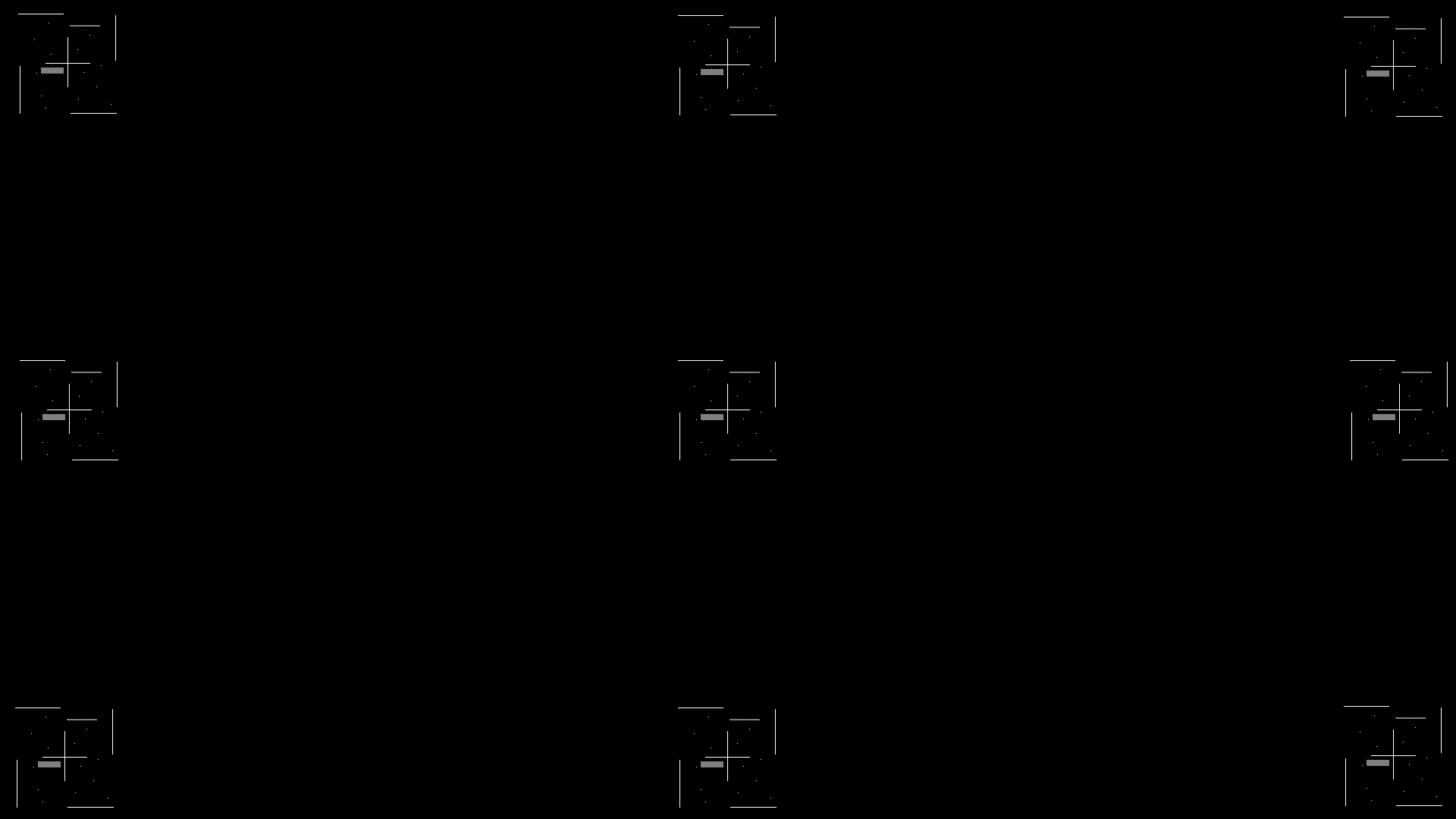
I tend to like randomly placed dots, since it prevents you from dazzling yourself with a grid or misinterpreting things due to patterns.
I threw some one-on-one-off bits just for the hell of it; I actually haven't used that so who knows if it'd help. 
Anyway, for what it's worth, there it is... it'd be easy to redo for whatever resolution in MSpaint or your other least favorite image editor.
Another thing I'll do is deliberately misconverge R, G, and B, and offset them a bit both X and Y, so I can see the other two colors while I'm working on one. Helps get an idea of the target you're working towards if you've got one tube set really well but the others not so much.
_________________
|
|
| Back to top |
|
|
|
|




