| Author |
Message |
Crabman

Joined: 17 Mar 2006
Posts: 197
Location: North West NC
|
| Posted: Sun Jan 17, 2010 3:48 pm Post subject: Hookup help-See if this makes sense please! |
|
|
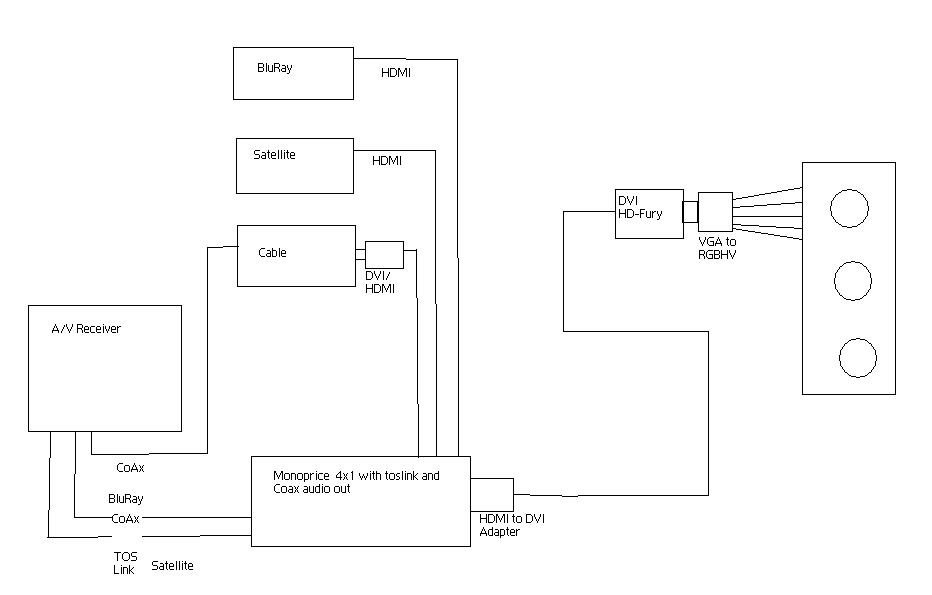
I had to make changes to my Theater and want to simplify somewhat, as I may be selling the home and don't want to leave a complicated system to operate for the future owners.
I need to see if what I want to do is reasonable. I don't want to spend a bunch of money on it right now, but I want it to work well.
I already have the sources, the AV receiver, and a 30' Heavy duty DVI cable. The DVI cable is already run from the sources to the PJ. I would need the Monoprice switch, the dvi/hdmi adapters, the DVI HD-Fury version, and a breakout cable.
| Description: |
|
| Filesize: |
34.29 KB |
| Viewed: |
5242 Time(s) |
|
_________________
Hey Earl, there's a long skinny dog lying in the back seat. No wait, it's standing, it just doesn't have any legs.
Maybe it's a snake. Earl, do snakes have fur?
-Randy
|
|
| Back to top |
|
 |
AnalogRocks
Forum Moderator

Joined: 08 Mar 2006
Posts: 26706
Location: Toronto, Ontario, Canada
TV/Projector: Sony 1252Q, AMPRO 4000G
|
| Posted: Sun Jan 17, 2010 3:54 pm Post subject: |
|
|
That looks do-able. However sometimes those HDMI to DVI adaptors can be flaky. Especially when going HDMI to DVI, you're putting allot of pressure on that HDMI jack in the switcher.
Is there any reason you aren't going to run the cable box's sound through the switcher? It seems to me that would simplify things. The future owners wouldn't need to do any switching at the receiver just at the Monoprice switcher. You could leave the receiver on one input.
_________________
Tech support for nothing
CRT.
HD done right!
|
|
| Back to top |
|
|
cmjohnson

Joined: 03 Apr 2006
Posts: 5180
Location: Buried under G90s
|
| Posted: Sun Jan 17, 2010 4:10 pm Post subject: |
|
|
Just take your system with you. It's very rare that YOUR home theater system will fit well with the ideas of the next person to buy your house. He'll probably be a digital kool-aid drinker and rip out your "ancient POS tubey thing" and put in a modern POS digital flashlight
instead, and throw your old machine out by the trash, without the faintest clue of what he's doing. And wondering why his picture isn't
as good as he remember it being when you demo'ed the system.
CJ
|
|
| Back to top |
|
|
Crabman
Joined: 17 Mar 2006
Posts: 197
Location: North West NC
|
| Posted: Sun Jan 17, 2010 4:10 pm Post subject: |
|
|
| AnalogRocks wrote: | That looks do-able. However sometimes those HDMI to DVI adaptors can be flaky. Especially when going HDMI to DVI, you're putting allot of pressure on that HDMI jack in the switcher.
Is there any reason you aren't going to run the cable box's sound through the switcher? It seems to me that would simplify things. The future owners wouldn't need to do any switching at the receiver just at the Monoprice switcher. You could leave the receiver on one input. |
The cable box doesn't have audio on the video cable as it's DVI out. I would have preferred to do that. Would I be better off scrapping the DVI cable for an HDMI and deleting all but one adapter?
_________________
Hey Earl, there's a long skinny dog lying in the back seat. No wait, it's standing, it just doesn't have any legs.
Maybe it's a snake. Earl, do snakes have fur?
-Randy
|
|
| Back to top |
|
|
Crabman
Joined: 17 Mar 2006
Posts: 197
Location: North West NC
|
| Posted: Sun Jan 17, 2010 4:13 pm Post subject: |
|
|
| cmjohnson wrote: | Just take your system with you. It's very rare that YOUR home theater system will fit well with the ideas of the next person to buy your house. He'll probably be a digital kool-aid drinker and rip out your "ancient POS tubey thing" and put in a modern POS digital flashlight
instead, and throw your old machine out by the trash, without the faintest clue of what he's doing. And wondering why his picture isn't
as good as he remember it being when you demo'ed the system.
CJ |
That hurts me in my heart man!
He can do it if he wants, but if I do it, I have to fix a BIG HOLE in the ceiling where this monster lives! 
Clay
_________________
Hey Earl, there's a long skinny dog lying in the back seat. No wait, it's standing, it just doesn't have any legs.
Maybe it's a snake. Earl, do snakes have fur?
-Randy
|
|
| Back to top |
|
|
Crabman
Joined: 17 Mar 2006
Posts: 197
Location: North West NC
|
| Posted: Sun Jan 17, 2010 4:28 pm Post subject: |
|
|
on a side note, and I don't want to stray on this thread, I can't figure out which HD fury is best for me.
_________________
Hey Earl, there's a long skinny dog lying in the back seat. No wait, it's standing, it just doesn't have any legs.
Maybe it's a snake. Earl, do snakes have fur?
-Randy
|
|
| Back to top |
|
|
AnalogRocks
Forum Moderator
Joined: 08 Mar 2006
Posts: 26706
Location: Toronto, Ontario, Canada
TV/Projector: Sony 1252Q, AMPRO 4000G
|
| Posted: Sun Jan 17, 2010 4:43 pm Post subject: |
|
|
| Crabman wrote: | | AnalogRocks wrote: | That looks do-able. However sometimes those HDMI to DVI adaptors can be flaky. Especially when going HDMI to DVI, you're putting allot of pressure on that HDMI jack in the switcher.
Is there any reason you aren't going to run the cable box's sound through the switcher? It seems to me that would simplify things. The future owners wouldn't need to do any switching at the receiver just at the Monoprice switcher. You could leave the receiver on one input. |
The cable box doesn't have audio on the video cable as it's DVI out. I would have preferred to do that. Would I be better off scrapping the DVI cable for an HDMI and deleting all but one adapter? |
Oh I see, the Monoprice is HDMI in and optical out? There's no SPDIF optical/coaxial inputs?
_________________
Tech support for nothing
CRT.
HD done right!
|
|
| Back to top |
|
|
AnalogRocks
Forum Moderator
Joined: 08 Mar 2006
Posts: 26706
Location: Toronto, Ontario, Canada
TV/Projector: Sony 1252Q, AMPRO 4000G
|
| Posted: Sun Jan 17, 2010 4:45 pm Post subject: |
|
|
| Crabman wrote: | | on a side note, and I don't want to stray on this thread, I can't figure out which HD fury is best for me. |
The HDfury1 should work. Unless one of the HDMI devices get's uppity because it's DVI and decides they wont send audio over the HDMI cable. I've only seen that with receivers so far though.
_________________
Tech support for nothing
CRT.
HD done right!
|
|
| Back to top |
|
|
Crabman
Joined: 17 Mar 2006
Posts: 197
Location: North West NC
|
| Posted: Sun Jan 17, 2010 4:50 pm Post subject: |
|
|
| AnalogRocks wrote: | | Crabman wrote: | | AnalogRocks wrote: | That looks do-able. However sometimes those HDMI to DVI adaptors can be flaky. Especially when going HDMI to DVI, you're putting allot of pressure on that HDMI jack in the switcher.
Is there any reason you aren't going to run the cable box's sound through the switcher? It seems to me that would simplify things. The future owners wouldn't need to do any switching at the receiver just at the Monoprice switcher. You could leave the receiver on one input. |
The cable box doesn't have audio on the video cable as it's DVI out. I would have preferred to do that. Would I be better off scrapping the DVI cable for an HDMI and deleting all but one adapter? |
Oh I see, the Monoprice is HDMI in and optical out? There's no SPDIF optical/coaxial inputs? |
No, it doesn't have ANY audio input. It pulls the audio from the HDMI connect and sends it to the receiver.
_________________
Hey Earl, there's a long skinny dog lying in the back seat. No wait, it's standing, it just doesn't have any legs.
Maybe it's a snake. Earl, do snakes have fur?
-Randy
|
|
| Back to top |
|
|
Crabman
Joined: 17 Mar 2006
Posts: 197
Location: North West NC
|
| Posted: Sun Jan 17, 2010 4:52 pm Post subject: |
|
|
| AnalogRocks wrote: | | Crabman wrote: | | on a side note, and I don't want to stray on this thread, I can't figure out which HD fury is best for me. |
The HDfury1 should work. Unless one of the HDMI devices get's uppity because it's DVI and decides they wont send audio over the HDMI cable. I've only seen that with receivers so far though. |
Excellent. What is the deal with all the gamma stuff? is that only necessary for BluRay?
_________________
Hey Earl, there's a long skinny dog lying in the back seat. No wait, it's standing, it just doesn't have any legs.
Maybe it's a snake. Earl, do snakes have fur?
-Randy
|
|
| Back to top |
|
|
zaphod

Joined: 16 Jun 2006
Posts: 2002
Location: Cloverdale
|
| Posted: Sun Jan 17, 2010 5:17 pm Post subject: |
|
|
| Crabman wrote: | That hurts me in my heart man!
He can do it if he wants, but if I do it, I have to fix a BIG HOLE in the ceiling where this monster lives!
Clay |
that's what i had to do. written right into the sale contract was "repair holes in downstairs room from removal of home theatre equipment...
a lot easier than imagining the XG on a street corner.
|
|
| Back to top |
|
|
Crabman
Joined: 17 Mar 2006
Posts: 197
Location: North West NC
|
| Posted: Sun Jan 17, 2010 5:46 pm Post subject: |
|
|
should I keep the DVI cable or just carry on??
_________________
Hey Earl, there's a long skinny dog lying in the back seat. No wait, it's standing, it just doesn't have any legs.
Maybe it's a snake. Earl, do snakes have fur?
-Randy
|
|
| Back to top |
|
|
AnalogRocks
Forum Moderator
Joined: 08 Mar 2006
Posts: 26706
Location: Toronto, Ontario, Canada
TV/Projector: Sony 1252Q, AMPRO 4000G
|
| Posted: Mon Jan 18, 2010 4:03 am Post subject: |
|
|
Carry on with the way you have it planed. It should work OK.
Just make sure you have a power supply with the HDFury1.
_________________
Tech support for nothing
CRT.
HD done right!
|
|
| Back to top |
|
|
Crabman
Joined: 17 Mar 2006
Posts: 197
Location: North West NC
|
| Posted: Mon Jan 18, 2010 4:25 pm Post subject: |
|
|
Thanks all for the help.
This may be on hold for awhile.
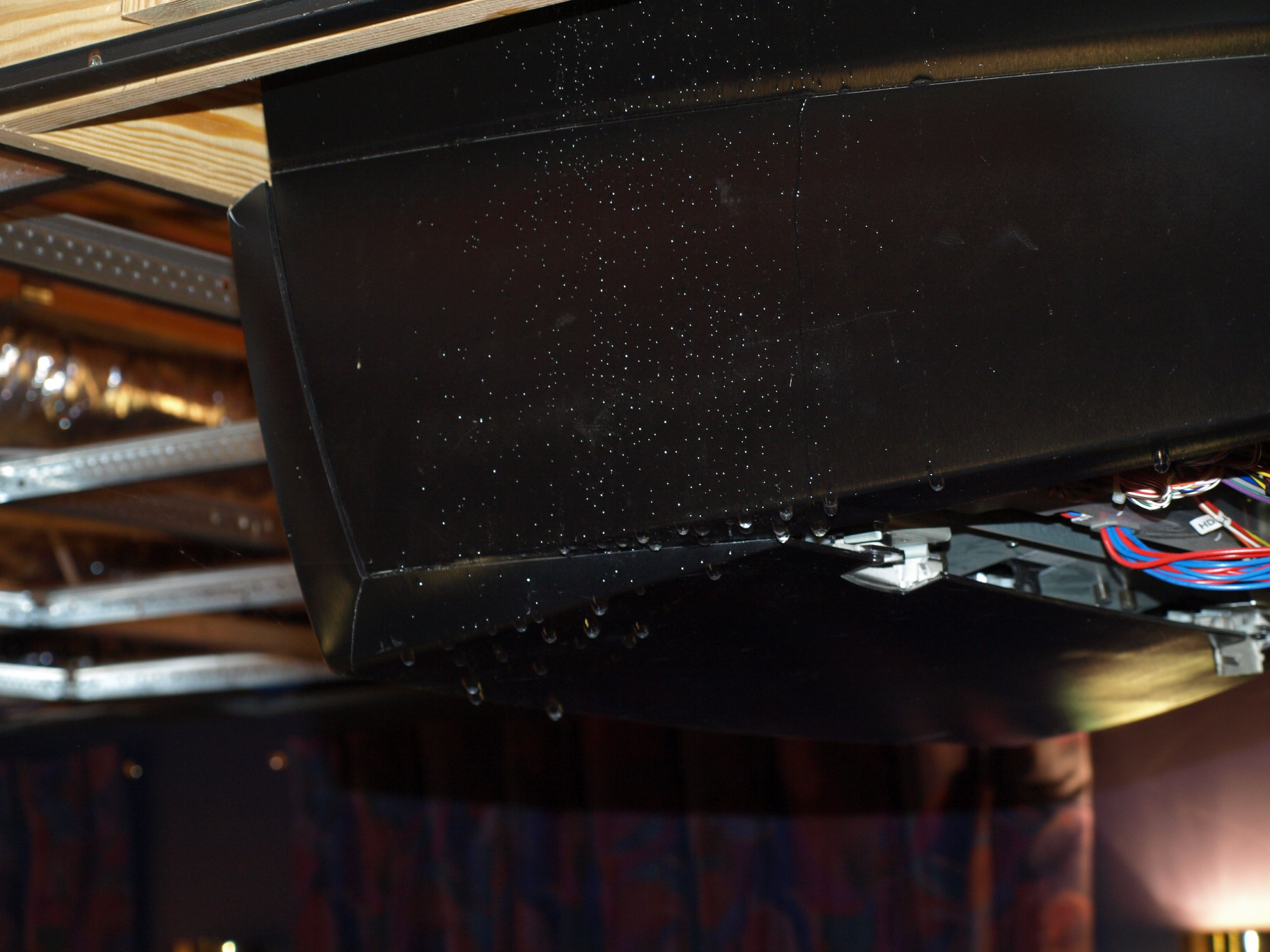
This happened last night. This is after removing ceiling tiles and the cover of the Projector which was dripping water. It was pouring off the machine, but you can't really tell from the pictures. My bathroom, bedroom and basement were thoroughly "wetted"

| Description: |
|
| Filesize: |
379.09 KB |
| Viewed: |
3875 Time(s) |
|
_________________
Hey Earl, there's a long skinny dog lying in the back seat. No wait, it's standing, it just doesn't have any legs.
Maybe it's a snake. Earl, do snakes have fur?
-Randy
|
|
| Back to top |
|
|
AnalogRocks
Forum Moderator
Joined: 08 Mar 2006
Posts: 26706
Location: Toronto, Ontario, Canada
TV/Projector: Sony 1252Q, AMPRO 4000G
|
| Posted: Mon Jan 18, 2010 4:36 pm Post subject: |
|
|
| Crabman wrote: | Thanks all for the help.
This may be on hold for awhile.
This happened last night. This is after removing ceiling tiles and the cover of the Projector which was dripping water. It was pouring off the machine, but you can't really tell from the pictures. My bathroom, bedroom and basement were thoroughly "wetted"
|
I didn't know you installed a projector wash?! 
Any damage?
_________________
Tech support for nothing
CRT.
HD done right!
|
|
| Back to top |
|
|
Crabman
Joined: 17 Mar 2006
Posts: 197
Location: North West NC
|
| Posted: Tue Jan 19, 2010 12:06 am Post subject: |
|
|
| AnalogRocks wrote: | | Crabman wrote: | Thanks all for the help.
This may be on hold for awhile.
This happened last night. This is after removing ceiling tiles and the cover of the Projector which was dripping water. It was pouring off the machine, but you can't really tell from the pictures. My bathroom, bedroom and basement were thoroughly "wetted"
|
I didn't know you installed a projector wash?!
Any damage? |
Not sure yet. It was in stand by when everything rained down on it. I pulled the plug ASAP. I haven't turned it on yet. I want it to dry thoroughly first. I hope there is no damage, but it does appear that my insurance said they will take care of it if anything is damaged. They will find a replacement, or have it repaired so that's cool.
Clay
_________________
Hey Earl, there's a long skinny dog lying in the back seat. No wait, it's standing, it just doesn't have any legs.
Maybe it's a snake. Earl, do snakes have fur?
-Randy
|
|
| Back to top |
|
|
AnalogRocks
Forum Moderator
Joined: 08 Mar 2006
Posts: 26706
Location: Toronto, Ontario, Canada
TV/Projector: Sony 1252Q, AMPRO 4000G
|
| Posted: Tue Jan 19, 2010 12:47 am Post subject: |
|
|
I've picked up CRT TVs/Monitors that have been soaking wet, dried them out and used them for years afterwards. Of course they weren't powered at the time. Hope it all works out.
_________________
Tech support for nothing
CRT.
HD done right!
|
|
| Back to top |
|
|
|
|




