| Author |
Message |
psilvest
Joined: 27 Jan 2007
Posts: 44
|
| Posted: Sun Jan 17, 2010 12:42 am Post subject: no light from re-assembled Marquee 9000 |
|
|
Hi there,
I finally managed to find the time to re-assemble a late M9000 that I had dis-assembled completely for a thorough cleaning several months ago. I put it all back together (except for the CCM) and powered it up, but I got a problem. The fans started normally and I could also hear relais contact noise at the moment of going from stand-by to power on, and then again 2 -3 seconds later (but no crackling noise typical of HV supply). No LVPS nor CLM diagnostic LEDs remain on, the tube filaments are lit (P14 measured to be 6.4 V), all would seem ok, but there is no sign of life whatsoever on the faces of the tubes.
I re-checked all the connections and found that, in the rush to finish, I had connected the HV wires to the HV splitter incorrectly - I had swapped one of tube HV cables with the HV cable from the HVPS. However, fixing this has not changed the situation. I have now swapped the LVPS with a spare one, but this has also not made any difference.
I suspect a failure in the HVPS, perhaps as a consequence of the initial mistake with the splitter wiring, but before swapping that too with a spare I would appreciate any suggestions about how to proceed.
Thank you,
Pier
|
|
| Back to top |
|
 |
Curt Palme
CRT Tech
Joined: 08 Mar 2006
Posts: 24396
Location: Langley, BC
TV/Projector: All of them!
|
| Posted: Sun Jan 17, 2010 12:46 am Post subject: |
|
|
It doesn't matte what way you've connected the leads to the HV splitter, they are all tied together internally.
I'm guessing problems with the HVPS, HDM, CLM or VIM. Possibly a neck board as well.
Any of those can cause a 'no HV' condition without showing an error code on teh back.
turn the set on and off twice in a row to see if an H fail comes up. Sometimes it will only show once you power up the second time.
A V yoke wire connected by 1 pin off will also cause a no pix condition, but should show a V fail error light right away.
|
|
| Back to top |
|
|
Nashou66

Joined: 12 Jan 2007
Posts: 16171
Location: West Seneca NY
|
|
| Back to top |
|
|
psilvest
Joined: 27 Jan 2007
Posts: 44
|
| Posted: Sun Jan 17, 2010 1:02 am Post subject: |
|
|
Thanks for your fast replies.
Indeed after turning the set on and off twice in a row the H fail LED comes up. Does this mean a failure in the HDM?
The ribbon cables seem connected ok.
Pier
|
|
| Back to top |
|
|
psilvest
Joined: 27 Jan 2007
Posts: 44
|
| Posted: Sat Jan 23, 2010 12:07 am Post subject: |
|
|
I have replaced the HDM with a spare one and now the pj is working... well, almost working, since the blue tube still shows no sign of life (red and green are fine). I rechecked all connections for the blue tube, all seems ok. Also, the filament is lit.
I have excluded problems with the VIM (swapping blue and green cables at the VIM makes no difference), the VIM blue cable, and the blue neck board, which I swapped with the red one (again, no change).
Any suggestion as to what to check next?
Can I swap tubes without damaging anything?
Thanks
Pier
|
|
| Back to top |
|
|
draganm

Joined: 08 Mar 2006
Posts: 8990
Location: Colorado
|
| Posted: Sat Jan 23, 2010 12:42 am Post subject: |
|
|
| Curt Palme wrote: | | It doesn't matte what way you've connected the leads to the HV splitter, they are all tied together internally. |
no that's wrong  The input is different because the 3 outputs have a resistor in line with them. Break out the meter and see for yuorself. The input is different because the 3 outputs have a resistor in line with them. Break out the meter and see for yuorself.
Plugging them in wrong will yield incorrect voltages going to the anode plates.
|
|
| Back to top |
|
|
Nashou66
Joined: 12 Jan 2007
Posts: 16171
Location: West Seneca NY
|
| Posted: Sat Jan 23, 2010 12:52 am Post subject: |
|
|
| psilvest wrote: | I have replaced the HDM with a spare one and now the pj is working... well, almost working, since the blue tube still shows no sign of life (red and green are fine). I rechecked all connections for the blue tube, all seems ok. Also, the filament is lit.
I have excluded problems with the VIM (swapping blue and green cables at the VIM makes no difference), the VIM blue cable, and the blue neck board, which I swapped with the red one (again, no change).
Any suggestion as to what to check next?
Can I swap tubes without damaging anything?
Thanks
Pier |
I wonder if you damaged the HV section when you connected the splitter wrong?
try the HV lead for the Green in the blue and the blue in the green.
Athanasios
_________________
Don't blame your underwear for your crooked ass~ unknown Greek philosopher
"Republicans believe every day is the Fourth of July, but the Democrats believe every day is April 15." --- President Reagan
One Smart Dog!!!
Marquee High Performance Bellows now shipping!!
Marquee Modifications and Performance Enhancement
Marquee C-element and Bellow removal
|
|
| Back to top |
|
|
Curt Palme
CRT Tech
Joined: 08 Mar 2006
Posts: 24396
Location: Langley, BC
TV/Projector: All of them!
|
| Posted: Sat Jan 23, 2010 2:14 am Post subject: |
|
|
| draganm wrote: | | Curt Palme wrote: | | It doesn't matte what way you've connected the leads to the HV splitter, they are all tied together internally. |
no that's wrong The input is different because the 3 outputs have a resistor in line with them. Break out the meter and see for yuorself.
Plugging them in wrong will yield incorrect voltages going to the anode plates. |
Yes, but it will still work. I've played with that, and while there's one RIGHT way to do it, there seems to be no WRONG way. 
|
|
| Back to top |
|
|
draganm
Joined: 08 Mar 2006
Posts: 8990
Location: Colorado
|
| Posted: Sat Jan 23, 2010 3:26 am Post subject: |
|
|
| Curt Palme wrote: | | Yes, but it will still work. I've played with that, and while there's one RIGHT way to do it, there seems to be no WRONG way. |
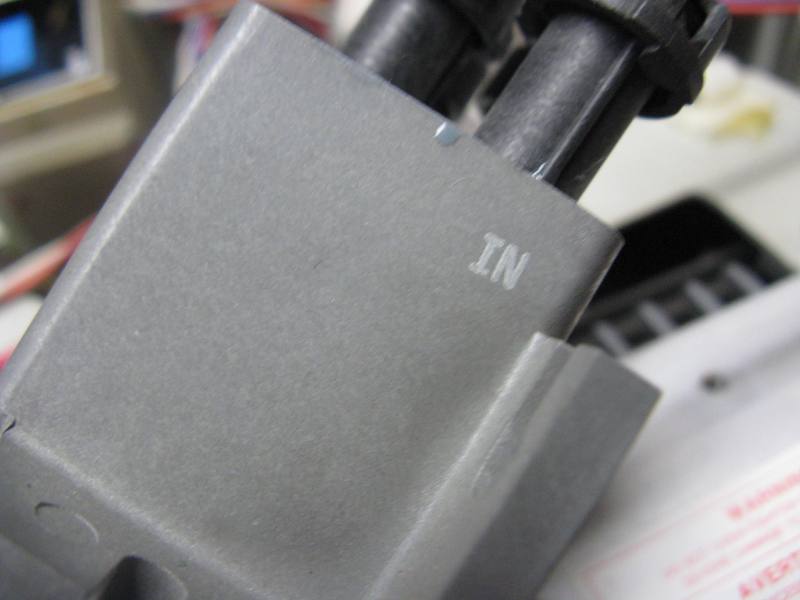
sure there's a right way, plug the feed into the port marked "IN" 
However you guys are right I don't think it hurts anything, I think it's noise filtering? If you look at the 1995 8500 brochure they talk about a "re-designed HV splitter to reduce noise", I wonder if that's the resistors?
| Description: |
|
| Filesize: |
39.73 KB |
| Viewed: |
5099 Time(s) |
|
|
|
| Back to top |
|
|
Nashou66
Joined: 12 Jan 2007
Posts: 16171
Location: West Seneca NY
|
|
| Back to top |
|
|
psilvest
Joined: 27 Jan 2007
Posts: 44
|
| Posted: Sat Jan 23, 2010 10:29 am Post subject: |
|
|
I swapped blue HV with red HV at the HV splitter, but there is no change - problem is not there.
I am thinking of swapping blue and red tubes to see if there is anything fundamentally wrong with the blue tube.
Is there any test point where I could check for correct voltage, for instance on the neck board?
Pier
|
|
| Back to top |
|
|
draganm
Joined: 08 Mar 2006
Posts: 8990
Location: Colorado
|
| Posted: Sat Jan 23, 2010 6:10 pm Post subject: |
|
|
Pier take a look a tthis thread
https://www.curtpalme.com/forum_archived/viewtopic.php@t=19735.html
very similar problem with flaky blue tube. If you already swapped neck-boards, then swap just the thick Black G2 wire to rule out the HVPS G2 feed. Failing that, The tube might simply be dead. Check the voltage across P14 at Motherboard, if higher than 6.35 tube filament might be stripped

|
|
| Back to top |
|
|
psilvest
Joined: 27 Jan 2007
Posts: 44
|
| Posted: Sat Jan 23, 2010 11:43 pm Post subject: |
|
|
Thanks Dragan, but I had swapped blu and red tubes before reading your post and concluded that the problem is with the blu tube, because the red tube works fine in the place of the blu, while there is still no sign of life from the blu tube. I had already checked that the neck boards are ok and that heater voltage is also ok. The tube does not have many hours and its emission should be as good as that of the red and green tubes.
I have now closely inspected the tube and I fear a problem with the HV cable / anode cap (everything else looks fine). I noted that the HV cable was strongly twisted inside the tube plastic case, such that it was sharply bent at the entrance of the anode cap. The mechanical connection between the cable and cap feels rather weak and the cable can be flexed very, very easily. I wonder if there is still an electrical connection with the tube anode, but I do not know how to verify this without removing the entire cap (as shown in http://www.curtpalme.com/HV_Lead_Removal.shtm ). I cannot see any other reason for this tube going dead.
Pier
|
|
| Back to top |
|
|
draganm
Joined: 08 Mar 2006
Posts: 8990
Location: Colorado
|
| Posted: Sun Jan 24, 2010 7:08 pm Post subject: |
|
|
| psilvest wrote: | . I cannot see any other reason for this tube going dead.
Pier |
sounds like a broken HV connection, cut it off and look it's not hard although yokes will have to come off. If you have the old style HV wire-boot you might want to replace it was well?
|
|
| Back to top |
|
|
psilvest
Joined: 27 Jan 2007
Posts: 44
|
| Posted: Sun Jan 31, 2010 10:02 pm Post subject: |
|
|
It seems I was jumping to conclusions too quickly about the reason for the apparently dead blu tube. I have checked the continuity of the HV connection by putting a needle through the centre of the anode boot to reach the clip, and continuity is oK, to my disappointment.. (I covered the hole in the boot, even if invisible, with a good dose of silicon to avoid HV leak). Also, a capacitance exists between HV lead and the aquadag lead, like on other (good) tubes - if the HV connection were broken, capacitance should be zero (I could not precisely measure it, it is below the sensitivity of my Fluke 179, but seems to be there).
To recap:
- the tube gives no light (except for filament..)
- another tube in its place works fine
- the tube is 'young', with no sign of wear, burn, neck browning, damaged pins,..
- HV connection seems OK
Is there anything I could check further? Is somebody with a tube tester my only chance to find out what is wrong?
Thanks
Pier
|
|
| Back to top |
|
|
|
|




